Cloud Computing vs Data Center A Full Comparison Guide
Cloud computing vs data center is a debate every business leader faces. The cloud offers flexibility and lower upfront costs, while data centers provide control and security. This guide breaks down the key differences in cost, performance, scalability, and more to help you choose the right path for your IT needs.
Every business today needs a place to store data and run applications. The big question is where. Should you go with cloud computing vs data center? It is a choice that shapes your budget, your security, and your growth. Many companies struggle with this decision because both options have real strengths.
In this guide, we will break everything down in plain language. You will learn what each option means, how they compare on cost and performance, and which one fits your business best. Whether you run a small startup or a large enterprise, this cloud computing vs data center comparison will give you the clarity you need.
Key Takeaways
- Cloud computing is flexible: You access resources over the internet and pay only for what you use.
- Data centers give you full control: You own and manage the hardware on your own premises.
- Cost models differ greatly: Cloud uses a pay-as-you-go model, while data centers require big upfront investments.
- Scalability favors the cloud: Scaling up or down in the cloud takes minutes, not weeks.
- Security varies by setup: Both options can be secure, but data centers offer more direct control over your data.
- Hybrid setups are growing: Many businesses now combine cloud and data center resources for the best of both worlds.
- Your business needs decide the winner: There is no one-size-fits-all answer.
📑 Table of Contents
- What Is Cloud Computing?
- What Is a Data Center?
- Cloud Computing vs Data Center: Head-to-Head Comparison
- Cost Comparison: Cloud vs Data Center
- Pros and Cons of Cloud Computing
- Pros and Cons of Data Centers
- Which One Is Right for Your Business?
- The Future of Cloud and Data Centers
- Common Mistakes to Avoid
- Conclusion
What Is Cloud Computing?
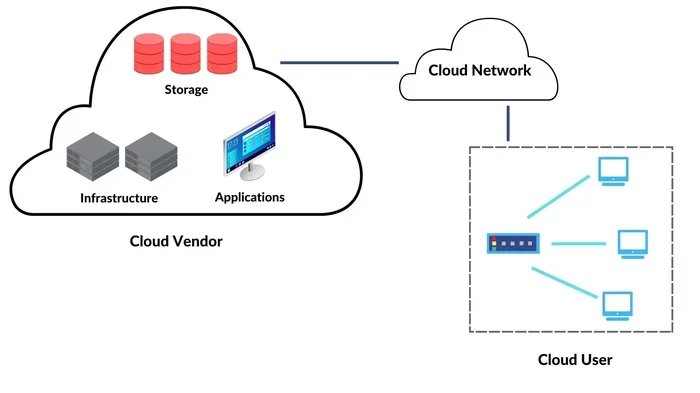
Cloud computing means using remote servers hosted on the internet to store, manage, and process data. Instead of running everything on your own machines, you rent access from a cloud provider like Amazon Web Services, Microsoft Azure, or Google Cloud Platform.
Think of it like renting an apartment. You do not own the building, but you get to live in it and use all the amenities. You pay a monthly fee, and the landlord handles maintenance.
How Cloud Services Work
Cloud services run on virtual machines and shared infrastructure. You access them through the internet. Here are the main types of cloud services:
- Infrastructure as a Service (IaaS): You rent basic computing resources like servers and storage.
- Platform as a Service (PaaS): You get tools to build and deploy applications without managing the underlying hardware.
- Software as a Service (SaaS): You use fully built applications hosted in the cloud, like email or customer management tools.
Most businesses use a mix of these. The beauty of cloud hosting is that you can scale up during busy times and scale down when things slow. You only pay for what you use.
What Is a Data Center?
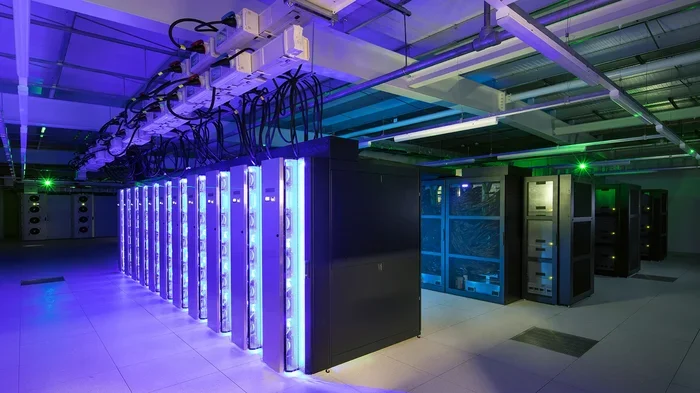
A data center is a physical facility that houses computer servers, storage systems, and networking equipment. Companies either build their own on-premises infrastructure or rent space in a shared facility. This is often called colocation or dedicated server hosting.
Think of a data center like owning a house. You have full control over every room, every system, and every upgrade. But you also handle all the repairs, bills, and upkeep yourself.
Types of Data Centers
Not all data centers are the same. Here are the main types:
- Enterprise data centers: Built and run by the company itself. These sit on the business’s own property.
- Colocation facilities: You rent rack space in a shared data center. The provider handles power, cooling, and physical security.
- Managed data centers: A third party owns and operates the facility and manages your equipment for you.
Each type gives you a different level of control. Data center management requires skilled IT staff, proper cooling systems, backup power, and strong security measures.
Cloud Computing vs Data Center: Head-to-Head Comparison
Now let us look at how cloud computing vs data center stacks up across the most important factors. This comparison will help you see the real differences.
Scalability and Flexibility
Scalability is one of the biggest advantages of the cloud. Need more storage or computing power? You can add it with a few clicks. Need less? You scale down just as fast. This makes the cloud ideal for businesses with changing demands.
Data centers are not as flexible. Adding more servers means buying new hardware, setting it up, and configuring it. This process can take weeks or even months. However, once your IT infrastructure is in place, it runs consistently without depending on an internet connection to a third party.
Performance and Speed
Cloud data storage and processing depend on your internet connection and the cloud provider’s network. Most major providers offer excellent performance. But during peak times or network issues, you might experience slowdowns.
Data centers give you dedicated resources. Your servers run on your own hardware, so performance stays consistent. There is no sharing with other tenants. For workloads that need steady, high-speed performance, a data center can have the edge.
Security and Compliance
Security is a top concern for every business. Both options can be secure, but the approach differs.
With cloud server hosting, the provider handles physical security and much of the software security. However, you still need to manage access controls and encryption on your end. Many cloud computing advantages include built-in security tools, but you must configure them properly.
With a data center, you control every layer of security. You decide who enters the building, how the servers are protected, and what software runs on them. This level of control helps businesses that must meet strict compliance requirements, such as healthcare or financial companies.
Disaster Recovery and Backup
Cloud platforms make disaster recovery easier. Most cloud providers offer built-in backup and redundancy across multiple regions. If one server goes down, your data stays safe elsewhere.
Data centers require you to set up your own disaster recovery plan. You need backup servers, offsite storage, and a clear recovery process. This takes more planning and investment but gives you full ownership of your recovery strategy.
Cost Comparison: Cloud vs Data Center
Cost is often the deciding factor in the cloud computing vs data center debate. Let us break down the real numbers.
Cloud Computing Costs
Cloud computing uses a pay-as-you-go model. You pay for the resources you consume each month. There are no large upfront hardware purchases. This makes the cloud attractive for startups and small businesses with limited budgets.
However, costs can add up over time. If your usage is consistently high, the monthly cloud bills can exceed what you would pay for your own servers. This is called the total cost of ownership, and it matters for long-term planning.
Data Center Costs
Setting up a data center requires a big initial investment. You need to buy servers, networking gear, cooling systems, and backup power. You also need a secure facility and skilled IT staff to manage everything.
Over time, the total cost of ownership for a data center can be lower than the cloud, especially for stable workloads. You own the hardware, so you do not pay recurring rental fees. The tradeoff is the upfront capital and ongoing maintenance costs.
Cost Comparison Table
| Factor | Cloud Computing | Data Center |
|---|---|---|
| Upfront Cost | Low | High |
| Monthly Cost | Variable (pay as you go) | Fixed (after setup) |
| Scalability Cost | Low and fast | High and slow |
| Maintenance | Handled by provider | Your responsibility |
| Best For | Variable workloads | Stable, predictable workloads |
Pros and Cons of Cloud Computing
Every option has tradeoffs. Here is a look at the cloud computing advantages and disadvantages.
Pros
- Low upfront cost: No need to buy expensive hardware.
- Easy to scale: Add or remove resources in minutes.
- Managed maintenance: The provider handles updates and hardware repairs.
- Accessible from anywhere: Your team can work from any location with internet access.
- Built-in disaster recovery: Most providers offer strong backup options.
Cons
- Ongoing costs add up: Long-term cloud usage can become expensive.
- Less control: You depend on the provider for uptime and security patches.
- Internet dependency: You need a reliable connection to access your resources.
- Potential vendor lock-in: Moving from one cloud provider to another can be complex.
Pros and Cons of Data Centers
Data centers also have their own set of strengths and weaknesses.
Pros
- Full control: You own and manage every piece of hardware.
- Consistent performance: Dedicated resources mean no slowdowns from other users.
- Strong security: You set and enforce your own security policies.
- Predictable costs: After setup, your expenses are more stable.
- No internet dependency for internal access: Your team can access local resources without relying on external networks.
Cons
- High upfront cost: Buying and setting up equipment requires significant capital.
- Hard to scale quickly: Adding capacity takes time and money.
- Needs skilled staff: You need IT professionals to manage and maintain the facility.
- Physical space required: Data centers need dedicated room and power infrastructure.
Which One Is Right for Your Business?
Choosing between cloud computing vs data center comes down to your specific needs. Let us look at a few scenarios to help you decide.
Choose the Cloud If…
- Your business is growing fast and needs to scale quickly.
- You have a limited upfront budget.
- Your team works remotely or across multiple locations.
- Your workloads are variable and unpredictable.
- You want to focus on your core business, not IT management.
Choose a Data Center If…
- You handle sensitive data with strict compliance rules.
- Your workloads are stable and predictable.
- You have the budget for upfront hardware investment.
- You need full control over your IT infrastructure.
- You have a skilled in-house IT team.
The Hybrid Approach
Many businesses are now choosing a hybrid cloud setup. This means they use both cloud resources and their own data center. Sensitive data stays on-premises, while less critical workloads run in the cloud. This hybrid cloud approach gives you the best of both worlds.
For example, a company might run its customer database in a private data center for security while using cloud server hosting for its website and email. This kind of cloud migration strategy is becoming very popular among mid-sized and large enterprises.
The Future of Cloud and Data Centers
The debate between cloud computing vs data center is not going away anytime soon. But the landscape is evolving. More cloud providers are offering hybrid and private cloud solutions that blur the line between the two options.
At the same time, data centers are getting smarter. Automation and AI-driven data center management are making it easier to run facilities efficiently. The trend is moving toward flexibility, and businesses that stay adaptable will have the biggest advantage.
One thing is clear: both cloud and data centers will play a role in the future of IT. The key is understanding your own needs and choosing the right mix of resources.
Common Mistakes to Avoid
Here are some pitfalls that businesses often fall into when deciding between cloud and data center:
- Ignoring the long-term cost: The cloud looks cheap at first, but ongoing usage can surprise you. Always calculate the total cost of ownership before deciding.
- Underestimating security needs: Neither option is automatically secure. You must actively manage and monitor security in both setups.
- Choosing based on trends alone: Just because cloud is popular does not mean it is right for your business. Evaluate your own requirements.
- Skipping the migration plan: Moving to the cloud or setting up a data center is complex. Have a clear plan in place before you start.
Quick Tips for Your Decision
- Start with a clear list of your business needs and budget.
- Test both options with a small pilot project before committing fully.
- Talk to your IT team and get their honest input.
- Consider a hybrid approach if you are not sure which way to go.
- Review your decision every 6 to 12 months as your business grows.
Conclusion
The cloud computing vs data center debate does not have a single winner. Both options serve different needs, and the best choice depends on your business size, budget, workload type, and security requirements.
If you want flexibility, low upfront cost, and easy scalability, the cloud is a strong choice. If you need full control, consistent performance, and strong data sovereignty, a data center may be the better fit. Many businesses are also finding success with a hybrid cloud strategy that combines the strengths of both.
Take your time. Evaluate your options carefully. And remember, the right choice is the one that supports your business goals today and as you grow. The cloud computing vs data center comparison is not about picking a side. It is about finding the right infrastructure for your business.
Frequently Asked Questions
What is the main difference between cloud computing and a data center?
Cloud computing uses remote servers accessed over the internet, while a data center is a physical facility that houses your own servers and equipment. The cloud offers flexibility and lower upfront costs, while a data center gives you full control over your hardware and data.
Is cloud computing cheaper than a data center in the long run?
It depends on your usage. For variable workloads and small businesses, the cloud is usually cheaper upfront. But for stable, high-usage workloads, a data center can be more cost-effective over time. Always calculate the total cost of ownership before deciding.
Can I use both cloud and a data center together?
Yes. Many businesses use a hybrid cloud setup. They keep sensitive data in their own data center while using cloud services for less critical tasks like email, web hosting, and backup. This approach gives you the best of both worlds.
Which is more secure: cloud or data center?
Both can be secure if set up correctly. A data center gives you more direct control over security, which helps businesses with strict compliance needs. Cloud providers offer strong built-in security tools, but you are still responsible for configuring them properly.
How long does it take to migrate to the cloud?
Migration time varies based on the size of your infrastructure. Small businesses can often migrate in a few weeks. Larger enterprises with complex systems may take several months. A well-planned cloud migration strategy is essential for a smooth transition.
Do I need IT staff for both options?
Yes, but the type of staff differs. Cloud computing requires less hands-on hardware management, but you still need IT professionals to manage cloud configurations and security. Data centers need skilled staff for hardware maintenance, facility management, and network administration.