Communication as a Service in Cloud Computing Explained
Communication as a service in cloud computing is a modern way for businesses to handle calls, messages, and video meetings through the cloud. It replaces old phone systems with flexible, scalable cloud communication tools that grow with your needs. This approach saves money, boosts teamwork, and makes remote work tools more effective. Whether you run a small shop or a big company, this model fits your goals. Keep reading to learn how it works and why so many teams are switching.
Communication as a service in cloud computing has changed the way companies talk to their customers and teams. If you have ever wondered why so many businesses are dropping their old phone lines, the answer is simple. Cloud-based communication is faster, cheaper, and far more flexible than traditional systems. In this guide, we will break down everything you need to know about this powerful technology.
You will learn how it works, what makes it different from older tools, and why it matters for your business. Whether you are a startup or a growing company, understanding this topic gives you a real edge. Let us dive in and explore the world of communication as a service in cloud computing together.
Key Takeaways
- Cost Efficiency: Communication as a service in cloud computing cuts hardware costs and lowers monthly bills by using a pay-as-you-go model.
- Scalability Made Easy: You can add or remove users instantly without buying new equipment or installing complex systems.
- Remote Work Friendly: Teams stay connected from anywhere with real-time communication tools built into the cloud.
- Rich Feature Set: Video conferencing, cloud PBX, messaging, and API communication all live in one platform.
- Better Security: Reputable providers offer strong encryption and compliance with industry standards.
- Easy Integration: These platforms connect smoothly with CRM software, email, and other business tools you already use.
📑 Table of Contents
- What Is Communication as a Service in Cloud Computing?
- How Communication as a Service in Cloud Computing Works
- Key Benefits of Communication as a Service in Cloud Computing
- Top Features You Should Look For
- Who Can Benefit from Communication as a Service in Cloud Computing?
- How to Choose the Right Communication as a Service in Cloud Computing Provider
- The Future of Communication as a Service in Cloud Computing
- Conclusion
What Is Communication as a Service in Cloud Computing?
Understanding the Basics
At its core, communication as a service in cloud computing means delivering phone calls, messages, and video meetings over the internet instead of through physical wires and hardware. Think of it like streaming a movie instead of buying a DVD. The content lives in the cloud, and you access it whenever you need it.
This model is part of a bigger trend called SaaS communication, where software lives online and you pay for what you use. Companies like RingCentral, Zoom, and Microsoft Teams offer versions of this. You do not need a bulky PBX box in your office anymore. Everything runs through the cloud.
The term UCaaS, which stands for unified communications as a service, is often used alongside this topic. UCaaS bundles voice, video, chat, and file sharing into one platform. Communication as a service in cloud computing is the broader umbrella that includes all of these tools and more.
How It Differs from Traditional Communication
Old-school phone systems relied on copper wires, dedicated phone lines, and expensive hardware. You had to buy a PBX system upfront, pay for maintenance, and hire technicians to fix issues. Scaling up meant buying more lines and more equipment.
Cloud communication flips this model on its head. Here is a quick look at the differences:
- Traditional: High upfront costs, fixed capacity, on-site hardware, and slow updates.
- Cloud-Based: Low monthly fees, flexible capacity, no on-site hardware, and instant updates.
With cloud communication, you can add ten new users in minutes. With traditional systems, that could take weeks. The difference is huge for growing businesses.
How Communication as a Service in Cloud Computing Works
The Technology Behind It
So how does this actually work under the hood? The magic happens through VoIP, which stands for Voice over Internet Protocol. VoIP turns your voice into digital data packets and sends them over the internet. On the other end, those packets are turned back into sound.
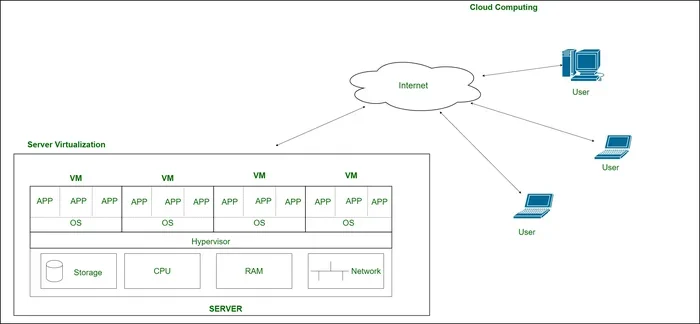
Cloud providers host the software on their own servers. You do not need to manage anything. You just log in, make calls, send messages, or hop on a video call. The cloud infrastructure handles routing, storage, and security behind the scenes.
APIs play a big role too. API communication lets different software tools talk to each other. For example, your customer service platform can automatically pull up a caller’s history when they phone in. This kind of integration makes communication platform as a service incredibly powerful for businesses.
Key Components of the System
A typical cloud communication setup includes several moving parts. Understanding them helps you make smarter choices:
- Cloud PBX: This is the virtual version of a private branch exchange. It handles call routing, voicemail, and extensions without any physical hardware.
- Real-Time Communication Tools: These include instant messaging, voice calls, and video conferences that happen live.
- Contact Center Cloud: This handles customer service operations, routing inquiries to the right agents and tracking performance.
- Cloud-Based Messaging: Team chat platforms like Slack or Microsoft Teams fall into this category.
- Integration Layer: This connects your communication tools to CRM systems, email, and other business apps.
All of these pieces work together to create a seamless business communication solution that keeps your team connected.
Key Benefits of Communication as a Service in Cloud Computing
Cost Savings and Scalability
One of the biggest reasons companies switch is the cost. Traditional phone systems cost thousands of dollars to set up. You also pay for maintenance, repairs, and ongoing upgrades. Cloud communication replaces all of that with a simple monthly subscription.
With scalable communication, you only pay for what you use. Need fifty more seats next month? No problem. Losing ten users? You can scale down just as easily. This pay-as-you-go model is a game-changer for small and medium businesses watching their budgets.
Here is a quick comparison:
- Traditional PBX Setup: $5,000 to $20,000 upfront, plus monthly maintenance fees.
- Cloud Communication Service: $15 to $50 per user per month, with no setup fees.
The numbers speak for themselves. Over time, communication as a service in cloud computing saves businesses thousands of dollars.
Flexibility and Remote Work Support
The rise of remote work made cloud communication essential. Teams spread across cities, countries, and time zones need a way to stay connected. Cloud tools make this possible.
Employees can make and receive calls from their laptops, tablets, or smartphones. They can join video meetings from a coffee shop or their living room. Remote work tools built into these platforms keep everyone on the same page, no matter where they are.
This flexibility also helps during emergencies. If your office closes unexpectedly, your team can keep working from home with no disruption. That kind of resilience is invaluable in today’s fast-changing world.
Top Features You Should Look For
Real-Time Communication Tools
When evaluating a provider, look for strong real-time communication features. These include HD voice calls, group video conferencing, and instant messaging. The best platforms offer screen sharing and recording options too.
Video conferencing cloud tools have become standard in most platforms. Being able to see your team face-to-face builds stronger connections than audio-only calls. Look for features like virtual backgrounds, breakout rooms, and live captions.
Integration Capabilities
A standalone communication tool is useful. But when it connects to your other software, it becomes powerful. The best cloud-based messaging platforms integrate with CRM systems like Salesforce, HubSpot, and Zoho.
This means your sales team can see customer details right inside their communication window. Support agents can pull up order history without switching tabs. These integrations save time and reduce errors across the board.
Security and Compliance
Security should always be a top priority. Look for providers that offer end-to-end encryption, two-factor authentication, and compliance with standards like GDPR and HIPAA. A strong enterprise cloud solution will have clear security policies and regular audits.
Do not be afraid to ask tough questions about data storage and access controls. Your communication data is sensitive, and you deserve a provider who takes its protection seriously.
Who Can Benefit from Communication as a Service in Cloud Computing?
Small and Medium Businesses
Startups and growing companies benefit the most from this model. They often have limited IT budgets and small teams. Cloud communication gives them access to professional-grade tools without the heavy price tag.
A small e-commerce store can use cloud telephony to handle customer calls without hiring a full-time receptionist. A marketing agency can use collaboration tools to keep remote freelancers aligned. The possibilities are endless.
Large Enterprises
Big companies also see massive value. They often have hundreds or thousands of employees spread across multiple locations. Managing all of those connections with traditional systems is a nightmare.
Cloud communication simplifies everything. A single dashboard can manage calls, messages, and video for the entire organization. Digital transformation efforts often center around cloud communication as a foundational piece.
Customer Support Teams
Contact center cloud solutions are built specifically for customer-facing teams. They offer call routing, queue management, analytics, and CRM integration. Support teams that use these tools resolve issues faster and keep customers happier.
How to Choose the Right Communication as a Service in Cloud Computing Provider
Factors to Consider
Not all providers are created equal. Here are the key factors to evaluate before making a decision:
- Pricing Model: Look for transparent pricing with no hidden fees. Per-user-per-month plans are the most common and easiest to budget for.
- Feature Set: Make sure the platform offers the tools your team actually needs. Do not pay for features you will never use.
- Ease of Use: The interface should be intuitive. If your team struggles to use it, adoption will be low.
- Customer Support: Choose a provider with responsive support. You want help when things go wrong, not a chatbot.
- Uptime Guarantee: Look for 99.9% uptime or better. Downtime means lost calls and frustrated customers.
Red Flags to Watch Out For
Some warning signs can help you avoid bad choices:
- Vague pricing with surprise add-ons
- No clear data privacy policy
- Limited integration options with your existing tools
- Poor reviews or frequent complaints about reliability
- No free trial or money-back guarantee
Avoiding these pitfalls saves you time, money, and headaches down the road.
Quick Tips for a Smooth Setup
Getting started with communication as a service in cloud computing is easier than you might think. Here are a few tips:
- Start with a free trial to test the platform before committing.
- Train your team on the basics first, then explore advanced features over time.
- Set clear expectations about response times and communication channels.
- Review your usage monthly to make sure you are getting the most value.
- Ask your provider about onboarding support and migration assistance.
These small steps make a big difference in getting your team up and running smoothly.
The Future of Communication as a Service in Cloud Computing
The future looks bright for this space. AI-powered communication is already making its way into cloud platforms. Think of smart assistants that transcribe meetings in real time, chatbots that handle routine customer queries, and analytics tools that predict communication trends.
As cloud infrastructure continues to improve, we can expect even faster speeds, better reliability, and more seamless experiences. The line between communication tools and business operations will keep blurring, creating smarter and more connected workplaces.
Companies that adopt communication as a service in cloud computing early will be best positioned to take advantage of these advances. The technology is here, and it is only getting better.
Conclusion
Communication as a service in cloud computing is more than just a trend. It is a fundamental shift in how businesses connect with their teams and customers. From cost savings and scalability to flexibility and powerful features, the benefits are clear and compelling.
Whether you are a small business looking to replace an outdated phone system or a large enterprise seeking better collaboration tools, this model has something to offer. The key is choosing the right provider, setting up your team for success, and staying open to new features as they emerge.
Take the time to explore your options today. The right cloud communication platform can transform the way your team works, connects, and grows. Start small, think big, and let the cloud do the heavy lifting.
Frequently Asked Questions
What is communication as a service in cloud computing?
It is a model where businesses deliver phone calls, messaging, and video meetings over the internet using cloud servers. Instead of relying on physical phone lines and hardware, companies use cloud-based platforms to handle all their communication needs. This approach is flexible, cost-effective, and easy to scale.
How does communication as a service differ from traditional phone systems?
Traditional systems require expensive hardware, physical phone lines, and ongoing maintenance. Communication as a service runs entirely in the cloud, meaning you access everything through the internet. This removes the need for on-site equipment and allows you to scale up or down instantly based on your needs.
Is communication as a service in cloud computing secure?
Reputable providers invest heavily in security. They use end-to-end encryption, two-factor authentication, and comply with industry standards like GDPR and HIPAA. Always check a provider’s security certifications and data privacy policies before signing up to make sure they meet your requirements.
Can small businesses benefit from this model?
Absolutely. Small businesses often benefit the most because they avoid large upfront costs. The pay-as-you-go pricing model means you only pay for what you use. This makes professional-grade communication tools accessible even with a tight budget.
What features should I look for in a provider?
Look for video conferencing, cloud PBX, instant messaging, CRM integration, and strong security features. Also check for uptime guarantees, customer support quality, and ease of use. The best platform is one that fits your team’s specific workflow and communication needs.
How quickly can a business switch to cloud communication?
The switch can be surprisingly fast. Most providers offer quick onboarding and migration support. Many businesses are fully operational within a few days to a couple of weeks. The exact timeline depends on your team size and how many tools you need to integrate.