All You Need to Know About Components of Cloud Computing
The components of cloud computing form the backbone of every cloud platform. Understanding these elements helps businesses choose the right cloud solutions and scale effectively. This guide covers everything from front-end and back-end platforms to cloud deployment models and security. You will learn how virtualization, cloud networking, and middleware work together to deliver seamless cloud services. By the end, you will have a clear picture of how modern cloud infrastructure operates.
When most people think about cloud computing, they picture files stored online or apps running in a browser. But behind that simple experience lies a complex system of interacting parts. Components of cloud computing work together to deliver the seamless digital experiences we rely on every day. From the device you are reading this on to the massive data centers halfway across the world, every piece plays a role.
Understanding these components is not just for tech experts. Whether you are a business owner, a student, or simply curious about how the cloud works, knowing the building blocks helps you make smarter decisions. This guide breaks down every major element in plain language. You will learn what each part does and why it matters.
Key Takeaways
- Cloud computing has four main components: front-end platform, back-end platform, cloud delivery models, and cloud networking.
- Virtualization is the foundation that allows multiple virtual machines to run on a single physical server.
- Cloud deployment models include public, private, hybrid, and multi-cloud — each suited for different business needs.
- Cloud security involves multiple layers including encryption, identity management, and compliance frameworks.
- IaaS, PaaS, and SaaS are the three primary cloud service models that define how users interact with cloud resources.
- Scalability and elasticity are key benefits that make cloud computing essential for modern businesses.
📑 Table of Contents
- What Are the Components of Cloud Computing?
- The Role of Virtualization in Cloud Computing
- Cloud Networking and Connectivity
- Cloud Security and Compliance
- Cloud Deployment Models Explained
- Cloud Management and Monitoring Tools
- Common Mistakes When Understanding Cloud Components
- Expert Insights on Cloud Computing Components
- Conclusion
What Are the Components of Cloud Computing?
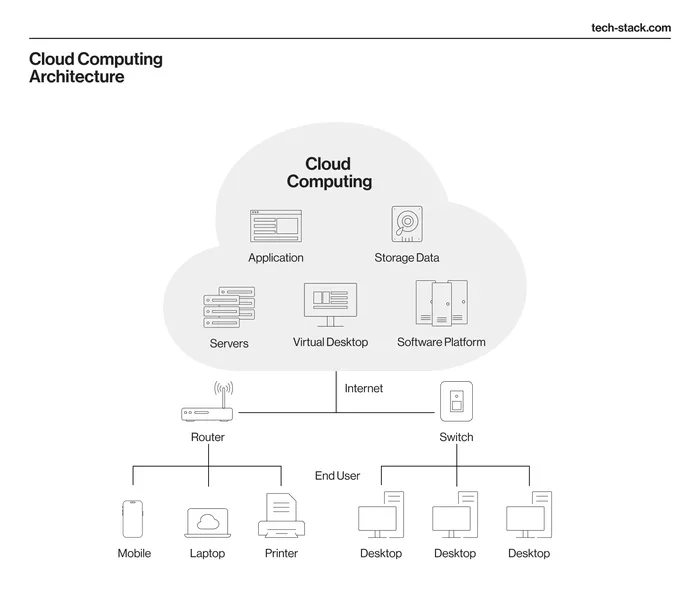
The components of cloud computing can be grouped into four broad categories. Each category handles a specific function within the cloud ecosystem. Together, they create the infrastructure that powers everything from email to streaming services. Let us explore each one in detail.
Front-End Platform
The front-end platform is what users see and interact with. It includes the client device, such as a laptop, smartphone, or tablet. Your web browser or a dedicated cloud application acts as the front-end interface. This is the layer where you access cloud services, upload files, or run web-based software.
The front-end does not need much processing power on its own. Most of the heavy lifting happens elsewhere. That is the beauty of cloud architecture. The front-end simply sends requests and displays results. This is why you can run powerful applications on a basic laptop, as long as you have a stable internet connection.
Back-End Platform
The back-end platform is where the real magic happens. It includes servers, storage systems, databases, and application software hosted by the cloud provider. Think of it as the engine room of the cloud. While users interact with the front-end, the back-end handles all the computation, data processing, and storage tasks.
Cloud providers operate massive back-end platforms across multiple data centers worldwide. These facilities house thousands of physical servers working together. The back-end ensures that data is stored securely and applications run without interruption. It also manages load balancing, which distributes traffic evenly across servers to prevent slowdowns.
Cloud Delivery Models
Cloud delivery models define how services are provided to users. The three main models are IaaS, PaaS, and SaaS. Each model offers a different level of control and management responsibility.
Infrastructure as a Service (IaaS) provides virtualized computing resources over the internet. Users get access to virtual machines, storage, and networking. Popular IaaS providers include Amazon Web Services, Microsoft Azure, and Google Cloud Platform. With IaaS, you manage the operating system and applications while the provider handles the physical hardware.
Platform as a Service (PaaS) offers a development environment in the cloud. Developers build, test, and deploy applications without worrying about underlying infrastructure. PaaS includes tools like databases, development frameworks, and operating systems. This model speeds up application development and reduces the need for in-house IT management.
Software as a Service (SaaS) delivers fully functional applications over the internet. Users access software through a browser without installing anything locally. Examples include Google Workspace, Microsoft 365, and Salesforce. SaaS is the most widely used cloud service model, and it continues to grow rapidly across industries.
The Role of Virtualization in Cloud Computing
Virtualization is the technology that makes cloud computing possible. It creates virtual versions of physical resources like servers, storage devices, and networks. Through virtualization, a single physical machine can run multiple virtual machines simultaneously. Each virtual machine operates independently with its own operating system and applications.
How Virtualization Works
A software layer called a hypervisor sits between the physical hardware and the virtual machines. The hypervisor divides the physical resources and allocates them to each virtual machine. This allows multiple users to share the same physical server without interfering with each other.
Virtualization offers several key benefits for cloud infrastructure. It improves resource utilization, meaning fewer physical servers are needed. It also enhances flexibility, allowing resources to be quickly allocated or reallocated based on demand. This directly supports cloud scalability and elasticity, two of the biggest advantages of cloud computing.
Types of Virtualization
There are several types of virtualization used in cloud environments. Server virtualization is the most common, where physical servers are divided into multiple virtual servers. Storage virtualization pools physical storage from multiple devices into a single virtual storage system. Network virtualization abstracts physical network resources into software-based virtual networks. Desktop virtualization allows users to access a full desktop environment from any device.
Each type plays a specific role in the overall cloud computing architecture. Together, they enable the efficient and flexible delivery of cloud services that businesses and consumers depend on every day.
Cloud Networking and Connectivity
Cloud networking refers to the communication infrastructure that connects users to cloud services. It includes virtual networks, load balancers, firewalls, and content delivery networks. Without cloud networking, users would not be able to access their data or applications stored in the cloud.
Key Networking Components
Several networking components are essential to cloud operations. Virtual private clouds create isolated network environments within a public cloud. Load balancers distribute incoming traffic across multiple servers to ensure consistent performance. Firewalls monitor and control incoming and outgoing network traffic based on security rules. Content delivery networks cache content at locations closer to users, reducing latency and improving speed.
Cloud networking also supports hybrid cloud and multi-cloud strategies. Many organizations use a combination of on-premises infrastructure and public cloud services. This approach gives them greater flexibility and control over their data. Cloud management tools help administrators monitor and optimize network performance across these complex environments.
Why Networking Matters
The performance of cloud services depends heavily on network quality. A slow or unreliable connection can degrade the user experience significantly. Cloud providers invest billions in building high-speed, low-latency networks around the world. They use fiber optic cables, edge computing nodes, and redundant data paths to ensure uptime and speed.
For businesses, choosing the right cloud networking setup is critical. Factors like bandwidth requirements, geographic distribution of users, and security needs all influence the decision. A well-designed cloud networking strategy ensures that applications run smoothly and users can access resources without delays.
Cloud Security and Compliance
Cloud security is one of the most important aspects of cloud computing. As more businesses move their operations to the cloud, protecting data and applications becomes a top priority. Cloud security involves a combination of technologies, policies, and controls designed to safeguard cloud environments.
Layers of Cloud Security
Cloud security operates across multiple layers. At the infrastructure level, providers use physical security measures like biometric access controls and surveillance at data centers. At the network level, firewalls and intrusion detection systems monitor traffic for suspicious activity. At the application level, encryption and secure coding practices protect data and software.
Identity and access management is another critical layer. It controls who can access cloud resources and what actions they can perform. Multi-factor authentication adds an extra layer of protection by requiring users to verify their identity through multiple methods. Data encryption ensures that even if information is intercepted, it cannot be read without the proper decryption keys.
Compliance and Regulations
Cloud providers must comply with various industry regulations and standards. These include GDPR for European users, HIPAA for healthcare data, and SOC 2 for service organizations. Compliance certifications give customers confidence that their data is handled responsibly. Many cloud providers publish transparency reports detailing their security practices and government data requests.
However, cloud security is a shared responsibility. The provider secures the infrastructure, but users must also take steps to protect their data and applications. This includes using strong passwords, configuring access controls properly, and regularly auditing security settings. Understanding this shared model is essential for anyone using cloud services.
Cloud Deployment Models Explained
Cloud deployment models determine how cloud resources are provisioned and managed. Each model offers different levels of control, flexibility, and cost. Choosing the right deployment model depends on your specific business needs and IT requirements.
Public Cloud
The public cloud is owned and operated by third-party cloud providers. Resources like servers and storage are shared among multiple customers, known as tenants. Public cloud offers the lowest cost and highest scalability. It is ideal for startups, small businesses, and projects with variable workloads. Popular public cloud providers include AWS, Azure, and Google Cloud.
Private Cloud
A private cloud is dedicated to a single organization. It can be hosted on-premises or by a third-party provider. Private clouds offer greater control and customization. They are often used by organizations with strict regulatory requirements or sensitive data. However, private clouds typically come with higher costs and require more in-house IT expertise.
Hybrid Cloud
The hybrid cloud combines public and private cloud environments. It allows businesses to keep sensitive data on a private cloud while using the public cloud for less critical workloads. This model provides flexibility and optimization. Many enterprises adopt hybrid cloud strategies to balance cost, performance, and security needs.
Multi-Cloud
A multi-cloud strategy uses services from multiple cloud providers simultaneously. This approach prevents vendor lock-in and increases redundancy. Organizations can choose the best services from each provider for specific needs. Multi-cloud also improves disaster recovery by distributing workloads across different providers and regions.
Cloud Management and Monitoring Tools
Effective cloud management is essential for maintaining performance and controlling costs. Cloud management platforms provide centralized control over cloud resources. They help administrators provision, monitor, and optimize their cloud environments.
Monitoring tools track key metrics like CPU usage, memory consumption, and network traffic. They alert administrators to potential issues before they become critical. Cost management tools help organizations track their cloud spending and identify opportunities to save money. Auto-scaling features automatically adjust resources based on real-time demand, ensuring optimal performance without overspending.
Many cloud providers offer built-in management tools. Third-party solutions like CloudHealth, Datadog, and New Relic provide additional capabilities. The right combination of tools depends on the size of your organization, your cloud deployment model, and your specific operational needs.
Common Mistakes When Understanding Cloud Components
Even experienced professionals sometimes overlook important aspects of cloud architecture. Here are some common mistakes to avoid.
- Ignoring security: Many users assume the cloud provider handles all security. In reality, security is a shared responsibility, and users must configure their own protections.
- Underestimating networking: Poor network design can bottleneck cloud performance. Invest time in planning your cloud networking architecture carefully.
- Choosing the wrong deployment model: Not every workload belongs in the public cloud. Evaluate your data sensitivity, compliance needs, and performance requirements before deciding.
- Neglecting cost monitoring: Cloud costs can spiral quickly without proper oversight. Use cost management tools and set budgets to stay on track.
- Overlooking vendor lock-in: Relying too heavily on a single provider’s proprietary services can limit your flexibility. Consider portability and interoperability when designing your cloud strategy.
Expert Insights on Cloud Computing Components
Industry experts consistently highlight the importance of understanding cloud architecture fundamentals. According to Gartner, organizations that invest in cloud literacy make better technology decisions and achieve faster returns on their cloud investments. The components of cloud computing are not static; they evolve as technology advances.
Experts also emphasize the growing role of artificial intelligence and machine learning in cloud platforms. Major providers now offer AI services integrated directly into their cloud ecosystems. Edge computing is another emerging trend that brings cloud capabilities closer to end users. Staying informed about these developments helps businesses remain competitive in a rapidly evolving digital landscape.
For those just starting their cloud journey, focus on mastering the basics first. Understand how virtualization enables cloud delivery, how networking connects users to services, and how security protects data. Once these foundations are solid, exploring advanced topics like serverless computing and containerization becomes much easier.
Conclusion
The components of cloud computing form an interconnected system that powers the modern digital world. From the front-end devices users interact with to the back-end data centers that store and process information, every component plays a vital role. Virtualization enables efficient resource sharing, while cloud networking ensures fast and reliable connectivity. Security layers protect sensitive data, and deployment models offer flexibility for different business needs.
Understanding these components gives you the knowledge to make informed decisions about cloud adoption. Whether you are a business leader evaluating cloud options or a developer building cloud-native applications, this foundational knowledge is invaluable. The cloud continues to evolve, but its core components remain the building blocks of everything it delivers.
Start by exploring the cloud service models that best fit your needs. Invest in learning about cloud security and networking. As you grow more comfortable, dive into advanced topics like multi-cloud strategies and edge computing. The cloud offers incredible opportunities, and understanding its components is the first step toward unlocking them.
Frequently Asked Questions
What are the main components of cloud computing?
The main components of cloud computing include the front-end platform, back-end platform, cloud delivery models, and cloud networking. Virtualization, storage, and security also play essential roles in the overall architecture. Together, these components enable the delivery of cloud services over the internet.
What is the difference between IaaS, PaaS, and SaaS?
IaaS provides virtualized infrastructure like servers and storage. PaaS offers a development platform for building applications. SaaS delivers ready-to-use software applications over the internet. Each model provides a different level of control and management responsibility for the user.
Why is virtualization important in cloud computing?
Virtualization is the foundation of cloud computing. It allows multiple virtual machines to run on a single physical server, improving resource utilization. It also enables cloud scalability and elasticity, which are key benefits of cloud services. Without virtualization, the efficient delivery of cloud resources would not be possible.
What are the four cloud deployment models?
The four cloud deployment models are public cloud, private cloud, hybrid cloud, and multi-cloud. Public clouds are shared among multiple tenants. Private clouds are dedicated to a single organization. Hybrid clouds combine public and private environments. Multi-cloud strategies use services from multiple providers simultaneously.
How does cloud security work?
Cloud security operates across multiple layers including infrastructure, network, and application levels. Providers implement physical security, encryption, and access controls. However, security is a shared responsibility between the cloud provider and the user. Users must also configure their own security settings properly.
Who are the major cloud providers?
The major cloud providers include Amazon Web Services, Microsoft Azure, and Google Cloud Platform. These providers offer a wide range of cloud services including computing, storage, and networking. They also provide management and monitoring tools to help users optimize their cloud environments.
=== QUICK SUMMARY (repeated for clarity) ===
The components of cloud computing form the backbone of every cloud platform. Understanding these elements helps businesses choose the right cloud solutions and scale effectively. This guide covers everything from front-end and back-end platforms to cloud deployment models and security. You will learn how virtualization, cloud networking, and middleware work together to deliver seamless cloud services. By the end, you will have a clear picture of how modern cloud infrastructure operates.
=== KEY TAKEAWAYS (repeated for clarity) ===
Key Takeaways
- Cloud computing has four main components: front-end platform, back-end platform, cloud delivery models, and cloud networking.
- Virtualization is the foundation that allows multiple virtual machines to run on a single physical server.
- Cloud deployment models include public, private, hybrid, and multi-cloud — each suited for different business needs.
- Cloud security involves multiple layers including encryption, identity management, and compliance frameworks.
- IaaS, PaaS, and SaaS are the three primary cloud service models that define how users interact with cloud resources.
- Scalability and elasticity are key benefits that make cloud computing essential for modern businesses.