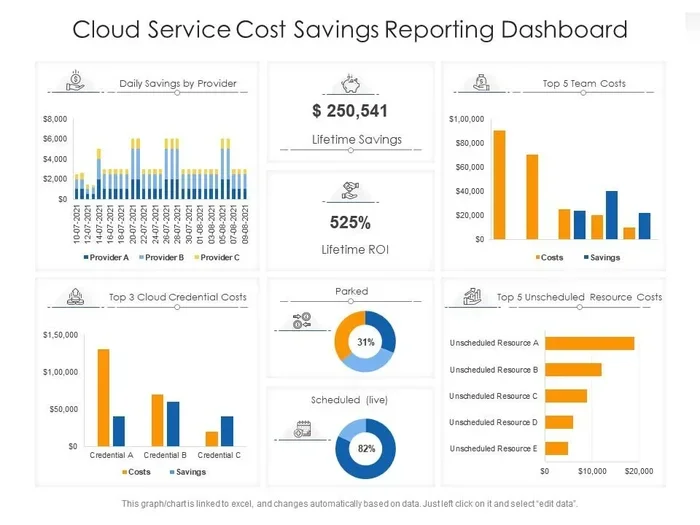
Cloud Computing Cost Savings Secrets You Need to Know
Cloud computing cost savings are real, measurable, and within reach for businesses of every size. By adopting cloud cost optimization strategies, you can slash IT expenses, eliminate wasted resources, and free up budget for growth. This guide reveals the practical steps and insider tips that help companies save big with the cloud.
Key Takeaways
- Pay-as-you-go models let you pay only for what you use, eliminating wasted spending.
- Cloud cost optimization requires ongoing monitoring, not just a one-time setup.
- Migrating to the cloud can reduce total cost of ownership by 30-50% for many businesses.
- Serverless computing and auto-scaling are powerful tools for cutting infrastructure costs.
- Common mistakes like over-provisioning and idle resources silently drain your cloud budget.
- Measuring cloud ROI helps you track savings and justify continued investment.
- Right-sizing resources is one of the simplest yet most effective ways to save money in the cloud.
📑 Table of Contents
- What Are Cloud Computing Cost Savings?
- How Cloud Computing Reduces IT Expenses
- Cloud Cost Optimization Strategies That Actually Work
- On-Premises vs Cloud: The Real Cost Comparison
- Common Cloud Computing Cost Savings Mistakes to Avoid
- How to Measure Your Cloud ROI
- Final Thoughts on Cloud Computing Cost Savings
What Are Cloud Computing Cost Savings?
Let’s talk about something every business owner cares about: saving money. Cloud computing cost savings refer to the money you save when you move your IT operations from traditional on-premises servers to the cloud. Instead of buying expensive hardware, paying for maintenance, and hiring large IT teams, you use shared infrastructure managed by cloud providers.
The beauty of cloud computing benefits goes beyond just lower bills. You get flexibility, scalability, and access to enterprise-grade technology without the enterprise-grade price tag. Small businesses can now compete with big corporations because the cloud levels the playing field.
When we talk about cloud migration savings, we mean the total reduction in spending across hardware, software, staffing, and energy costs. Many companies report saving 30 to 50 percent on their IT expenses after moving to the cloud. That is real money you can reinvest in your business.
But here is the thing most people miss. Cloud cost savings do not happen automatically. You need a plan. You need the right strategies. And you need to stay vigilant about how you use your cloud resources. This guide will walk you through everything you need to know.
Why Cost Savings Matter More Than Ever
Economic pressures are pushing every business to find ways to cut costs. IT budgets are under constant scrutiny. Leaders want proof that every dollar spent delivers value. Cloud infrastructure offers a clear path to efficiency, but only if you use it wisely.
The shift toward remote work and digital-first operations has made cloud adoption even more critical. Companies that embraced the cloud early are already seeing the rewards. Those still on the fence are missing out on significant opportunities to reduce spending and boost performance.
How Cloud Computing Reduces IT Expenses
Understanding how cloud computing reduces IT expenses starts with knowing what you are paying for today. Traditional IT setups come with hidden costs that add up fast. Let us break down the major areas where the cloud helps you save.
Eliminating Hardware Costs
On-premises servers are expensive. You pay for the hardware upfront. Then you pay for maintenance, repairs, and eventual replacement. Cloud infrastructure removes all of that. You rent computing power instead of buying it. This shifts your spending from capital expenditure to operational expenditure, which is much easier to manage.
Here is a quick comparison:
- On-premises servers: High upfront cost, ongoing maintenance, regular upgrades, and dedicated space needed.
- Cloud servers: Low upfront cost, provider handles maintenance, automatic updates, and no physical space required.
The difference is clear. When you eliminate hardware costs, your operational expenses drop significantly. That is one of the biggest reasons companies pursue cloud adoption savings.
Reducing Energy and Cooling Costs
Data centers eat electricity. They need constant cooling to keep servers running. These costs add up fast, especially for businesses running their own server rooms. Cloud providers handle all of that. They operate massive, energy-efficient data centers that are far cheaper to run per unit of computing power.
By moving to the cloud, you pass those energy savings on to your bottom line. This is a frequently overlooked area of cloud computing cost savings, but it adds up over time.
Lowering Staffing Costs
Managing on-premises infrastructure requires a dedicated IT team. You need engineers, administrators, and support staff. Cloud services reduce the need for large in-house IT departments. Your cloud provider handles security patches, system updates, and hardware failures.
This does not mean you do not need IT talent at all. But your team can focus on strategic projects instead of keeping the lights on. That shift in focus drives productivity and further reduces costs.
Cloud Cost Optimization Strategies That Actually Work
Knowing about cloud computing cost savings is one thing. Actually achieving them is another. You need concrete strategies that deliver results. Here are the most effective approaches used by successful companies today.
Right-Size Your Resources
One of the biggest reasons businesses overspend in the cloud is over-provisioning. They buy more computing power than they actually need. Right-sizing means matching your resources to your actual workload requirements.
Start by analyzing your usage patterns. Look at CPU, memory, and storage utilization. If a server is running at 20 percent capacity most of the time, you are paying for resources you are not using. Scale down to match real demand. This single step can unlock significant cloud cost optimization results.
Use Pay-As-You-Go Pricing Models
Most cloud providers offer pay-as-you-go pricing models. You only pay for the resources you consume. No long-term contracts. No wasted capacity. This model is perfect for businesses with fluctuating workloads.
For example, an e-commerce site might need extra computing power during holiday sales. With pay-as-you-go, you scale up during peak times and scale back down afterward. You never pay for idle resources. This is one of the most powerful cloud cost management tools available.
Leverage Reserved Instances and Savings Plans
If you have predictable workloads, consider reserved instances or savings plans. These options let you commit to using certain resources for one or three years. In return, you get significant discounts compared to on-demand pricing.
Many businesses save 30 to 60 percent by using reserved instances. The key is to analyze your usage history and commit only to what you know you will use. Overestimating your needs defeats the purpose of cloud cost savings.
Implement Auto-Scaling
Auto-scaling automatically adjusts your computing resources based on demand. When traffic spikes, more resources kick in. When traffic drops, resources scale back down. This ensures you are never paying for more than you need.
Auto-scaling works especially well for applications with variable traffic patterns. It is a hands-off way to maintain efficiency and keep cloud spending under control. Most major cloud platforms offer built-in auto-scaling features.
Monitor and Analyze Cloud Spending
You cannot optimize what you do not measure. Use cloud cost monitoring tools to track where your money goes. Most providers offer native dashboards that break down spending by service, team, and project.
Set up alerts for unusual spending patterns. Review your bills monthly. Identify resources that are running but not being used. Consistent monitoring is the foundation of effective cloud cost optimization. Without it, waste accumulates silently.
Use Serverless Computing Where Possible
Serverless computing is a game-changer for cloud computing cost savings. With serverless, you do not manage servers at all. You simply write code, and the cloud provider runs it. You pay only when your code executes, measured in milliseconds.
This model is ideal for event-driven applications, APIs, and background processing tasks. If your workload fits the serverless pattern, you can dramatically reduce costs. You also eliminate the burden of managing infrastructure entirely.
On-Premises vs Cloud: The Real Cost Comparison
Many businesses hesitate to move to the cloud because they do not fully understand the cost differences. Let us compare the two approaches honestly and clearly.
Total Cost of Ownership Breakdown
When you calculate total cost of ownership, on-premises costs go far beyond the initial server purchase. You must factor in:
- Hardware purchase and replacement costs
- Software licensing fees
- IT staff salaries and benefits
- Electricity and cooling
- Physical security and facility maintenance
- Disaster recovery and backup infrastructure
- Downtime and lost productivity
When you add all of these up, on-premises systems are often far more expensive than they appear. Cloud computing shifts these costs into a predictable monthly model. The cloud billing models are transparent and flexible.
Where On-Premises Still Makes Sense
Let us be fair. On-premises infrastructure is not always the wrong choice. Some industries have strict data residency requirements. Some workloads need dedicated hardware for performance reasons. The key is to evaluate each workload individually and choose the option that delivers the best cloud efficiency for your specific situation.
Common Cloud Computing Cost Savings Mistakes to Avoid
Even with the best intentions, businesses make mistakes that erode their cloud computing cost savings. Knowing what to avoid is just as important as knowing what to do.
Over-Provisioning Resources
This is the number one mistake. Teams provision more resources than needed “just in case.” Over time, these idle resources accumulate into significant waste. Regular audits and right-sizing exercises can eliminate this problem.
Ignoring Tagging and Cost Allocation
Without proper tagging, you cannot track which teams or projects are driving costs. Implement a tagging strategy from day one. This gives you visibility and accountability across your organization.
Failing to Review and Optimize Regularly
Cloud cost management is not a set-it-and-forget-it task. Cloud environments change constantly. New services get deployed. Old ones get forgotten. Regular reviews ensure you catch waste before it spirals out of control.
Choosing the Wrong Cloud Provider
Not all cloud providers are created equal. Pricing varies significantly between providers. Take time to compare offerings, pricing models, and discount options. A cloud vendor comparison can reveal savings opportunities you did not know existed.
How to Measure Your Cloud ROI
You cannot improve what you do not measure. Measuring cloud ROI helps you understand whether your migration is delivering real value.
Key Metrics to Track
Focus on these metrics to evaluate your cloud computing cost savings:
- Total IT spending before and after migration
- Cost per user or cost per workload
- Resource utilization rates across your cloud environment
- Downtime and incident costs reduced through cloud reliability
- Time to deploy new applications and services
Track these metrics over time. Look for trends. Celebrate wins. Adjust strategies that are not delivering results. This data-driven approach ensures your cloud cost optimization efforts stay on track.
Setting Realistic Expectations
Do not expect to save millions overnight. Cloud computing cost savings build over time. Start with quick wins like right-sizing and eliminating idle resources. Then tackle more complex optimization strategies as your team gains experience. Patience and consistency pay off.
Final Thoughts on Cloud Computing Cost Savings
The path to cloud computing cost savings is clear, but it requires intention and effort. You need to understand your current spending, choose the right strategies, and stay committed to ongoing optimization. The rewards are well worth it.
Companies that master cloud cost management enjoy lower expenses, better performance, and greater agility. They can respond to market changes faster and invest more in innovation. In today’s competitive landscape, that advantage is hard to ignore.
Start small. Pick one strategy from this guide and implement it this week. Monitor the results. Then add another strategy. Over time, these small wins compound into significant cloud computing cost savings that transform your business.
The cloud is not just a technology shift. It is a financial strategy. And the companies that recognize this are the ones that thrive. Your journey to cloud cost savings starts now.
Frequently Asked Questions
What are cloud computing cost savings?
Cloud computing cost savings refer to the money businesses save by moving their IT operations from on-premises servers to the cloud. These savings come from reduced hardware costs, lower energy bills, decreased staffing needs, and efficient pay-as-you-go pricing models. Many companies save 30 to 50 percent on IT expenses after migrating to the cloud.
How can I reduce my cloud spending?
You can reduce cloud spending by right-sizing your resources, using auto-scaling, leveraging reserved instances, and monitoring usage regularly. Eliminating idle resources and implementing a strong tagging strategy also help you identify and cut unnecessary costs. Consistent cloud cost optimization is the key to long-term savings.
Is cloud computing cheaper than on-premises infrastructure?
For most businesses, yes. Cloud computing eliminates the need for expensive hardware, dedicated data center space, and large IT teams. The total cost of ownership for cloud is typically much lower. However, the exact savings depend on your workload, usage patterns, and how well you manage your cloud environment.
What is the fastest way to achieve cloud cost savings?
The fastest way is to right-size your resources and eliminate idle or underutilized instances. These quick wins can be implemented within days and often result in immediate cost reductions. Pair this with a monitoring strategy to catch waste early and sustain your savings over time.
Does serverless computing save money?
Yes, serverless computing can save significant money for the right workloads. You pay only for the compute time your code actually uses, measured in milliseconds. This eliminates costs for idle servers and is especially cost-effective for event-driven applications, APIs, and short-running tasks.
How often should I review my cloud costs?
You should review your cloud costs at least monthly. Set up automated alerts for unusual spending spikes. Conduct a deeper review quarterly to identify optimization opportunities. Regular reviews ensure your cloud cost management practices stay effective as your usage patterns evolve.
=== MAIN CONTENT END ===