Authentication in Cloud Computing Explained for Everyone
Authentication in cloud computing is the process of verifying who you are before you access cloud services. It acts as the first line of defense against unauthorized access and data breaches. Understanding authentication in cloud computing helps you protect personal and business data in today’s digital world. This guide breaks down every method, best practice, and challenge in simple terms.
Every time you log into your email, bank, or favorite app in the cloud, something happens behind the scenes. That something is called authentication. It is the process that checks whether you are really who you say you are. Without it, anyone could walk right into your personal or work accounts. Authentication in cloud computing is the foundation of digital security, and it affects everyone who uses the internet today.
You might think authentication is just typing a password. But it has grown far beyond that. Today, cloud services use a mix of methods to keep bad actors out. From fingerprint scans to security tokens, the options are varied and powerful. This article breaks it all down in plain language. Whether you are a student, a small business owner, or just someone who cares about online safety, you will find useful information here.
We will explore what authentication in cloud computing means, why it is so important, and the different methods available. You will also learn best practices, common challenges, and what the future holds. Let us dive in and make cloud security easy to understand.
Key Takeaways
- Authentication in cloud computing verifies user identity before granting access to cloud resources.
- Multi-factor authentication (MFA) adds extra layers of security beyond just passwords.
- Single sign-on (SSO) simplifies access while maintaining strong security controls.
- Zero-trust security is becoming the gold standard for cloud authentication.
- Passwordless login and biometric methods are shaping the future of cloud security.
- Regular access audits and strong password policies are essential best practices.
- Understanding authentication helps both individuals and businesses stay safe online.
📑 Table of Contents
What Is Authentication in Cloud Computing?
Authentication in cloud computing is the process of confirming a user’s identity before they can access cloud-based services. Think of it like a bouncer at a club. The bouncer checks your ID to make sure you are allowed inside. Similarly, authentication checks your credentials to make sure you are the real account owner.
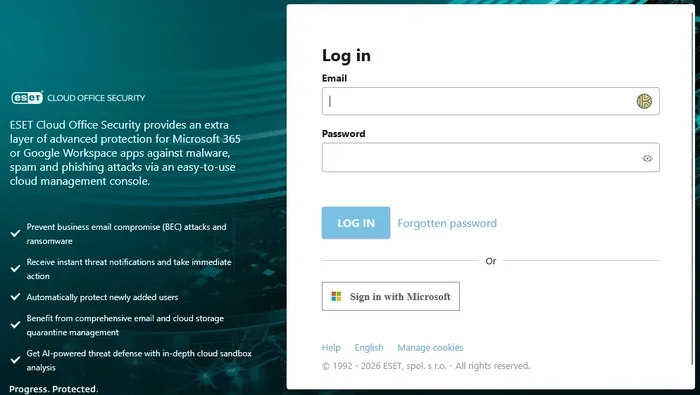
In simple terms, it answers one question: “Are you really you?” This happens every time you sign in to a cloud platform like Google Drive, Dropbox, or Microsoft Azure. The system compares what you provide against what it has stored. If the details match, you get access. If they do not, you are locked out.
How It Differs from Traditional Authentication
Traditional authentication usually happens on a single device or local network. For example, logging into your laptop at home. But authentication in cloud computing works across the internet. Your credentials travel through networks, and the cloud server verifies them remotely. This makes it more complex but also more flexible.
Cloud authentication also supports many users at once. A company might have thousands of employees accessing the same cloud platform. The system must verify each person quickly and accurately. This scale is something traditional local authentication simply cannot handle.
Why Authentication Matters in the Cloud
Cloud computing stores and processes data on remote servers instead of your own device. That means your information lives somewhere else. You rely on the cloud provider to keep it safe. Authentication is the gatekeeper that controls who gets to see or change that data.
Without strong authentication in cloud computing, sensitive information is at risk. Hackers can exploit weak login systems to steal personal files, financial records, and even business secrets. The consequences can be devastating for individuals and organizations alike.
Protecting Sensitive Data
Your cloud account holds a lot of personal data. Photos, documents, emails, and payment details all live in the cloud. Strong authentication ensures only you can reach them. If someone else tries to log in, the system should block them.
For businesses, the stakes are even higher. Customer data, trade secrets, and employee records sit in cloud environments. A single breach can cost millions of dollars and damage a company’s reputation. That is why authentication in cloud computing is not optional. It is a necessity.
Meeting Compliance Requirements
Many industries have strict rules about data protection. Healthcare, finance, and education all have regulations that require strong identity verification. Authentication in cloud computing helps organizations meet these legal requirements.
For example, the Health Insurance Portability and Accountability Act (HIPAA) in the United States demands that patient data be securely accessed. Without proper authentication, a cloud service provider could face serious fines. Compliance is not just about avoiding penalties. It is about building trust with customers and partners.
Types of Authentication Methods
There are several ways to verify identity in the cloud. Each method has its own strengths and use cases. Let us look at the most common ones you will encounter.
Multi-Factor Authentication (MFA)
Multi-factor authentication is one of the most effective tools available. It requires two or more proof points before granting access. These factors fall into three categories:
- Something you know: A password or PIN.
- Something you have: A phone, security token, or smart card.
- Something you are: A fingerprint, face scan, or voice recognition.
When you use MFA, a hacker needs to steal more than just your password. They would also need your phone or your fingerprint. This makes unauthorized access much harder. MFA is a core part of authentication in cloud computing and should be enabled on every cloud account.
Single Sign-On (SSO)
Single sign-on lets you log in once and access multiple services. Instead of remembering dozens of passwords, you use one set of credentials. Google’s SSO system is a great example. Once you sign into your Google account, you can access Gmail, YouTube, Google Drive, and more without logging in again.
SSO simplifies the user experience. It also makes it easier for IT teams to manage access. When an employee leaves a company, the admin can revoke one set of credentials instead of many. However, SSO must be paired with strong authentication in cloud computing to remain secure. If the single login is compromised, all connected services are at risk.
Biometric Authentication
Biometric methods use your body to verify your identity. Fingerprint scanners, facial recognition, and iris scans are all examples. These methods are fast and convenient. You do not need to remember a password or carry a token.
Biometric authentication is growing in popularity in cloud computing. Many smartphones now use face recognition to unlock cloud apps. The data is stored securely and compared locally before any cloud communication happens. This adds a strong layer of protection to authentication in cloud computing.
OAuth and SAML Protocols
OAuth and SAML are technical protocols that make authentication work smoothly across different platforms. SAML stands for Security Assertion Markup Language. It is commonly used in enterprise cloud environments to share identity information between systems.
OAuth, on the other hand, is often used for API access. It lets one application access another application’s data without sharing passwords. For example, when you let a photo editing app access your Google photos, OAuth handles that securely. Both protocols play a big role in authentication in cloud computing, especially for developers and businesses.
Best Practices for Cloud Authentication
Setting up authentication is not enough. You need to follow best practices to keep it effective. Here are some proven strategies that work well for both individuals and organizations.
Implement Zero-Trust Security
Zero-trust security means you trust no one by default. Every user and device must verify their identity every time they try to access a resource. This approach has become a gold standard in cloud computing. It assumes that threats can come from both outside and inside the network.
With zero-trust, authentication in cloud computing happens continuously. The system checks your identity not just at login but throughout your session. If something looks unusual, access is blocked. This method dramatically reduces the risk of data breaches.
Use Strong Password Policies
Passwords are still the most common form of authentication. But weak passwords are a major security risk. A strong password policy should require:
- At least 12 to 16 characters.
- A mix of uppercase letters, lowercase letters, numbers, and symbols.
- No reuse of old passwords.
- Regular password changes for sensitive accounts.
Many people reuse passwords across multiple sites. This is a dangerous habit. If one site is breached, hackers can try the same password on your cloud accounts. Using a password manager can help you create and store unique passwords for every service.
Regularly Audit Access Logs
Access logs show who logged in, when, and from where. Regularly reviewing these logs helps you spot suspicious activity early. For example, if you see a login from a country you have never visited, that is a red flag.
Cloud providers offer tools to monitor and analyze access logs. Setting up alerts for unusual behavior adds another layer of protection. Auditing is a simple but powerful way to strengthen authentication in cloud computing.
Educate Users About Phishing
Phishing attacks trick users into giving away their login details. These attacks often come through fake emails or websites that look real. Even the best authentication system can fail if a user hands over their credentials willingly.
Training users to recognize phishing attempts is essential. Teach them to check URLs carefully, avoid clicking suspicious links, and report strange messages. Awareness is one of the strongest defenses in authentication in cloud computing.
Common Challenges and How to Overcome Them
Authentication in cloud computing is not without its challenges. Let us look at some common problems and practical solutions.
Dealing with Password Fatigue
Password fatigue happens when users have too many passwords to remember. This leads to weak passwords, reuse, or writing them down on sticky notes. Both habits create security risks.
The solution is to adopt password managers and single sign-on systems. A password manager stores all your passwords securely and fills them in automatically. SSO reduces the number of passwords you need. Together, these tools make authentication easier without sacrificing security.
Managing Hybrid Cloud Environments
Many businesses use a mix of public and private cloud services. This is called a hybrid cloud setup. Managing authentication across different platforms can be tricky. Each system may use different protocols and tools.
Using a centralized identity provider solves this problem. An identity provider manages all user accounts in one place and works across multiple cloud platforms. This approach streamlines authentication in cloud computing and reduces the chance of misconfigurations.
Balancing Security with User Experience
Strong security can sometimes feel like a hassle. Too many verification steps can frustrate users and slow them down. The key is to find a balance. You want security that protects without annoying people.
Adaptive authentication helps here. It adjusts the level of verification based on risk. If you log in from your usual device and location, you might only need a password. But if you log in from a new device, the system asks for extra verification. This smart approach keeps things secure while staying user-friendly.
The Future of Authentication in Cloud Computing
Authentication in cloud computing is evolving fast. New technologies are making identity verification smarter and more seamless. Here are some trends to watch.
Passwordless Authentication
Passwordless login is gaining popularity fast. Instead of typing a password, users verify their identity through a phone notification, biometric scan, or security key. This approach removes the weakest link in cloud security: the password itself.
Major tech companies are already supporting passwordless options. Microsoft, Google, and Apple all offer passwordless login features. As adoption grows, authentication in cloud computing will become simpler and safer for everyone.
AI-Driven Security
Artificial intelligence is changing how cloud systems detect threats. AI can analyze login patterns in real time and spot unusual behavior instantly. For example, if someone tries to log in at 3 a.m. from a new country, the AI flags it immediately.
Machine learning models get better over time. They learn what normal behavior looks like for each user. This makes authentication in cloud computing more accurate and responsive. AI-driven security will play a huge role in the future of cloud protection.
Decentralized Identity Systems
Decentralized identity is an emerging concept that puts users in control of their own data. Instead of relying on a central server to store identity information, users hold their credentials in digital wallets. They choose what to share and with whom.
This approach reduces the risk of large-scale data breaches. If there is no central database of passwords, hackers have less to target. Decentralized identity could reshape authentication in cloud computing in the coming years.
Conclusion
Authentication in cloud computing is the cornerstone of digital security. It protects your personal data, business assets, and private communications every single day. From multi-factor authentication to biometric scans, the methods available today are powerful and accessible. By following best practices like using strong passwords, enabling MFA, and staying alert to phishing, you can keep your cloud accounts safe.
The future of authentication is bright. Passwordless login, AI-driven security, and decentralized identity are all pushing the industry forward. But the most important step you can take right now is to understand and use the tools available to you. Authentication in cloud computing is not just a technical topic. It is a personal responsibility for anyone who uses the cloud. Take it seriously, stay informed, and keep your data secure.
Frequently Asked Questions
What is authentication in cloud computing?
Authentication in cloud computing is the process of verifying a user’s identity before they can access cloud-based services. It ensures that only authorized users can view or modify data stored in the cloud. Common methods include passwords, multi-factor authentication, biometrics, and single sign-on.
Why is authentication important in cloud security?
Authentication acts as the first line of defense against unauthorized access. Without it, sensitive data stored in the cloud would be open to anyone. Strong authentication in cloud computing protects personal information, business records, and financial data from hackers and breaches.
What is the difference between authentication and authorization?
Authentication verifies who you are, while authorization determines what you can do. For example, logging into your cloud account is authentication. Accessing a specific file or folder within that account is authorization. Both work together to keep cloud environments secure.
Is multi-factor authentication necessary for cloud accounts?
Yes, multi-factor authentication is highly recommended for cloud accounts. It adds extra layers of protection beyond just a password. Even if someone steals your password, they cannot access your account without the second factor. Most cloud providers now offer MFA as a standard security feature.
What are the most common authentication protocols used in cloud computing?
The most common protocols are SAML, OAuth, and OpenID Connect. SAML is widely used in enterprise environments for single sign-on. OAuth handles secure API access between applications. OpenID Connect is a modern identity layer built on OAuth. All three play key roles in authentication in cloud computing.
What does the future of authentication in cloud computing look like?
The future points toward passwordless login, AI-driven threat detection, and decentralized identity systems. Passwordless authentication removes the risk of weak or stolen passwords. AI makes security smarter by detecting unusual behavior in real time. Decentralized identity gives users more control over their personal data. These trends will make cloud authentication faster, safer, and more user-friendly.