How to Build a Business Continuity Plan for Cloud Computing
A business continuity plan for cloud computing is your roadmap for keeping operations running when disasters strike. This guide walks you through every step, from risk assessment to testing your strategy. You will learn how to choose the right cloud provider, build a failover system, and protect your data with confidence.
Every business that relies on cloud services needs a safety net. A business continuity plan for cloud computing is exactly that. It is a detailed strategy that keeps your operations running when things go wrong. Whether it is a cyberattack, a natural disaster, or a simple server outage, having a plan in place saves time, money, and stress.
In this guide, we will walk you through everything you need to know. We will cover what a continuity plan is, why it matters for cloud environments, and how to build one step by step. By the end, you will have a clear roadmap to protect your business operations and keep your systems running smoothly.
Key Takeaways
- Know Your Risks: A solid risk assessment is the foundation of any continuity plan.
- Define Clear Goals: Set realistic RTO and RPO targets before choosing tools.
- Pick the Right Cloud Partner: Not all providers offer the same level of uptime and redundancy.
- Test Regularly: A plan that is never tested is a plan that will fail when you need it most.
- Automate Where Possible: Automation reduces human error and speeds up recovery time.
- Document Everything: Clear, accessible documentation keeps your team aligned during a crisis.
📑 Table of Contents
- What Is a Business Continuity Plan for Cloud Computing?
- Why Cloud Computing Changes the Continuity Game
- Key Components of a Cloud Business Continuity Plan
- Step-by-Step Guide to Building Your Plan
- Choosing the Right Cloud Provider for Continuity
- Testing and Maintaining Your Cloud Continuity Plan
- Conclusion
What Is a Business Continuity Plan for Cloud Computing?
A business continuity plan for cloud computing is a set of procedures designed to keep your IT services available during unexpected events. It covers everything from data backup to system failover. The goal is simple: minimize downtime and protect your business from lasting damage.
Think of it as an insurance policy for your digital operations. Without one, a single outage can halt your entire business. With one, you can recover quickly and keep serving your customers. A strong plan also includes a disaster recovery plan that focuses specifically on restoring data and systems after an incident.
Cloud environments add unique challenges and opportunities. Your infrastructure lives on someone else’s servers, which means you share responsibility for continuity. Understanding this shared model is the first step toward building a resilient IT setup.
Why Cloud Continuity Matters More Than Ever
Businesses today depend heavily on cloud services for everything from email to customer databases. When those services go down, the ripple effects are immediate. Sales stop, customers get frustrated, and revenue drops. A well-built continuity strategy ensures that your business operations continue with minimal disruption.
The shift to remote work has made this even more important. Employees access cloud tools from everywhere. If those tools become unavailable, your entire workforce grinds to a halt. Investing in IT resilience is no longer optional. It is a core part of running a modern business.
Why Cloud Computing Changes the Continuity Game
Traditional continuity plans were built around physical servers and on-premises hardware. Cloud computing has completely changed the game. Your data and applications now live in distributed data centers managed by a cloud provider. This brings new advantages but also new responsibilities.
One of the biggest benefits is data redundancy. Cloud providers store copies of your data across multiple locations. If one data center goes offline, another takes over. This level of system availability is hard to achieve with traditional infrastructure.
However, cloud outages do happen. Major providers have experienced downtime that affected thousands of businesses. Your continuity plan must account for these scenarios. You cannot simply assume that your cloud infrastructure is always available. You need a strategy that works even when your provider faces issues.
The Shared Responsibility Model
Understanding the shared responsibility model is critical. Your cloud provider handles the physical security and basic uptime of their data centers. But you are responsible for configuring your services correctly, managing access, and backing up your data. If you skip these steps, your business continuity is at risk.
For example, if you do not enable automatic backups, no provider can recover your lost data for you. The provider keeps the platform running, but you must protect what lives on it. This shared model means your continuity plan needs to cover both sides of the equation.
Key Components of a Cloud Business Continuity Plan
A strong business continuity plan for cloud computing includes several essential components. Each piece plays a role in keeping your systems running and your data safe. Let us break them down.
Risk Assessment and Business Impact Analysis
Start by identifying the risks your business faces. These could include cyberattacks, power outages, or provider-side failures. A thorough risk assessment helps you understand what could go wrong and how likely each scenario is.
Next, conduct a business impact analysis. This tells you which systems are most critical. Ask yourself what would happen if your email went offline for a day. What if your customer database was unavailable for a week? These answers help you prioritize your continuity efforts.
Use this analysis to assign a recovery time objective (RTO) for each system. RTO is the maximum amount of time you can afford to be down. Also set a recovery point objective (RPO), which is the maximum amount of data loss you can tolerate. These two metrics guide every decision you make.
Data Backup and Redundancy Strategy
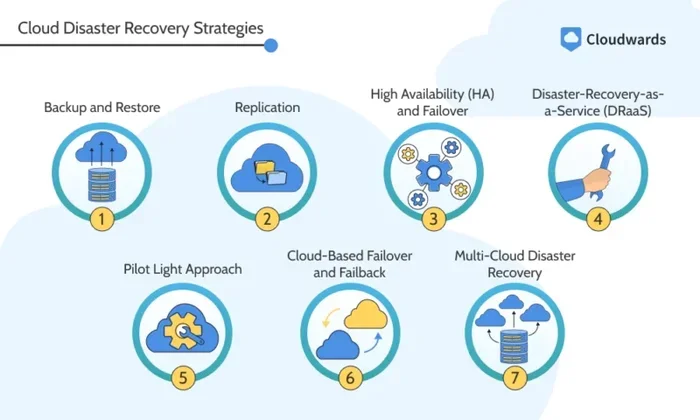
Cloud backup is the backbone of any continuity plan. You need copies of your data stored in separate locations. A good strategy uses multiple backup tiers. This might include local snapshots, regional cloud backups, and offsite copies.
Consider a multi-cloud strategy where you spread your workloads across more than one provider. This reduces your dependence on a single vendor. If one provider experiences issues, your other cloud environment can take over. It adds a powerful layer of operational resilience.
Automate your backups wherever possible. Manual backup processes are error-prone and easy to forget. Set up scheduled backups with clear retention policies. Test your backups regularly to make sure they actually work when you need them.
Failover and Recovery Procedures
Failover is the process of switching to a backup system when your primary system fails. In a cloud environment, this can happen automatically if you configure it correctly. Set up health checks that monitor your services around the clock. When an issue is detected, the failover system kicks in without human intervention.
Your recovery procedures should be documented in detail. Every team member should know their role during an outage. Include step-by-step instructions for restoring services, communicating with customers, and monitoring system health. Clear procedures reduce panic and speed up recovery.
Step-by-Step Guide to Building Your Plan
Building a business continuity plan for cloud computing does not have to be overwhelming. Follow these steps to create a plan that actually works.
Step 1: Inventory Your Assets
Start by listing every cloud service, application, and data set your business uses. Include SaaS tools, IaaS platforms, and any custom applications. For each item, note who depends on it and what the impact of an outage would be. This inventory forms the foundation of your entire plan.
Step 2: Define Your Recovery Priorities
Not all systems are equally important. Rank them based on the business impact analysis from earlier. Your customer-facing applications should be at the top of the list. Internal tools like HR portals can tolerate longer recovery times. Use your RTO and RPO targets to guide this prioritization.
Step 3: Choose Your Continuity Architecture
Decide how you will maintain continuity. Options include active-active setups where two systems run simultaneously, or active-passive setups where a backup system waits to take over. Your choice depends on your budget, your RTO targets, and the complexity of your cloud migration setup.
Step 4: Implement Monitoring and Alerts
Set up monitoring tools that track system health in real time. Configure alerts that notify your team the moment something goes wrong. Early detection is one of the best ways to reduce downtime. Many cloud providers offer built-in monitoring, but third-party tools often provide deeper insights.
Step 5: Document and Share the Plan
Write down every procedure, contact, and decision in your plan. Store this documentation in a secure, accessible location. Make sure every team member knows where to find it. A plan that lives only in one person’s head is not a real plan.
Choosing the Right Cloud Provider for Continuity
Your cloud provider plays a huge role in your continuity strategy. Not all providers are created equal. Before committing, evaluate them on several key factors.
First, look at their uptime guarantees. Most providers offer service level agreements (SLAs) that promise 99.9% or higher uptime. Read the fine print carefully. Understand what is covered and what is not. A 99.9% uptime guarantee still allows for over 8 hours of downtime per year.
Next, check their data center locations. Providers with multiple regions offer better data redundancy. If one region experiences an outage, your services can failover to another region automatically. This geographic distribution is a key advantage of cloud computing for continuity.
Also evaluate their disaster recovery features. Some providers offer built-in tools for backup, replication, and automated failover. Others require you to build these capabilities yourself. Choose a provider whose tools align with your continuity goals.
Questions to Ask Before Committing
- What is their historical uptime record?
- Do they offer automated failover between regions?
- What does their SLA actually cover?
- How do they handle data security and compliance?
- What support do they offer during an outage?
Asking these questions upfront saves you from nasty surprises later. A good provider will be transparent about their capabilities and limitations.
Testing and Maintaining Your Cloud Continuity Plan
A business continuity plan for cloud computing is not a set-it-and-forget-it document. You must test it regularly and update it as your business evolves. A plan that has never been tested is a plan that will likely fail when you need it most.
Start with tabletop exercises. Gather your team and walk through a simulated outage scenario. Discuss what each person would do and where bottlenecks might occur. These exercises reveal gaps in your plan without any real-world risk.
Next, run technical failover tests. Trigger a switch to your backup environment and measure how long it takes. Compare the results against your RTO targets. If you are not meeting your goals, adjust your setup and try again. These tests build confidence and improve your recovery time objective over time.
Update your plan whenever something changes in your environment. A new application, a new cloud provider, or a change in business processes all require plan updates. Schedule quarterly reviews to keep your plan current and relevant.
Common Mistakes to Avoid
- Skipping regular tests: Untested plans fail when it matters most.
- Ignoring human factors: Training your team is just as important as setting up the right tools.
- Overlooking third-party dependencies: Your plan must account for all services you rely on, not just your core platform.
- Setting unrealistic RTO and RPO targets: Be honest about what your business can actually tolerate.
Quick Tips for Success
- Use automation to reduce manual errors during recovery.
- Keep your documentation in a cloud-based system that is accessible even during an outage.
- Involve stakeholders from every department in the planning process.
- Track your uptime and system availability metrics continuously.
- Review and update your plan at least every quarter.
Conclusion
Building a business continuity plan for cloud computing is one of the smartest investments you can make. It protects your business operations, keeps your customers happy, and gives you peace of mind. The steps in this guide give you a solid foundation to start with.
Remember that continuity is not a one-time project. It is an ongoing process. Test your plan regularly, update it as your business grows, and stay informed about new tools and best practices. With the right strategy in place, you can face any disruption with confidence. Start building your plan today, and give your business the resilience it deserves.
Frequently Asked Questions
What is a business continuity plan for cloud computing?
A business continuity plan for cloud computing is a strategy that keeps your IT services running during unexpected events. It includes backup procedures, failover systems, and recovery steps tailored to your cloud environment.
How often should I test my cloud continuity plan?
You should test your plan at least every quarter. Regular testing reveals gaps and ensures your recovery time objective targets are still realistic. Technical failover tests and tabletop exercises both add value.
What is the difference between RTO and RPO?
RTO (Recovery Time Objective) is the maximum time you can afford to be down. RPO (Recovery Point Objective) is the maximum amount of data loss you can tolerate. Both metrics are essential for building an effective continuity strategy.
Can a multi-cloud strategy improve business continuity?
Yes, a multi-cloud strategy spreads your workloads across different providers. This reduces your risk of a single point of failure and improves your overall operational resilience during outages.
Is the cloud provider responsible for my business continuity?
No, continuity is a shared responsibility. Your cloud provider maintains the platform and data centers, but you must configure backups, set up failover, and manage your own recovery procedures correctly.
What should be included in a cloud continuity plan?
Your plan should include a risk assessment, data backup strategy, failover procedures, team roles, contact information, and regular testing schedules. Clear documentation is the backbone of any successful continuity effort.