Why Cloud Computing for Small Business Is a Game Changer
Cloud computing for small business is transforming how companies operate, save money, and grow. It gives small teams access to powerful tools without huge upfront costs. This guide covers everything you need to know about cloud computing for small business, from benefits to setup tips.
Running a small business means wearing many hats. You handle sales, manage finances, lead your team, and try to keep up with technology. It is a lot. That is where cloud computing for small business comes in. It changes the way you work, store data, and serve customers. The best part? You do not need to be a tech expert to get started.
More small businesses are moving to the cloud every year. And the reasons are clear. Cloud solutions save money, boost productivity, and give you tools that were once only available to big corporations. Whether you run a bakery or a marketing agency, cloud computing for small business can make a real difference in how you operate day to day.
Key Takeaways
- Cost Savings: Cloud computing for small business eliminates the need for expensive hardware and IT staff.
- Scalability: You can grow your cloud usage as your business grows, paying only for what you use.
- Remote Work Ready: Cloud tools enable teams to collaborate from anywhere in the world.
- Built-In Security: Leading cloud providers offer strong security features that protect your data.
- Easy Migration: Moving to the cloud is simpler than most small business owners think.
- Disaster Recovery: Cloud backup ensures your business stays running even during emergencies.
📑 Table of Contents
What Is Cloud Computing for Small Business?
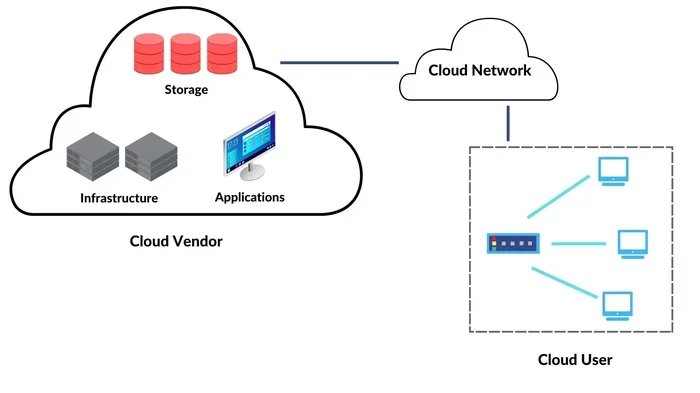
Let us break it down simply. Cloud computing for small business means using the internet to access software, storage, and computing power instead of running everything on your own computers or servers. Think of it like renting electricity instead of building your own power plant. You get what you need, when you need it, and you pay for what you use.
Here are the main types of cloud services you will hear about:
- SaaS (Software as a Service): This is the most common type. It includes tools like Google Workspace, Microsoft 365, and QuickBooks Online. You access them through your browser. No installation needed.
- IaaS (Infrastructure as a Service): This gives you virtual servers and storage. Amazon Web Services and Microsoft Azure are big players here. It is great for businesses that want more control.
- PaaS (Platform as a Service): This helps developers build custom apps without managing the underlying infrastructure. It is more relevant for tech-focused companies.
For most small businesses, SaaS is the sweet spot. It is affordable, easy to use, and gets you up and running fast. You do not need to understand the inner workings of cloud hosting to benefit from it.
Why Cloud Computing for Small Business Is a Game Changer
The shift to cloud computing for small business is not just a trend. It is a fundamental change in how small companies compete. Let us look at the biggest reasons why this technology is so powerful for small teams.
1. Massive Cost Savings
One of the top reasons small business owners love cloud computing for small business is the cost savings. Traditional IT setups require buying servers, paying for maintenance, and hiring technical staff. That adds up fast. With cloud solutions, you pay a monthly subscription. There are no huge upfront costs.
According to recent studies, small businesses save an average of 20-40% on IT costs after moving to the cloud. That money can go toward hiring, marketing, or growing your product line. Cloud cost savings are one of the biggest draws for budget-conscious owners.
Here is a simple comparison:
- Traditional IT Setup: High upfront costs, ongoing maintenance fees, need for IT staff
- Cloud Computing: Low monthly fees, no maintenance hassle, no need for in-house IT experts
When you use cloud services for small business, you also avoid the cost of replacing outdated equipment. The provider handles all upgrades. You always have access to the latest tools.
2. Scalability That Grows With You
Your business is not static. Some months are busy. Others are slow. Scalable cloud solutions let you adjust your usage based on demand. Need more storage during the holiday season? Easy. Fewer users in the off-season? Scale down. You are not locked into a fixed plan.
This flexibility is something traditional IT simply cannot match. With cloud computing for small business, you are never paying for what you do not need. And you never outgrow what you have. The cloud grows with you.
3. Remote Work and Online Collaboration
The pandemic changed how we work. Remote work is now a permanent part of the business landscape. Cloud computing for small business makes remote collaboration seamless. Your team can access files, apps, and customer data from anywhere with an internet connection.
Tools like Slack, Zoom, Google Drive, and Microsoft Teams all run in the cloud. They let your team communicate in real time, share documents, and work on projects together even if everyone is in different locations. Online collaboration has never been easier.
If you have freelancers or part-time workers, the cloud keeps everyone connected. You do not need to be in the same office to get great work done.
4. Strong Cloud Security
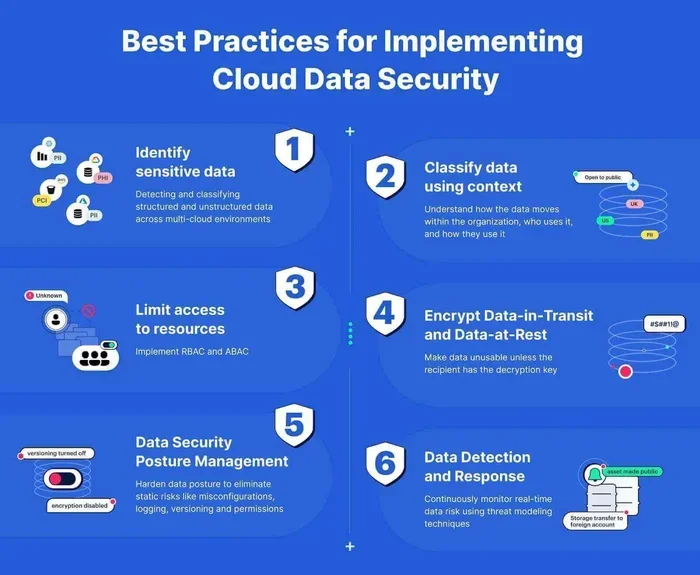
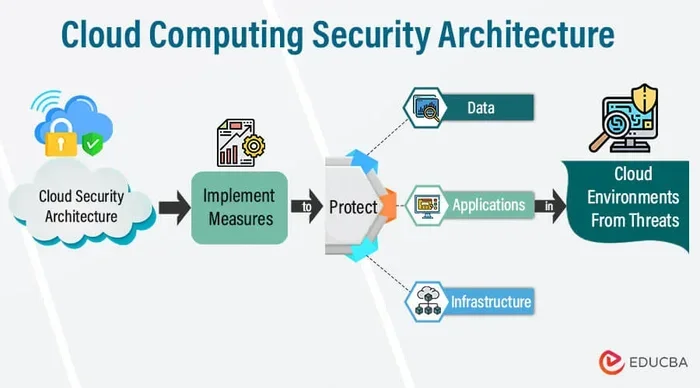
Many small business owners worry about cloud security. They think their data might be safer on their own computers. The truth is the opposite. Major cloud providers invest billions in security measures. They have teams of experts working around the clock to protect your data.
Here is what leading cloud providers offer:
- Encryption for data at rest and in transit
- Multi-factor authentication to prevent unauthorized access
- Regular security updates and patches
- Compliance with industry standards like GDPR and HIPAA
- Automatic cloud backup to prevent data loss
Of course, you still need to play your part. Use strong passwords, enable two-factor authentication, and train your team on basic security practices. But overall, cloud computing for small business gives you security that most small companies could never afford on their own.
5. Business Continuity and Disaster Recovery
What happens if your office floods, your computer crashes, or you get hit by ransomware? Without a backup plan, you could lose everything. Cloud computing for small business solves this problem with built-in disaster recovery.
Your data is stored in secure data centers around the world. Even if your office is completely destroyed, your information is safe and accessible. You can get back up and running in hours, not days or weeks. Business continuity is one of the most overlooked benefits of the cloud.
Small businesses that use cloud backup recover from disasters much faster than those relying on local storage only. This is a huge advantage in uncertain times.
How to Get Started with Cloud Computing for Small Business
Now that you understand the benefits, you might be wondering how to actually make the switch. Cloud migration does not have to be scary. Here is a simple roadmap to follow.
Step 1: Assess Your Current Needs
Start by looking at what you currently use. What software do you rely on every day? Where do you store your files? What causes the most frustration in your workflow? Make a list. This helps you understand what to move to the cloud first.
Talk to your team too. They know where the pain points are. Their input will guide your cloud computing for small business strategy.
Step 2: Choose the Right Cloud Provider
Not all cloud services for small business are created equal. Here are some popular options:
- Google Workspace: Great for email, docs, and collaboration. Affordable and user-friendly.
- Microsoft 365: Ideal if your team already uses Word, Excel, and PowerPoint. Familiar interface.
- Dropbox or OneDrive: Best for simple file storage and sharing.
- QuickBooks Online: Perfect for cloud-based accounting and invoicing.
- Salesforce: Excellent for customer relationship management (CRM).
Pick tools that match your budget and your team’s needs. You do not need to switch everything at once. Start small and expand over time.
Step 3: Train Your Team
The best cloud computing for small business setup will fail if no one knows how to use it. Take the time to train your employees. Most cloud tools have free tutorials and customer support. Make learning part of your onboarding process.
Quick tip: Create a simple one-page guide for each tool your team uses. It saves time and reduces frustration.
Step 4: Monitor and Optimize
After you move to the cloud, keep an eye on your usage. Are you paying for features you do not use? Can you switch to a cheaper plan? Review your cloud computing costs every few months. This keeps your spending lean and efficient.
Common Mistakes to Avoid When Moving to the Cloud
Even though the cloud is powerful, mistakes can happen. Here are pitfalls to watch out for:
- Choosing the cheapest plan without thinking ahead: A low price today might mean limited features tomorrow. Think about growth.
- Skipping security training: The cloud is secure, but human error is not. Teach your team good habits.
- Moving everything at once: A big bang migration can cause confusion. Move in phases instead.
- Ignoring internet requirements: Cloud tools need a reliable connection. Make sure your internet is solid before you switch.
- Not reading the fine print: Understand your provider’s data policies, uptime guarantees, and exit terms.
Avoiding these mistakes makes your cloud migration smoother and your experience much better.
Expert Insights on Cloud Computing for Small Business
Digital transformation is at the heart of modern business. Experts agree that cloud computing for small business is the fastest path to staying competitive. Small businesses that adopt cloud tools early gain an edge over those that wait.
Industry leaders point out that cloud-based software levels the playing field. A 10-person startup can access the same powerful tools as a 500-person company. This is what makes cloud computing for small business truly a game changer. You get enterprise-grade technology at a fraction of the cost.
Another expert insight: the best time to move to the cloud is now. Every day you wait is a day you are not taking advantage of cloud computing benefits. The technology has matured. The costs are low. The tools are user-friendly. There has never been a better time to make the switch.
Key Takeaways
- Cost Efficiency: Cloud computing for small business eliminates expensive hardware and reduces IT spending significantly.
- Scalability: You can easily scale up or down based on your current needs without major disruptions.
- Remote Accessibility: Team members can work from anywhere, boosting flexibility and productivity.
- Enhanced Security: Cloud providers invest heavily in security, giving you protection you could not afford alone.
- Disaster Recovery: Automatic backups ensure your data is safe and your business can recover quickly.
- Easy Adoption: Most cloud tools are intuitive and require minimal training to get started.
- Competitive Edge: Small businesses using the cloud can compete with larger companies on a level playing field.
Conclusion
Cloud computing for small business is no longer optional. It is essential. The benefits are clear: lower costs, better security, easier collaboration, and the ability to scale as you grow. Whether you are just starting out or looking to modernize your existing setup, the cloud has something to offer.
Start small. Pick one or two tools that solve your biggest pain points. Get your team comfortable. Then expand from there. The journey to cloud computing for small business does not have to be overwhelming. Every step you take brings you closer to a more efficient, more resilient, and more competitive business.
The technology is ready. The tools are affordable. The time to act is now. Embrace cloud computing for small business and watch your company thrive in the digital age.
Frequently Asked Questions
Is cloud computing for small business expensive?
Not at all. Most cloud services operate on a subscription model with low monthly fees. You avoid the high costs of buying servers and hiring IT staff. Many tools even have free tiers for small teams getting started.
How secure is cloud computing for small business?
Major cloud providers use bank-level security, including encryption and multi-factor authentication. Their security teams are far larger than what any small business could afford. As long as you follow basic security practices, your data is very safe in the cloud.
Can I migrate my existing data to the cloud easily?
Yes. Most cloud providers offer migration tools and support. You can move your files, emails, and applications gradually. A phased approach reduces risk and helps your team adjust without disruption.
What internet speed do I need for cloud computing for small business?
A stable broadband connection is usually sufficient. You do not need ultra-fast speeds for most cloud tools. If your team relies heavily on video calls, aim for at least 25 Mbps download speed for a smooth experience.
Will my employees need training to use cloud tools?
Most modern cloud applications are designed to be intuitive. Your team will likely pick them up quickly. Offering a brief orientation session and a simple guide goes a long way in making the transition smooth and stress-free.
What happens to my data if the cloud provider shuts down?
Reputable providers have strict data retention policies. You can usually export your data before closing an account. Always read the provider’s terms and keep local backups of critical information as an extra precaution.