Categories of Cloud Computing You Should Understand
Categories of cloud computing shape how businesses store, manage, and access data online. The main types include public cloud, private cloud, hybrid cloud, and multi-cloud environments. Each category offers unique benefits for cloud deployment and cloud infrastructure needs. Understanding these models helps you make smarter technology decisions. This guide breaks down every category in simple, practical terms.
Cloud computing has changed the way we work, store data, and build software. If you have heard the term categories of cloud computing tossed around, you are not alone. Many people find the topic confusing at first. But here is the good news. Once you understand the basics, everything clicks into place.
The categories of cloud computing refer to the different ways cloud services are deployed and delivered. Think of them as different flavors of the same core idea. Each category serves a unique purpose. Some focus on sharing resources with many users. Others prioritize security and control. Knowing these differences helps you pick the right fit for your needs. Whether you are a small business owner or a tech enthusiast, this guide will walk you through it all.
In this article, we will explore every major cloud computing category in detail. You will learn what each type is, who uses it, and why it matters. We will also cover cloud service models, real-world examples, and practical tips. By the end, you will have a clear picture of the cloud landscape. Let us dive right in.
Key Takeaways
- Public cloud is the most popular and affordable option, ideal for startups and small businesses.
- Private cloud offers maximum control and security for sensitive data and regulated industries.
- Hybrid cloud combines public and private environments for flexibility and balance.
- Multi-cloud uses multiple providers to avoid lock-in and optimize costs.
- IaaS, PaaS, and SaaS are the three cloud service models that define your level of control.
- Choosing the right cloud category depends on your budget, security needs, and team expertise.
- Start small and scale up as your understanding and needs grow.
📑 Table of Contents
- Understanding the Categories of Cloud Computing
- Public Cloud — The Most Popular Choice
- Private Cloud — Security-First Computing
- Hybrid Cloud — The Best of Both Worlds
- Multi-Cloud — Managing Multiple Environments
- Cloud Service Models — IaaS, PaaS, and SaaS
- How to Choose the Right Cloud Category
- Conclusion
Understanding the Categories of Cloud Computing
What Exactly Is Cloud Computing?
Before we jump into the categories of cloud computing, let us quickly define cloud computing itself. In simple terms, cloud computing means using remote servers hosted on the internet to store, manage, and process data. You do not need a physical hard drive or a local server. Instead, you access everything through the web. This is the foundation of cloud infrastructure.
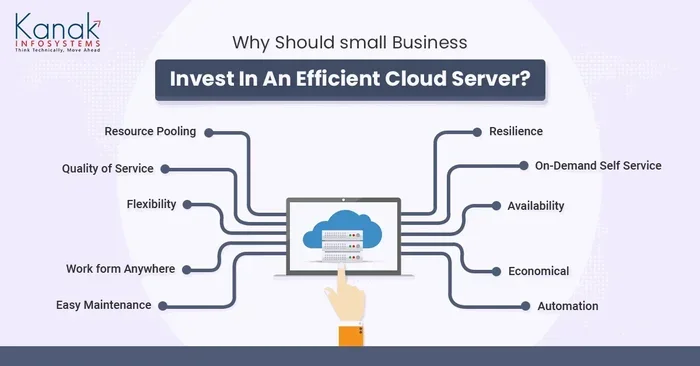
The idea is not new. Companies have used remote servers for decades. But modern cloud computing is faster, cheaper, and more flexible. You can scale up or down in minutes. You pay only for what you use. This cloud scalability is one of the biggest reasons businesses love the cloud. It removes the need for expensive hardware. It also makes cloud hosting accessible to almost anyone.
Why the Categories Matter
Now you might wonder. Why do we need different categories of cloud computing? The answer is simple. Different users have different needs. A startup might want a cheap and flexible solution. A hospital might need strict data control. A global company might want to use multiple providers at once. The cloud deployment models exist to match these varied needs.
Each category comes with its own trade-offs. Some offer more cloud computing benefits like cost savings. Others focus on cloud security and compliance. By understanding the categories, you can avoid costly mistakes. You can also plan your cloud migration more effectively. Let us now look at each category in detail.
Public Cloud — The Most Popular Choice
How Public Cloud Works
The public cloud is the most widely used category of cloud computing. In a public cloud, resources like servers and storage are owned by a third-party provider. These resources are shared among many users, also called tenants. Think of it like a public park. Everyone can use it, and the cost is shared.
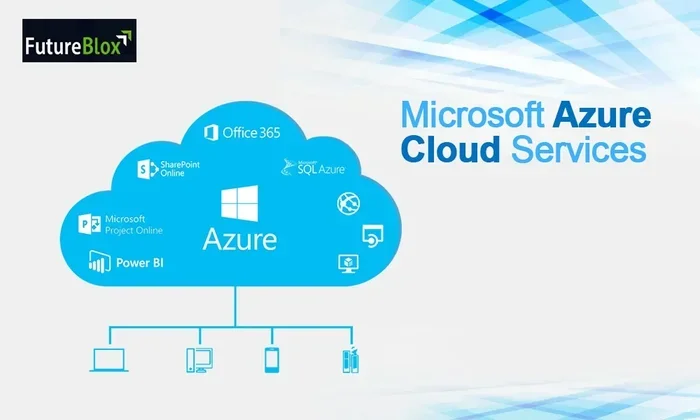
Major public cloud providers include Amazon Web Services, Microsoft Azure, and Google Cloud Platform. These companies build massive data centers around the world. They rent out computing power to individuals and businesses. This model is perfect for cloud computing examples like web hosting, email services, and online storage.
The public cloud offers incredible cloud scalability. You can start small and grow fast. You do not need to invest in physical hardware. This makes it a top choice for startups and small businesses. The cloud computing benefits of the public model are hard to ignore.
Who Uses Public Cloud?
Almost everyone uses the public cloud in some form. Here are common users:
- Startups and small businesses — They need affordable, scalable cloud hosting without big upfront costs.
- Developers — They use public cloud platforms to build and test applications quickly.
- Content creators — They store videos, images, and files on public cloud storage.
- E-commerce stores — They handle traffic spikes using the elastic resources of public cloud.
Quick Tips for Public Cloud Users
Want to get the most out of public cloud? Keep these tips in mind:
- Monitor your usage regularly to avoid surprise bills.
- Use auto-scaling features to handle traffic changes.
- Take advantage of free tiers offered by major providers.
- Set up budget alerts to stay in control of costs.
Private Cloud — Security-First Computing
How Private Cloud Works
The private cloud is a cloud environment dedicated to a single organization. Unlike the public cloud, the resources are not shared with others. This gives businesses more control over their cloud infrastructure and data. A private cloud can be hosted on-premises or by a third-party provider.
Companies that handle sensitive data often prefer the private cloud. Think of banks, government agencies, and healthcare providers. These organizations need strict cloud security measures. The private cloud delivers that level of control. It also helps meet regulatory requirements like HIPAA and GDPR.
When to Choose Private Cloud
Private cloud is not for everyone. Here are situations where it makes sense:
- Your business handles highly sensitive or regulated data.
- You need complete control over your cloud deployment environment.
- You have strict compliance requirements to meet.
- Your workloads require custom hardware or configurations.
The trade-off is cost. Private cloud setups can be expensive. You are essentially building and maintaining your own cloud environment. But for many enterprise cloud users, the benefits outweigh the costs.
Common Mistakes with Private Cloud
Many organizations make avoidable errors when moving to private cloud. One common mistake is underestimating the cost of maintenance. Another is skipping proper cloud migration planning. Some businesses also ignore staff training. Without the right skills, managing a private cloud becomes a headache. Plan carefully and invest in your team.
Hybrid Cloud — The Best of Both Worlds
How Hybrid Cloud Works
The hybrid cloud combines public and private cloud environments. It lets businesses share data and applications between the two. This model offers flexibility and more cloud computing benefits. You get the security of a private cloud and the scalability of a public cloud.
In a hybrid setup, you might keep sensitive data on a private server. At the same time, you use public cloud resources for less sensitive tasks. This balance is what makes the hybrid cloud so powerful. It is one of the most popular categories of cloud computing for medium and large businesses.
Hybrid Cloud Use Cases
Here are real-world examples of hybrid cloud in action:
- Retailers use private cloud for customer data and public cloud for handling holiday traffic spikes.
- Healthcare providers store patient records on private cloud while using public cloud for analytics.
- Financial firms keep trading data secure on private cloud and use public cloud for testing new apps.
Expert Insights on Hybrid Cloud
According to industry experts, hybrid cloud is the fastest-growing cloud deployment model. Many enterprise cloud strategies now include hybrid elements. The key is to find the right balance between public and private resources. A well-planned hybrid setup gives you agility without sacrificing security.
Multi-Cloud — Managing Multiple Environments
Why Go Multi-Cloud?
The multi-cloud approach means using more than one cloud provider at the same time. Instead of relying on a single provider, businesses spread their workloads across AWS, Azure, Google Cloud, and others. This is different from hybrid cloud, which mixes public and private.
Why do companies choose multi-cloud? There are several reasons:
- Avoiding vendor lock-in — You are not stuck with one provider.
- Better redundancy — If one provider goes down, others keep things running.
- Best-of-breed services — You pick the best tools from each provider.
- Cost optimization — You can use the cheapest option for each workload.
Challenges of Multi-Cloud
Multi-cloud is not without its downsides. Managing multiple environments can get complex. You need strong cloud management tools and skilled teams. Cloud migration between providers also requires careful planning. Security becomes harder when data moves across different platforms. But with the right strategy, multi-cloud can be a game-changer.
Quick Tips for Multi-Cloud Management
- Use a centralized management platform to monitor all clouds from one place.
- Standardize your security policies across all providers.
- Document your architecture clearly to avoid confusion.
- Train your team on each cloud provider’s tools and features.
Cloud Service Models — IaaS, PaaS, and SaaS
Beyond deployment models, there are also cloud service models. These describe what level of service you get from a cloud provider. The three main models are IaaS, PaaS, and SaaS. Together, they form the backbone of modern cloud computing services.
Infrastructure as a Service (IaaS)
IaaS provides the most basic level of cloud computing. You get virtual machines, storage, and networking. You manage the operating system, applications, and data. The provider handles the physical hardware. Think of IaaS as renting an empty building. You decide what to put inside it.
Popular IaaS providers include AWS EC2, Microsoft Azure Virtual Machines, and Google Compute Engine. This model is great for businesses that want full control over their cloud infrastructure without buying physical hardware.
Platform as a Service (PaaS)
PaaS goes a step further. It provides a platform for building and deploying applications. You do not need to manage the underlying infrastructure. The provider handles servers, storage, and networking. You just focus on writing code and launching apps.
PaaS is ideal for developers who want to speed up cloud hosting of applications. Examples include Heroku, Google App Engine, and Microsoft Azure App Service. It saves time and lets teams focus on innovation.
Software as a Service (SaaS)
SaaS delivers complete software applications over the internet. You do not need to install or maintain anything. The provider handles everything — infrastructure, platform, and software. You simply log in and use the application.
Common cloud computing examples of SaaS include Gmail, Salesforce, Slack, and Microsoft 365. SaaS is the most consumer-friendly model. It is also the fastest-growing segment of cloud computing services.
Comparison Table: IaaS vs PaaS vs SaaS
| Feature | IaaS | PaaS | SaaS |
|---|---|---|---|
| Control Level | High | Medium | Low |
| Management Responsibility | User manages OS and apps | Provider manages infrastructure | Provider manages everything |
| Best For | IT teams and sysadmins | Developers | End users and businesses |
| Flexibility | Very flexible | Moderately flexible | Least flexible |
| Examples | AWS EC2, Azure VMs | Heroku, Google App Engine | Gmail, Salesforce, Slack |
How to Choose the Right Cloud Category
Factors to Consider
Choosing the right categories of cloud computing depends on your specific situation. Here are key factors to weigh:
- Budget — Public cloud is usually cheapest to start. Private cloud requires more investment.
- Security needs — Sensitive data may require private or hybrid cloud.
- Scalability — Public and hybrid clouds offer the best cloud scalability.
- Compliance — Some industries require private cloud for regulatory reasons.
- Team expertise — Managing private or multi-cloud needs skilled staff.
Making the Decision
Start by assessing your current needs. Think about growth over the next three to five years. If you are a small business just starting out, public cloud or SaaS solutions are great entry points. Larger organizations with strict security needs might lean toward private or hybrid cloud. And companies that want maximum flexibility should explore multi-cloud strategies.
Remember, there is no one-size-fits-all answer. The best cloud deployment model is the one that fits your goals, budget, and team capabilities. Do not be afraid to start small and evolve over time.
Conclusion
The categories of cloud computing give us a clear framework for understanding how cloud services work. From the flexibility of public cloud to the security of private cloud, each category serves a unique purpose. The hybrid cloud and multi-cloud models combine the best features of each. And the cloud service models — IaaS, PaaS, and SaaS — define what level of control you get.
Understanding these categories is essential for anyone navigating today’s technology landscape. Whether you are migrating to the cloud or building a new system, the right choice depends on your needs. Take the time to evaluate your options. The right cloud computing strategy can save you money, boost security, and drive growth. Start exploring your options today and make the cloud work for you.
Frequently Asked Questions
What are the four main categories of cloud computing?
The four main categories of cloud computing are public cloud, private cloud, hybrid cloud, and multi-cloud. Each category serves a different purpose and offers unique benefits for cloud deployment and cloud infrastructure needs.
Which cloud category is best for small businesses?
Most small businesses benefit from public cloud or SaaS solutions. These options are affordable, scalable, and require minimal technical expertise. They let small businesses access powerful cloud hosting without big upfront investments.
Is hybrid cloud more expensive than public cloud?
Hybrid cloud can cost more than public cloud alone because it combines private infrastructure with public resources. However, the added cloud security and control often justify the cost for businesses handling sensitive data or meeting strict compliance requirements.
What is the difference between hybrid cloud and multi-cloud?
A hybrid cloud mixes public and private cloud environments. A multi-cloud uses multiple public cloud providers. Many large organizations use both strategies together to get the best of each approach to cloud computing.
Do I need technical skills to use cloud computing services?
It depends on the model. SaaS products like Gmail require very little technical knowledge. IaaS and PaaS demand more technical skills for setup and management. Choose based on your team’s expertise and your cloud computing goals.
How do I know if I need cloud migration?
If your current setup is costly, inflexible, or hard to scale, cloud migration may be the right move. Look for signs like slow performance, high maintenance costs, or difficulty handling traffic spikes. A well-planned migration to the right cloud category can solve these problems.