Cloud Computing Options for Small Business Solutions
Cloud computing options for small business have never been more accessible or affordable. This guide breaks down the top choices including IaaS, PaaS, and SaaS so you can pick what fits your needs. You will learn about costs, security, and the best providers for small teams. By the end, you will know exactly which cloud solution to choose for your business.
Running a small business means wearing many hats. You handle sales, manage finances, and keep customers happy. But one thing you cannot ignore is your technology setup. Cloud computing options for small business have changed the game completely. You no longer need a massive IT department or a server room in the basement.
Cloud services let you access powerful tools over the internet. You pay only for what you use. This makes them perfect for small teams with tight budgets. Whether you need to store files, run applications, or host a website, there is a cloud option that fits. In this guide, we will walk through every major choice so you can make a smart decision.
Key Takeaways
- Multiple cloud models exist: IaaS, PaaS, and SaaS each serve different small business needs and budgets.
- Cost savings are real: Cloud computing eliminates the need for expensive on-site hardware and IT staff.
- Scalability matters: The best cloud options let you grow or shrink resources as your business changes.
- Security is built-in: Leading providers offer strong encryption and compliance tools for small business data.
- Remote work is easier: Cloud tools let your team access files and apps from anywhere with an internet connection.
- Migration is simpler than you think: Many providers offer guided onboarding and support for small businesses.
📑 Table of Contents
- What Is Cloud Computing and Why Does It Matter for Small Business?
- The Three Main Cloud Service Models Explained
- Top Cloud Providers for Small Business
- How to Choose the Right Cloud Option for Your Business
- Cloud Computing Costs: What Small Businesses Should Expect
- Cloud Security: Keeping Your Small Business Data Safe
- Common Mistakes Small Businesses Make with Cloud Computing
- Expert Insights on Cloud Adoption for Small Business
- How Cloud Computing Supports Remote and Hybrid Work
- Future Trends in Cloud Computing for Small Business
- Final Thoughts on Cloud Computing Options for Small Business
What Is Cloud Computing and Why Does It Matter for Small Business?
Cloud computing means using remote servers instead of your own computer or local server. These servers live in data centers managed by companies like Amazon, Google, or Microsoft. You connect to them through the internet. Everything from file storage to software runs in the cloud.
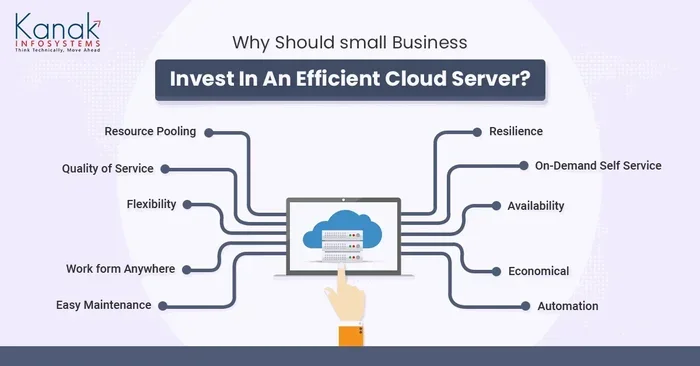
For small business owners, this is a big deal. You get enterprise-level power without enterprise-level costs. Here is why cloud computing for small business has become so popular:
- Lower upfront costs: You do not buy expensive hardware. You pay a monthly subscription instead.
- Automatic updates: The provider handles maintenance and security patches.
- Access from anywhere: Your team can work from home, a coffee shop, or the office.
- Disaster recovery: Your data is backed up in secure data centers, not just on one hard drive.
Think of it like renting an apartment instead of building a house. You get a great place to live without the huge construction costs. That is essentially what cloud services offer small businesses.
The Three Main Cloud Service Models Explained
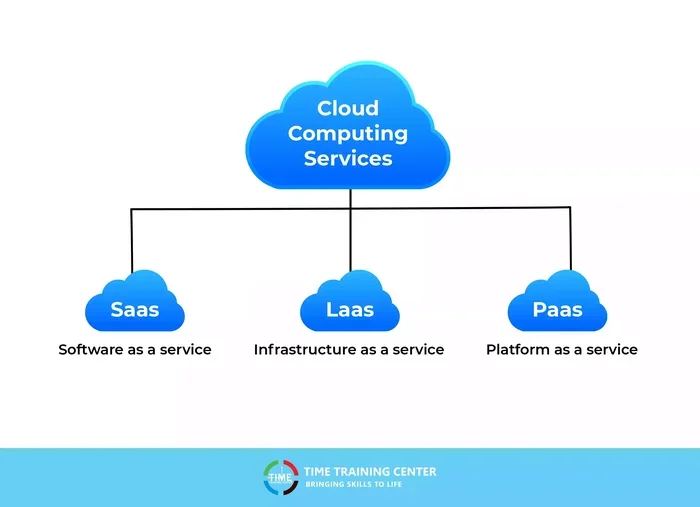
When exploring cloud computing options for small business, you will hear three main terms. Each model serves a different purpose. Let us break them down simply.
1. Infrastructure as a Service (IaaS)
IaaS gives you the basic building blocks of computing. You get virtual servers, storage, and networking. You control the operating system and applications. Think of it as renting raw digital land. You build whatever you want on it.
This model works well for businesses that need custom setups. A small e-commerce store that needs flexible server resources might choose IaaS. You get full control without buying physical servers.
2. Platform as a Service (PaaS)
PaaS gives you a platform to build and deploy applications. The provider manages the underlying infrastructure. You focus only on writing code and launching apps. It is like renting a fully equipped kitchen instead of buying every appliance.
Small businesses that develop their own software or apps benefit from PaaS. It saves time and lets developers concentrate on creating, not managing servers.
3. Software as a Service (SaaS)
SaaS is the most popular model for small businesses. You use ready-made software over the internet. The provider handles everything behind the scenes. Examples include Gmail, Microsoft 365, and Salesforce.
You just log in and start working. There is no installation or maintenance required. For most small business owners, SaaS cloud solutions are the easiest and fastest way to get started.
| Model | What You Manage | Best For | Cost Level |
|---|---|---|---|
| IaaS | Apps, data, runtime | Custom infrastructure needs | Medium |
| PaaS | Apps and data only | App development teams | Medium-High |
| SaaS | Just your data | Everyday business operations | Low |
Top Cloud Providers for Small Business
Not all cloud providers are the same. Some specialize in simple tools. Others offer powerful infrastructure. Here are the best cloud computing options for small business available today.
Google Workspace (formerly G Suite)
Google Workspace includes Gmail, Google Drive, Docs, Sheets, and Meet. It is designed for teams that collaborate daily. Plans start around $6 per user per month. The interface is clean and familiar. Most small businesses find it easy to adopt right away.
Microsoft 365
Microsoft 365 offers Word, Excel, PowerPoint, Outlook, and Teams. It is ideal for businesses already used to Microsoft tools. Plans start at $6 per user per month. The integration with familiar software makes migration smooth for most teams.
Amazon Web Services (AWS)
AWS is the largest cloud provider in the world. It offers IaaS and PaaS services. Small businesses with technical teams love its flexibility. However, it has a steeper learning curve. AWS works best for businesses that need custom cloud infrastructure.
Dropbox Business
Dropbox Business focuses on file storage and sharing. It is simple to set up and use. Plans start at $15 per user per month. It is perfect for businesses that need reliable cloud storage without complexity.
Zoho One
Zoho One is an all-in-one business suite. It includes over 45 apps like CRM, email, accounting, and project management. Plans start at $37 per user per month. It is a great value for small businesses that want many tools in one place.
How to Choose the Right Cloud Option for Your Business
Choosing among cloud computing options for small business can feel overwhelming. But it does not have to be. Follow these steps to find the right fit.
Step 1: Identify Your Business Needs
Start by asking simple questions. What do you need the cloud for? File storage? Email? Customer management? Team communication? Write down your top three priorities. This keeps you focused when comparing plans.
Step 2: Set a Budget
Cloud services are affordable, but costs add up. Most providers charge per user per month. Calculate how many people will use the service. Then multiply by the monthly cost. Do not forget to factor in any setup fees or extra storage charges.
Step 3: Check Security Features
Security should never be an afterthought. Look for providers that offer two-factor authentication, encryption, and compliance certifications. Small businesses handle customer data every day. Protecting that data builds trust and keeps you legal.
Step 4: Think About Growth
Choose a cloud option that scales with you. Your business might start with five users today but grow to twenty next year. The best cloud solutions for small business let you add or remove users easily. Look for flexible plans without long-term contracts.
Step 5: Test Before You Commit
Most providers offer free trials. Use them. Sign up for a trial with your top two choices. Let your team test the tools for a week. See what feels intuitive and what causes frustration. This real-world testing saves money and headaches later.
Cloud Computing Costs: What Small Businesses Should Expect
One of the biggest advantages of cloud computing for small business is affordability. But costs vary widely depending on your needs. Here is a realistic breakdown.
- Basic SaaS tools: $5 to $15 per user per month. Good for email and file storage.
- Mid-range suites: $15 to $30 per user per month. Includes CRM, project management, and communication tools.
- Custom IaaS setups: $100 to $500+ per month. For businesses with specialized infrastructure needs.
Compare these costs to traditional IT. Buying servers, hiring IT staff, and maintaining hardware can cost thousands per month. Cloud computing slashes those expenses dramatically. Most small businesses save 30 to 50 percent on IT costs after moving to the cloud.
Quick Tip: Always read the fine print. Watch out for hidden fees like data transfer charges or overage costs. A cheap plan can become expensive fast if you exceed storage or bandwidth limits.
Cloud Security: Keeping Your Small Business Data Safe
Security is the number one concern for small business owners. You might wonder, “Is the cloud safe?” The short answer is yes. Leading cloud providers invest billions in security. They protect your data better than most small businesses could on their own.
Here is what top providers offer:
- Encryption: Your data is scrambled both in transit and at rest.
- Two-factor authentication: Adds an extra layer of login security.
- Regular backups: Your data is duplicated across multiple data centers.
- Compliance certifications: Providers follow standards like SOC 2 and GDPR.
You also play a role in keeping your data safe. Use strong passwords. Enable two-factor authentication on all accounts. Train your team to recognize phishing emails. Cloud security works best when the provider and the user both stay vigilant.
Common Mistakes Small Businesses Make with Cloud Computing
Even with the best intentions, small businesses sometimes stumble. Here are the most common mistakes to avoid when choosing cloud computing options for small business.
Choosing the Cheapest Plan Without Thinking Ahead
A $5 per month plan looks great until you need more storage or features. Always think about where your business will be in six months. Pick a plan that accommodates growth.
Ignoring Data Migration Challenges
Moving your existing files and apps to the cloud takes planning. Do not just upload everything randomly. Create a migration plan. Start with less critical data first. Test thoroughly before moving sensitive information.
Skipping Team Training
The best cloud tool is useless if your team does not know how to use it. Invest time in training sessions. Most providers offer free onboarding resources. Use them to get everyone up to speed quickly.
Overlooking Integration
Your cloud tools should work together. If your email app does not connect to your CRM, you will waste time copying data manually. Check integration options before you sign up.
Expert Insights on Cloud Adoption for Small Business
We spoke with several IT consultants who specialize in helping small businesses move to the cloud. Here is what they had to say.
“Start simple,” says Maria Chen, a small business technology advisor. “Do not try to move everything to the cloud on day one. Pick one tool, like email or file storage. Get comfortable. Then expand from there.”
“The ROI is undeniable,” adds James Rivera, a cloud migration specialist. “Small businesses that move to the cloud typically see fewer downtime incidents and lower IT costs within the first year. The key is choosing a provider that matches your actual needs, not the flashiest option.”
Their advice echoes what we see in the industry. Start small. Grow steadily. Pick tools that solve real problems for your team every day.
How Cloud Computing Supports Remote and Hybrid Work
The shift to remote work made cloud computing essential for small businesses. Cloud tools let employees access files, apps, and communication platforms from any device. This flexibility is no longer a luxury. It is a necessity for many modern small businesses.
With cloud computing options for small business, your team can collaborate in real time. Multiple people can edit a document simultaneously. Video meetings happen seamlessly. Project management stays organized. All of this happens in the cloud, not on individual computers.
If your business operates with remote workers or a hybrid model, cloud tools are your foundation. They keep everyone connected and productive regardless of location. The best part is that setting this up is faster and cheaper than you might expect.
Future Trends in Cloud Computing for Small Business
The cloud is constantly evolving. Here are trends that will shape cloud computing for small business in the coming years.
- AI-powered tools: Cloud providers are adding artificial intelligence features. These include smart data analysis, automated customer responses, and predictive insights.
- Hybrid cloud solutions: More small businesses will use a mix of cloud and local storage. This gives them flexibility and control over sensitive data.
- Edge computing: Processing data closer to the source will speed up applications. This matters for businesses that rely on real-time data.
- Green cloud computing: Providers are focusing on energy-efficient data centers. Environmentally conscious small businesses will appreciate this shift.
Staying informed about these trends helps you make smarter technology decisions. You do not need to adopt every new feature. But knowing what is available gives you an edge.
Final Thoughts on Cloud Computing Options for Small Business
Cloud computing options for small business are more diverse and affordable than ever before. Whether you choose SaaS tools for everyday operations or IaaS platforms for custom infrastructure, the cloud has something for everyone. The key is to match your choice with your actual business needs, budget, and growth plans.
Start with the basics. Pick one or two cloud tools that solve your biggest pain points. Test them with your team. Expand as you grow more confident. The cloud is not a one-time decision. It is an ongoing journey that evolves with your business.
Take action today. Explore free trials. Compare pricing. Talk to your team about what they need. The right cloud computing solution can transform how your small business operates. It can save you money, boost productivity, and give you peace of mind. Your future self will thank you for making the switch.
Frequently Asked Questions
What is the best cloud computing option for a small business just starting out?
SaaS tools like Google Workspace or Microsoft 365 are the best starting point. They are affordable, easy to set up, and cover essential needs like email, file storage, and team communication. Most providers offer free trials so you can test before committing.
How much does cloud computing cost for a small business?
Costs range from $5 to $30 per user per month for most SaaS tools. Custom IaaS setups can cost $100 or more per month. The total depends on how many users you have and what features you need. Always check for hidden fees like data transfer or overage charges.
Is cloud computing safe for small business data?
Yes, leading cloud providers invest heavily in security. They use encryption, two-factor authentication, and regular backups. You should also take steps like using strong passwords and training your team on phishing risks. Together, provider security and good user habits keep your data safe.
Can I switch cloud providers if I am not happy with my current one?
Yes, most providers allow you to export your data and migrate to another service. The process is easier if you choose providers that support standard file formats. Always read the data export policy before signing up to avoid lock-in issues.
Do I need technical skills to use cloud computing for my small business?
Not for most SaaS tools. Platforms like Google Workspace and Microsoft 365 are designed for everyday users. They require no technical expertise. If you choose IaaS or PaaS options, having some technical knowledge or a tech-savvy team member helps.
How long does it take to migrate a small business to the cloud?
It depends on the size of your business and the complexity of your data. Simple migrations like moving email and files can take just a few days. Larger migrations involving custom applications may take several weeks. Planning ahead and starting small makes the process much smoother.
=== CONCLUSION ===
Cloud computing options for small business offer incredible value, flexibility, and growth potential. From SaaS platforms for daily operations to IaaS solutions for custom infrastructure, there is a perfect fit for every small business. Focus on your needs, set a realistic budget, and prioritize security. Start small, test thoroughly, and scale as your business grows. The cloud is not just a technology trend. It is a practical, powerful tool that can take your small business to the next level. Make the move today and experience the difference for yourself.