Learn Cloud Computing for Beginners and Get Started
Learning cloud computing for beginners is easier than you think. This guide breaks down cloud basics, key platforms like AWS and Azure, and simple steps to get started. You will learn what cloud services are, how they work, and why they matter in today’s tech world. Whether you want a new career or just need cloud skills, this article gives you a clear path forward.
Have you ever wondered how companies like Netflix, Spotify, or Airbnb store and serve millions of files every day? The answer is simple: cloud computing. These companies do not rely on big, clunky servers sitting in their offices. Instead, they use remote servers hosted on the internet. This is what cloud computing is all about. And the best part? You can learn it too, even if you have zero experience.
If you have been searching for a way to learn cloud computing for beginners, you are in the right place. This guide is written for real people who want real answers. No confusing jargon. No overwhelming tech talk. Just clear, practical steps to help you understand the cloud and start your journey with confidence.
Key Takeaways
- Cloud computing basics are simple: It means using remote servers instead of your own computer to store, manage, and process data.
- Three main cloud service models exist: IaaS, PaaS, and SaaS each serve different needs and skill levels.
- AWS, Azure, and Google Cloud are the top platforms: Each offers free tiers perfect for beginners to practice safely.
- You do not need a tech degree: Anyone can learn cloud computing with free courses, hands-on practice, and patience.
- Cloud careers pay well: Roles like cloud engineer and cloud architect are in high demand across industries.
- Start small and build up: Focus on one platform first, get hands-on experience, then expand your skills gradually.
📑 Table of Contents
- What Is Cloud Computing? A Simple Explanation
- The Three Main Types of Cloud Services
- Top Cloud Platforms for Beginners
- How to Start Learning Cloud Computing Today
- Cloud Computing Careers and Opportunities
- Common Mistakes Beginners Make (and How to Avoid Them)
- Quick Tips for Faster Learning
- Final Thoughts: Your Cloud Journey Starts Now
What Is Cloud Computing? A Simple Explanation
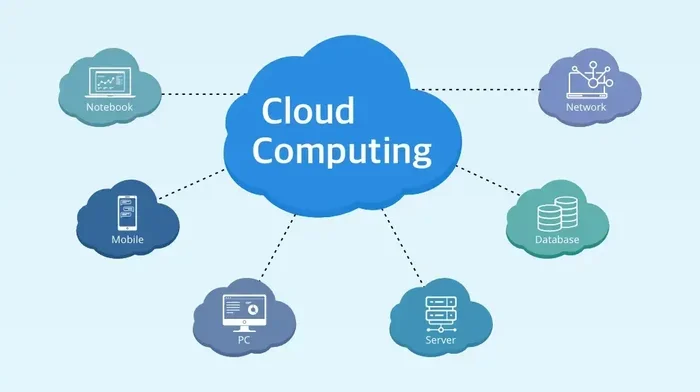
Let us start with the basics. Cloud computing explained is actually quite straightforward. Instead of buying and maintaining your own physical computers and servers, you rent computing power over the internet. Think of it like renting an apartment instead of building a house. You get what you need, when you need it, and you pay only for what you use.
Here are some simple ways cloud computing shows up in everyday life:
- Google Drive or Dropbox — these are cloud storage services where your files live online, not on your laptop.
- Netflix — it streams movies from cloud servers, not from a DVD or a local hard drive.
- Gmail — your emails are stored in the cloud, so you can access them from any device, anywhere.
- Spotify — music streaming runs entirely on cloud infrastructure.
These examples show how deeply cloud technology is woven into our daily routines. The cloud technology behind these services handles massive amounts of data and millions of users at the same time. And companies of all sizes now rely on it to run their businesses smoothly.
Why Should You Care About the Cloud?
The cloud is not just for big tech companies anymore. Small businesses, startups, hospitals, schools, and even government agencies use cloud services. Here is why the cloud matters so much today:
- Cost savings: You do not need to buy expensive hardware. Cloud cloud hosting lets you scale up or down based on your needs.
- Flexibility: Access your work from any device with an internet connection.
- Reliability: Cloud providers offer backup and recovery options that most businesses could never afford on their own.
- Speed: Deploy new apps and services in minutes instead of weeks.
Understanding these benefits gives you a strong foundation. It also helps you see why cloud computing skills are so valuable in today’s job market.
The Three Main Types of Cloud Services
When you start exploring the cloud, you will hear three important terms: IaaS, PaaS, and SaaS. These are the three main cloud service models. Let us break each one down in plain language.
IaaS — Infrastructure as a Service
IaaS gives you the raw building blocks. Think of it as renting a blank plot of land. You get virtual machines, storage, and networking. You are responsible for installing the operating system, applications, and everything else. It offers the most control but requires more technical knowledge.
Popular IaaS providers include Amazon Web Services (AWS), Microsoft Azure, and Google Cloud Platform. Many companies use IaaS to run their own custom applications without buying physical servers.
PaaS — Platform as a Service
PaaS is like renting a fully built house. The provider gives you the infrastructure plus the tools and frameworks you need to build applications. You focus on writing code and building your app. You do not worry about managing servers or operating systems.
PaaS is great for developers who want to move fast. It removes the hassle of managing the underlying infrastructure. Popular PaaS examples include Heroku and Google App Engine.
SaaS — Software as a Service
SaaS is the most consumer-friendly model. You use a fully finished application running in the cloud. You do not manage anything behind the scenes. You just log in and use it.
Examples of SaaS are everywhere:
- Microsoft 365 — word processing, spreadsheets, and presentations in the cloud.
- Salesforce — a customer relationship management tool used by thousands of businesses.
- Zoom — video conferencing powered by cloud infrastructure.
Understanding these three models helps you see the big picture of how cloud services work. It also prepares you for cloud computing certification exams and real-world job roles.
Top Cloud Platforms for Beginners
Not all cloud platforms are the same. Each one has its own strengths, pricing, and learning curve. Here is a closer look at the three biggest players in the cloud computing market.
| Platform | Owner | Best For | Free Tier Available |
|---|---|---|---|
| AWS | Amazon | Wide range of services, most popular overall | Yes, 12 months free |
| Microsoft Azure | Microsoft | Enterprise users, Microsoft ecosystem | Yes, generous free credits |
| Google Cloud | Data analytics, machine learning | Yes, always-free tier |
As a beginner, you do not need to learn all three at once. Pick one and go deep. AWS is the most widely used platform, so it is a safe bet for your first choice. Azure is a great option if you already use Microsoft products. Google Cloud shines in data analytics and machine learning.
All three platforms offer free tier options. This means you can practice without spending a dime. That is a huge advantage for anyone just starting out.
How to Choose Your First Platform
Here are a few tips to help you decide:
- Check job listings in your area or on remote job boards. See which platform appears most often.
- Consider your background. If you know Windows well, Azure might feel natural. If you prefer open-source tools, AWS or Google Cloud could be a better fit.
- Start with the free tier. Sign up for a free account on one platform and explore the dashboard.
Remember, the goal is to get hands-on experience. The platform you choose matters less than the fact that you start learning.
How to Start Learning Cloud Computing Today
Now that you understand the basics, let us talk about action steps. How do you actually learn cloud computing for beginners in a practical way?
Step 1: Learn the Fundamentals
Before diving into a specific platform, build a solid understanding of core concepts. You should know what cloud architecture means, how virtualization works, and the basics of cloud deployment. Many beginners skip this step and jump straight into hands-on labs. That can feel overwhelming. Take it slow and build your knowledge layer by layer.
Great resources for fundamentals include:
- Google Cloud Skills Boost — offers free introductory courses.
- AWS Cloud Practitioner Essentials — a beginner-friendly course on AWS basics.
- Microsoft Learn — free learning paths for Azure fundamentals.
Step 2: Get Hands-On Practice
Reading about the cloud is helpful. But you will truly understand it when you start doing things yourself. Create a free account on AWS, Azure, or Google Cloud. Try launching a virtual machine. Set up a simple storage bucket. Deploy a basic website.
Hands-on practice builds muscle memory. It also helps you understand billing, security settings, and how different services connect with each other.
Step 3: Earn a Beginner Certification
Certifications are not just for experts. Many platforms offer entry-level certifications designed for newcomers. These credentials look great on your resume and prove to employers that you have real skills.
Consider these beginner-friendly certifications:
- AWS Cloud Practitioner — the easiest AWS certification, perfect for newcomers.
- Microsoft AZ-900 — covers Azure fundamentals in a beginner-friendly way.
- Google Cloud Digital Leader — a general cloud fundamentals certification.
Each of these exams tests your understanding of basic cloud concepts. They do not require deep technical expertise. With a few weeks of focused study, most beginners can pass one of these exams.
Step 4: Build a Project
Nothing beats a real project when it comes to learning. Pick a simple idea and build it in the cloud. For example, you could create a personal website hosted on AWS S3, or build a to-do list app using Azure App Service. Projects give you something tangible to show potential employers or clients.
Cloud Computing Careers and Opportunities
One of the biggest reasons people want to learn cloud computing for beginners is career growth. The demand for cloud professionals is soaring. Companies across every industry need people who understand the cloud.
Here are some popular cloud computing careers for beginners:
- Cloud Support Associate — helps customers troubleshoot cloud issues. A great entry-level role.
- Cloud Engineer — designs, manages, and optimizes cloud infrastructure.
- Cloud Administrator — oversees day-to-day cloud operations and user access.
- DevOps Engineer — bridges the gap between development and operations using cloud tools.
- Cloud Architect — designs large-scale cloud solutions (this usually requires more experience).
Salaries in cloud roles tend to be competitive. Even entry-level positions often pay more than traditional IT roles. And as you gain experience, your earning potential grows significantly.
Skills Employers Look For
Beyond technical knowledge, employers value certain soft skills in cloud professionals:
- Problem-solving: You will face unexpected issues. The ability to troubleshoot is key.
- Communication: You need to explain technical concepts to non-technical team members.
- Continuous learning: The cloud evolves fast. Staying curious and keeping up with updates is essential.
Focus on building both technical and soft skills. This combination sets you apart from other candidates.
Common Mistakes Beginners Make (and How to Avoid Them)
Everyone makes mistakes when starting something new. The good news is that you can avoid many of the common pitfalls that trip up beginners in cloud computing.
Mistake 1: Trying to Learn Everything at Once
The cloud is vast. There are hundreds of services, tools, and configurations. If you try to learn them all at once, you will burn out fast. Instead, focus on core concepts first. Master one platform. Then slowly expand your knowledge.
Mistake 2: Ignoring Billing and Costs
Most cloud platforms offer free tiers, but it is easy to accidentally incur charges. Always set up billing alerts. Monitor your usage regularly. Treat your free tier like a budget and stay within it.
Mistake 3: Skipping Hands-On Practice
Watching video tutorials is helpful. But without hands-on practice, you will not truly understand how the cloud works. Spend at least as much time doing as you do watching or reading.
Mistake 4: Not Using Official Documentation
Every cloud provider has excellent official documentation. Many beginners ignore it and rely only on third-party tutorials. The official docs are accurate, up-to-date, and free. Make them your best friend.
Quick Tips for Faster Learning
Want to speed up your learning journey? Here are some practical tips that work:
- Set a daily goal. Even 30 minutes of focused learning each day adds up fast.
- Join a community. Reddit, Discord, and LinkedIn groups for cloud learners offer support and motivation.
- Use flashcards. Tools like Anki help you memorize key cloud terms and concepts.
- Teach what you learn. Explaining a concept to someone else is one of the best ways to understand it deeply.
- Stay curious. Explore new services and features regularly. The cloud landscape changes constantly.
These simple habits make a big difference over time. Consistency beats intensity every single time.
Final Thoughts: Your Cloud Journey Starts Now
Learning cloud computing for beginners does not have to be intimidating. You now know the basics of what the cloud is, the three main service models, the top platforms, and practical steps to get started. You also understand the career opportunities and common pitfalls to avoid.
The most important step is the first one. Sign up for a free account. Watch one beginner tutorial. Try one small hands-on exercise. That is all it takes to start. From there, your knowledge will grow naturally with practice and curiosity.
The cloud is shaping the future of technology. By learning it today, you are investing in your future. Whether you want a new career, a promotion, or just to understand the technology around you better, cloud computing gives you the tools to succeed. Start your journey now and see where it takes you.
Frequently Asked Questions
Do I need a computer science degree to learn cloud computing?
Absolutely not. Many successful cloud professionals come from non-tech backgrounds. All you need is curiosity, a willingness to learn, and consistent practice. Free online courses make it easy for anyone to get started.
How long does it take to learn cloud computing as a beginner?
It depends on your pace and goals. Most beginners can grasp the fundamentals in 4 to 8 weeks of regular study. Earning a beginner certification like AWS Cloud Practitioner typically takes 1 to 2 months of preparation.
Is cloud computing hard to learn?
The basics are quite accessible. Cloud platforms are designed to be user-friendly. You do not need to be a programmer to start. However, advanced topics like cloud security and architecture do require deeper study over time.
Which cloud platform should I learn first?
AWS is the most popular and has the largest community, making it a great first choice. Azure is a strong alternative if you are already familiar with Microsoft products. Pick one and stick with it until you feel confident.
Can I learn cloud computing for free?
Yes! All three major platforms offer free tiers and free courses. AWS, Azure, and Google Cloud all have free learning resources. You can learn a lot without spending any money at all.
What jobs can I get after learning cloud computing?
Entry-level roles include cloud support associate, cloud administrator, and junior cloud engineer. With more experience, you can move into cloud architect, DevOps engineer, or cloud security specialist positions. The options are growing every year.