Hybrid Cloud Computing for Small Business Made Simple
Hybrid cloud computing for small business combines the best of both worlds — private on-premises systems and public cloud services. It gives small business owners flexibility, cost savings, and strong data security without the complexity of full cloud migration. This guide breaks down everything you need to know in plain, simple terms.
Running a small business means wearing a lot of hats. You handle sales, manage your team, keep the books in order, and now you need to think about technology too. Hybrid cloud computing for small business has become one of the smartest ways to handle your IT needs. It gives you the power of the cloud without forcing you to give up control over your most important data.
If you have been hearing the term everywhere and wondering what it actually means, you are in the right place. This guide walks you through everything step by step. We will cover what hybrid cloud is, why it matters for small businesses, how to pick the right setup, and the mistakes you should avoid. By the end, you will have a clear picture of whether hybrid cloud computing for small business is the right move for you.
Key Takeaways
- Hybrid cloud gives small businesses the best of both worlds by combining private and public cloud resources.
- Cost savings are real — you only pay for the cloud resources you actually use.
- Data security improves when sensitive info stays on-premises while less critical data lives in the public cloud.
- Scalability becomes easy — scale up during busy seasons and scale back when things slow down.
- Business continuity gets stronger with built-in backup and disaster recovery options.
- Start small and grow your hybrid strategy — you do not need to migrate everything at once.
📑 Table of Contents
- What Is Hybrid Cloud Computing?
- Why Hybrid Cloud Computing for Small Business Is Essential
- Hybrid Cloud vs. Public Cloud vs. Private Cloud
- How to Choose the Right Hybrid Cloud Setup for Your Business
- Common Mistakes Small Businesses Make with Hybrid Cloud
- Expert Tips for a Smooth Hybrid Cloud Transition
What Is Hybrid Cloud Computing?
Think of hybrid cloud computing as a blend of two different worlds. On one side, you have your own computers and servers sitting in your office — this is called on-premises infrastructure. On the other side, you have public cloud services provided by companies like Amazon Web Services, Microsoft Azure, or Google Cloud.
In a hybrid cloud setup, these two environments work together. Your sensitive data and critical applications stay on your own servers. Meanwhile, less sensitive tasks and extra computing power come from the public cloud when you need them. This combination gives you flexibility and control that you cannot get from either world alone.
Here is a simple way to think about it. Imagine you have a kitchen at home where you cook your most important meals. But when you are hosting a big party, you also rent extra kitchen space nearby. You keep your core cooking at home, but you scale up when the demand grows. That is basically how hybrid cloud computing works for your business.
Key Parts of a Hybrid Cloud Setup
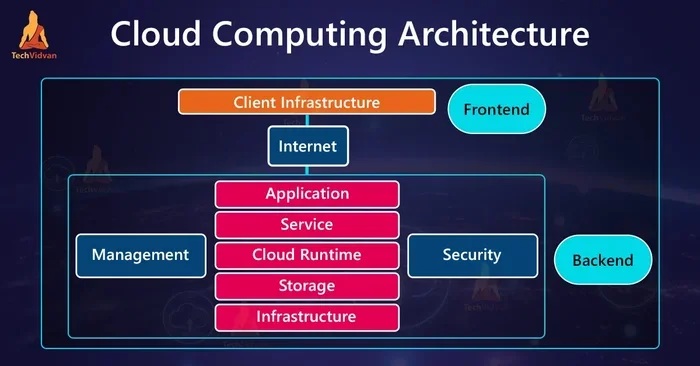
A hybrid cloud environment has three main pieces:
- Private cloud or on-premises servers — These are your own physical servers or a private cloud you control. They hold sensitive data and core business applications.
- Public cloud services — These are shared resources from cloud providers. You use them for extra storage, computing power, or backup.
- Connection and integration tools — These are the software and networks that link your private and public environments together seamlessly.
When all three parts work well together, you get a smooth hybrid IT setup that adapts to your business needs. You are not locked into one approach, and you can shift workloads between environments as things change.
Why Hybrid Cloud Computing for Small Business Is Essential
You might wonder why a small business even needs cloud computing in the first place. The truth is, the digital landscape has changed a lot. Small businesses today face the same data challenges as big companies, but they usually have smaller budgets and fewer IT staff. Hybrid cloud computing for small business bridges that gap beautifully.
Here are the biggest reasons small businesses are making the shift:
- Cost savings — You do not need to buy expensive servers for every possible scenario. You use your own hardware for daily needs and rent extra cloud power only when you need it. This cost-effective cloud approach keeps your spending in check.
- Scalability — Busy seasons happen. Whether it is holiday shopping or tax time, you can quickly scale up your cloud resources and scale back when things calm down. No need to over-provision hardware.
- Data security — Keeping sensitive customer data and financial records on your own servers gives you more control. At the same time, the public cloud handles less sensitive tasks with strong cloud security measures.
- Business continuity — If something goes wrong with your on-premises systems, your data is backed up in the cloud. This means less downtime and faster recovery, which is critical for small businesses that cannot afford long outages.
- Competitive edge — Small businesses that use hybrid cloud solutions can offer faster services and better customer experiences. This helps you compete with larger companies that have bigger IT budgets.
The bottom line is that hybrid cloud adoption levels the playing field. You get enterprise-grade capabilities without the enterprise-grade price tag.
Real-World Example: A Small Retailer’s Hybrid Setup
Let us say you run a small online clothing store. Your point-of-sale system and customer payment data live on your own secure servers. But during the holiday rush, your website traffic triples. Instead of crashing or buying new servers, your hybrid cloud strategy automatically shifts extra website traffic to the public cloud. Once the holidays are over, things scale back down. You saved money, kept your data safe, and your customers never noticed any slowdown.
Hybrid Cloud vs. Public Cloud vs. Private Cloud
Not sure how hybrid cloud compares to other options? You are not alone. Many small business owners confuse these terms. Let us break it down clearly.
| Feature | Public Cloud | Private Cloud | Hybrid Cloud |
|---|---|---|---|
| Where data lives | Third-party data centers | Your own servers or dedicated facilities | Both on-premises and public cloud |
| Cost structure | Pay-as-you-go, low upfront cost | High upfront cost, lower long-term cost | Balanced — mix of both |
| Control level | Limited — provider manages infrastructure | Full control over everything | High control over sensitive data |
| Scalability | Very high — nearly unlimited | Limited by your hardware | High — scale public side as needed |
| Security | Good, but shared responsibility | Best — you control everything | Very good — sensitive data stays private |
| Best for | Startups and variable workloads | Regulated industries with strict rules | Businesses needing both control and flexibility |
As you can see, hybrid cloud computing offers a middle ground. You get the scalability and low upfront cost of the public cloud, combined with the security and control of keeping key data on-premises.
When to Choose Each Option
Public cloud works well for startups that need to keep costs low and do not have sensitive data to protect. Private cloud makes sense for businesses in regulated industries like healthcare or finance that must follow strict data rules. Hybrid cloud is ideal for growing small businesses that want the best of both worlds — cost savings and strong security.
How to Choose the Right Hybrid Cloud Setup for Your Business
Not every hybrid cloud strategy looks the same. Your setup should match your business needs, budget, and technical skills. Here is a practical guide to help you decide.
Step 1: Identify Your Critical Workloads
Start by listing your most important business applications and data. What absolutely needs to stay on your own servers? Your customer database, financial records, and proprietary business plans are good examples. These are your on-premises workloads.
Next, list the tasks that can safely run in the public cloud. Email hosting, website hosting, and backup storage often fall into this category. This workload management approach helps you decide what goes where.
Step 2: Evaluate Your Internet Connection
Hybrid cloud computing relies on a solid internet connection to link your private and public environments. If your business has a slow or unreliable internet connection, you may run into performance issues. Consider upgrading your internet plan or adding a backup connection before moving forward.
Step 3: Set a Realistic Budget
One of the biggest advantages of hybrid cloud solutions is cost savings. But you still need a plan. Factor in the cost of your on-premises hardware, cloud service subscriptions, and any cloud migration services you might need. A clear budget prevents surprise expenses later.
Step 4: Pick the Right Cloud Provider
Look for providers that offer strong hybrid cloud support. Microsoft Azure and Amazon Web Services both have tools designed to connect private and public environments. Choose a provider that fits your budget and offers good support for small businesses.
Quick Tips for Choosing Your Setup
- Start with a pilot project — move just one or two workloads to the cloud first.
- Ask your cloud provider about small business pricing plans and discounts.
- Make sure your team has basic cloud management skills or plan for training.
- Document your hybrid strategy so everyone on your team understands the plan.
Common Mistakes Small Businesses Make with Hybrid Cloud
Even with the best intentions, small businesses can stumble when adopting hybrid cloud computing. Here are the most common mistakes and how to avoid them.
Mistake 1: Trying to Migrate Everything at Once
The biggest mistake is attempting a full cloud migration overnight. This approach overwhelms your team and increases the risk of data loss or downtime. Instead, take a phased approach. Move one workload at a time, test it thoroughly, and then move on to the next. A gradual hybrid IT transition is much safer and more manageable.
Mistake 2: Ignoring Data Security in the Public Cloud
Just because data is in the public cloud does not mean it is automatically secure. You still need to encrypt sensitive information and set proper access controls. Many small businesses assume the cloud provider handles everything, but cloud security is a shared responsibility. Take an active role in protecting your data.
Mistake 3: Underestimating Bandwidth Needs
When your on-premises systems and public cloud need to communicate constantly, you need enough bandwidth to handle the traffic. Underestimating this can lead to slow performance and frustrated employees. Monitor your usage and upgrade your internet plan as needed.
Mistake 4: Not Training Your Team
A hybrid cloud setup requires different skills than a traditional on-premises setup. If your team does not understand how to manage both environments, you will run into problems. Invest in training or hire a part-time IT management consultant to help your team get up to speed.
Expert Tips for a Smooth Hybrid Cloud Transition
Making the shift to hybrid cloud computing for small business does not have to be stressful. Here are expert-backed tips to make your transition smoother and more successful.
Tip 1: Focus on Business Continuity First
Before you move anything to the cloud, make sure you have a solid business continuity plan. This means having backups, disaster recovery procedures, and clear steps for what to do if something goes wrong. A strong foundation in business continuity makes the rest of the transition much easier.
Tip 2: Use Automation Tools
Managing two environments can feel like a lot of work. But modern cloud services offer automation tools that handle routine tasks for you. These tools can automatically move workloads between your private and public environments based on demand. This saves time and reduces the chance of human error.
Tip 3: Monitor Your Costs Regularly
One of the perks of hybrid cloud is cost savings, but only if you keep an eye on spending. Set up cost monitoring tools to track your cloud usage. Review your bills monthly and look for ways to optimize. Small adjustments can lead to significant cost savings over time.
Tip 4: Build a Relationship with Your Cloud Provider
Your cloud provider is more than just a service. They are a partner in your cloud adoption journey. Make sure you understand their support options, escalation procedures, and any small business programs they offer. A good relationship with your provider can make a huge difference when issues come up.
Tip 5: Plan for Growth
Your hybrid strategy should grow with your business. Choose solutions that can scale as your needs change. Think about where your business will be in two or three years and pick a setup that can handle that growth without requiring a complete overhaul.
Hybrid cloud computing for small business is not just a trend — it is a practical, powerful approach that helps small businesses thrive in the digital age. By combining the control of on-premises systems with the flexibility of the public cloud, you get a setup that is secure, cost-effective, and built to grow.
Start small, learn as you go, and remember that your hybrid cloud journey does not need to be perfect on day one. The most important step is the first one. Evaluate your needs, pick a strategy that fits your business, and take the leap. Your future self — and your bottom line — will thank you.
Frequently Asked Questions
What is hybrid cloud computing for small business in simple terms?
Hybrid cloud computing for small business is a setup that combines your own private servers with public cloud services from providers like AWS or Microsoft Azure. It lets you keep sensitive data on your own equipment while using the cloud for extra power and storage when you need it.
Is hybrid cloud expensive for small businesses?
Not necessarily. One of the biggest benefits of hybrid cloud solutions is cost savings. You use your existing hardware for everyday tasks and only pay for public cloud resources when you need extra capacity. This pay-as-you-go model keeps costs manageable for small business budgets.
How long does cloud migration take for a small business?
The timeline varies depending on your current setup and how much data you need to move. Most small businesses complete a phased cloud migration over three to six months. Starting with a pilot project and moving one workload at a time keeps the process smooth and manageable.
What kind of small businesses benefit most from hybrid cloud?
Growing businesses that handle both sensitive and non-sensitive data benefit the most. Retailers, healthcare practices, accounting firms, and e-commerce stores often see great results. Any small business that needs scalability, strong data security, and cost-effective cloud options is a good fit.
Do I need an IT team to manage a hybrid cloud setup?
You do not need a large IT department, but you should have at least one person with basic IT management skills. Many small businesses also hire part-time consultants or use managed service providers to handle their hybrid IT environment. The key is having someone who understands both your private and public cloud setups.
How does hybrid cloud improve business continuity?
Hybrid cloud improves business continuity by backing up your critical data in the public cloud. If your on-premises systems go down due to hardware failure or a disaster, you can quickly switch to cloud-based backup systems. This minimizes downtime and keeps your business running even during unexpected events.
=== END ===