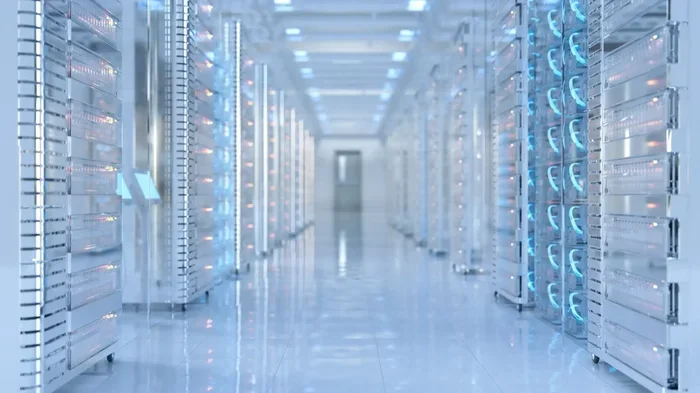
Understanding Data Center Technology in Cloud Computing
Data center technology in cloud computing is the backbone of every cloud service you use daily. It covers the hardware, software, and systems that store, process, and deliver data worldwide. Understanding this technology helps businesses choose better cloud solutions and improve performance. This guide breaks down everything from architecture to security in simple terms.
Every time you stream a video, open a web app, or save a file online, data center technology in cloud computing is working behind the scenes. It is the invisible engine that makes the modern internet run. Without it, services like Netflix, Google Drive, and Zoom would simply not exist.
But what exactly does this technology involve? And why should you care about it? Whether you are a business owner exploring cloud migration or a curious learner, understanding how data centers power the cloud gives you a real advantage. This article walks you through everything you need to know in a clear and practical way.
We will cover the core components, different types of facilities, cooling systems, security measures, and future trends. By the end, you will have a solid grasp of how data center technology in cloud computing shapes the digital world we live in every single day.
Key Takeaways
- Core Foundation: Data center technology in cloud computing provides the physical and virtual infrastructure that makes all cloud services possible.
- Multiple Types: From hyperscale facilities to edge data centers, each type serves different cloud computing needs and workloads.
- Cooling Matters: Efficient cooling systems and green energy practices are critical to modern data center operations.
- Security Is Non-Negotiable: Physical and digital security measures protect sensitive data stored in cloud data centers.
- Future Trends: AI-driven optimization, liquid cooling, and edge computing are shaping the next generation of data center technology.
📑 Table of Contents
- What Is Data Center Technology in Cloud Computing?
- How Data Centers Power the Cloud
- Key Components of Modern Data Center Architecture
- Types of Data Centers for Cloud Computing
- The Role of Cooling and Energy Efficiency
- Security and Reliability in Cloud Data Centers
- Future Trends in Data Center Technology
- Conclusion
What Is Data Center Technology in Cloud Computing?
Let us start with the basics. A data center is a facility that houses computing equipment, storage systems, and networking devices. Its main job is to process, store, and distribute data reliably and securely. In the context of cloud computing, these facilities serve as the physical foundation for all cloud-based services.
When you use cloud computing services, you are not actually storing your data on a cloud. That term is just a metaphor. Your data lives on physical servers inside massive data centers around the world. These centers connect to the internet and deliver your information whenever you need it.
Cloud infrastructure depends heavily on data center technology. The servers, switches, routers, and cooling systems inside these facilities work together to keep everything running smoothly. Think of a data center as a giant, highly organized warehouse for digital information.
Understanding this technology also means understanding server virtualization. Instead of running one operating system per physical server, virtualization allows multiple virtual servers to run on a single machine. This dramatically improves efficiency and reduces costs for cloud providers.
Why It Matters for Everyday Users
You might wonder why this matters to you as an everyday user. The answer is simple: every email you send, every photo you upload, and every video call you make relies on cloud data centers. The speed, reliability, and security of these facilities directly affect your online experience.
When a service feels slow or goes down, it is often a data center issue. So the better the technology behind these facilities, the smoother your digital life becomes. This is why companies invest billions of dollars into improving their data center architecture every year.
How Data Centers Power the Cloud
Now that we understand what data centers are, let us look at how they actually power the cloud. The process involves several layers of technology working together seamlessly. Each layer plays a vital role in delivering the services you use every day.
The first layer is the physical hardware. This includes servers, storage drives, and networking equipment. These machines are organized in server racks inside large facilities. Modern racks can hold dozens of servers stacked vertically, creating a dense computing environment.
The second layer is the software that manages all this hardware. Software-defined networking and containerization technologies allow data center operators to allocate resources dynamically. This means they can quickly scale up or down based on demand.
The third layer is the network that connects everything. High-speed fiber optic cables link data centers to each other and to users around the world. Load balancing distributes traffic evenly across servers to prevent any single machine from becoming overwhelmed.
The Role of Virtualization
Server virtualization deserves a closer look because it is the backbone of modern cloud computing. Without virtualization, every application would need its own dedicated physical server. That would be incredibly wasteful and expensive.
Virtualization uses a hypervisor to divide a single physical server into multiple virtual machines. Each virtual machine runs its own operating system and applications independently. This allows cloud providers to serve many customers from a single piece of hardware.
Containerization takes this a step further. Containers package applications with only the files they need to run. They are lighter and faster than virtual machines. Many cloud-native applications now use containers to deliver services more efficiently.
How Cloud Computing Services Depend on Data Centers
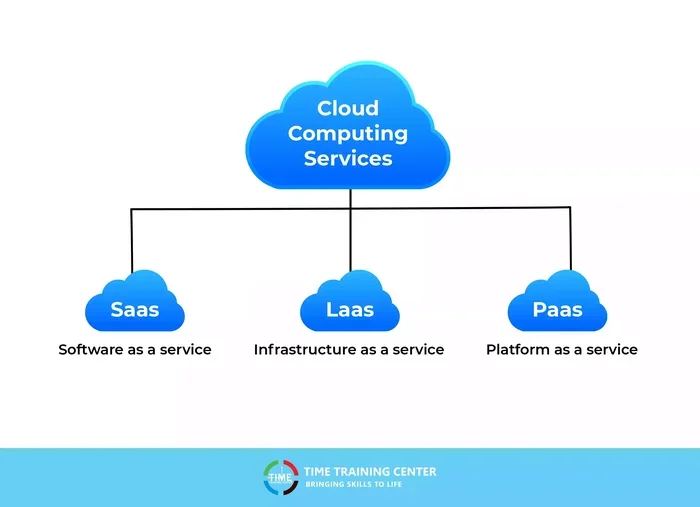
Different types of cloud services rely on data centers in different ways. Here is a quick look at the three main service models:
- Infrastructure as a Service (IaaS): Provides virtualized computing resources over the internet. Users rent servers, storage, and networks from a data center provider.
- Platform as a Service (PaaS): Offers a development environment hosted in data centers. Developers build and deploy applications without managing underlying hardware.
- Software as a Service (SaaS): Delivers ready-to-use applications through the cloud. Examples include email platforms, CRM tools, and office suites.
All three models depend on robust data center technology in cloud computing. The quality of the underlying facility determines the performance of every service built on top of it.
Key Components of Modern Data Center Architecture
A modern data center is a complex system made up of many interconnected parts. Let us break down the most important components so you can understand what goes on inside these facilities.
Computing Hardware
The servers are the heart of any data center. They process requests, run applications, and store data. Today’s data centers use a mix of general-purpose servers and specialized hardware for tasks like AI workloads and machine learning processing.
Storage systems are equally important. Data centers use a combination of hard disk drives (HDDs) and solid-state drives (SSDs) to store vast amounts of information. Cloud storage solutions rely on redundant storage arrays to prevent data loss.
Networking Equipment
Networking equipment connects all the servers and allows them to communicate. Switches, routers, and firewalls manage data traffic within the facility and between the data center and the outside world.
Network redundancy is critical here. Data centers build multiple backup network paths so that if one connection fails, traffic can automatically reroute. This ensures high uptime reliability, which is essential for cloud services.
Power Systems
Data centers consume enormous amounts of electricity. A single large facility can use as much power as a small town. The power infrastructure includes utility connections, backup generators, and uninterruptible power supplies (UPS).
Power usage effectiveness (PUE) is a metric that measures how efficiently a data center uses energy. A lower PUE means less energy is wasted on cooling and overhead. The best facilities aim for a PUE close to 1.0, which is incredibly efficient.
Cooling Systems
All that computing power generates a lot of heat. Without proper cooling, servers would overheat and fail. Data centers use advanced cooling systems to maintain safe temperatures around the clock.
We will explore cooling in more detail in the next section. For now, just know that cooling is one of the biggest operational challenges for any facility that supports cloud computing services.
Types of Data Centers for Cloud Computing
Not all data centers are the same. Different types serve different purposes and scale. Understanding these differences helps you make informed decisions about where your data lives and how it is managed.
Hyperscale Data Centers
Hyperscale data centers are the largest facilities in the world. They can house tens of thousands of servers and occupy hundreds of thousands of square feet. Companies like Amazon Web Services, Microsoft Azure, and Google Cloud operate hyperscale facilities globally.
These centers are designed for massive workloads and high scalability. They support services used by millions of people every day. Cloud migration projects often involve moving workloads into hyperscale environments for better performance and cost savings.
Enterprise Data Centers
Enterprise data centers are built and operated by individual organizations for their own use. A bank, for example, might run its own data center to store sensitive financial data. These facilities are smaller than hyperscale centers but offer more control over data center security and operations.
Many enterprises now use a hybrid cloud approach. They keep sensitive workloads in their own data centers while using public cloud services for less critical tasks. This gives them the best of both worlds.
Edge Data Centers
Edge computing has changed the game in recent years. Edge data centers are smaller facilities placed closer to end users. They reduce latency by processing data locally instead of sending it to a distant central facility.
This is especially important for applications that need real-time responses, such as autonomous vehicles and online gaming. Edge computing is one of the fastest-growing trends in data center technology in cloud computing today.
Colocation Facilities
Colocation centers rent space to multiple businesses. Each business brings its own servers and equipment, and the facility provides power, cooling, and network connectivity. This is a popular option for companies that want professional data center infrastructure without building their own.
Comparison Table: Types of Data Centers
| Type | Size | Best For | Control Level | Cost Model |
|---|---|---|---|---|
| Hyperscale | Very Large | Massive cloud workloads | Low (shared) | Pay-as-you-go |
| Enterprise | Medium | Private business operations | High | Capital intensive |
| Edge | Small | Low-latency applications | Medium | Variable |
| Colocation | Small to Medium | Businesses needing shared infrastructure | Medium | Monthly rental |
The Role of Cooling and Energy Efficiency
Cooling is one of the most important aspects of data center operations. Servers generate significant heat, and if temperatures rise too high, equipment can fail. Keeping facilities cool requires sophisticated technology and careful planning.
Traditional Cooling Methods
Older data centers relied on large air conditioning units to cool the entire facility. Cold air was blown through computer room air conditioning (CRAC) units, and hot air was extracted and expelled outside. While this approach works, it is not very energy efficient.
Modern facilities use more advanced techniques. Hot and cold aisles are arranged so that cold air flows directly to the front of server racks and hot air exits from the back. This containment strategy dramatically improves cooling efficiency.
Liquid Cooling and Green Data Centers
Liquid cooling is gaining popularity as a more efficient alternative to air cooling. Instead of using air, liquid coolant is circulated directly around hot components. This method removes heat much faster and uses less energy overall.
Green data centers focus on reducing environmental impact. They use renewable energy sources like solar and wind power. Some facilities also recycle waste heat to warm nearby buildings. These practices make data center technology in cloud computing more sustainable for the future.
Quick Tips for Evaluating Data Center Efficiency
- Look for the PUE rating. Lower is better, with 1.0 being ideal.
- Check if the facility uses renewable energy sources.
- Ask about their cooling technology. Liquid cooling is more efficient than traditional air cooling.
- Find out if they have certifications like LEED or ISO 14001 for environmental standards.
Security and Reliability in Cloud Data Centers
Security is a top concern for anyone storing data in the cloud. Data centers implement multiple layers of protection to keep information safe from both physical threats and cyber attacks.
Physical Security
Physical security starts at the perimeter. Most facilities use guarded fences, security cameras, and biometric access controls. Only authorized personnel can enter sensitive areas. Visitors are often escorted at all times.
Inside the facility, data center security measures include mantraps (double-door entry systems), 24/7 surveillance, and strict badge access policies. These layers make it extremely difficult for unauthorized individuals to reach the servers.
Digital Security
On the digital side, data centers use firewalls, intrusion detection systems, and encryption to protect data. Network redundancy ensures that even if one system is compromised, backup systems can take over without interruption.
Regular security audits and penetration testing help identify vulnerabilities before they can be exploited. Leading cloud providers follow strict compliance standards like SOC 2, ISO 27001, and GDPR to ensure data protection.
Uptime and Reliability
Uptime reliability is measured by how often a data center is operational. The best facilities guarantee 99.999% uptime, which translates to less than five minutes of downtime per year. They achieve this through redundant power supplies, backup generators, and multiple network connections.
The concept of disaster recovery is also critical. Data centers replicate data across multiple geographic locations. If one facility experiences an outage, traffic automatically shifts to another location. This is a key reason why cloud computing services feel so reliable to end users.
Common Mistakes to Avoid
- Ignoring compliance requirements: Always verify that your data center meets industry regulations for your specific sector.
- Overlooking geographic redundancy: Relying on a single data center location creates unnecessary risk. Choose providers with multiple regions.
- Underestimating cooling costs: Energy costs for cooling can be significant. Factor this into your total cost of ownership calculations.
- Neglecting backup testing: Having backup systems is not enough. Regularly test your disaster recovery plans to ensure they work when needed.
Future Trends in Data Center Technology
The world of data center technology in cloud computing is constantly evolving. New innovations are reshaping how facilities are designed, powered, and managed. Here are the trends that will define the future.
AI-Driven Optimization
Artificial intelligence is being used to optimize data center operations. AI algorithms can predict cooling needs, detect hardware failures before they happen, and dynamically allocate resources to match demand. This leads to significant improvements in efficiency and cost savings.
Edge Computing Expansion
As more devices connect to the internet, the demand for low-latency processing will grow. Edge computing will play a bigger role in delivering content faster and supporting real-time applications like augmented reality and smart city infrastructure.
Sustainable and Modular Designs
The push for sustainability is driving new data center designs. Modular data centers can be built quickly and scaled up incrementally. They reduce construction waste and allow operators to deploy capacity exactly where it is needed.
Many companies are also exploring underwater data centers and Arctic facilities that use natural cooling. These creative approaches could redefine what we think about data center architecture in the coming years.
Expert Insight
Industry experts predict that by 2030, more than half of all enterprise workloads will run in the cloud. This growth will require massive investment in new data center facilities. Companies that invest in cutting-edge cloud infrastructure today will be best positioned to handle the demands of tomorrow.
The rise of AI workloads is also changing the hardware requirements inside data centers. Specialized chips like GPUs and TPUs are becoming standard in modern facilities. This shift will continue to drive innovation in data center technology in cloud computing for years to come.
Conclusion
Data center technology in cloud computing is the foundation of the digital economy. Every cloud service, every online application, and every digital interaction depends on the facilities and systems we have explored in this article. From server virtualization to edge computing, from cooling systems to security protocols, each component plays a vital role.
Understanding this technology empowers you to make better decisions. Whether you are choosing a cloud provider, planning a migration, or simply curious about how the internet works, this knowledge gives you real value. The industry is evolving fast, and staying informed will help you keep up with the changes.
The future of cloud computing is bright, and data centers will continue to be at the center of that evolution. As new technologies emerge and demand grows, these facilities will become even more powerful, efficient, and secure. Embrace the knowledge, and you will be ready for whatever comes next.
Frequently Asked Questions
What is the role of data centers in cloud computing?
Data centers provide the physical infrastructure that powers cloud computing. They house servers, storage systems, and networking equipment that store and process data for cloud services. Without data centers, cloud computing would not be possible.
How does data center technology affect cloud performance?
The quality of data center technology directly impacts speed, reliability, and security of cloud services. Better hardware, efficient cooling, and robust networking all contribute to faster and more stable cloud performance for end users.
What are the main types of data centers used in cloud computing?
The main types include hyperscale data centers, enterprise data centers, edge data centers, and colocation facilities. Each type serves different needs, from massive cloud workloads to low-latency edge applications and shared infrastructure solutions.
Why is cooling so important in data centers?
Servers generate a lot of heat during operation. Without effective cooling, equipment can overheat and fail, leading to downtime and data loss. Modern data centers use advanced cooling systems to maintain optimal temperatures and ensure reliable performance.
How is data center technology evolving for the future?
Key trends include AI-driven optimization, edge computing expansion, liquid cooling adoption, and sustainable facility designs. These innovations aim to improve efficiency, reduce environmental impact, and support the growing demand for cloud services worldwide.
What should businesses look for when choosing a cloud data center provider?
Businesses should consider factors like uptime guarantees, security certifications, geographic redundancy, cooling efficiency, and compliance standards. Evaluating these areas helps ensure reliable and secure cloud infrastructure for your organization.
=== META DESCRIPTION ===
Learn how data center technology in cloud computing powers the internet. Explore architecture, types, cooling, and security for better cloud performance.
=== URL SLUG ===
data-center-technology-cloud-computing
=== SEO TITLE ===
Understanding Data Center Technology in Cloud Computing
=== META TITLE ===
Data Center Technology in Cloud Computing Explained
=== META DESCRIPTION (for reference, 150-160 chars) ===
Learn how data center technology in cloud computing powers the internet. Explore architecture, types, cooling, and security for better cloud performance.