Data Center Virtualization in Cloud Computing Explained
Data center virtualization in cloud computing is the process of creating virtual versions of physical servers, storage, and networks inside a cloud environment. It allows businesses to run multiple virtual machines on a single physical machine, which saves money and boosts data center efficiency. This technology powers cloud computing benefits like scalability in cloud, disaster recovery, and workload consolidation. Understanding how it works helps IT teams make smarter infrastructure decisions. Below, you will find a full breakdown of how data center virtualization in cloud computing reshapes the way organizations operate.
Data center virtualization in cloud computing has changed the way businesses run their IT operations. Instead of buying and managing rows of physical servers, companies now use software to create virtual versions of hardware. This shift brings massive cloud computing benefits to organizations of all sizes. Whether you are a startup or a large enterprise, understanding this technology is essential.
The idea behind data center virtualization in cloud computing is simple. You take one physical server and divide it into many virtual servers. Each virtual server runs its own operating system and applications. This process is called server virtualization, and it is the foundation of modern cloud infrastructure. Let us dive deeper into how this works and why it matters.
Key Takeaways
- Server virtualization lets you run multiple virtual machines on one physical server, cutting hardware costs significantly.
- Hypervisor technology is the backbone of data center virtualization in cloud computing, managing resource allocation.
- Cloud migration becomes faster and safer when you use virtualization to test and move workloads.
- Network virtualization and storage virtualization work together with server virtualization to create a fully cloud infrastructure.
- Disaster recovery and uptime optimization improve dramatically with virtualized environments.
- Energy-efficient data centers are a direct result of hardware abstraction and resource pooling.
- Containerization and virtual desktop infrastructure are the next steps beyond traditional virtualization.
📑 Table of Contents
- What Is Data Center Virtualization in Cloud Computing?
- Benefits of Data Center Virtualization
- Types of Virtualization in Cloud Data Centers
- How Data Center Virtualization Transforms Cloud Infrastructure
- Best Practices for Implementing Virtualization
- Common Mistakes to Avoid
- Expert Insights and Future Trends
- Conclusion
What Is Data Center Virtualization in Cloud Computing?
How Virtualization Works
At its core, data center virtualization in cloud computing uses software to simulate physical hardware. A piece of software called a hypervisor sits on top of the physical machine. It splits the server’s CPU, memory, and storage into separate virtual machines (VMs). Each VM acts like its own independent computer.
Think of it like an apartment building. One physical building houses many apartments. Each apartment has its own kitchen, bathroom, and living space. But they all share the same structure. Virtual machines work the same way. They share one physical server but operate independently.
This concept is known as hardware abstraction. It means the software no longer depends on specific physical hardware. You can move a virtual machine from one server to another without changing anything. This flexibility is one of the biggest cloud computing benefits.
Key Components of Virtualization
Several components make data center virtualization in cloud computing possible. Here are the most important ones:
- Hypervisor — The software layer that creates and manages virtual machines. Popular examples include VMware ESXi, Microsoft Hyper-V, and KVM.
- Virtual Machines (VMs) — Software-based computers that run their own operating systems and applications.
- Resource Pooling — The process of combining physical resources and sharing them among multiple virtual machines.
- Virtual Network — A software-defined network that connects virtual machines without physical switches or cables.
- Virtual Storage — Storage space that is pooled from multiple physical drives and presented as a single resource.
Benefits of Data Center Virtualization
Cost Savings and Efficiency
One of the biggest reasons companies adopt data center virtualization in cloud computing is cost savings. Physical servers are expensive to buy, power, and cool. With server virtualization, you can run many workloads on a single machine. This means fewer physical servers, lower electricity bills, and less space needed.
Data center efficiency improves dramatically. Instead of running a server at 10% capacity, you can pack multiple workloads onto one server running at 70% or higher. This is called workload consolidation, and it saves both money and physical space.
Energy-efficient data centers are a direct result of virtualization. Fewer servers mean less heat and less power consumption. Many companies report cutting their energy costs by 30% or more after virtualizing their environments.
Scalability and Flexibility
Scalability in cloud is another major advantage. When your business grows, you need more computing power. With physical servers, this means buying new hardware, which takes weeks. With virtualization, you can add a new virtual machine in minutes.
This flexibility also helps during busy periods. For example, an online store might need extra servers during the holiday season. With data center virtualization in cloud computing, you can spin up additional virtual machines instantly and remove them when traffic drops.
Cloud deployment models also benefit from this flexibility. Whether you use public cloud, private cloud, or hybrid cloud, virtualization makes it easy to scale resources up or down based on demand.
Types of Virtualization in Cloud Data Centers
Server Virtualization
Server virtualization is the most common type. It involves dividing a physical server into multiple virtual machines. Each VM runs its own operating system and applications, completely isolated from the others.
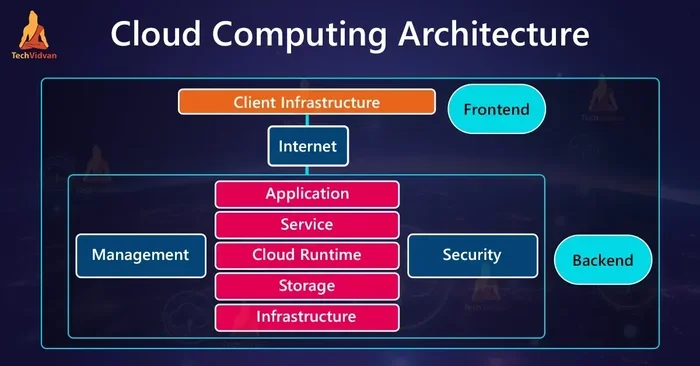
This is the backbone of cloud infrastructure. Cloud providers like AWS, Microsoft Azure, and Google Cloud all rely heavily on server virtualization to serve millions of customers from shared physical hardware.
A virtual private server (VPS) is a great example. You get your own dedicated resources within a shared physical server. It feels like having your own server, but at a fraction of the cost.
Network Virtualization
Network virtualization separates the network from the physical hardware. It creates virtual networks that are completely independent of the underlying physical switches and routers.
This is especially useful for cloud migration. You can recreate your entire network setup in a virtual environment before moving anything to the cloud. This reduces risk and makes testing much easier.
Network virtualization also improves security. You can isolate different workloads on separate virtual networks without running extra physical cables. This keeps traffic separated and secure.
Storage Virtualization
Storage virtualization pools physical storage from multiple devices into a single virtual storage unit. From the perspective of the virtual machines, it looks like one big hard drive.
This makes data center management much simpler. Administrators do not need to worry about which physical disk holds which data. The virtualization layer handles all of that behind the scenes.
Storage virtualization also improves disaster recovery. Because storage is abstracted, you can replicate virtual storage to a backup site quickly. If a physical drive fails, the virtual machine keeps running without interruption.
How Data Center Virtualization Transforms Cloud Infrastructure
Resource Pooling and Multi-Tenancy
Resource pooling is a core principle of cloud computing. It means multiple customers share the same physical resources, but each feels like they have their own dedicated system. Data center virtualization in cloud computing makes this possible.
Multi-tenancy is the practice of serving multiple customers from the same physical infrastructure. Cloud providers use hypervisors to create isolated virtual machines for each customer. This keeps data and applications separate and secure.
For businesses, this means you get enterprise-grade infrastructure without the enterprise-grade price tag. You share the cost of physical hardware with other users, which makes cloud computing benefits accessible to everyone.
Disaster Recovery and Uptime Optimization
Disaster recovery is much easier with virtualization. In a traditional setup, you would need to reinstall everything on a new physical server after a failure. With virtual machines, you simply restart the VM on another physical host.
Uptime optimization improves because virtual machines can be live-migrated between servers. This means you can perform hardware maintenance without any downtime. The virtual machine keeps running while it moves from one server to another.
Many businesses achieve uptime rates of 99.99% or higher using virtualized cloud infrastructure. This level of reliability used to require massive investments in physical hardware.
Quick Tips
- Always back up your virtual machines before performing any migrations.
- Monitor resource pooling usage to avoid overloading a single physical host.
- Use network virtualization to create isolated test environments before deploying to production.
- Choose a hypervisor that supports live migration for better uptime optimization.
Best Practices for Implementing Virtualization
Choosing the Right Hypervisor
Your hypervisor is the most important piece of software in a virtualization setup. It controls how virtual machines share physical resources. Choosing the right one affects performance, cost, and ease of management.
Type 1 hypervisors run directly on the hardware. They offer better performance and are ideal for production environments. Type 2 hypervisors run on top of an operating system and are better suited for testing and development.
Popular choices include VMware vSphere for enterprise environments, Microsoft Hyper-V for Windows-centric shops, and KVM for open-source lovers. Each has strengths, so evaluate your needs before deciding.
Planning Your Cloud Migration
Cloud migration is a big step, and virtualization makes it smoother. Before moving anything, map out your current cloud infrastructure. Identify which workloads can be virtualized and which need physical hardware.
Start small. Migrate a few low-risk virtual machines first. Test them thoroughly in the new environment. Once you are confident, move on to more critical workloads.
Document everything. Keep track of IP addresses, dependencies, and configurations. This makes cloud migration faster and reduces the chance of errors.
Common Mistakes to Avoid
Over-Provisioning Resources
One common mistake is giving each virtual machine more resources than it needs. This wastes physical capacity and defeats the purpose of workload consolidation. Always monitor usage and right-size your virtual machines.
Ignoring Security
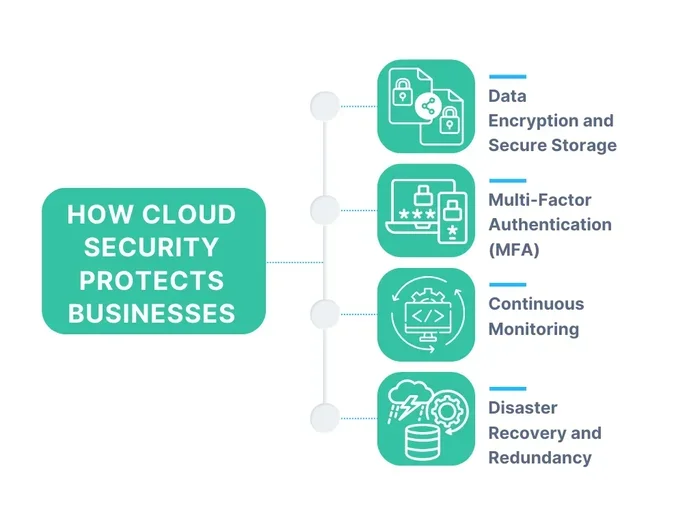
Virtualization adds new security considerations. A compromised hypervisor could potentially affect all virtual machines on that host. Keep your hypervisor patched, use strong access controls, and segment your virtual networks properly.
Expert Insights and Future Trends
Data center virtualization in cloud computing continues to evolve. Containerization is one of the most exciting developments. While virtual machines virtualize the entire operating system, containers share the host OS and are much lighter. Many organizations now use containers alongside virtual machines for the best of both worlds.
Virtual desktop infrastructure (VDI) is another growing trend. It allows companies to deliver full desktop environments to users from a centralized cloud infrastructure. This is especially useful for remote work and BYOD policies.
Looking ahead, data center virtualization in cloud computing will become even more integrated with artificial intelligence and automation. Smart resource pooling and automated disaster recovery will make cloud infrastructure more resilient than ever.
Conclusion
Data center virtualization in cloud computing is no longer optional. It is the foundation of modern IT. From server virtualization to network virtualization and storage virtualization, this technology delivers real cloud computing benefits. It saves money, improves data center efficiency, and enables scalability in cloud.
By following best practices and avoiding common mistakes, any organization can harness the power of virtualization. Start with a clear plan, choose the right tools, and test thoroughly. The results will speak for themselves. Data center virtualization in cloud computing is the key to a more agile, efficient, and resilient IT future.
Frequently Asked Questions
What is the difference between virtualization and cloud computing?
Virtualization is the technology that creates virtual versions of hardware, while cloud computing is the delivery of computing services over the internet. Data center virtualization in cloud computing combines both to create flexible, scalable infrastructure.
Do I need virtualization to use the cloud?
Most cloud services rely on virtualization behind the scenes, but you do not need to set up your own virtual machines to use the cloud. Cloud providers handle the virtualization for you. However, understanding it helps you make better decisions about your cloud infrastructure.
Is data center virtualization expensive to implement?
The initial setup can require some investment in hypervisor software and training. However, the long-term savings from workload consolidation and reduced hardware costs usually outweigh the upfront expenses. Most organizations see a return on investment within one to two years.
Can virtualization improve disaster recovery?
Yes, absolutely. Virtual machines can be backed up, replicated, and restored much faster than physical servers. Data center virtualization in cloud computing makes disaster recovery faster, cheaper, and more reliable than traditional approaches.
What is a hypervisor, and why does it matter?
A hypervisor is the software that creates and manages virtual machines. It is the core of any virtualization setup. Choosing the right hypervisor affects performance, security, and how easily you can manage your cloud infrastructure.
How does virtualization support energy-efficient data centers?
By running multiple virtual machines on fewer physical servers, virtualization reduces power consumption and cooling needs. This directly leads to energy-efficient data centers that are better for both the environment and your bottom line.