Cloud Based Storage for Business Growth and Security
Cloud based storage for business is transforming how companies store, share, and protect their data. It offers scalable solutions that grow with your needs while keeping information secure and accessible from anywhere. This guide covers the key benefits, security features, and practical tips to help you choose the right cloud storage solution for your team.
Running a business today means dealing with more data than ever before. Every client email, every invoice, every project file adds up fast. Cloud based storage for business has become the go-to answer for companies that want to keep everything organized, safe, and easy to reach.
Whether you run a small startup or a growing team, moving your files to the cloud can change the way you work. You no longer need to worry about hard drive failures or lost USB sticks. Your files stay backed up and ready whenever you need them.
In this article, we will walk you through everything you need to know about cloud based storage for business. You will learn how it helps your company grow, why it keeps your data secure, and how to pick the right provider. By the end, you will have a clear plan to make the switch with confidence.
Key Takeaways
- Scalable Growth: Cloud based storage for business lets you expand storage capacity effortlessly as your company grows, without investing in expensive hardware.
- Strong Security: Leading providers offer data encryption, multi-factor authentication, and automatic backups that protect your files better than most on-site setups.
- Remote Work Ready: Cloud storage enables seamless file sharing and collaboration for teams working from anywhere in the world.
- Cost Effective: Pay-as-you-go pricing models make cloud storage affordable for businesses of all sizes, eliminating the need for costly servers.
- Disaster Recovery: Automatic data backup and cloud-based recovery ensure your business stays running even after unexpected events.
- Smart Provider Choice: The right provider depends on your team size, budget, security needs, and the tools you already use.
📑 Table of Contents
What Is Cloud Based Storage for Business?
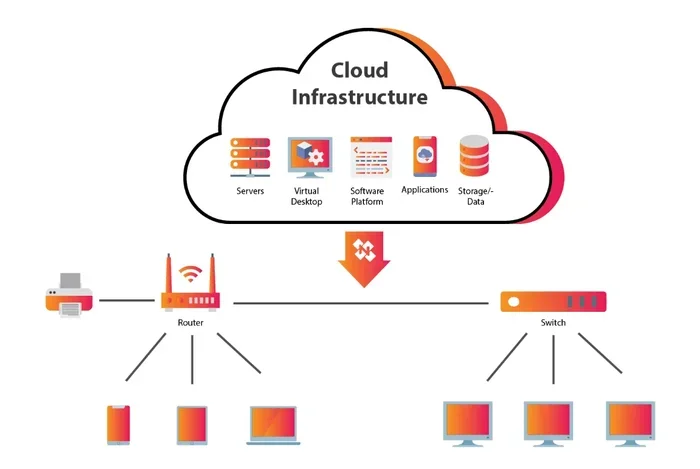
Cloud based storage for business is a service that lets you save your files on remote servers instead of your computer’s hard drive. These servers are managed by a cloud provider, and you access them through the internet. Think of it like renting a digital filing cabinet that you can open from any device, anywhere.
How It Works
When you upload a file to the cloud, it travels over the internet to a data center. The provider stores it safely and makes copies to prevent loss. You can then pull that file up on your laptop, phone, or tablet as long as you have an internet connection.
Most cloud storage platforms also offer file synchronization. This means if you edit a document on your office computer, the change shows up instantly on your phone or at home. It keeps everything in sync without you lifting a finger.
Many businesses also use cloud apps alongside their storage. Tools like Google Workspace or Microsoft 365 let you edit documents, spreadsheets, and presentations right inside the cloud. This makes team collaboration smoother and faster than ever before.
Why Businesses Are Making the Switch
More and more companies are choosing cloud based storage for business because it simply works better than old-school methods. Physical servers take up space, cost a fortune to maintain, and can fail without warning. The cloud removes all of those headaches. It also supports secure file sharing and document management in ways that keep your workflow clean and efficient.
How Cloud Based Storage for Business Drives Growth
Growth is the goal for every business owner. But growth brings challenges, especially when it comes to managing data. Cloud based storage for business removes many of those challenges and gives you room to expand without limits.
Scaling Without Limits
Traditional storage has a ceiling. You buy a server, it fills up, and you need to buy another one. Cloud storage solutions work differently. You pay for what you use and can increase your space with just a few clicks.
This scalable storage model is perfect for businesses that are growing fast. You do not need to guess how much space you will need next year. The cloud adjusts to your needs as your business evolves. Whether you need 100 GB or 10 TB, the cloud adapts.
Supporting Remote and Hybrid Teams
Remote work is here to stay. More than half of employees now want some form of remote work flexibility. Cloud based storage for business makes this possible by giving every team member access to the same files from any location.
Your sales team can pull up client files from a coffee shop. Your designers can share large image files with the office team. Your manager can review reports on a Sunday morning from home. Cloud storage removes the barriers that used to keep people tied to a desk.
Improving Team Collaboration
When everyone works from the same cloud storage system, collaboration becomes much easier. Multiple people can work on the same document at the same time. You can leave comments, track changes, and see who edited what and when.
This level of business file sharing cuts down on email chains and version confusion. Instead of sending files back and forth, your team works together in one shared space. It saves time and reduces mistakes.
Faster Decision Making
When files are easy to find and access, your team makes better decisions faster. Cloud based storage for business lets you search for documents in seconds, filter by date or author, and share links instantly. This speed adds up to a real competitive advantage over businesses still relying on filing cabinets and email attachments.
How Cloud Storage Boosts Security
One of the biggest concerns business owners have is cloud security. After all, your data is leaving your office. But the truth is, cloud based storage for business often provides stronger protection than what most companies can build on their own.
Data Encryption and Protection
Reputable cloud providers use data encryption both when files are stored and when they are being transferred. This means even if someone intercepts your data, they cannot read it without the decryption key.
Leading providers also use multi-factor authentication. This adds an extra layer of cloud security by requiring a second form of verification, like a code sent to your phone. Even if a password is stolen, your files stay safe.
Enterprise cloud storage plans often include advanced security features like access controls and audit logs. These tools let you see exactly who accessed which files and when. You can restrict access to sensitive documents and monitor for unusual activity.
Disaster Recovery and Data Backup
Hard drives crash. Computers get stolen. Coffee spills on laptops. These things happen every day in offices around the world. With cloud based storage for business, your files are backed up automatically in multiple locations.
This is called business continuity. If something goes wrong at your office, your data is still safe in the cloud. You can recover files quickly and get back to work with minimal downtime.
Data recovery from the cloud is also much faster than traditional methods. Instead of rebuilding from scratch, you simply restore your files from the backup. Many providers offer automatic backup features that run without any effort from your team.
Quick Tip: Always check if your provider offers version history. This feature lets you restore earlier versions of a file if something gets accidentally deleted or overwritten. It is a simple but powerful safety net.
Choosing the Right Cloud Storage Provider
Not all cloud storage providers are the same. Choosing the right one depends on your business size, budget, and needs. Here is what to look for when you compare your options.
Top Providers to Consider
There are many great providers in the market. Some focus on small businesses, while others cater to large enterprises. Here are a few popular choices:
- Google Workspace – Great for teams already using Google tools. Offers 1 TB of storage per user and strong collaboration features.
- Microsoft OneDrive – Ideal for businesses that rely on Microsoft Office. Integrates smoothly with Word, Excel, and PowerPoint.
- Dropbox Business – Known for its easy-to-use interface and excellent file sharing capabilities. Great for creative teams.
- Box – Strong on security and compliance. A good choice for businesses in regulated industries like healthcare or finance.
- Amazon Web Services (AWS) – Best for large companies that need custom hybrid cloud setups and massive storage capacity.
Key Features to Look For
When evaluating providers, keep these features in mind:
- Storage capacity – Make sure the plan offers enough space for your current needs and room to grow.
- Security features – Look for encryption, multi-factor authentication, and compliance certifications like SOC 2 or GDPR.
- Ease of use – The platform should be intuitive enough for all team members, not just tech-savvy users.
- Integration options – Check if it connects with the tools your team already uses, like Slack, Zoom, or your CRM.
- Customer support – Reliable support matters when something goes wrong. Look for 24/7 live chat or phone support.
- File sharing controls – You should be able to set permissions, add passwords to shared links, and track downloads.
| Provider | Starting Price (per user/month) | Free Tier | Best For |
|---|---|---|---|
| Google Workspace | $6 | Yes (15 GB) | Teams using Google tools |
| Microsoft OneDrive | $5 | Yes (5 GB) | Microsoft Office users |
| Dropbox Business | $15 | No | Creative and design teams |
| Box | $15 | No | Security-focused businesses |
| AWS | Varies | Yes (limited) | Large enterprises |
Cloud Storage Costs and Pricing
Understanding cloud storage pricing helps you budget properly and avoid surprises. The good news is that cloud storage is often more affordable than maintaining your own servers.
Understanding Pricing Models
Most providers offer a pay-as-you-go model. You pay a monthly or annual fee based on the amount of storage you need. This means you only pay for what you use, which is a big advantage over buying and maintaining physical hardware.
For small businesses, plans typically start at $5 to $15 per user per month. This usually includes anywhere from 100 GB to 1 TB of storage per user. Larger companies with more data may need custom pricing, which can be negotiated directly with the provider.
Cloud storage costs also include factors like data transfer fees, additional features, and premium support. Make sure to read the fine print and ask about any hidden charges before signing a contract.
Quick Tip: Start with a free trial or a basic plan before committing to a long-term contract. This lets you test the service with your real workflow and see if it fits your team’s needs.
Hidden Costs to Watch Out For
Some providers charge extra for things like API access, advanced analytics, or priority support. These add-ons can quietly inflate your monthly bill. Always ask for a full breakdown of costs before you commit. Compare at least three providers side by side to make sure you are getting the best value for your cloud storage pricing.
Common Mistakes and Tips for Success
Moving to the cloud is a big step, and it is easy to make mistakes along the way. Here are the most common pitfalls and how to avoid them.
Mistakes to Avoid
Skipping the security setup. Many businesses sign up for a cloud plan and leave all the default settings. This is a risky move. Take the time to set up user permissions, enable multi-factor authentication, and review who has access to sensitive files.
Not training your team. Even the best cloud storage platform will not help if your employees do not know how to use it. Invest in a short training session to walk your team through the basics of uploading, sharing, and organizing files.
Ignoring data organization. Throwing all your files into one folder creates chaos. Create a clear folder structure and naming convention before you migrate. This saves time and frustration in the long run.
Forgetting about compliance. If your business handles customer data, you may have legal obligations around how it is stored. Make sure your chosen provider meets the compliance standards relevant to your industry, such as HIPAA for healthcare or SOC 2 for finance.
Tips for a Smooth Transition
Start small. Do not try to move everything at once. Begin with a single department or project and expand from there. This approach lets you learn the system and fix issues before a full rollout.
Set clear rules. Create a simple policy that explains how your team should use the cloud storage system. Include guidelines on naming files, sharing permissions, and what types of files should be stored in the cloud.
Monitor usage regularly. Check your storage usage and user activity on a monthly basis. This helps you spot unused accounts, manage costs, and ensure no one is accessing files they should not be.
Keep a backup plan. Even with automatic backup in the cloud, it is wise to keep a secondary backup for your most critical files. A simple external hard drive or a second cloud provider can serve as a safety net.
Expert Insight: According to industry analysts, businesses that plan their cloud migration strategy carefully are 40% more likely to report satisfaction with their cloud setup. Take the time to map out your goals, choose the right provider, and train your team before the big switch.
The Future of Business Cloud Storage
The world of cloud computing is changing fast. New technologies are making cloud storage even more powerful, affordable, and secure every year.
Artificial intelligence is playing a bigger role in cloud storage. AI-powered tools can now automatically organize your files, suggest relevant documents, and even detect security threats in real time. This makes managing your cloud based storage for business easier and safer than ever before.
Hybrid cloud solutions are also gaining popularity. These setups let you keep sensitive data on your own servers while using the cloud for less critical files. This gives you the best of both worlds: control and flexibility.
As remote work continues to grow, the demand for reliable cloud storage solutions will only increase. Businesses that embrace cloud based storage for business today are positioning themselves for long-term success in a digital-first world.
Key Takeaway: The cloud is not just a trend. It is the foundation of modern business operations. Companies that adopt cloud based storage for business early gain a competitive edge in speed, security, and scalability.
Making the switch does not have to be overwhelming. Start with a clear plan, choose a provider that fits your needs, and take it step by step. Your business data deserves the safety, flexibility, and ease that only the cloud can provide.
Frequently Asked Questions
Is cloud based storage for business safe?
Yes, reputable cloud providers invest heavily in security measures like data encryption, multi-factor authentication, and regular audits. In most cases, cloud security is stronger than what a typical small business can set up on its own. Always choose a provider with strong compliance certifications and a proven track record.
How much does cloud storage cost for small businesses?
Most small business plans range from $5 to $15 per user per month. This usually includes 100 GB to 1 TB of storage per user. The exact cost depends on the provider, the features you need, and the amount of storage you require. Many providers also offer free tiers for very small teams getting started.
Can I migrate my existing files to the cloud?
Absolutely. Most cloud providers offer migration tools that make the process straightforward. You can upload files in bulk, use desktop sync apps, or even hire a migration service for large-scale transfers. It is best to start with a small batch of files to test the process before moving everything over.
What happens if the internet goes down?
If your internet connection drops, you will not be able to access or upload files in real time. However, many cloud platforms offer offline access features that let you work on cached files locally. Once the connection is restored, your changes sync automatically. Keeping a backup plan for critical offline access is always a smart move.
Which cloud storage provider is best for small businesses?
The best provider depends on your specific needs. Google Workspace is excellent for teams already using Google tools. Microsoft OneDrive is ideal for businesses relying on Office applications. Dropbox Business shines for creative teams that need easy file sharing. Box is a top pick for businesses that need strong security and compliance features.
How does cloud storage help with team collaboration?
Cloud storage gives every team member access to the same files from any device. Multiple people can edit documents simultaneously, leave comments, and track changes in real time. This eliminates email chains, reduces version confusion, and keeps everyone working from the same source of truth. It is one of the biggest reasons teams choose cloud based storage for business over traditional methods.