How Cloud Computing in the Classroom Is Changing Education
Cloud computing in the classroom is reshaping how teachers teach and students learn. It brings powerful tools like Google Classroom, Microsoft Teams, and Zoom directly into everyday education. Schools save money, boost collaboration, and give students anytime access to learning materials. This technology makes classrooms more flexible, inclusive, and future-ready. Here is everything you need to know about this education revolution.
Key Takeaways
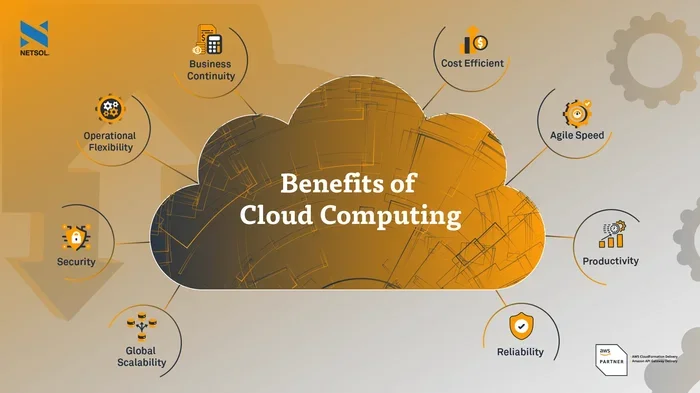
- Easy Access Anytime: Students can reach lessons, assignments, and resources from any device, anywhere.
- Cost Savings: Schools cut hardware and maintenance costs by moving to the cloud.
- Better Collaboration: Cloud tools let students and teachers work together in real time.
- Enhanced Security: Modern cloud platforms offer strong data protection for sensitive student information.
- Supports Hybrid Learning: Cloud computing makes it easy to blend in-person and remote education seamlessly.
- Boosts Engagement: Interactive apps and multimedia tools keep students more involved in their learning.
- Future-Proofs Education: Schools that adopt cloud technology prepare students for the digital workforce.
📑 Table of Contents
- What Is Cloud Computing in the Classroom?
- Why Schools Are Embracing Cloud Computing
- Popular Cloud Tools Transforming Classrooms Today
- How Teachers Are Using Cloud Technology Every Day
- Challenges Schools Face with Cloud Computing
- Quick Tips for Getting Started with Cloud Computing in the Classroom
- Expert Insights on Cloud Computing in Education
- The Future of Cloud Computing in Education
- Conclusion
What Is Cloud Computing in the Classroom?
Let us start with the basics. Cloud computing in the classroom means using internet-based tools and services to teach, learn, and manage school work. Instead of relying on heavy textbooks or installed software, students and teachers access everything online.
Think about it this way. You probably already use cloud tools every day. Google Docs, Dropbox, and Spotify all run in the cloud. Now imagine bringing that same simplicity into a classroom setting. That is exactly what cloud-based learning does.
Schools use cloud storage for schools to store assignments, grades, and lesson plans. Teachers share materials instantly. Students submit work without printing a single page. It is a cleaner, faster, and smarter way to run a classroom.
The beauty of this approach is its flexibility. A student at home can open the same document as a student sitting in the front row. Everyone stays on the same page, literally. That is the power of cloud computing in the classroom.
Why Schools Are Embracing Cloud Computing
Schools across the world are making the shift to the cloud. But why? The reasons go far beyond just keeping up with technology trends.
Cost Savings and Efficiency
Running a school is expensive. Buying computers, maintaining servers, and hiring IT staff adds up fast. Cloud computing in the classroom slashes those costs. Schools pay for what they use, usually through a monthly subscription. There is no need for expensive hardware on-site.
Smaller schools benefit the most. They get access to the same powerful tools as big districts, without the big price tag. This makes cost-effective education technology a game-changer for equality in learning.
Anytime, Anywhere Learning
One of the biggest advantages of cloud computing in the classroom is anytime access to learning. Students do not need to be physically present to participate. They can watch lectures, complete assignments, and collaborate with classmates from home.
This matters a lot for students who are sick, traveling, or balancing part-time jobs. Cloud computing in the classroom ensures nobody gets left behind because of circumstances outside their control.
Better Collaboration and Engagement
Learning works best when students work together. Cloud computing in the classroom makes group projects easier than ever. Students can edit the same document at the same time. They can leave comments, share ideas, and give feedback instantly.
Teachers also benefit. They can monitor group progress in real time. They can jump into discussions and offer guidance exactly when it is needed. This level of interaction keeps student engagement high and makes learning feel more connected.
Popular Cloud Tools Transforming Classrooms Today
Not all cloud tools are the same. Some are built specifically for education. Others are general-purpose platforms that schools have adapted. Here are some of the most popular options driving cloud computing in the classroom today.
| Tool | Best For | Key Feature |
|---|---|---|
| Google Classroom | Assignment management | Seamless integration with Google Workspace |
| Microsoft Teams for Education | Communication and collaboration | Video calls, chat, and file sharing |
| Zoom Education | Virtual classes | Reliable video conferencing |
| Dropbox Education | File storage and sharing | Large file handling and version control |
| Kahoot! | Interactive quizzes | Gamified learning for student engagement |
| Canvas LMS | Course management | Comprehensive learning management system |
Google Classroom and Google Workspace
Google Classroom has become a staple in many schools. It works perfectly with Google Docs, Sheets, and Slides. Teachers can create assignments, share resources, and grade work all in one place. Students love the simplicity. Everything is organized in one dashboard.
As part of cloud computing in the classroom, Google Classroom helps teachers stay organized and students stay on track. It is one of the most widely adopted edtech solutions in the world.
Microsoft Teams for Education
Microsoft Teams offers a full communication hub. Teachers can host live classes, share files, and run discussions. Its integration with Office 365 makes it a strong choice for schools already using Microsoft products.
Teams also supports hybrid learning models. Students can join from the classroom or from home and have the same experience. This flexibility is essential in today’s education landscape.
Learning Management Systems (LMS)
A learning management system is the backbone of many digital classrooms. Platforms like Canvas, Schoology, and Moodle help teachers organize courses, track progress, and communicate with parents. These systems are built on cloud technology, which means they are always up to date and accessible from any device.
How Teachers Are Using Cloud Technology Every Day
Cloud computing in the classroom is not just about technology. It changes the way teachers actually teach. Here is how educators are putting cloud tools to work every single day.
Creating Interactive Lessons
Teachers no longer rely only on chalkboards and printed handouts. They build interactive lessons using cloud apps. They embed videos, add quizzes, and include multimedia elements that make learning more vivid. Students respond better to content they can touch, click, and explore.
For example, a history teacher might use a shared Google Slides presentation where each student researches a different era and contributes a slide. The class builds a collaborative timeline in real time. That kind of active participation boosts student engagement significantly.
Streamlining Grading and Feedback
Grading takes time. Cloud tools make it faster and more efficient. Teachers can leave comments directly on digital documents. Students see feedback immediately and can make revisions on the spot. This real-time collaboration speeds up the learning cycle.
Some platforms even use automated grading for quizzes and multiple-choice assignments. This frees up teachers to focus on what matters most: helping students understand the material.
Connecting with Parents
Cloud platforms also improve communication with parents. Teachers can share progress reports, announcements, and upcoming assignments through cloud-based portals. Parents stay informed without waiting for parent-teacher conferences.
This transparency builds trust. Parents feel more involved in their child’s education, and students benefit from a stronger home-school connection.
Supporting Different Learning Styles
Every student learns differently. Some prefer reading. Others learn better through videos or hands-on activities. Cloud computing in the classroom lets teachers offer multiple formats for the same lesson. A student can watch a video, read an article, or listen to a podcast, all from the same platform.
This flexibility is especially helpful for students with learning differences. Cloud tools can include text-to-speech, adjustable font sizes, and translation features. Educational technology becomes truly inclusive when it is powered by the cloud.
Challenges Schools Face with Cloud Computing
No technology is perfect. Cloud computing in the classroom comes with its own set of challenges. Schools need to address these head-on to make the transition successful.
Internet Access and Digital Divide
The biggest barrier is reliable internet access. Not all students have strong Wi-Fi at home. Some families cannot afford data plans. This digital divide can make cloud computing in the classroom feel unfair for some students.
Schools can help by providing devices with offline capabilities. They can also set up community Wi-Fi hotspots. Libraries and community centers can serve as learning hubs for students who lack home internet.
Data Security and Privacy
Student data is sensitive. Schools must ensure that cloud storage for schools meets strict privacy regulations like FERPA in the United States. Not every cloud platform offers the same level of data security in education.
Schools should choose platforms with strong encryption, two-factor authentication, and clear privacy policies. IT teams need to audit tools regularly and train staff on best practices for protecting student information.
Teacher Training and Adoption
Technology only works when people know how to use it. Some teachers feel overwhelmed by new tools. They need proper training and ongoing support. Schools should invest in professional development that builds confidence with cloud applications.
Start small. Introduce one tool at a time. Let teachers explore and experiment. Once they see the benefits, adoption happens naturally.
Over-Reliance on Technology
There is such a thing as too much screen time. Schools should balance cloud-based activities with hands-on, offline learning. Cloud computing in the classroom should enhance education, not replace the human connection between teachers and students.
Quick Tips for Getting Started with Cloud Computing in the Classroom
Ready to explore cloud computing in the classroom? Here are some practical tips to get started.
- Start with one tool. Do not try to adopt everything at once. Pick one platform that fits your needs and learn it well.
- Train your team. Invest time in training teachers and staff. Comfortable users create better learning experiences.
- Check internet access. Make sure all students can connect. Have a backup plan for those who cannot.
- Set clear guidelines. Establish rules for cloud tool usage. This keeps things organized and safe.
- Gather feedback. Ask students and teachers what is working and what is not. Adjust your approach based on real input.
- Focus on security. Choose platforms with strong privacy protections. Review permissions regularly.
Expert Insights on Cloud Computing in Education
We spoke with education technology experts about the future of cloud computing in the classroom. Here is what they had to say.
Dr. Sarah Mitchell, EdTech Researcher: “The shift to cloud-based learning is not a trend. It is a fundamental change in how education works. Schools that embrace it now will be better prepared for whatever comes next.”
James Rivera, High School IT Coordinator: “Since moving to the cloud, our teachers save hours every week. Assignments are submitted digitally, grades are updated in real time, and students collaborate more effectively than ever before.”
Linda Chen, Elementary School Teacher: “My students light up when they use cloud tools. They feel like they are part of something bigger. Collaboration and creativity go hand in hand with these platforms.”
These voices confirm that cloud computing in the classroom is delivering real results. The technology is not just theoretical. Teachers and students are living it every day.
The Future of Cloud Computing in Education
What comes next for cloud computing in the classroom? The future looks bright and full of possibility.
Artificial intelligence will play a bigger role. Imagine cloud platforms that adapt to each student’s learning pace. They could suggest personalized exercises and flag areas where a student is struggling. Edtech solutions are moving toward smarter, more intuitive experiences.
Virtual reality and augmented reality will also find a home in the cloud. Students could take virtual field trips or explore 3D models of the human body, all through cloud-powered platforms. The possibilities are exciting and still unfolding.
As school IT infrastructure improves, more schools will make the leap. Governments and organizations are investing heavily in digital education. Cloud computing in the classroom will become the norm, not the exception, within the next decade.
The key is to start now. Schools that adopt cloud tools early give their students a head start. They build skills that matter in the modern workforce. They create learning environments that are flexible, inclusive, and future-ready.
Conclusion
Cloud computing in the classroom is more than a tech upgrade. It is a transformation of how education happens. From cost savings to better collaboration, from anytime access to inclusive learning, the benefits are clear and powerful.
Schools that embrace cloud computing in the classroom position themselves for long-term success. Teachers work smarter. Students learn more effectively. Parents stay connected. Everyone wins.
The journey does not have to be perfect. Start small, stay consistent, and keep learning. The cloud is already changing education. The question is not whether your school will join the movement. It is how soon you will get started.
Frequently Asked Questions
What is cloud computing in the classroom?
Cloud computing in the classroom refers to using internet-based tools and services to teach, learn, and manage school activities. Instead of relying on physical textbooks or installed software, students and teachers access lessons, assignments, and resources online through cloud platforms like Google Classroom or Microsoft Teams.
How does cloud computing benefit students?
Students benefit from anytime access to learning materials, the ability to collaborate in real time, and exposure to digital tools they will use in their careers. Cloud platforms also support different learning styles by offering videos, interactive activities, and multimedia resources all in one place.
Is cloud computing in education secure?
Yes, when implemented correctly. Reputable cloud platforms use strong encryption, two-factor authentication, and comply with privacy regulations like FERPA. Schools should choose trusted providers and train staff on data security in education best practices to keep student information safe.
What are the costs of adopting cloud tools in schools?
Many cloud tools offer free or low-cost education plans. Schools save money by reducing hardware purchases and IT maintenance. Cost-effective education technology makes cloud adoption accessible even for schools with tight budgets. Most platforms operate on a subscription model that scales with the number of users.
Can cloud computing support remote learning?
Absolutely. Cloud computing in the classroom is the backbone of remote and hybrid learning. Students can attend live classes, submit assignments, and collaborate with classmates from anywhere in the world. Platforms like Zoom, Google Meet, and Microsoft Teams make remote education seamless and effective.
What training do teachers need for cloud tools?
Teachers need basic training on how to use specific cloud platforms and integrate them into daily lessons. Schools should offer ongoing professional development, starting with simple tools and gradually introducing more advanced features. Comfortable, confident teachers create the best learning experiences for students.