Thin Clients in Cloud Computing and Their Benefits
A thin client in cloud computing is a lightweight device that relies on remote servers to do the heavy lifting. Instead of storing data and running apps locally, thin clients connect to cloud desktops and virtual environments. This approach slashes hardware costs, strengthens security, and makes IT management far simpler. Whether you run a small business or a large enterprise, thin clients offer a practical, scalable solution for modern computing needs.
Imagine a computer that does almost nothing on its own. It has no large hard drive, no powerful processor, and no fancy graphics card. Yet it can run the same software, access the same files, and deliver the same experience as a high-end desktop. That is the magic of a thin client in cloud computing. These small, lightweight devices have changed the way businesses think about computing. Instead of putting all the workload on the local machine, thin clients send tasks to powerful servers in the cloud. The cloud does the work, and the thin client simply displays the results.
This model is not entirely new. In fact, the idea of centralized computing dates back decades. But cloud technology has given it a powerful new life. Today, companies across every industry use thin clients to cut costs, improve security, and simplify IT operations. If you are curious about how this works and why it matters, you are in the right place. Let us break it all down in simple terms.
Key Takeaways
- Lower Hardware Costs: Thin clients cost less than traditional PCs and last longer because they have fewer moving parts.
- Enhanced Security: Data stays in the cloud, not on the device, reducing the risk of breaches and data loss.
- Simplified IT Management: IT teams can update, patch, and manage thousands of thin clients from a single centralized location.
- Energy Efficiency: Thin clients use significantly less power than full desktop computers, lowering electricity bills.
- Scalability: Adding new users is quick and easy since you only need to provision a cloud desktop and connect a thin client device.
- Remote Work Friendly: Thin clients enable seamless remote access to cloud desktops from anywhere with an internet connection.
- Longer Device Lifespan: With minimal hardware requirements, thin clients remain functional for many years without needing upgrades.
📑 Table of Contents
- What Is a Thin Client in Cloud Computing?
- How Thin Clients Work in a Cloud Environment
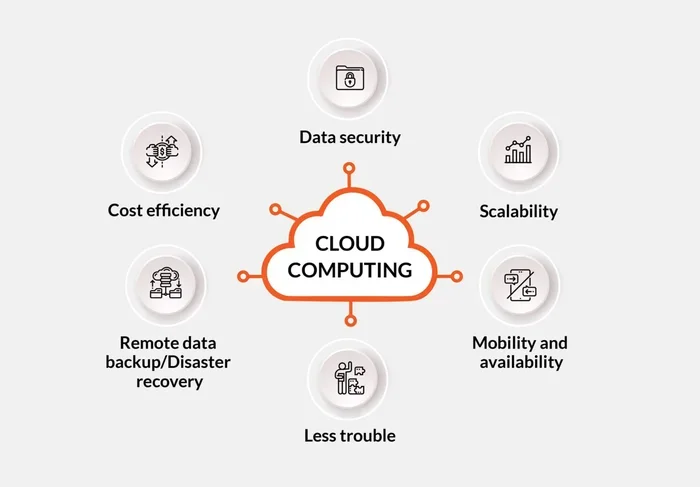
- Key Benefits of Using Thin Clients with Cloud Computing
- Thin Client vs. Thick Client: Which Is Right for You?
- Common Use Cases for Thin Clients in Cloud Computing
- Choosing the Right Thin Client for Your Cloud Setup
- Common Mistakes to Avoid When Using Thin Clients
- Expert Insights on Thin Clients and Cloud Computing
- Conclusion
What Is a Thin Client in Cloud Computing?
A thin client is a small computer that depends on a network connection to function. It does not store data or run heavy applications by itself. Instead, it connects to a cloud-based desktop or virtual machine hosted on a remote server. The server handles all the processing, storage, and application execution. The thin client just receives and displays the output.
Think of it like watching a movie on Netflix. Your TV or phone does not store the movie files. It simply streams the content from a remote server. A thin client works the same way, but for your entire computing environment. You see the desktop, you click the icons, you type on the keyboard. All of that happens on the server side.
Thin client hardware is usually very basic. It might have a small amount of RAM, a modest processor, and flash storage instead of a traditional hard drive. Some thin clients do not even have moving parts. This simplicity is a huge advantage. There are fewer things that can break, which means less maintenance and a longer lifespan.
How Does a Thin Client Differ from a Traditional PC?
A traditional PC, often called a thick client, does all the work itself. It has a powerful CPU, a large hard drive, and enough memory to run multiple applications at once. A thin client relies entirely on the cloud for that power. The difference is similar to the difference between a calculator and a smartphone. Both can do math, but the smartphone taps into a much larger network of resources.
Here are the key differences at a glance:
- Processing Power: A thick client uses its own CPU and RAM. A thin client relies on the cloud server.
- Storage: Thick clients store data locally. Thin clients store data in the cloud or on a central server.
- Maintenance: Thick clients need individual updates and patches. Thin clients are managed centrally.
- Cost: Thick clients cost more upfront. Thin clients are cheaper to buy and cheaper to maintain over time.
- Security: Thick clients store sensitive data on the device. Thin clients keep data in secure data centers.
How Thin Clients Work in a Cloud Environment
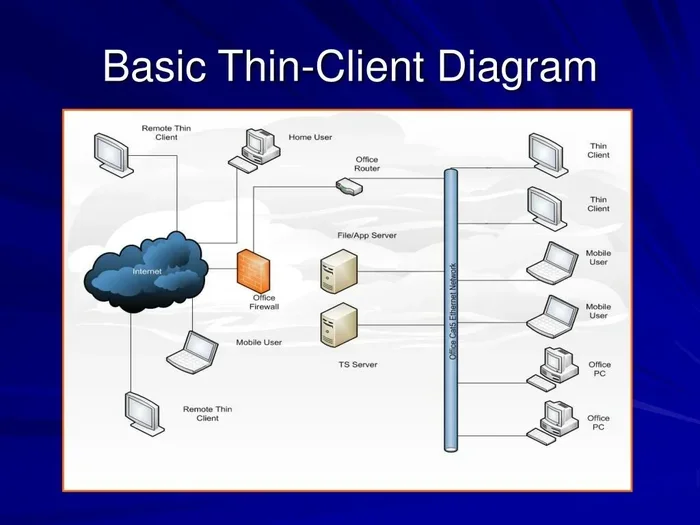
Understanding how a thin client in cloud computing actually operates is straightforward. The process happens in a few simple steps. First, the user turns on the thin client and connects to the network. Next, the thin client authenticates the user, often through a cloud-based authentication system. Once verified, the user receives access to their virtual desktop.
The virtual desktop lives on a server-based computing platform. This could be a virtual desktop infrastructure (VDI) environment or a desktop as a service (DaaS) platform. The server runs the operating system and applications. It processes every keystroke, every mouse click, and every command. Then it sends the visual output back to the thin client over the network.
All of this happens in milliseconds. The user experience feels just like using a regular desktop computer. In fact, most people cannot tell the difference. The only thing that changes is where the computing happens. Instead of happening on the desk in front of you, it happens in a data center somewhere else.
The Role of Network Connectivity
A stable network connectivity connection is essential for thin clients to work well. Since all processing happens in the cloud, the thin client must send and receive data constantly. A slow or unreliable connection can cause lag, delayed responses, or a poor user experience.
Most thin clients work well with a standard broadband connection. For businesses, a wired Ethernet connection is often preferred over Wi-Fi because it provides a more stable link. Some organizations also use cloud infrastructure optimizations like content delivery networks to reduce latency and improve performance.
Key Benefits of Using Thin Clients with Cloud Computing
The benefits of using a thin client in cloud computing are significant. They touch on cost, security, management, and performance. Let us explore each one in detail.
1. Lower Hardware Costs
One of the biggest advantages of thin clients is the cost savings. Traditional desktop computers can cost several hundred dollars each. A thin client device typically costs a fraction of that. Because thin clients do not need powerful processors or large storage drives, the hardware itself is inexpensive.
And the savings do not stop at purchase price. Thin clients use very little electricity. A full desktop computer might draw 200 to 300 watts of power. A thin client often draws 15 to 30 watts. Over time, those energy savings add up. Businesses with hundreds or thousands of endpoints can save a substantial amount on their electricity bills.
2. Stronger Security
Security is a top concern for every organization. A thin client in cloud computing offers a naturally more secure setup. Since thin clients do not store data locally, there is very little risk if a device is lost or stolen. The data lives in the cloud, protected by security protocols and encryption.
Thin clients also reduce the attack surface for malware and ransomware. There is no local operating system for viruses to infect. There is no hard drive for hackers to access. If a thin client is compromised, IT can simply disconnect it and re-provision a new one in minutes.
3. Centralized IT Management
Managing a fleet of traditional PCs is a nightmare. Each machine needs individual updates, patches, and troubleshooting. With thin clients, IT management becomes centralized. IT teams can push updates, deploy new software, and apply security policies to all thin clients at once from a single console.
This saves a tremendous amount of time and effort. Instead of walking from desk to desk, an IT technician can manage thousands of endpoints remotely. This is especially valuable for organizations with multiple office locations or a large remote workforce.
4. Scalability and Flexibility
When a company grows, adding new users to a traditional IT setup can be slow and expensive. You need to purchase new computers, install software, and configure each machine. With cloud desktops and thin clients, scaling is much faster.
You simply provision a new virtual desktop in the cloud and connect a thin client device. The new user can start working within minutes. This flexibility makes thin clients ideal for businesses that experience seasonal spikes, rapid growth, or frequent hiring cycles.
5. Improved Reliability
Thin clients have very few moving parts. There are no fans that can fail, no spinning hard drives that can crash, and no complex components that can overheat. This simplicity translates into high reliability. Thin clients tend to run cool and quiet, and they rarely need repairs.
Since the heavy lifting happens in the cloud, a thin client can still function even if its local hardware is modest. The cloud infrastructure handles the workload, so the end user gets a consistent experience regardless of the device.
Thin Client vs. Thick Client: Which Is Right for You?
Choosing between a thin client and a thick client depends on your specific needs. Both have strengths and weaknesses. Let us compare them across several important factors.
| Factor | Thin Client | Thick Client |
|---|---|---|
| Upfront Cost | Low | High |
| Ongoing Maintenance | Low (centralized) | High (per-device) |
| Processing Power | Depends on cloud server | Built into the device |
| Security | High (no local data storage) | Lower (data stored locally) |
| Offline Capability | Limited | Full |
| Energy Usage | Very low | Moderate to high |
| Scalability | Easy and fast | Slower and more expensive |
| Best For | Call centers, offices, remote work | Engineering, design, gaming |
As you can see, thin clients are not a one-size-fits-all solution. They work best in environments where users need access to standard business applications, email, web browsing, and shared files. They are less ideal for tasks that require heavy local processing, such as 3D rendering or video editing.
When a Thick Client Makes More Sense
There are situations where a thick client is the better choice. If your team works with resource-intensive applications like CAD software, video editing tools, or scientific modeling programs, a thick client provides the local horsepower needed. In these cases, the cloud connection may not be fast enough to deliver a smooth experience.
However, even in these scenarios, some organizations use a hybrid approach. They provide thick clients for specialized tasks and thin clients for everyday work. This gives users the best of both worlds.
Common Use Cases for Thin Clients in Cloud Computing
Thin clients are used across many industries and settings. Here are some of the most common use cases where a thin client in cloud computing delivers real value.
Call Centers and Customer Service
Call centers are one of the most popular environments for thin clients. Agents typically use a standardized set of applications like CRM software, phone systems, and email. A thin client provides exactly what they need without the cost and complexity of a full desktop. IT teams can manage hundreds of thin clients from a single dashboard.
Healthcare and Hospitals
Hospitals and clinics use thin clients at nurse stations, billing desks, and administrative offices. Healthcare IT teams appreciate the security benefits. Patient data stays in the cloud and is protected by strict compliance rules. If a thin client is left in a public area, no sensitive data is exposed because nothing is stored locally.
Education and Schools
Schools and universities deploy thin clients in computer labs and classrooms. This allows students to access cloud-based desktops and educational software without the school needing to maintain expensive PC labs. It also keeps costs low, which is always a priority in education budgets.
Remote and Hybrid Work
The rise of remote work has boosted interest in thin clients. Employees can connect to their cloud desktops from a thin client at home or from a remote desktop app on their personal device. This gives companies more control over their computing environment while supporting flexible work arrangements.
Choosing the Right Thin Client for Your Cloud Setup
If you are considering thin clients for your organization, picking the right device matters. Not all thin clients are the same. Here are some factors to keep in mind.
Consider Your Use Case
Think about what your users will be doing. Do they need to run lightweight office applications, or do they need access to more demanding software? For basic tasks like email, web browsing, and document editing, almost any thin client will work. For more demanding workloads, look for thin clients with better processors and more RAM.
Check Compatibility with Your Cloud Platform
Make sure the thin client you choose is compatible with your cloud computing platform. Popular options include VMware Horizon, Citrix Virtual Apps and Desktops, and Amazon WorkSpaces. Most thin clients support these major platforms, but it is always worth double-checking.
Think About Connectivity
Thin clients need a reliable network connection. If your office has weak Wi-Fi in certain areas, consider thin clients with Ethernet ports. Some thin clients also support dual-band Wi-Fi for better wireless performance.
Plan for the Long Term
Thin clients are built to last. Look for devices from reputable manufacturers that offer good warranty support and firmware updates. A well-chosen thin client can serve your organization for five to seven years or more.
Quick Tips for a Smooth Thin Client Deployment
- Start with a pilot group before rolling out thin clients company-wide.
- Ensure your internet connection has enough bandwidth to support all users.
- Set up a centralized management console for easy IT administration.
- Train users on how to access their cloud desktops.
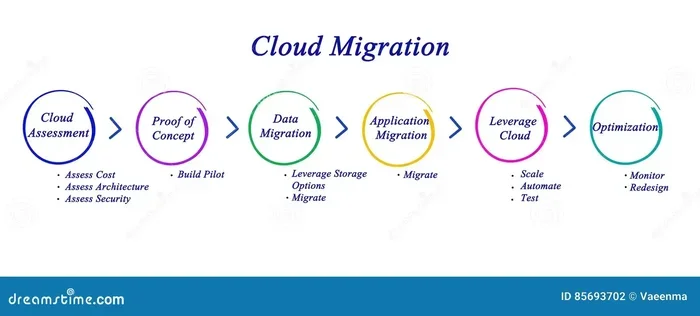
- Monitor performance regularly and adjust cloud resources as needed.
Common Mistakes to Avoid When Using Thin Clients
While thin clients are relatively simple to use, there are some common pitfalls to watch out for.
One mistake is underestimating network requirements. Thin clients depend entirely on a network connection. If your internet is slow or unreliable, the user experience will suffer. Invest in a good network infrastructure before deploying thin clients.
Another mistake is ignoring user training. Some users are used to working on full desktop computers. They may find the transition to a cloud desktop unfamiliar. Provide clear instructions and support to help users adapt.
A third mistake is choosing the wrong cloud provider. Not all cloud platforms are equal. Look for a provider with strong uptime guarantees, good security features, and responsive support. The cloud provider is the backbone of your thin client setup.
Expert Insights on Thin Clients and Cloud Computing
According to IT leaders, thin clients are one of the most cost-effective ways to modernize an organization’s computing infrastructure. “Thin clients let us manage endpoints at scale without breaking the bank,” says a senior IT manager at a mid-sized enterprise. “Our security posture has improved dramatically because data never touches the local device.”
Experts also point out that thin clients are not just for large corporations. Small businesses can benefit just as much. The low upfront cost and minimal maintenance requirements make thin clients accessible for companies of all sizes.
As cloud computing continues to evolve, thin clients will likely become even more capable. Advances in remote desktop protocols, faster networks, and more powerful cloud servers will only improve the thin client experience.
Conclusion
A thin client in cloud computing is a smart, practical choice for businesses that want to save money, strengthen security, and simplify IT operations. These lightweight devices offload all the heavy work to powerful cloud servers, giving users a reliable and consistent computing experience.
The benefits are clear. Lower hardware costs, reduced energy usage, centralized management, and stronger security make thin clients an attractive option for many organizations. From call centers to hospitals to schools, thin clients are proving their value every day.
If you have been wondering whether thin clients could work for your business, now is a great time to explore the options. Start small, test the waters, and see how this approach fits your needs. The world of cloud computing is evolving fast, and thin clients are a key part of that evolution.
Embrace the simplicity. Embrace the savings. And let the cloud do what it does best.
Frequently Asked Questions
What exactly is a thin client in cloud computing?
A thin client is a lightweight computer that relies on a cloud server to process data and run applications. Instead of storing files and running software locally, the thin client connects to a virtual desktop hosted in the cloud. The cloud handles all the computing, and the thin client simply displays the results to the user.
Are thin clients cheaper than traditional desktop computers?
Yes, thin clients are significantly cheaper than traditional desktops. They have fewer components, which lowers the purchase price. They also use much less electricity, which reduces ongoing energy costs. Over time, the total cost of ownership for thin clients is considerably lower.
Can thin clients work offline?
Thin clients are designed to work online and rely on a connection to the cloud server. They have very limited offline capability. If the network connection is lost, the user may not be able to access their virtual desktop or run applications. However, some advanced setups offer limited offline caching for basic tasks.
Is data safe on thin clients?
Yes, data is very safe on thin clients. Since thin clients do not store data locally, there is no sensitive information on the device itself. All data lives in the cloud, protected by encryption and security protocols. If a thin client is lost or stolen, the risk of data exposure is minimal.
What industries use thin clients the most?
Thin clients are widely used in call centers, healthcare, education, financial services, and government organizations. Any industry that needs secure, manageable, and cost-effective computing endpoints benefits from thin clients. They are especially popular in environments with large numbers of users who perform similar tasks.
How do I set up thin clients for my business?
Setting up thin clients starts with choosing a cloud platform like VDI or DaaS. Next, you select compatible thin client devices and connect them to your network. IT teams then configure user accounts, deploy virtual desktops, and set up centralized management. Most providers offer step-by-step guides and support to make the process smooth.