Cloud Computing and HIPAA Compliance A Complete Guide
Cloud computing and HIPAA compliance go hand in hand for healthcare organizations that store and share patient data online. Understanding the rules around protected health information helps you avoid costly fines and data breaches. This guide breaks down everything you need to know about staying compliant in the cloud.
Cloud computing has changed the way healthcare organizations handle data. Storing patient records in the cloud offers speed, flexibility, and cost savings. But with those benefits comes a big responsibility. Healthcare providers must follow strict rules to protect sensitive information. That is where cloud computing and HIPAA compliance come into the picture.
The Health Insurance Portability and Accountability Act sets the standard for protecting patient data. If you handle healthcare information in any cloud environment, you need to know the rules cold. This guide walks you through everything from basic concepts to practical steps. Whether you are a small clinic or a large hospital system, you will find useful insights here.
Key Takeaways
- HIPAA sets strict rules: Any cloud platform handling healthcare data must meet specific security and privacy standards.
- Encryption is non-negotiable: Both data at rest and data in transit must be encrypted to protect patient information.
- Choose the right provider: Not all cloud service providers offer HIPAA-compliant solutions. Look for BAA agreements and strong access controls.
- Regular audits matter: Ongoing compliance monitoring helps catch gaps before they become expensive problems.
- Shared responsibility applies: The cloud provider and healthcare organization both play a role in keeping data safe.
📑 Table of Contents
- What Is Cloud Computing and Why Does HIPAA Matter?
- Understanding HIPAA Rules for Cloud Environments
- How to Choose a HIPAA-Compliant Cloud Provider
- Common Cloud HIPAA Compliance Mistakes
- Best Practices for Maintaining HIPAA Compliance in the Cloud
- Benefits of Cloud Computing for HIPAA-Compliant Healthcare
- Key Takeaways
- Conclusion
What Is Cloud Computing and Why Does HIPAA Matter?
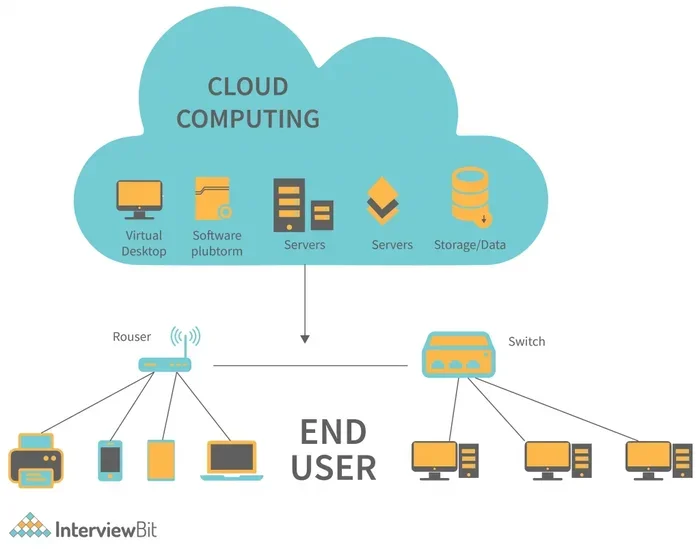
Cloud computing means storing and accessing data over the internet instead of on local servers. Think of it like renting digital space from a provider who manages the hardware for you. You access your files, applications, and databases through the web. It is fast, scalable, and convenient.
HIPAA stands for the Health Insurance Portability and Accountability Act. It is a U.S. law that protects patient health information. The law applies to any organization that handles protected health information, also called PHI. When you move PHI into the cloud, you must make sure it stays safe and private.
Why Cloud Computing Is Popular in Healthcare
Healthcare organizations love cloud computing for good reasons. It reduces the need for expensive on-site servers. It makes it easier to share data between doctors and hospitals. It also supports remote work and telehealth services. During the pandemic, cloud adoption in healthcare grew fast. And it has kept growing since then.
But popularity does not mean it is risk-free. Storing data in the cloud introduces new security challenges. That is why understanding HIPAA compliance is so important. You cannot just move data to the cloud and assume it is safe. You must take active steps to protect it.
Understanding HIPAA Rules for Cloud Environments
HIPAA has several key rules that apply to cloud computing. The Privacy Rule controls how PHI is used and shared. The Security Rule sets standards for protecting electronic PHI. The Breach Notification Rule requires organizations to report data breaches. All three matter when you use cloud storage.
The Privacy Rule in the Cloud
The Privacy Rule gives patients control over their health data. It limits who can see and use PHI. In a cloud environment, this means you need strict access controls. Only authorized people should be able to view patient records. You must also have policies in place to handle data properly.
The Security Rule and Technical Safeguards
The Security Rule focuses on technical protections. It requires covered entities to implement measures like encryption, audit logs, and access controls. In the cloud, these safeguards must extend to the provider’s infrastructure. You need to confirm that your cloud platform meets these standards.
The Breach Notification Rule
If a data breach happens, you must notify affected individuals. You also need to report breaches to the Department of Health and Human Services. In some cases, the media must be notified too. This rule applies whether the breach occurs on your servers or in the cloud. Having a clear response plan is essential.
How to Choose a HIPAA-Compliant Cloud Provider
Not all cloud providers are created equal. Some offer HIPAA-compliant services. Others do not. Choosing the right provider is one of the most important decisions you will make. Here is what to look for.
Business Associate Agreement
A Business Associate Agreement, or BAA, is a must-have. This legal document outlines the provider’s responsibilities for protecting PHI. No BAA means no HIPAA-compliant relationship. Before signing any contract, make sure the provider will sign a BAA with you.
Encryption Standards
Your cloud provider should encrypt data at rest and in transit. Encryption scrambles data so that only authorized users can read it. Look for providers that use AES-256 encryption or higher. This is considered the gold standard for data protection.
Access Controls and Audit Logs
Strong access controls limit who can view or change data. Multi-factor authentication adds an extra layer of security. Audit logs track every action taken on the data. These logs help you monitor activity and spot suspicious behavior early.
Data Backup and Recovery
Your cloud provider should offer reliable data backup options. Regular backups protect against data loss from accidents or attacks. Make sure the provider has a clear disaster recovery plan. You do not want to lose patient records because of a server failure.
Compliance Certifications
Look for providers with certifications like HITRUST or SOC 2. These certifications show that the provider has been independently audited. They give you extra confidence that the platform meets strict security standards.
Review the Provider’s Terms
Before committing to any cloud provider, carefully review their terms and conditions. These documents spell out the provider’s responsibilities and limitations. Understanding the fine print helps you avoid surprises later. You can check an example of a detailed terms and conditions document to see what a thorough agreement looks like.
Common Cloud HIPAA Compliance Mistakes
Many healthcare organizations make avoidable mistakes when moving to the cloud. Here are some of the most common ones.
Assuming the Cloud Provider Handles Everything
Cloud providers share responsibility with you. They secure the infrastructure, but you must secure the data you put in. This shared responsibility model trips up many organizations. Do not assume that the provider handles all compliance tasks for you.
Ignoring Access Controls
Weak access controls are a leading cause of data breaches. If everyone in your organization can access all data, that is a problem. Implement role-based access so each user only sees what they need.
Failing to Train Staff
Technology alone does not keep data safe. Your staff needs training on HIPAA rules and cloud security best practices. Regular training sessions help everyone stay aware of risks and proper procedures.
Not Conducting Regular Audits
Compliance is not a one-time check. You need to audit your cloud environment regularly. Audits help you find gaps and fix them before they turn into violations. Schedule these reviews at least once a year.
Choosing the Cheapest Option
Price matters, but it should not be the only factor. The cheapest cloud plan may lack the security features you need. Cutting corners on compliance can lead to expensive fines later. Invest in a provider that puts security first.
Best Practices for Maintaining HIPAA Compliance in the Cloud
Staying compliant in the cloud requires ongoing effort. Follow these best practices to keep your healthcare data safe.
Conduct a Risk Assessment
Before moving any data to the cloud, perform a thorough risk assessment. Identify potential vulnerabilities and threats. This assessment helps you build a strong security plan tailored to your needs.
Implement Strong Encryption
Encrypt all PHI, both in storage and during transmission. Use strong encryption algorithms and manage keys carefully. Proper key management is just as important as the encryption itself.
Monitor and Log Everything
Keep detailed logs of all activity in your cloud environment. Monitor these logs regularly for unusual behavior. Quick detection of suspicious activity can prevent a small issue from becoming a major breach.
Create a Response Plan
Have a clear incident response plan in place. This plan should outline steps to take if a breach occurs. Include roles, responsibilities, and communication procedures. Practice the plan with your team so everyone knows what to do.
Keep Documentation Up to Date
HIPAA requires thorough documentation of all compliance efforts. Keep records of risk assessments, policies, training sessions, and audits. Good documentation shows regulators that you take compliance seriously.
Stay Updated on Regulations
HIPAA rules evolve over time. Stay informed about any changes or updates. Subscribe to official guidance from the Department of Health and Human Services. Regularly review your policies to make sure they align with current requirements.
Benefits of Cloud Computing for HIPAA-Compliant Healthcare
When done right, cloud computing offers real advantages for healthcare organizations. Let us look at the key benefits.
Cost Savings
Cloud computing eliminates the need for expensive on-site hardware. You pay for what you use, which helps manage budgets. Maintenance and upgrades are handled by the provider. This frees up resources for patient care.
Scalability
Cloud platforms scale easily as your organization grows. You can increase storage and computing power on demand. This flexibility is especially helpful during health emergencies or seasonal spikes in patient volume.
Improved Collaboration
Cloud tools make it easier for healthcare teams to collaborate. Doctors, nurses, and specialists can access shared records securely. This leads to better coordination and improved patient outcomes.
Disaster Recovery
Cloud providers offer robust disaster recovery solutions. Your data is backed up across multiple secure locations. If a local disaster strikes, your records remain safe and accessible. This level of protection is hard to match with on-site systems.
Remote Access
Cloud computing supports remote work and telehealth services. Healthcare professionals can access patient data from anywhere with an internet connection. This is invaluable for rural clinics and after-hours care.
Key Takeaways
- HIPAA sets strict rules: Any cloud platform handling healthcare data must meet specific security and privacy standards.
- Encryption is non-negotiable: Both data at rest and data in transit must be encrypted to protect patient information.
- Choose the right provider: Not all cloud service providers offer HIPAA-compliant solutions. Look for BAA agreements and strong access controls.
- Regular audits matter: Ongoing compliance monitoring helps catch gaps before they become expensive problems.
- Shared responsibility applies: The cloud provider and healthcare organization both play a role in keeping data safe.
- Training is essential: Staff must understand HIPAA rules and cloud security practices to prevent human errors.
- Documentation keeps you protected: Maintaining thorough records of compliance efforts proves your commitment during audits.
Conclusion
Cloud computing and HIPAA compliance must work together seamlessly. Healthcare organizations cannot afford to treat one without the other. The cloud offers incredible benefits, but it also demands careful attention to security and privacy rules. By choosing a compliant provider, implementing strong safeguards, and staying informed, you can enjoy the cloud without putting patient data at risk.
Take the time to understand HIPAA requirements. Evaluate your cloud provider carefully. Train your staff and audit your systems regularly. These steps may seem like a lot of work, but they pay off. You protect your patients, your organization, and your reputation. The cloud is a powerful tool, and when used correctly, it helps you deliver better healthcare while staying fully compliant.
Frequently Asked Questions
What is HIPAA compliance in cloud computing?
HIPAA compliance in cloud computing means following HIPAA rules when storing, processing, or transmitting protected health information in a cloud environment. This includes using encryption, access controls, and signing a Business Associate Agreement with your cloud provider.
Can any cloud provider be HIPAA compliant?
No, not every cloud provider offers HIPAA-compliant services. You must choose a provider that signs a BAA, offers strong encryption, and meets the Security Rule requirements. Always verify a provider’s HIPAA compliance before storing any patient data.
What happens if a healthcare organization violates HIPAA in the cloud?
HIPAA violations can result in significant fines, legal action, and damage to your organization’s reputation. The severity of penalties depends on the nature of the violation. In serious cases, fines can reach millions of dollars.
Who is responsible for HIPAA compliance in the cloud?
Both the cloud provider and the healthcare organization share responsibility. The provider secures the infrastructure, while the organization must properly configure and manage its use of the cloud. This shared model is key to maintaining compliance.
How often should a HIPAA cloud compliance audit be performed?
You should conduct compliance audits at least once a year. However, more frequent audits are wise if your cloud environment changes often. Regular audits help you catch vulnerabilities and stay ahead of potential risks.
Is cloud computing safe for storing patient records?
Yes, cloud computing can be very safe for patient records, as long as you follow HIPAA guidelines. Use a compliant provider, encrypt all data, enforce strong access controls, and train your staff. When these steps are in place, the cloud offers a secure and efficient solution.