Measuring Cloud Computing Costs A Step By Step Guide
Measuring cloud computing costs is the key to saving money and boosting efficiency in any cloud environment. This step-by-step guide shows you how to analyze bills, track usage, and cut waste. You will learn practical tools, proven strategies, and common pitfalls to avoid. By the end, you will have a clear plan to take control of your cloud cost management today.
Key Takeaways
- Know Your Pricing Model: Understanding pay-as-you-go, reserved instances, and spot pricing helps you pick the best option for your needs.
- Track Every Line Item: Gathering and categorizing billing data is the foundation of accurate cloud cost analysis.
- Use the Right Tools: Native and third-party tools like AWS Cost Explorer and CloudHealth make cloud spending visible and manageable.
- Avoid Common Traps: Over-provisioning, ignored storage costs, and lack of tagging are the top reasons companies overspend.
- Optimize Continuously: Cloud cost optimization is not a one-time task. Regular reviews and automated alerts keep costs in check.
- Adopt FinOps Practices: Building a culture of cloud financial operations aligns your team around smart spending decisions.
📑 Table of Contents
Why Measuring Cloud Computing Costs Matters
Cloud platforms offer incredible flexibility. You can spin up servers in seconds and scale down just as fast. But that freedom comes with a hidden challenge. Without a clear system for measuring cloud computing costs, your monthly bills can spiral out of control fast.
Many businesses assume cloud is cheaper than on-premise. That is often true. But only if you manage it wisely. Companies that skip cloud cost management routinely waste 20 to 30 percent of their cloud budget. That is money that could go toward growth, innovation, or better products.
The good news is that measuring cloud computing costs does not have to be complicated. With the right approach, anyone can build a clear picture of where the money goes. This guide will walk you through the entire process. You will learn how to track spending, find waste, and optimize your cloud infrastructure pricing like a pro.
The True Cost of Running Workloads in the Cloud
When most people think about cloud computing expenses, they picture compute hours. But the real cost picture is much bigger. It includes storage, data transfer, networking, support tiers, and even idle resources that still bill you every hour.
Your total cost of ownership in the cloud goes well beyond the hourly rate. Consider these hidden factors:
- Data egress fees – Moving data out of the cloud can cost more than running the workload.
- Storage growth – Unmanaged logs, backups, and old snapshots add up silently.
- Idle resources – Stopped instances that still charge for attached storage.
- Support plans – Premium support tiers can add thousands per year.
- Training and migration – Moving to the cloud takes time and expertise.
All of these pieces matter when you are doing serious cloud cost analysis. Ignoring even one can skew your entire budget forecast.
Why Most Companies Overspend on Cloud
Overspending happens for a few common reasons. First, teams often provision more resources than they need. This is called over-provisioning, and it is the number one cause of cloud waste. Second, many companies lack proper tagging. Without tags, you cannot tell which team or project is responsible for each charge.
Third, pricing models change constantly. What was cost-effective six months ago may not be today. Finally, many teams simply do not review their bills regularly. They pay the invoice without questioning it. That mindset is the enemy of smart cloud budget planning.
Understanding Cloud Pricing Models
Before you can measure costs effectively, you need to understand how cloud providers charge you. Each cloud pricing model has its own strengths and trade-offs. Let us break them down.
Pay-As-You-Go vs Reserved Instances
The pay-as-you-go model is the most flexible. You pay for exactly what you use, by the hour or even the second. This is perfect for workloads with unpredictable traffic. The downside is that it is the most expensive per-unit option.
Reserved instances lock you into a one- or three-year commitment. In return, you get significant discounts of up to 70 percent. This works best for steady, predictable workloads like databases or production servers. Cloud cost forecasting becomes much easier when you know exactly what your reserved capacity costs each month.
Spot Instances and Other Pricing Options
Spot instances let you bid on unused cloud capacity at steep discounts. The catch? They can be interrupted with little notice. Use them for fault-tolerant workloads like batch processing or testing environments. Cost per compute hour drops dramatically with spot pricing, but you need to build resilience into your architecture.
Some providers also offer sustained use discounts or committed use contracts. These automatically reward you for running workloads consistently over time. Understanding these options is essential for effective cloud cost optimization.
Comparing Cloud Provider Pricing at a Glance
| Provider | Pricing Model | Best For | Key Consideration |
|---|---|---|---|
| AWS | Pay-as-you-go, Reserved, Spot | Enterprise workloads | Complex billing, rich toolset |
| Google Cloud | Sustained use, Committed, Spot | Data analytics and AI | Automatic sustained discounts |
| Microsoft Azure | Pay-as-you-go, Reserved, Hybrid | Microsoft ecosystem shops | Hybrid cloud savings |
| Oracle Cloud | Pay-as-you-go, Bring Your Own License | Database-heavy workloads | License portability |
Each provider has its own strengths. Your choice should depend on your workload type, existing tech stack, and long-term cloud resource allocation strategy.
Step-by-Step Process to Measure Cloud Costs
Now that you understand the pricing landscape, let us walk through the actual process of measuring cloud computing costs. Follow these steps in order, and you will build a reliable, repeatable system.
Step 1: Gather Your Billing Data
Start by pulling all your billing data into one place. Every major cloud provider offers detailed billing reports. AWS has AWS Cost Explorer and AWS Budgets. Google Cloud provides Cloud Billing Reports. Azure offers Cost Management + Billing.
Export at least 12 months of data if you can. This gives you a full seasonal view of your cloud spending patterns. You will see peaks and valleys that shorter windows might miss. Store this data in a centralized location your finance and engineering teams can access.
Step 2: Categorize Your Expenses
Raw billing data is overwhelming. You need to break it down into meaningful categories. Start with these buckets:
- Compute – Virtual machines, containers, serverless functions.
- Storage – Block storage, object storage, databases.
- Networking – Data transfer, load balancers, CDN costs.
- Support and Services – Premium support, third-party marketplace tools.
- Miscellaneous – Training, professional services, unexpected charges.
Proper cloud cost allocation depends on how well you categorize. Use resource tags, labels, and project names to make this process as accurate as possible.
Step 3: Analyze Usage Patterns
Once your data is categorized, look for trends. Which services consume the most? Are there spikes during certain hours or days? Do you have resources running 24/7 that could scale down at night?
This is where cloud usage monitoring becomes critical. Tools like Datadog, New Relic, and Prometheus can show you real-time utilization. Compare what you are paying for with what you are actually using. The gap between those two numbers is your optimization opportunity.
Step 4: Identify Waste and Inefficiencies
This is the payoff step. After analyzing your patterns, you will likely find several areas of waste. Common culprits include:
- Idle VMs running with no active workload.
- Oversized instances that are underutilized.
- Old EBS volumes or snapshots with no attached resources.
- Unattached elastic IPs that still cost money.
- Underutilized databases with more capacity than needed.
Each of these items represents money leaking from your budget. Fixing them is one of the fastest ways to reduce cloud computing expenses without sacrificing performance.
Quick Tips for Accurate Cost Measurement
- Tag every resource with owner, environment, and project information.
- Set up automated alerts for unusual spending spikes.
- Review billing reports weekly until you build a rhythm.
- Use a FinOps tool to automate cloud cost allocation across teams.
- Compare providers regularly to ensure you are getting the best cloud infrastructure pricing.
Tools and Platforms for Cloud Cost Measurement
The right tools can make measuring cloud computing costs dramatically easier. You have several options, ranging from native provider tools to specialized third-party platforms.
Native Cloud Tools
Every major provider offers built-in cost management tools. AWS Cost Explorer gives you visual breakdowns of spending by service, region, and tag. Google Cloud Cost Management offers similar features with strong cloud cost forecasting capabilities. Azure Cost Management integrates well with Microsoft’s ecosystem and provides budget alerts and recommendations.
These native tools are free or included with your subscription. They are a great starting point for any team. However, they often lack cross-cloud visibility. If you run workloads across multiple providers, you will need additional tools.
Third-Party Cloud Cost Management Platforms
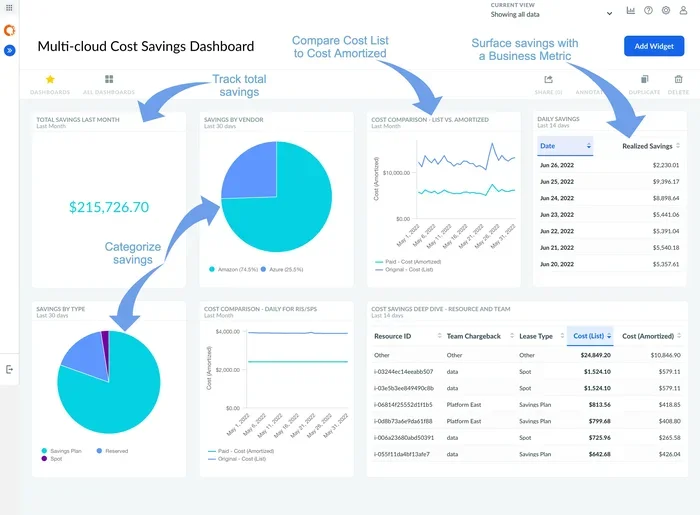
Tools like CloudHealth by VMware, Spot.io, Apptio Cloudability, and Flexera One offer multi-cloud cloud cost management. They aggregate billing data from AWS, Azure, and Google Cloud into a single dashboard. Many also provide automated recommendations for rightsizing and waste reduction.
These platforms are especially valuable for organizations practicing cloud financial operations, or FinOps. They bring finance and engineering teams together around shared visibility and accountability.
Common Mistakes in Cloud Cost Tracking
Even well-intentioned teams make mistakes when tracking cloud spending. Here are the most common ones to avoid.
Mistake 1: Ignoring Data Transfer Costs
Many teams focus on compute and storage but forget about data transfer. Egress fees – the cost of moving data out of the cloud – can be surprisingly high. If your application moves large amounts of data between regions or to external users, these fees can dominate your bill.
Mistake 2: Not Setting Up Budgets and Alerts
Without budgets and alerts, you have no early warning system. A misconfigured auto-scaling group can spin up hundreds of instances in minutes. Setting up cloud budget planning alerts ensures you catch these issues before the damage is done.
Mistake 3: Over-Reliance on a Single Pricing Model
Sticking to one pricing model for all workloads is a missed opportunity. Mix pay-as-you-go for variable workloads, reserved instances for steady-state databases, and spot instances for batch jobs. This cloud cost optimization strategy can save 30 to 50 percent on your compute bill.
Mistake 4: Neglecting Storage Cleanup
Storage is cheap per gigabyte, but it adds up fast. Old snapshots, orphaned volumes, and unused S3 buckets all bill silently. Schedule regular storage audits as part of your cloud cost analysis routine.
Expert Tips for Optimizing Cloud Spending
Top cloud teams do not just measure costs. They actively optimize them. Here are some expert-backed strategies to level up your cloud cost management game.
Implement a FinOps Culture
Cloud financial operations, or FinOps, is a practice that brings finance, engineering, and business teams together around cloud spending. The goal is shared ownership and accountability. When developers can see the cost impact of their architectural decisions, they naturally make more efficient choices.
Start small. Pick one team or project and give them visibility into their cloud spending. Share reports regularly. Celebrate savings. Over time, expand this practice across the organization.
Rightsize Your Resources
Rightsizing means matching your instance types and sizes to actual workload demands. Many companies run large instances for workloads that only need small ones. Cloud usage monitoring tools can identify these mismatches automatically. Resizing them can lead to immediate and significant savings.
Leverage Automation for Idle Resource Detection
Set up automated scripts or use tools that shut down idle resources. Development and test environments that run overnight or on weekends are prime candidates. Automating the shutdown and startup of these resources can reduce cloud computing expenses by 10 to 15 percent with minimal effort.
Negotiate and Commit Strategically
Do not be afraid to negotiate with cloud providers. If you have predictable workloads, committed use contracts or reserved capacity can save significant money. Some providers also offer volume discounts or enterprise agreements. Always review your contract terms annually to ensure you are getting the best deal.
Conclusion
Measuring cloud computing costs is not just a financial exercise. It is a strategic capability that gives your organization a real advantage. When you know exactly where your money goes, you can make smarter decisions, eliminate waste, and reinvest savings into what matters most.
Start with the basics. Gather your billing data, categorize your expenses, and analyze your usage patterns. Use the right tools and avoid the common traps that trip up most teams. Build a culture of cloud cost optimization that grows with your business.
The cloud will keep evolving. Pricing models will change. New services will emerge. But the fundamentals of measuring cloud computing costs remain the same. Track everything, analyze regularly, and optimize continuously. Your budget – and your bottom line – will thank you.
Frequently Asked Questions
What is the first step in measuring cloud computing costs?
The first step is to gather all your billing data from every cloud provider you use. Export detailed reports from AWS, Azure, Google Cloud, or whichever platforms are in your environment. Centralize this data so you can analyze it in one place and build a complete picture of your cloud spending.
How often should I review my cloud costs?
You should review your cloud costs at least monthly. However, the best practice is to do a quick review weekly and a deep analysis monthly. Weekly reviews help you catch unusual spikes early, while monthly reviews give you enough data to spot trends and make strategic adjustments to your cloud cost management plan.
What tools help with cloud cost measurement?
Native tools like AWS Cost Explorer, Google Cloud Billing Reports, and Azure Cost Management are great starting points. For more advanced needs, third-party platforms like CloudHealth, Spot.io, and Apptio Cloudability offer multi-cloud visibility and automated cloud cost analysis features.
What is FinOps and why does it matter?
FinOps, or cloud financial operations, is a practice that brings finance and engineering teams together to manage cloud spending collaboratively. It matters because it creates shared accountability, improves visibility into cloud cost allocation, and helps teams make data-driven decisions about resource usage and spending.
How can I reduce my cloud computing expenses?
You can reduce expenses by rightsizing instances, eliminating idle resources, using reserved or spot instances for predictable workloads, setting up automated shutdowns for non-production environments, and regularly auditing your storage. These cloud cost optimization strategies can cut your bill by 20 to 40 percent over time.
Is measuring cloud costs only important for large companies?
No, measuring cloud computing costs matters for businesses of every size. Small companies often have tighter budgets, making waste even more impactful. Whether you run a single workload or thousands of instances, understanding your cloud billing and cloud spending patterns helps you get the most value from every dollar you spend.