Cloud Computing Cost Comparison Find the Best Value
Finding the right cloud provider starts with a thorough cloud computing cost comparison. AWS, Azure, and Google Cloud each offer unique pricing models that can save you money or surprise you with hidden fees. This guide breaks down every major cost factor so you can choose the best value for your needs. Whether you are a startup or an enterprise, understanding cloud pricing helps you avoid overspending and maximize ROI.
Key Takeaways
- AWS, Azure, and Google Cloud each have distinct pricing strengths depending on your workload type.
- Pay-as-you-go, reserved instances, and spot pricing are the three main cloud billing models you should understand.
- Hidden costs like data transfer fees and API calls can inflate your cloud bill unexpectedly.
- Total cost of ownership includes more than just compute and storage expenses.
- Regular cost audits and optimization tools can reduce cloud spending by 20-40%.
- Multi-cloud strategies let you leverage the best pricing from each provider.
- Serverless and container-based workloads often deliver the best cost efficiency for specific use cases.
📑 Table of Contents
- Why Cloud Computing Cost Comparison Matters More Than Ever
- Major Cloud Providers and How They Stack Up
- Understanding Cloud Pricing Models
- Hidden Costs That Blow Up Cloud Bills
- How to Compare Cloud Computing Costs Effectively
- Cloud Cost Optimization Strategies
- Common Mistakes to Avoid in Cloud Cost Management
- Expert Insights on Getting the Most Value
- Key Takeaways
- Conclusion
Why Cloud Computing Cost Comparison Matters More Than Ever
Cloud computing has transformed how businesses run. But here is the thing most people miss. The cheapest option on paper is rarely the cheapest option in practice. A cloud computing cost comparison is essential before you commit to any provider.
When you look at cloud pricing, you see numbers that look simple. Compute costs per hour. Storage costs per gigabyte. Bandwidth costs per terabyte. But the real picture is far more complex. Different providers charge differently for the same basic services. And the way you use those services changes everything.
A proper cloud pricing comparison considers your actual usage patterns. It looks at your workload type. It factors in your data transfer needs. And it accounts for the tools and services you will rely on. Without this deeper analysis, you risk paying 30% to 50% more than you need to.
Small businesses especially benefit from understanding cloud computing expenses. A few extra dollars per month might not sound like much. But over a year, those costs add up fast. The goal is to find the best value, not just the lowest price tag.
In this guide, we walk through every major cloud provider. We break down their pricing structures. We highlight hidden fees. And we give you practical tips to keep your cloud infrastructure pricing as low as possible. By the end, you will know exactly how to compare and choose.
Major Cloud Providers and How They Stack Up
The cloud market is dominated by three big players. Amazon Web Services leads the pack. Microsoft Azure holds a strong second place. Google Cloud Platform rounds out the top three. Each has its own approach to cloud service providers pricing and value.
Amazon Web Services (AWS)
AWS is the oldest and largest cloud platform. It offers the widest range of services. Its pay-as-you-go pricing model is flexible and well-documented. AWS EC2 instances come in many sizes and configurations. You can choose from on-demand, reserved, or spot instances.
One of AWS strengths is its global network. It has data centers in more regions than any competitor. This means lower latency for users worldwide. But AWS pricing can be confusing. The sheer number of services and tiers makes it hard to predict costs.
AWS also charges for many extras. Data transfer out of the cloud costs extra. API calls add up over time. Even simple operations like DNS queries have associated fees. This is why a detailed cloud computing cost comparison is so important.
Microsoft Azure
Azure is a strong choice for businesses already using Microsoft products. If your team uses Windows Server, Active Directory, or SQL Server, Azure fits naturally. Its cloud computing pricing is competitive, especially for enterprise workloads.
Azure offers hybrid cloud benefits. You can extend your on-premises infrastructure into the cloud seamlessly. This is a big advantage for large organizations. Azure also provides strong compliance certifications for regulated industries.
On the cost side, Azure reserved instances can save significant money. Its cloud billing models are straightforward once you understand the basics. However, Azure pricing documentation can be dense. It takes time to navigate and compare options effectively.
Google Cloud Platform (GCP)
Google Cloud is known for its data analytics and machine learning services. Its cloud infrastructure pricing is often the most competitive for compute-heavy workloads. GCP uses a sustained-use discount model. This means you automatically get discounts for running instances over 25% of a month.
Google also offers custom machine types. You pay only for the exact resources you need. This level of flexibility can lead to real savings. GCP network pricing is also competitive. Egress costs tend to be lower than AWS and Azure.
However, GCP has a smaller service catalog compared to AWS. It also has fewer data center regions. For most standard workloads, GCP delivers excellent value. But for niche or specialized services, AWS or Azure may be better.
Understanding Cloud Pricing Models
Not all cloud pricing works the same way. Each provider offers different models. Understanding these models is the foundation of any cloud computing cost comparison. Let us break down the main options.
Pay-As-You-Go Pricing
Pay-as-you-go is the most common model. You pay for exactly what you use. No long-term contracts. No upfront commitments. This model works great for unpredictable workloads. If your traffic spikes randomly, pay-as-you-go keeps you flexible.
The downside is the premium price. On-demand rates are always higher than reserved rates. Over time, this can add up significantly. It is the most expensive option for steady, consistent workloads.
Reserved Instances and Committed Use
Reserved instances let you commit to a term. You typically choose one or three years. In exchange, you get significant discounts. AWS and Azure both offer this model. Google Cloud calls it committed use discounts.
Reserved pricing can save 30% to 60% compared to on-demand rates. This is ideal for stable, predictable workloads. If you know your baseline usage, reserved instances are a no-brainer. The key is to forecast accurately. Overestimating your needs locks you into paying for unused capacity.
Spot and Preemptible Instances
Spot instances are unused cloud capacity sold at steep discounts. AWS calls them spot instances. Azure calls them spot VMs. Google Cloud calls them preemptible VMs. These can save up to 90% compared to on-demand pricing.
The catch is availability. The cloud provider can reclaim these instances with little notice. Spot instances work best for fault-tolerant workloads. Batch processing, rendering, and testing are great use cases. You should not run mission-critical systems on spot instances.
Hidden Costs That Blow Up Cloud Bills
Here is where most businesses get caught off guard. The base compute and storage prices look reasonable. But the hidden cloud costs tell a different story. These are the charges that make your bill spike unexpectedly.
Data transfer fees are the biggest culprit. Moving data into the cloud is usually free. But moving data out costs money. AWS charges for every gigabyte that leaves its network. Azure and GCP do the same. If your application serves large files to users, these fees add up fast.
API request charges are another sneaky cost. Every time your application calls a cloud service, you pay. It might be fractions of a cent per call. But at scale, thousands of calls per second create a real bill. AWS S3 API calls, for example, can become a significant expense.
Support plans also factor into cloud computing expenses. AWS offers multiple support tiers. Basic support is free. But for serious business operations, you need business or enterprise support. These plans can cost thousands of dollars per month.
Monitoring and management tools add another layer of cost. CloudWatch, Azure Monitor, and Stackdriver all charge for detailed metrics. The free tiers are limited. As your infrastructure grows, so do these monitoring costs.
Licensing fees for software running in the cloud are often overlooked. If you bring your own license, there may be additional charges. Microsoft SQL Server in Azure, for example, has specific licensing costs. These are separate from the base compute and storage fees.
Quick Tips to Avoid Hidden Costs
- Always check data transfer pricing before choosing a provider.
- Set up billing alerts to catch unexpected charges early.
- Review your API call logs monthly to identify unnecessary usage.
- Use cloud cost management tools like AWS Cost Explorer or Azure Cost Management.
- Consider a multi-cloud strategy to spread workloads across providers.
How to Compare Cloud Computing Costs Effectively
A meaningful cloud computing cost comparison requires a structured approach. You cannot just look at one number and make a decision. Here is how to do it right.
Step 1: Define Your Workload Requirements
Start by listing what you need. How much compute power do you require? How much storage? What is your expected traffic pattern? Write everything down. Be specific about CPU, memory, and network needs.
Consider your workload type. Is it a web application? A database? A data processing pipeline? Each type has different cost drivers. Web apps are often bandwidth-heavy. Databases need consistent IOPS. Data pipelines require heavy compute for short bursts.
Step 2: Map Your Usage to Pricing Tiers
Once you know your requirements, map them to each provider’s pricing tiers. Use the pricing calculators provided by AWS, Azure, and GCP. These tools let you input your exact specifications. They give you estimated monthly costs for each provider.
Be sure to include all services you will use. Do not just compare compute prices. Include storage, networking, databases, and any specialized services. The full picture matters for an accurate total cost of ownership cloud analysis.
Step 3: Factor in Operational Costs
Operational costs are easy to overlook. These include the time your team spends managing the cloud infrastructure. If one provider is harder to manage, that costs you in labor. Also consider training costs. Moving to a new cloud platform requires your team to learn new tools.
Cloud cost optimization is an ongoing process. Plan for regular reviews and adjustments. The cheapest option today might not be the cheapest option in six months. Your needs will change. Your provider should be able to grow with you.
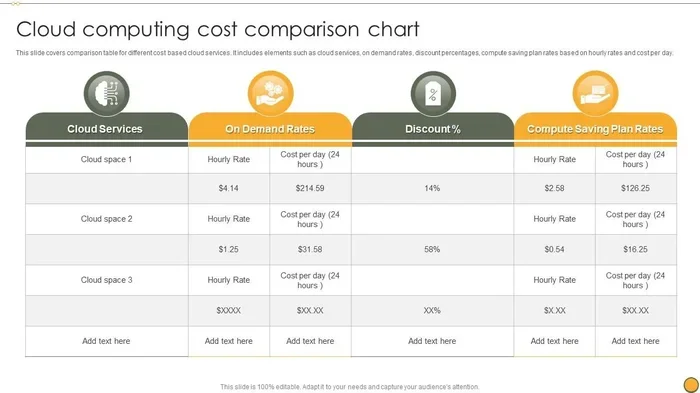
Comparison Table: High-Level Pricing Overview
| Provider | On-Demand Compute | Reserved Discount | Egress Data Transfer | Best For |
|---|---|---|---|---|
| AWS | $0.01-$0.10/hr (varies) | Up to 60% | $0.09/GB (first 10TB) | Broadest service catalog |
| Azure | $0.01-$0.09/hr (varies) | Up to 72% | $0.087/GB (first 5GB) | Enterprise and hybrid |
| GCP | $0.01-$0.08/hr (varies) | Up to 57% sustained | $0.12/GB (first 1TB) | Data analytics and ML |
Note: Prices vary by region, instance type, and configuration. Always use the official calculators for your specific needs. These figures are approximate and meant for general comparison only.
Cloud Cost Optimization Strategies
Choosing the right provider is only half the battle. Keeping your cloud computing costs low over time requires ongoing effort. Here are proven strategies that work.
Right-Size Your Resources
Many businesses over-provision their cloud resources. They buy more compute than they actually need. Regularly review your instance utilization. If your CPU usage averages below 30%, you are likely overpaying. Downsize or switch to smaller instance types.
Auto-scaling helps too. It adjusts your resources based on real-time demand. You pay for what you use, when you use it. This is one of the simplest ways to practice cloud cost optimization.
Use Reserved and Spot Instances Wisely
Mix your instance types for the best results. Use reserved instances for your baseline workloads. Use spot instances for flexible, interruptible tasks. This combination gives you both stability and savings.
Set up automation to manage spot instances. If a spot instance is reclaimed, your system should automatically replace it. This keeps your applications running without manual intervention.
Leverage Cloud Cost Management Tools
Every major provider offers cost management tools. AWS Cost Explorer shows your spending patterns. Azure Cost Management gives detailed budget tracking. GCP’s Billing reports help identify cost anomalies.
Third-party tools like CloudHealth, Spot.io, and Vantage add deeper insights. They provide cross-cloud visibility. You can compare costs across AWS, Azure, and GCP in one dashboard. This is invaluable for any multi-cloud strategy.
Implement Tagging and Accountability
Tag every resource with project, team, and environment labels. This makes it easy to track who is spending what. When costs spike, you can quickly identify the source. Tagging also creates accountability across teams.
Set up budgets and alerts for each tag. If a project exceeds its allocated cloud spending, you get notified immediately. This prevents surprises and keeps everyone mindful of cloud computing expenses.
Consider Serverless for the Right Workloads
Serverless computing eliminates the need to manage servers. AWS Lambda, Azure Functions, and Google Cloud Functions all offer this model. You pay only for the execution time of your code. There are no idle server costs.
Serverless is ideal for event-driven workloads. API backends, data processing, and scheduled tasks work great with serverless. But it is not a fit for every application. Long-running processes can become more expensive on serverless compared to traditional instances.
Common Mistakes to Avoid in Cloud Cost Management
Even experienced teams make mistakes with cloud costs. Here are the most common ones to watch out for.
- Ignoring data transfer costs. These are the silent budget killers. Always factor in egress fees.
- Choosing a provider based on brand alone. AWS is famous, but it is not always the cheapest. A proper cloud computing cost comparison reveals better options.
- Not using reserved pricing. If you have steady workloads, paying on-demand rates is leaving money on the table.
- Over-provisioning resources. Bigger is not always better. Right-size everything.
- Neglecting regular cost reviews. Cloud costs change as your usage evolves. Monthly reviews keep you in control.
- Forgetting about free tier limits. Most providers offer generous free tiers. Know the limits and stay within them.
Expert Insights on Getting the Most Value
Industry experts agree on one thing. The best cloud provider is the one that fits your specific needs. There is no universal winner. A startup with a small team will have different needs than a Fortune 500 company.
Focus on cloud computing savings over the long term, not just the first month. A provider that is 10% cheaper upfront might be 30% more expensive after a year due to hidden fees. Look at the total picture.
Also consider the ecosystem around each provider. AWS has the largest community and the most third-party integrations. Azure excels in enterprise environments. GCP leads in data and analytics. Your choice should align with your team skills and your business goals.
Finally, remember that cloud migration costs are real. Moving your existing applications to the cloud takes time and money. Factor these costs into your decision. A provider that saves you 20% on monthly costs but costs 50% more to migrate is not always the better deal.
Key Takeaways
- AWS, Azure, and Google Cloud each have distinct pricing strengths depending on your workload type.
- Pay-as-you-go, reserved instances, and spot pricing are the three main cloud billing models you should understand.
- Hidden costs like data transfer fees and API calls can inflate your cloud bill unexpectedly.
- Total cost of ownership includes more than just compute and storage expenses.
- Regular cost audits and optimization tools can reduce cloud spending by 20-40%.
- Multi-cloud strategies let you leverage the best pricing from each provider.
- Serverless and container-based workloads often deliver the best cost efficiency for specific use cases.
Conclusion
A thorough cloud computing cost comparison is the foundation of smart cloud spending. No single provider is the best for everyone. AWS offers unmatched breadth of services. Azure excels in enterprise and hybrid environments. GCP delivers strong value for data-heavy and machine learning workloads.
The key is to understand your own needs first. Map your workloads to the right pricing models. Watch out for hidden costs. And commit to ongoing optimization. Cloud spending is not a set-and-forget task. It requires regular attention and adjustment.
Use the strategies in this guide to take control of your cloud computing expenses. Start with a detailed analysis of your current usage. Compare providers side by side. And do not be afraid to switch if a better option emerges. The cloud market is competitive, and providers want your business. Use that to your advantage and find the best value for your organization.
Take action today. Run the numbers. Build a comparison spreadsheet. Talk to your team about your cloud needs. The savings you unlock through a smart cloud computing cost comparison will pay for the effort many times over.
Frequently Asked Questions
What is the cheapest cloud provider for small businesses?
There is no single cheapest provider for everyone. Google Cloud often offers the lowest base compute prices. AWS provides the most generous free tier for startups. Azure is competitive for businesses already invested in the Microsoft ecosystem. A proper cloud computing cost comparison based on your specific workload will reveal the best choice for you.
How much can I save with reserved cloud instances?
Reserved instances can save you 30% to 60% compared to on-demand pricing. AWS and Azure both offer one-year and three-year reservation options. Google Cloud provides committed use discounts for similar savings. The exact savings depend on your instance type, region, and commitment length. Always run the numbers before committing to a reserved term.
What are the most common hidden cloud costs?
Data transfer fees are the biggest hidden cost. API request charges add up quickly at scale. Support plan fees can be surprisingly high for business tiers. Monitoring and logging tools also carry additional costs. Licensing fees for software running in the cloud are another often-overlooked expense. Always read the full pricing details before committing.
Is a multi-cloud strategy worth the complexity?
For many businesses, yes. A multi-cloud strategy lets you use AWS for its breadth of services, Azure for enterprise integration, and GCP for data analytics. It also reduces vendor lock-in. However, managing multiple clouds requires more expertise and tooling. The cost savings must justify the added complexity for your specific situation.
How often should I review my cloud costs?
Monthly reviews are recommended for most businesses. Cloud usage patterns change as your applications grow. New services get added. Old resources get forgotten. Setting up automated alerts and dashboards helps you stay on top of your cloud computing expenses without manual effort every day.
Can serverless computing really save money?
Serverless can save money for the right workloads. If your application has variable traffic and short execution times, serverless is often cheaper. You pay only for actual compute time, not idle server hours. However, for long-running or consistently high-traffic applications, traditional instances may be more cost-effective. Always benchmark both options before deciding.