The Complete Guide to Data Migration in Cloud Computing
Data migration in cloud computing is the process of moving your data from on-premise systems to cloud platforms safely and efficiently. This guide covers every step of the journey, from planning and strategy to execution and testing. You will learn about the different migration types, common challenges, and the best tools available today.
Key Takeaways
- Cloud migration offers scalability, cost savings, and better accessibility for businesses of all sizes.
- There are six main types of data migration in cloud computing, including lift-and-shift, re-platforming, and refactoring.
- A solid migration strategy reduces risks and ensures business continuity throughout the process.
- Common challenges include data loss, downtime, and security concerns — but these can be managed with proper planning.
- Testing and validation are critical to confirm that migrated data is complete, accurate, and accessible.
- Choosing the right migration tools can save time and reduce manual effort significantly.
📑 Table of Contents
- What Is Data Migration in Cloud Computing?
- Why Companies Move Data to the Cloud
- Types of Data Migration in Cloud Computing
- Step-by-Step Migration Strategy
- Common Migration Challenges and How to Overcome Them
- Best Tools for Data Migration in Cloud Computing
- Best Practices for a Smooth Migration
- Conclusion
What Is Data Migration in Cloud Computing?
Data migration in cloud computing means moving your data from one environment to another. Usually, this involves shifting data from on-premise servers or legacy systems to a cloud-based platform. Think of it like moving your entire filing cabinet into a digital, accessible, and secure online space.
The process is not just about copying files. It requires careful planning, the right tools, and a clear strategy. Companies migrate data to cloud storage for many reasons. They want better scalability, lower costs, and improved access for their teams.
Whether you are a small startup or a large enterprise, understanding how cloud migration works is essential. The better you plan, the smoother the transition will be. Let us explore why so many businesses are making this move today.
Why Companies Move Data to the Cloud
More and more organizations are adopting cloud computing for their data needs. The reasons are clear and compelling. Here is why businesses choose to migrate:
Cost Savings
Running on-premise servers is expensive. You pay for hardware, maintenance, cooling, and IT staff. Cloud migration eliminates many of these costs. You pay only for what you use, which makes budgeting much easier.
Scalability
As your business grows, your data needs grow too. Cloud storage scales up or down based on demand. You do not need to buy new servers every time your data volume increases.
Better Accessibility
With cloud-based platforms, your team can access data from anywhere. Remote work has made this even more important. Employees can collaborate in real time without being in the same office.
Improved Security
Leading cloud providers invest heavily in data security. They offer encryption, compliance certifications, and automatic backups. Most small and mid-sized businesses cannot match this level of protection on their own.
Disaster Recovery
Cloud platforms make business continuity much simpler. If something goes wrong at your physical location, your data stays safe in the cloud. Recovery times are faster and more reliable.
Types of Data Migration in Cloud Computing
Not all cloud data migration projects look the same. Different businesses have different needs. Here are the most common types of migration approaches:
Lift and Shift
This is the simplest method. You move your data and applications as-is to the cloud. No major changes are needed. It is fast and works well for businesses that want a quick transition.
Re-Platforming
Also known as “lift, tinker, and shift,” this approach makes small optimizations during migration. You might change a database engine or adjust configurations. It offers a balance between speed and improvement.
Refactoring or Re-Architecting
This is the most thorough approach. You redesign your applications to be cloud-native. It takes more time and effort, but it delivers the best long-term results in performance and scalability.
Hybrid Migration
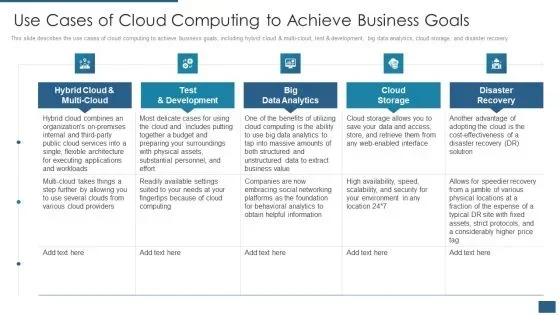
Some businesses keep part of their data on-premise while moving the rest to the cloud. This hybrid cloud approach is common for organizations with compliance requirements or legacy systems that cannot be moved easily.
Data Replication
This involves copying data from one system to another in real time or near real time. It is useful for maintaining data synchronization between on-premise and cloud environments during a transition.
Step-by-Step Migration Strategy
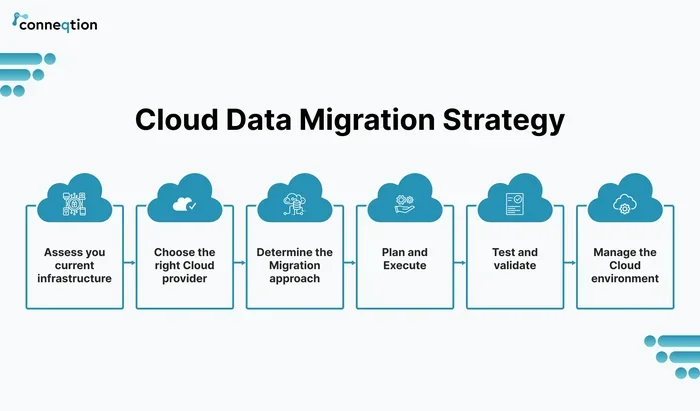
A successful data migration in cloud computing project follows a clear process. Skipping steps leads to problems. Here is a practical roadmap you can follow:
Step 1: Assess Your Current Environment
Start by understanding what you have. Catalog all your data sources, formats, and volumes. Identify legacy systems that may need special attention. This assessment helps you estimate the scope of the project.
Step 2: Define Your Goals
Ask yourself what you want to achieve. Is it cost reduction? Better performance? Improved collaboration? Clear goals guide every decision you make during the migration.
Step 3: Choose the Right Cloud Provider
Compare providers like AWS, Microsoft Azure, and Google Cloud. Look at their storage options, pricing models, and security features. Choose the one that fits your migration requirements best.
Step 4: Plan Your Migration Approach
Decide which type of migration fits your needs. Will you lift and shift, or refactor? Create a detailed timeline with milestones. Assign roles and responsibilities to your team members.
Step 5: Execute the Migration
Begin moving your data according to the plan. Start with a small batch to test the process. Monitor for errors, performance issues, or data corruption during this phase.
Step 6: Test and Validate
After migration, verify that all data is intact and accessible. Run migration testing to check data integrity, application performance, and user access. Fix any issues before going live.
Step 7: Optimize and Monitor
Once your data is in the cloud, keep monitoring performance. Use cloud analytics tools to identify optimization opportunities. Regularly review costs and adjust your resources as needed.
Common Migration Challenges and How to Overcome Them
Data migration in cloud computing is not without its hurdles. Understanding these challenges helps you prepare and avoid costly mistakes.
Data Loss and Corruption
Data can get lost or corrupted during transfer. To prevent this, always create a full backup before migration begins. Use reliable migration tools that verify data integrity automatically.
Downtime and Business Disruption
Nobody wants their systems going offline during migration. Plan your migration during off-peak hours. Use incremental migration techniques to reduce downtime and keep operations running.
Security and Compliance Risks
Moving sensitive data to the cloud raises security concerns. Ensure your cloud provider meets industry compliance standards. Use encryption for data both in transit and at rest. Implement strong access controls.
Compatibility Issues
Legacy systems may not work well with modern cloud platforms. Test compatibility early in the process. Consider re-platforming or refactoring if your current setup is too outdated.
Cost Overruns
Cloud costs can spiral if not managed carefully. Set a budget and track spending throughout the migration. Use cost monitoring tools provided by your cloud provider.
Skill Gaps in the Team
Your team may not have experience with cloud migration tools and processes. Invest in training or hire experts. Many cloud providers offer free migration resources and support programs.
Best Tools for Data Migration in Cloud Computing
Using the right tools makes cloud data migration faster and more reliable. Here are some of the most popular options:
- AWS Database Migration Service (DMS): Great for moving databases to AWS. It supports both homogeneous and heterogeneous migrations.
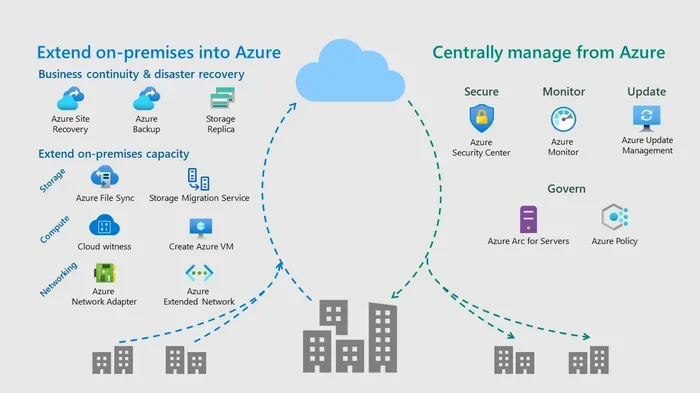
- Azure Migrate: Microsoft’s all-in-one migration tool. It assesses on-premise workloads and helps with migration to Azure.
- Google Cloud Migrate for Compute Engine: Helps you move virtual machines to Google Cloud with minimal downtime.
- CloudEndure Migration: Works across multiple cloud platforms. It offers continuous replication and automated failover.
- Talend Data Integration: A powerful tool for data integration and transformation during migration projects.
- AWS Snowball: Useful for large-scale data transfers. You ship physical devices to AWS for data ingestion.
Choose tools based on your migration requirements, budget, and cloud provider. Most of these tools offer free trials or basic tiers that let you test before committing.
Best Practices for a Smooth Migration
Follow these proven tips to make your data migration in cloud computing project a success:
- Start with a pilot migration. Move a small subset of data first. This helps you identify issues early and build confidence in the process.
- Document everything. Keep detailed records of your migration plan, timelines, and decisions. This makes troubleshooting easier and helps with future migrations.
- Communicate with stakeholders. Keep your team and business leaders informed throughout the process. Transparency builds trust and reduces resistance to change.
- Prioritize data security. Use encryption, access controls, and audit logs at every stage. Security should never be an afterthought.
- Plan for rollback. Always have a backup plan in case something goes wrong. A rollback strategy gives you peace of mind and protects your business.
- Monitor performance after migration. Keep an eye on application speed, data access times, and user feedback. Optimization is an ongoing process.
Quick Tips for Success
- Always back up your data before starting any migration.
- Use incremental migration to reduce risk and downtime.
- Test thoroughly before declaring the migration complete.
- Train your team on the new cloud environment before going live.
- Set clear KPIs to measure the success of your migration project.
Common Mistakes to Avoid
- Skipping the assessment phase and jumping straight into migration.
- Underestimating the time and resources needed for the project.
- Ignoring data cleanup before migration, which leads to transferring unnecessary or duplicate data.
- Not involving key stakeholders in the planning process.
- Failing to test the migrated data thoroughly before cutting over.
Expert Insights
“The biggest mistake we see in cloud migration projects is rushing the planning phase. Companies that invest time in assessment and strategy save themselves from costly rework and data loss later on.” — This insight from industry experts highlights why a structured approach matters so much.
Successful data migration in cloud computing is not just a technical project. It is a business transformation. When done right, it unlocks new levels of efficiency, agility, and innovation for your organization.
Conclusion
Data migration in cloud computing is a powerful way to modernize your business infrastructure. It offers real benefits in cost savings, scalability, security, and accessibility. But success depends on careful planning, the right tools, and a clear strategy.
Start by understanding your current environment and defining clear goals. Choose the migration type that fits your needs. Use proven tools and follow best practices at every step. And never underestimate the importance of testing and optimization after migration.
Whether you are taking your first steps toward the cloud or optimizing an existing setup, the principles in this guide will help you succeed. Cloud migration is an investment in your business’s future. Make it count by doing it right.
Frequently Asked Questions
What is data migration in cloud computing?
Data migration in cloud computing is the process of moving data from on-premise systems or legacy platforms to a cloud-based environment. It involves planning, transferring, testing, and optimizing data to ensure it works properly in the new cloud setup.
How long does a cloud data migration take?
The timeline varies based on the size and complexity of the project. Small migrations can take a few weeks, while large enterprise migrations may take several months. Proper planning and the right approach can significantly reduce the timeline.
What are the main types of cloud migration?
The main types include lift and shift, re-platforming, refactoring, hybrid migration, and data replication. Each approach has its own benefits and is suited for different business needs and technical requirements.
Is cloud data migration secure?
Yes, when done correctly. Leading cloud providers offer strong security features like encryption, access controls, and compliance certifications. The key is to follow best practices for data security throughout the entire migration process.
What tools are best for data migration in cloud computing?
Popular tools include AWS Database Migration Service, Azure Migrate, Google Cloud Migrate, CloudEndure, and Talend. The best tool depends on your cloud provider, budget, and specific migration requirements.
What are the biggest risks in cloud migration?
The main risks include data loss, downtime, security breaches, and cost overruns. These risks can be minimized with proper planning, thorough testing, and choosing experienced migration partners or tools.