Different Types of Cloud Computing Services Explained
Cloud computing services come in three main flavors: IaaS, PaaS, and SaaS. Each type serves a different purpose and fits different business needs. Understanding these cloud computing models helps you make smarter technology decisions. This guide breaks down every option in simple, clear language. By the end, you will know exactly which service fits your goals.
Key Takeaways
- IaaS gives you raw infrastructure: virtual machines, storage, and networking you control yourself.
- PaaS offers a development platform: perfect for building apps without managing servers.
- SaaS delivers ready-to-use software: no installation or maintenance needed on your end.
- Deployment models matter too: public, private, hybrid, and multi-cloud each have unique benefits.
- Choosing the right type depends on your needs: budget, technical skill, and business goals all play a role.
- Serverless computing is a growing trend: it lets you run code without managing any infrastructure at all.
- Scalability is a core advantage: cloud services let you grow or shrink resources on demand.
📑 Table of Contents
What Are the Different Types of Cloud Computing Services?
Cloud computing has changed the way businesses and individuals use technology. Instead of buying expensive hardware, you rent computing resources over the internet. This approach is flexible, affordable, and incredibly powerful.
But not all cloud services are the same. The industry recognizes three main categories: IaaS, PaaS, and SaaS. Each one serves a different purpose and appeals to different users. Think of them like rental properties. IaaS gives you an empty lot. PaaS gives you a house frame. SaaS hands you a fully furnished home ready to move into.
Understanding these cloud computing models is essential for anyone making technology decisions. Whether you are a startup founder, an IT manager, or a curious learner, this guide covers everything you need. We will walk through each type in detail, compare them side by side, and help you pick the best fit.
The right cloud service type can save you money, boost productivity, and future-proof your operations. Let us dive in and explore each option thoroughly.
IaaS – Infrastructure as a Service
IaaS stands for Infrastructure as a Service. It is the most hands-on cloud service model. With IaaS, you rent fundamental computing resources like virtual machines, storage, and networking. You manage everything on top of that infrastructure yourself.
Think of IaaS as renting a bare piece of land. The cloud provider owns the land and basic utilities. You decide what to build on it and how to maintain it. This gives you maximum control and flexibility.
How IaaS Works
When you use IaaS, the provider hosts physical servers in their data centers. They also handle cooling, power, and physical security. You access these resources remotely through the internet. You choose the operating system, applications, and configurations you want.
Popular IaaS providers include Amazon Web Services (AWS), Microsoft Azure, and Google Cloud Platform. Each offers thousands of virtual machines, storage options, and networking tools.
Who Benefits Most from IaaS?
IaaS works best for these situations:
- IT teams who want full control over their environment
- Startups that want to avoid buying physical hardware
- Companies running legacy applications that need custom infrastructure
- Developers who need scalable testing environments
The pay-as-you-go pricing model is a huge advantage. You only pay for what you use. This makes IaaS cost-effective for businesses with fluctuating workloads.
Real-World IaaS Examples
Amazon Web Services offers Amazon EC2, which provides virtual servers on demand. Microsoft Azure offers Azure Virtual Machines. Google Cloud provides Compute Engine. All of these let you spin up a server in minutes and scale it as needed.
Cloud infrastructure through IaaS also supports cloud migration projects. Many businesses move their existing workloads to IaaS before optimizing them further.
PaaS – Platform as a Service
PaaS stands for Platform as a Service. It sits between IaaS and SaaS in the cloud stack. PaaS provides a complete development and deployment environment. You build, test, and launch applications without worrying about the underlying infrastructure.
Imagine PaaS as renting a fully equipped kitchen. The appliances, counters, and utilities are all there. You just focus on cooking the meal. In this case, the meal is your application.
How PaaS Works
With PaaS, the cloud provider manages servers, storage, networking, and operating systems. They also provide development tools, database management systems, and middleware. You write your code and deploy it. The platform handles everything else.
This model is perfect for application development. It removes the burden of managing infrastructure so developers can focus on writing code.
Who Benefits Most from PaaS?
PaaS is ideal for these users:
- Developers who want to build apps quickly
- Development teams that need collaboration tools
- Businesses creating custom applications without a full IT department
- Freelance developers who want to avoid server management
Serverless computing is closely related to PaaS. With serverless, you run code in response to events without provisioning any servers at all. AWS Lambda and Google Cloud Functions are popular serverless platforms in this category.
Real-World PaaS Examples
Heroku is a well-known PaaS platform. It lets developers deploy apps in minutes with minimal configuration. Google App Engine and Microsoft Azure App Services are other strong examples. These platforms handle scaling, patching, and maintenance automatically.
PaaS also supports rapid application development. Teams can build, test, and launch products faster than with traditional methods. This speed advantage is why many companies choose PaaS for new projects.
SaaS – Software as a Service
SaaS stands for Software as a Service. It is the most consumer-friendly cloud model. SaaS delivers fully functional software applications over the internet. You access them through a web browser. No installation, no maintenance, no server management.
Think of SaaS like ordering food at a restaurant. The meal is prepared and served to you. You just enjoy it. You do not need to know how the kitchen works or own the cooking equipment.
How SaaS Works
SaaS providers host and manage the application and all its underlying infrastructure. They handle updates, security patches, and data storage. Users simply log in and start working. Most SaaS apps run on a subscription model.
Cloud hosting makes SaaS possible. The application runs on distributed servers across multiple data centers. This ensures high availability and performance for all users.
Who Benefits Most from SaaS?
SaaS is perfect for these scenarios:
- Small businesses that need professional software without IT staff
- Remote teams who need access from anywhere
- Companies wanting quick deployment without complex setup
- Individuals using productivity or communication tools
Cloud storage services like Google Drive and Dropbox are also SaaS products. They store your files online and let you access them from any device.
Real-World SaaS Examples
Some of the most popular software in the world is SaaS. Google Workspace (Gmail, Docs, Sheets) is a prime example. Salesforce is a leading customer relationship management platform built on SaaS. Microsoft 365, Slack, Zoom, and Dropbox all fall into this category.
SaaS has become the dominant cloud service model for end users. Most people interact with SaaS daily without even realizing it. The on-demand computing nature of SaaS means you can start using the software within minutes of signing up.
Cloud Deployment Models
Beyond the three service types, cloud computing also has different deployment models. These describe where and how the cloud infrastructure is hosted. Understanding deployment models helps you make better decisions about cloud computing solutions.
Public Cloud
A public cloud is owned and operated by a third-party provider. Resources are shared among multiple customers. This model offers the lowest cost and highest scalability. AWS, Azure, and Google Cloud are all public cloud providers. Public clouds are great for startups, small businesses, and projects with variable workloads.
Private Cloud
A private cloud is dedicated to a single organization. It can be hosted on-premises or by a third-party provider. Private clouds offer greater control and security. They are popular in industries with strict compliance requirements like healthcare and finance.
Hybrid Cloud
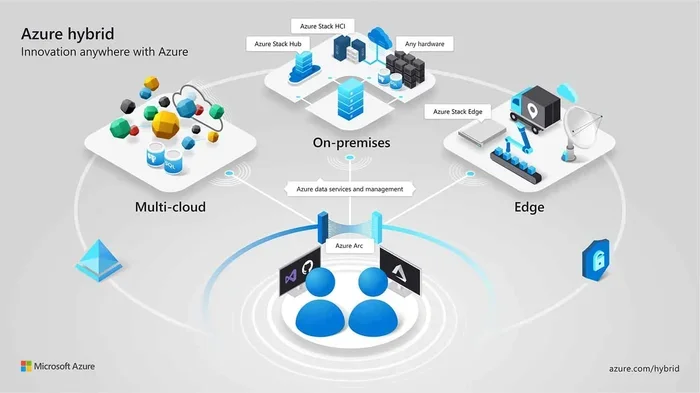
A hybrid cloud combines public and private clouds. It lets you keep sensitive data on private infrastructure while using public cloud resources for less sensitive workloads. This model gives you the best of both worlds. Many enterprises adopt hybrid cloud strategies for flexibility and cost savings.
Multi-Cloud
Multi-cloud means using services from multiple cloud providers simultaneously. For example, you might use AWS for compute and Google Cloud for analytics. Multi-cloud helps avoid vendor lock-in and improves redundancy. It is increasingly common among large organizations.
Comparison Table
Here is a quick comparison of the main deployment models:
- Public Cloud: Shared resources, lowest cost, highest scalability, managed by a provider.
- Private Cloud: Dedicated resources, higher cost, greater control, stronger security.
- Hybrid Cloud: Mix of public and private, balanced cost and control, flexible.
- Multi-Cloud: Multiple providers, avoids lock-in, complex to manage, high resilience.
How to Choose the Right Cloud Service Type
Choosing between IaaS, PaaS, and SaaS depends on several factors. There is no one-size-fits-all answer. Your decision should align with your technical capabilities, budget, and business goals.
Consider Your Technical Expertise
If you have a strong IT team, IaaS gives you the most control. If you are a developer who wants to focus on code, PaaS is your best bet. If you just need software to run your business, SaaS is the simplest choice.
Think About Your Budget
SaaS usually has the lowest upfront cost because you rent a finished product. PaaS costs a bit more since you are building on a platform. IaaS can be very cost-effective but requires more technical investment in setup and management.
Evaluate Your Security Needs
SaaS providers handle most security responsibilities. With IaaS, you are responsible for securing your own applications and data. PaaS falls in the middle. The provider secures the platform, but you manage application-level security.
Quick Tips for Decision Making
- Start with SaaS if you need ready-made software quickly.
- Choose PaaS if you are building custom applications.
- Go with IaaS if you need full control over your infrastructure.
- Consider hybrid approaches for complex business needs.
- Review your cloud migration strategy before committing to any single provider.
Cloud scalability is another important factor. All three service types offer scalability, but the degree of control varies. IaaS gives you the most granular control over scaling. SaaS scales automatically in the background. PaaS scales your applications with minimal effort from you.
Common Mistakes to Avoid
- Choosing a model based on trends alone without evaluating your actual needs.
- Ignoring long-term costs beyond the initial subscription or usage fees.
- Overlooking vendor lock-in risks, especially with PaaS and SaaS.
- Underestimating the training required for your team to adopt new tools.
- Skipping security reviews before migrating data to any cloud environment.
Expert Insights
Industry experts agree that most businesses benefit from a combination of cloud models. A multi-cloud strategy using different service types for different workloads is increasingly the norm. For example, a company might use SaaS for email and CRM, PaaS for its customer-facing app, and IaaS for data analytics pipelines.
The key is to match each workload to the right service model. This approach maximizes efficiency, controls costs, and ensures the best performance for every part of your business.
Resource pooling and on-demand computing are foundational principles behind all cloud services. These concepts ensure that computing resources are shared efficiently and available whenever you need them. Understanding these basics helps you appreciate why cloud services are so powerful and flexible.
Conclusion
The different types of cloud computing services each serve a unique purpose. IaaS gives you raw infrastructure and total control. PaaS provides a platform for building and deploying applications. SaaS delivers complete software solutions ready to use. Beyond these, deployment models like public, private, hybrid, and multi-cloud add another layer of choice.
Choosing the right cloud service type is a strategic decision. It affects your budget, your team’s productivity, and your security posture. Take the time to evaluate your needs carefully. Start small if you are new to the cloud. You can always expand and evolve your setup as your requirements grow.
Cloud computing services have revolutionized the technology landscape. They empower businesses of all sizes to access world-class infrastructure and software. The best time to explore your options is now. Whether you are migrating existing systems or building something new, the right cloud model is out there waiting for you.
Embrace the cloud with confidence. Use this guide as your starting point. Make informed decisions, and let cloud technology work for you.
Frequently Asked Questions
What is the difference between IaaS, PaaS, and SaaS?
IaaS provides raw infrastructure like virtual machines and storage that you manage yourself. PaaS offers a development platform where you build applications without managing servers. SaaS delivers complete software applications that you simply use through a browser. Think of IaaS as renting an empty building, PaaS as renting a workshop, and SaaS as renting a fully serviced office.
Which cloud service type is best for small businesses?
SaaS is usually the best starting point for small businesses. It requires no technical expertise and has minimal upfront costs. You can access professional software immediately. As your business grows, you may add PaaS for custom apps or IaaS for more control over your infrastructure.
Can I use more than one cloud service type at the same time?
Absolutely. Many businesses use a combination of IaaS, PaaS, and SaaS for different purposes. This approach is called a multi-cloud or hybrid strategy. For example, you might use SaaS for email, PaaS for your app, and IaaS for data storage. Mixing service types lets you optimize each workload individually.
Is cloud computing secure?
Reputable cloud providers invest heavily in security measures. They use encryption, access controls, and regular audits to protect your data. However, security is a shared responsibility. The provider secures the infrastructure, but you must secure your applications, passwords, and access permissions. Following best practices ensures a strong security posture.
How much do cloud computing services cost?
Costs vary widely depending on the service type and usage. SaaS typically operates on a monthly subscription per user. IaaS and PaaS usually follow a pay-as-you-go model where you pay for the resources you consume. Most providers offer free tiers for testing, so you can explore options before committing to a paid plan.
What is serverless computing, and how does it fit into cloud services?
Serverless computing is a cloud execution model where the provider manages all server infrastructure automatically. You simply write and deploy code, and the platform runs it in response to events. It falls under the PaaS category and is perfect for building microservices and event-driven applications. Serverless eliminates the need to provision or manage any servers at all.
=== SEO Title ===
Different Types of Cloud Computing Services Explained
=== META TITLE ===
Different Types of Cloud Computing Services Explained
=== URL SLUG ===
/different-types-of-cloud-computing-services