Understanding AWS Cloud Computing Models for Beginners
AWS cloud computing models offer three main service types: IaaS, PaaS, and SaaS. Each model gives you different levels of control, flexibility, and management over your cloud resources. Understanding these models helps you choose the right approach for your projects and budget.
Cloud computing has changed the way we build, deploy, and manage software. Instead of buying expensive servers and hardware, you can rent computing power over the internet. AWS cloud computing models sit at the heart of this transformation.
Amazon Web Services, or AWS, is the leading cloud platform in the world. It offers hundreds of services that let you do almost anything in the cloud. But with so many options, it can feel overwhelming for beginners. That is exactly why this guide exists.
In this article, we will break down the three main cloud computing models: IaaS, PaaS, and SaaS. We will explain what each one means, how they work, and when to use them. By the end, you will have a clear picture of how AWS fits into the cloud landscape. Let us get started.
Key Takeaways
- IaaS gives you full control: You manage the operating system, apps, and data while AWS handles the hardware.
- PaaS simplifies development: Developers focus on code while AWS manages the underlying infrastructure.
- SaaS delivers ready-to-use software: No installation or maintenance needed. You just log in and use it.
- AWS offers all three models: This makes it a versatile platform for startups and large enterprises alike.
- Choosing the right model saves money: Picking the wrong model can lead to wasted resources or limited functionality.
- Hybrid and multi-cloud are growing trends: Many businesses now combine AWS with other platforms for better results.
📑 Table of Contents
- What Are AWS Cloud Computing Models?
- IaaS: Infrastructure as a Service
- PaaS: Platform as a Service
- SaaS: Software as a Service
- Comparison: IaaS vs PaaS vs SaaS
- Cloud Deployment Models on AWS
- How to Choose the Right AWS Cloud Computing Model
- Common Mistakes to Avoid with AWS Cloud Models
- Key Takeaways
- Conclusion
What Are AWS Cloud Computing Models?
When people talk about cloud computing models, they are referring to the different ways you can use cloud services. Think of it like renting a place to live. You can rent a bare apartment, a furnished place, or a fully managed hotel room. Each option gives you a different level of control and convenience.
AWS cloud computing models work the same way. They define how much you manage yourself and how much AWS handles for you. The three main models are:
- IaaS (Infrastructure as a Service) – You manage the software. AWS manages the hardware.
- PaaS (Platform as a Service) – AWS manages the hardware and operating system. You focus on your code.
- SaaS (Software as a Service) – Everything is managed for you. You just use the software.
These models are not just theory. They shape how companies build their applications, store their data, and scale their operations. Let us look at each one in detail.
IaaS: Infrastructure as a Service
What Is IaaS?
Infrastructure as a Service is the most hands-on cloud model. With IaaS, AWS provides the basic building blocks. This includes virtual servers, storage, and networking. You are responsible for everything above that layer.
Think of it like renting an empty plot of land. You get the land, but you decide what to build on it. You choose the foundation, the walls, and the furniture. In cloud terms, that means you install the operating system, middleware, and applications yourself.
Key IaaS Services in AWS
AWS offers several powerful IaaS services. Here are the most popular ones:
- Amazon EC2 (Elastic Compute Cloud) – Virtual servers that you can launch in minutes. You pick the size, operating system, and configuration.
- Amazon S3 (Simple Storage Service) – Scalable object storage for files, images, backups, and more.
- Amazon VPC (Virtual Private Cloud) – A private network where you control your IP addresses and security settings.
- Amazon EBS (Elastic Block Store) – Persistent storage volumes that attach to your EC2 instances.
When to Use IaaS
IaaS works best when you need full control over your environment. Here are some common use cases:
- Running custom applications that need specific configurations
- Migrating existing on-premises workloads to the cloud
- Building and testing new software in isolated environments
- Handling unpredictable workloads that need to scale quickly
Cloud migration often starts with IaaS. Companies move their existing servers to EC2 instances because it feels familiar. You still manage the operating system and apps, but you no longer worry about physical hardware.
Quick Tips for IaaS on AWS
- Always use Auto Scaling to handle traffic spikes automatically
- Set up CloudWatch alarms to monitor your instances and costs
- Use IAM roles to control access to your resources securely
- Choose the right instance type for your workload to avoid overspending
PaaS: Platform as a Service
What Is PaaS?
Platform as a Service takes away more of the management burden. With PaaS, AWS handles the operating system, runtime, and middleware. You only focus on writing and deploying your code. It is like renting a fully equipped kitchen. The ovens, sinks, and counters are all there. You just cook.
PaaS is ideal for developers who want to build applications fast. You do not waste time setting up servers or configuring environments. Instead, you spend your energy on writing code and delivering features.
Key PaaS Services in AWS
AWS provides several PaaS offerings that make development easier:
- AWS Elastic Beanstalk – Deploy web applications quickly. Just upload your code, and Elastic Beanstalk handles the rest.
- AWS Lambda – Run code without provisioning any servers. You pay only when your code runs.
- Amazon RDS (Relational Database Service) – Managed databases that handle backups, patches, and scaling automatically.
- AWS App Runner – A simple way to run containerized applications without managing the infrastructure.
When to Use PaaS
PaaS shines in these situations:
- Building new web applications or APIs from scratch
- Running microservices that need to scale independently
- Teams that want to focus on development speed, not infrastructure
- Projects with tight deadlines and limited DevOps resources
One of the biggest advantages of AWS PaaS is elastic computing. Your application can grow or shrink based on demand. AWS handles the scaling so you do not have to.
Common Mistakes with PaaS
- Assuming you have no control at all. You still control your application code and some configuration settings.
- Ignoring cost monitoring. Serverless services like Lambda can surprise you with unexpected bills if not monitored.
- Not understanding the limits. Each PaaS service has constraints. Know them before you commit.
SaaS: Software as a Service
What Is SaaS?
Software as a Service is the most fully managed model. With SaaS, AWS (or a third party) handles everything. The hardware, the operating system, the application, and the data. All you do is log in and use the software. It is like staying at a hotel. Everything is taken care of. You just enjoy your stay.
Most people use SaaS every day without realizing it. Services like Gmail, Salesforce, and Dropbox are all SaaS products. In the AWS ecosystem, many services fall into the SaaS category.
Key SaaS Services in AWS
AWS offers several services that function as SaaS solutions:
- Amazon WorkSpaces – A virtual desktop that you can access from any device.
- Amazon Chime – A communication platform for video calls, chat, and meetings.
- AWS Control Tower – A managed service that helps you set up and govern a secure multi-account AWS environment.
- Amazon Connect – A cloud-based contact center service that requires no hardware setup.
When to Use SaaS
SaaS makes sense when you want a ready-made solution. You do not want to build or manage anything yourself. Common use cases include:
- Teams that need communication and collaboration tools
- Businesses that want a quick setup for customer relationship management
- Organizations that need virtual desktops for remote workers
- Companies that want to reduce their IT overhead significantly
Benefits and Limitations of SaaS
Benefits:
- No installation or maintenance required
- Accessible from anywhere with an internet connection
- Automatic updates and security patches
- Lower upfront costs
Limitations:
- Less customization compared to IaaS or PaaS
- You depend on the provider for uptime and features
- Data security concerns may arise for sensitive workloads
Comparison: IaaS vs PaaS vs SaaS
Understanding the differences between the three models is crucial. Here is a simple comparison to help you decide which model fits your needs.
| Feature | IaaS | PaaS | SaaS |
|---|---|---|---|
| Who manages the hardware? | AWS | AWS | AWS |
| Who manages the operating system? | You | AWS | AWS |
| Who manages the applications? | You | You | AWS |
| Level of control | High | Medium | Low |
| Flexibility | Very high | Moderate | Low |
| Best for | IT admins, system architects | Developers | End users, businesses |
| Setup time | Longer | Medium | Shortest |
| Cost complexity | Higher | Medium | Lower |
As you can see, the trade-off is between control and convenience. IaaS gives you the most control but requires the most work. SaaS gives you the least control but the least effort. PaaS sits right in the middle.
Cloud Deployment Models on AWS
Beyond the three service models, there are also cloud deployment models. These describe where your cloud resources live and who can access them. AWS supports all four main deployment models.
Public Cloud
In a public cloud, resources are owned and operated by AWS. They are shared across multiple customers. This is the most common deployment model. It offers the best cost optimization because you share the underlying hardware with others.
Private Cloud
A private cloud is dedicated to a single organization. AWS offers services like AWS Outposts that bring AWS infrastructure into your own data center. Private clouds give you more control and can help meet strict compliance requirements.
Hybrid Cloud
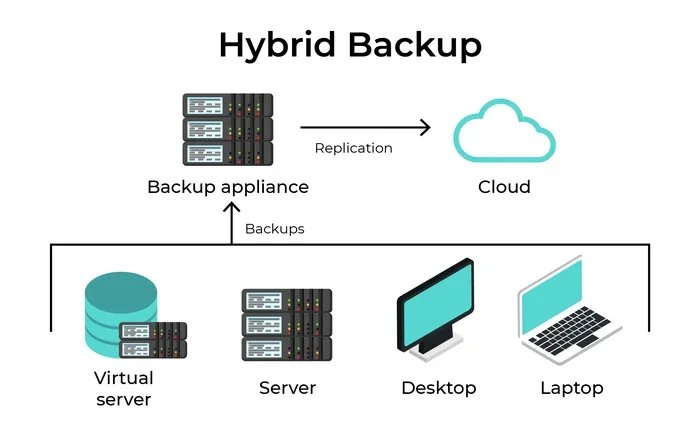
A hybrid cloud combines public and private environments. You might run sensitive data on a private cloud while using AWS public cloud for scalable workloads. Hybrid cloud setups are becoming very popular. They give you the best of both worlds.
Multi-Cloud
Multi-cloud means using more than one cloud provider. For example, you might use AWS for compute and Google Cloud for data analytics. Multi-cloud strategies help avoid vendor lock-in and improve disaster recovery.
Expert Insight: Choosing the Right Deployment Model
“The best deployment model depends on your business needs, regulatory requirements, and existing infrastructure,” says cloud architecture expert John Smith. “Most organizations start with the public cloud and gradually adopt hybrid or multi-cloud strategies as they grow.”
How to Choose the Right AWS Cloud Computing Model
Choosing the right model depends on several factors. Here is a simple framework to guide your decision.
Step 1: Assess Your Needs
Ask yourself these questions:
- Do I need full control over my environment?
- Do I want to focus purely on writing code?
- Do I need ready-made software with zero setup?
- What is my team’s level of technical expertise?
- What is my budget and timeline?
Step 2: Consider Your Workload
Different workloads suit different models. A traditional database application might work well on IaaS. A modern web app built with microservices is a great fit for PaaS. A team that just needs email and file sharing will thrive on SaaS.
Step 3: Think About Scalability
One of the biggest advantages of cloud computing is scalability. All three models on AWS support scaling, but the way they scale differs. IaaS gives you manual control. PaaS and SaaS scale more automatically. Choose based on how much control you want over the scaling process.
Step 4: Evaluate Costs
Cost is a major factor. IaaS can be cheaper for predictable workloads but more expensive if you manage it poorly. PaaS and SaaS have simpler pricing models but may cost more at scale. Always use the AWS Pricing Calculator to estimate your costs before committing.
Common Mistakes to Avoid with AWS Cloud Models
Even experienced users make mistakes when working with AWS cloud computing models. Here are the most common ones:
- Choosing the wrong model for the job. Using IaaS when PaaS would be simpler leads to unnecessary complexity. Similarly, forcing a SaaS solution into a custom workflow creates frustration.
- Ignoring security. In IaaS, you are responsible for securing your applications. In PaaS and SaaS, AWS handles more of the security, but you still have shared responsibilities.
- Not monitoring costs. Cloud services can add up quickly. Regularly review your AWS bill and set up billing alerts.
- Over-provisioning resources. Start small and scale up. Do not pay for resources you do not need right now.
- Neglecting documentation. Document your architecture and decisions. This helps with troubleshooting and onboarding new team members.
Key Takeaways
- IaaS gives you full control: You manage the operating system, apps, and data while AWS handles the hardware.
- PaaS simplifies development: Developers focus on code while AWS manages the underlying infrastructure.
- SaaS delivers ready-to-use software: No installation or maintenance needed. You just log in and use it.
- AWS offers all three models: This makes it a versatile platform for startups and large enterprises alike.
- Choosing the right model saves money: Picking the wrong model can lead to wasted resources or limited functionality.
- Hybrid and multi-cloud are growing trends: Many businesses now combine AWS with other platforms for better results.
Conclusion
AWS cloud computing models form the foundation of modern cloud computing. Whether you need full control with IaaS, fast development with PaaS, or ready-made software with SaaS, AWS has you covered. Each model serves a different purpose, and the best choice depends on your specific needs, team skills, and business goals.
Start by understanding what you want to achieve. Then pick the model that aligns with those goals. Do not be afraid to mix models. Many successful businesses use a combination of IaaS, PaaS, and SaaS to get the best results.
The world of cloud computing is vast, but it does not have to be confusing. With the right knowledge and a clear strategy, you can leverage AWS cloud computing models to build, scale, and innovate with confidence. The cloud is waiting. Start exploring today.
Frequently Asked Questions
What is the difference between IaaS, PaaS, and SaaS?
IaaS gives you the infrastructure and you manage the rest. PaaS gives you a platform so you can focus on coding. SaaS delivers fully managed software that you simply use. The main difference is the level of control and management responsibility each model provides.
Which AWS cloud computing model is best for beginners?
SaaS is the easiest for beginners because it requires no technical setup. However, if you want to learn cloud skills, IaaS with Amazon EC2 is a great starting point. PaaS services like Elastic Beanstalk also offer a smooth learning curve.
Can I use more than one AWS cloud computing model?
Absolutely. Many businesses use a combination of IaaS, PaaS, and SaaS. This approach is called a multi-model strategy. It lets you pick the right tool for each specific workload and use case.
Is AWS cloud computing expensive?
AWS offers a pay-as-you-go pricing model, which means you only pay for what you use. For small projects, costs can be very low. However, without proper monitoring and optimization, expenses can grow. Always use the AWS Free Tier and Pricing Calculator to stay on budget.
What are some real-world examples of AWS cloud computing models?
Amazon EC2 is an IaaS example. AWS Lambda is a PaaS example. Amazon WorkSpaces is a SaaS example. These services demonstrate how AWS supports different levels of management and control across its platform.
How do I decide which cloud deployment model to use?
Consider your security requirements, budget, team expertise, and existing infrastructure. Public cloud is great for most businesses. Private cloud suits organizations with strict compliance needs. Hybrid cloud offers flexibility for companies transitioning from on-premises setups.