Auditing in Cloud Computing Everything You Need to Know
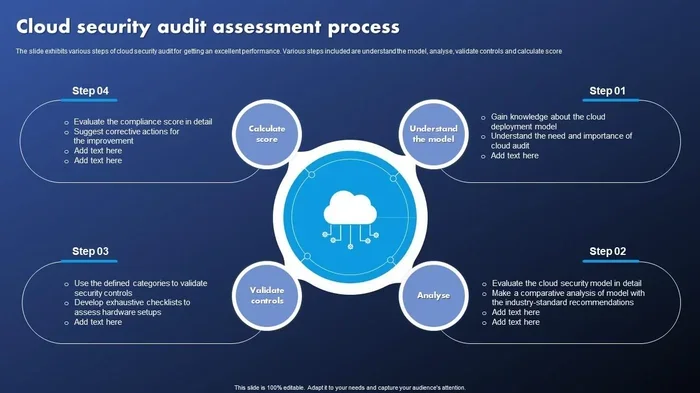
Auditing in cloud computing is the process of reviewing, monitoring, and verifying your cloud environment for security, compliance, and performance. It helps organizations catch vulnerabilities, meet regulatory requirements, and protect sensitive data. This guide covers everything from cloud compliance and audit trails to the best tools and practices you need. Whether you are a small business or a large enterprise, understanding cloud security audit fundamentals is essential for a safe cloud infrastructure.
Auditing in cloud computing is not just a checkbox exercise. It is a vital practice that keeps your data safe, your systems running smoothly, and your business compliant with laws and regulations. If you have moved your operations to the cloud or are planning to, understanding how auditing in cloud computing works is one of the smartest things you can do.
Think of a cloud audit like a health checkup for your digital environment. It looks at who has access to what, whether your security controls are working, and if your data meets regulatory standards. Without regular audits, you might not even know there is a problem until it is too late. This guide walks you through everything you need to know, from the basics to advanced best practices.
We will cover the key components of a cloud audit, the compliance standards you need to follow, the tools that make the process easier, and the common mistakes that trip up even experienced teams. By the end, you will have a clear picture of how to protect your cloud infrastructure and keep your cloud security posture strong.
Key Takeaways
- Auditing in cloud computing ensures your cloud environment stays secure, compliant, and performant.
- Audit trails and audit logs are the backbone of any effective cloud audit strategy.
- Cloud compliance frameworks like SOC 2, ISO 27001, GDPR, and HIPAA set the standards you must meet.
- Continuous monitoring and threat detection tools make auditing faster and more accurate.
- The shared responsibility model means both you and your cloud provider share security duties.
- Avoiding common mistakes like ignoring access management can prevent serious security breaches.
- Using the right cloud governance tools simplifies the entire risk assessment process.
📑 Table of Contents
What Is Auditing in Cloud Computing?
At its core, auditing in cloud computing means systematically reviewing your cloud environment. You examine configurations, access logs, security settings, and performance metrics. The goal is to find weaknesses, ensure compliance, and verify that everything is working as it should.
Unlike traditional on-premise audits, cloud auditing involves environments that are dynamic and shared. Your data lives on servers managed by a provider like AWS, Microsoft Azure, or Google Cloud. This adds layers of complexity that you need to understand.
Why Auditing in Cloud Computing Matters
Cloud environments grow fast. New services, users, and data stores appear regularly. Without a structured compliance monitoring process, it is easy for gaps to form. Here is why auditing in cloud computing matters so much:
- Security: Audits uncover vulnerabilities before attackers can exploit them. Threat detection becomes far more effective when you review your environment regularly.
- Compliance: Many industries face strict rules. Healthcare, finance, and e-commerce all have regulatory requirements that demand proof of security and data protection.
- Accountability: Audit trails create a clear record of who did what and when. This is invaluable during investigations or audits from regulators.
- Performance: Audits also check whether your resources are being used efficiently. Wasted spending on unused services is a common problem that audits can reveal.
How Cloud Auditing Differs from Traditional Auditing
Traditional audits focus on physical servers, paper records, and fixed infrastructure. Auditing in cloud computing is different in several important ways:
- Dynamic environments: Cloud resources can spin up and down in seconds. An audit must account for this constant change.
- Shared infrastructure: You do not own the physical servers. The shared responsibility model defines what your provider handles versus what you must manage.
- Scale: Cloud environments can span multiple regions and millions of resources. Manual auditing is simply not practical at this scale.
- Automation: Cloud-native tools and third-party solutions can automate much of the compliance monitoring process, making audits faster and more thorough.
Key Components of a Cloud Audit
A thorough cloud security audit covers several critical areas. Each one plays a role in keeping your environment secure and compliant. Let us break them down.
Audit Trails and Audit Logs
Audit trails and audit logs are the foundation of any cloud audit. These records track every action taken within your cloud infrastructure. They capture who logged in, what resources were accessed, and what changes were made.
Without proper audit logs, you are essentially flying blind. Here is what good log management looks like:
- Logs are stored securely and cannot be tampered with.
- Logs cover a sufficient retention period to meet compliance needs.
- Logs are centralized so you can search and analyze them easily.
- Logs are reviewed on a regular schedule, not just during an audit.
Tip: Set up automated alerts for suspicious activity in your audit logs. This turns a passive record into an active threat detection tool.
Access Management and Identity Verification
Who has access to your cloud resources? This is one of the first questions any cloud provider audit will ask. Access management and identity verification are critical components of auditing in cloud computing.
Weak access controls are one of the leading causes of data breaches. A proper audit should review:
- User roles and permissions across all cloud services.
- Multi-factor authentication (MFA) adoption rates.
- Inactive accounts that still have access to sensitive data.
- Administrative privileges and who holds them.
- API key management and rotation practices.
The principle of least privilege is essential here. Every user and service should have only the access they need and nothing more. Regular reviews ensure that permissions do not creep outward over time.
Data Protection and Encryption Standards
Data protection is at the heart of auditing in cloud computing. Your audit must verify that sensitive data is properly encrypted both at rest and in transit. Encryption standards like AES-256 are widely considered the baseline for cloud environments.
During an audit, you should check:
- Whether encryption is enabled for all storage services.
- How encryption keys are managed and rotated.
- Whether data backups are encrypted and tested regularly.
- How data is handled during cloud migration or transfer between services.
Strong data protection practices not only keep your data safe but also help you meet cloud compliance requirements across different industries and regions.
Common Cloud Compliance Standards
Cloud compliance is a major reason organizations conduct audits. Different industries and regions have different rules. Here are the most important standards to know.
SOC 2 and ISO 27001
SOC 2 is a framework developed by the AICPA that focuses on security, availability, processing integrity, confidentiality, and privacy. Many cloud service providers pursue SOC 2 certification to prove they meet high standards.
ISO 27001 is an international standard for information security management systems. It provides a structured approach to managing sensitive company information. Both frameworks are widely recognized and respected in the industry.
GDPR and HIPAA
The GDPR (General Data Protection Regulation) applies to any organization that handles personal data of EU residents. It has strict rules about data processing, storage, and breach notification.
HIPAA (Health Insurance Portability and Accountability Act) governs how healthcare data is handled in the United States. Organizations in the healthcare sector must ensure their cloud infrastructure meets HIPAA requirements for data protection and access control.
When planning your auditing in cloud computing strategy, always map your audit activities to the specific compliance frameworks that apply to your business.
Best Practices for Auditing in Cloud Computing
Following best practices makes your audits more effective and less burdensome. These tips come from real-world experience and can save you significant time and effort.
Continuous Monitoring Over Periodic Audits
One of the biggest shifts in modern cloud security is moving from periodic audits to continuous monitoring. The cloud changes so fast that a point-in-time audit can miss problems that arise between audit cycles.
Continuous monitoring means:
- Real-time tracking of configuration changes.
- Automated alerts for policy violations.
- Ongoing risk assessment rather than annual reviews.
- Dashboards that give you visibility into your cloud security posture at all times.
This approach aligns with the dynamic nature of cloud environments and catches issues before they become serious problems.
Embrace the Shared Responsibility Model
Every cloud provider operates on a shared responsibility model. The provider secures the underlying infrastructure, but you are responsible for securing what you put in the cloud. Understanding this division is crucial for effective auditing in cloud computing.
For example, AWS secures the physical data centers and hypervisor layer. But you are responsible for configuring security groups, managing access keys, and encrypting your data. Many breaches happen because organizations misunderstand where their responsibilities begin and end.
Automate Wherever Possible
Manual auditing in a cloud environment is slow and error-prone. Automation should be a core part of your strategy. Use infrastructure-as-code tools, automated compliance checks, and scripted audit procedures to scale your efforts.
Quick Tip: Start by automating the most repetitive audit tasks, such as checking for open ports, verifying encryption settings, and reviewing user access permissions. This frees up your team to focus on higher-value analysis.
Tools and Technologies for Cloud Auditing
The right tools can transform how you approach auditing in cloud computing. Here are some categories of tools to consider:
- Cloud-native audit tools: AWS CloudTrail, Azure Monitor, and Google Cloud Audit Logs provide built-in visibility into your environment.
- Cloud Security Posture Management (CSPM): Tools like Prisma Cloud, Wiz, and Orca Security scan your environment for misconfigurations and compliance gaps.
- SIEM platforms: Security Information and Event Management tools like Splunk and Sentinel aggregate logs and correlate events for deeper analysis.
- Governance platforms: Tools like AWS Config and Azure Policy enforce rules and automatically remediate issues.
Choosing the right tools depends on your cloud provider, budget, and the complexity of your environment. Many organizations use a combination of tools to cover different aspects of their cloud governance needs.
Common Mistakes to Avoid in Cloud Auditing
Even well-intentioned teams make mistakes when auditing their cloud environments. Here are the most common ones to watch out for:
- Ignoring the shared responsibility model. Assuming your cloud provider handles everything is a dangerous mistake. You must own your part of the security equation.
- Neglecting audit log retention. If your logs are not retained long enough, you may not have the evidence you need during an investigation or compliance review.
- Overlooking insider threats. Audits often focus on external threats while ignoring risks from within. Review access patterns for all users, including employees and contractors.
- Skipping cloud migration audit checks. When moving workloads to the cloud, many organizations forget to audit the migration process itself. Misconfigurations during migration can introduce serious vulnerabilities.
- Relying on a single audit. A one-time audit is not enough. Cloud environments evolve constantly, and so do threats. Regular, ongoing compliance monitoring is essential.
Avoiding these pitfalls will make your auditing in cloud computing efforts far more effective and help you maintain a strong cloud security posture over time.
Key Takeaways
- Auditing in cloud computing ensures your cloud environment stays secure, compliant, and performant.
- Audit trails and audit logs are the backbone of any effective cloud audit strategy.
- Cloud compliance frameworks like SOC 2, ISO 27001, GDPR, and HIPAA set the standards you must meet.
- Continuous monitoring and threat detection tools make auditing faster and more accurate.
- The shared responsibility model means both you and your cloud provider share security duties.
- Avoiding common mistakes like ignoring access management can prevent serious security breaches.
- Using the right cloud governance tools simplifies the entire risk assessment process.
Conclusion
Auditing in cloud computing is not optional. It is a fundamental part of running a secure and compliant cloud operation. From audit trails and access management to compliance monitoring and continuous monitoring, every piece of the audit process plays a role in protecting your data and your business.
The cloud offers incredible flexibility and power, but it also demands vigilance. By understanding the shared responsibility model, following cloud compliance standards, using the right tools, and avoiding common pitfalls, you can keep your cloud infrastructure strong and your cloud security posture excellent.
Start small if you need to. Pick one area, like reviewing your audit logs or tightening your access management policies, and build from there. The most important step is the first one. Your future self and your data will thank you for it.
Frequently Asked Questions
What is the main goal of auditing in cloud computing?
The main goal is to ensure your cloud environment is secure, compliant, and performing well. Audits help you find vulnerabilities, verify that security controls are working, and confirm that you meet regulatory requirements like GDPR or HIPAA.
How often should you audit your cloud environment?
Ideally, you should use continuous monitoring for day-to-day oversight and conduct formal, in-depth audits at least quarterly. The frequency depends on your industry, the sensitivity of your data, and your cloud compliance obligations.
What is the shared responsibility model in cloud auditing?
The shared responsibility model means your cloud provider secures the underlying infrastructure, while you are responsible for securing your data, access controls, and configurations. Understanding this division is essential for effective auditing in cloud computing.
Can small businesses benefit from cloud auditing?
Absolutely. Small businesses often handle sensitive customer data and face the same compliance requirements as larger companies. Cloud security audit practices help small businesses protect their data, build customer trust, and avoid costly breaches.
What tools are best for cloud auditing?
The best tools depend on your setup. Cloud-native options like AWS CloudTrail and Azure Monitor are great starting points. For deeper analysis, consider CSPM tools like Prisma Cloud or Wiz, along with SIEM platforms for log aggregation and correlation.
What is the difference between a cloud security audit and a compliance audit?
A cloud security audit focuses on technical vulnerabilities, configurations, and threat detection. A compliance audit verifies that you meet specific regulatory or industry standards. In practice, the two overlap significantly, and a strong auditing in cloud computing strategy covers both.