The Ultimate Guide to Asset Management in Cloud Computing
Asset management in cloud computing is the process of tracking, organizing, and optimizing all digital and physical resources hosted in the cloud. This guide covers everything from inventory tracking to cost optimization, security, and lifecycle management. Whether you are a small business or an enterprise, you will find actionable strategies to take control of your cloud assets.
Managing assets in the cloud is not just about keeping a list of what you own. It is about understanding every resource, tracking how it performs, and making sure it delivers real value. Asset management in cloud computing has become essential for businesses of all sizes. Without a solid strategy, companies waste money, lose visibility, and expose themselves to security risks.
In this guide, we will walk you through everything you need to know. We will cover the basics, explore best practices, and share practical tips you can start using today. By the end, you will have a clear roadmap to manage your cloud assets like a pro. Let us dive in.
Key Takeaways
- Cloud asset management helps you save money by identifying unused or underutilized resources and eliminating waste.
- Real-time tracking gives you full visibility into every asset across your cloud environment.
- Automation streamlines repetitive tasks like inventory updates, tagging, and compliance checks.
- Strong governance policies prevent costly mistakes and keep your cloud infrastructure secure.
- Lifecycle management ensures assets stay relevant and performant from deployment to retirement.
- Cloud cost optimization goes hand in hand with effective asset management strategies.
- Security and compliance are easier to maintain when you have a clear picture of all your assets.
📑 Table of Contents
- What Is Asset Management in Cloud Computing?
- Key Components of Cloud Asset Management
- Benefits of Managing Cloud Assets Effectively
- Best Practices for Cloud Asset Management
- Common Mistakes to Avoid
- Tools and Platforms for Cloud Asset Management
- The Role of Automation in Cloud Asset Management
- Future Trends in Cloud Asset Management
- Conclusion
What Is Asset Management in Cloud Computing?
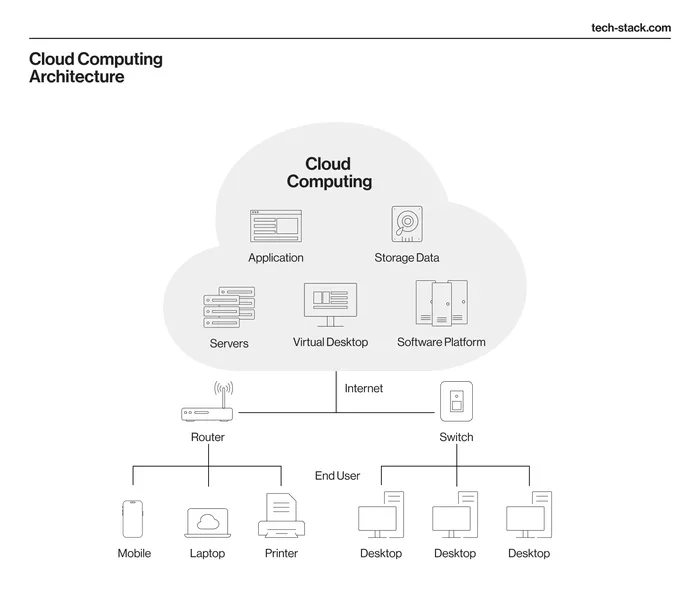
At its core, asset management in cloud computing means keeping track of every digital and physical resource that lives in your cloud environment. This includes virtual machines, storage buckets, databases, software licenses, and even the physical servers that power cloud services behind the scenes.
Think of it like managing a library. You need to know what books you have, where they are, who is borrowing them, and when they need to be returned. Cloud asset management works the same way, but instead of books, you are managing servers, applications, and data.
Why It Matters More Than Ever
Businesses today rely heavily on cloud infrastructure. A single company might use hundreds of different cloud services across multiple providers. Without proper cloud asset management, it is easy to lose track of what you are paying for and what you actually need. This leads to wasted spending and security gaps.
Here is a quick look at why this topic is so important right now:
- Cloud spending is growing fast. Companies routinely overspend on unused resources.
- Security threats are evolving. Unmanaged assets become easy targets for hackers.
- Compliance rules are getting stricter. You need clear records of all your assets.
- Performance depends on visibility. You cannot optimize what you cannot see.
Key Components of Cloud Asset Management
Effective asset management in cloud computing involves several interconnected pieces. Each one plays a vital role in keeping your environment organized and efficient.
Asset Discovery and Inventory
The first step is knowing what you have. Asset discovery tools scan your cloud environment and build a complete inventory. This includes every virtual machine, container, database, and service running in your account.
Without a solid inventory, everything else falls apart. You cannot optimize costs or secure assets if you do not know they exist. Many teams discover they have dozens of forgotten resources sitting idle and still generating charges.
Asset Tagging and Classification
Once you know what you have, the next step is organizing it. Tagging means adding labels to each asset based on its purpose, owner, environment, or cost center. For example, you might tag a server as “production,” “marketing,” or “development.”
Cloud resource tagging makes it much easier to filter, search, and report on your assets. It also helps with cost allocation, so you can see exactly which team or project is driving spending.
Monitoring and Performance Tracking
Assets in the cloud are not static. They change constantly. Monitoring tools track performance metrics like CPU usage, memory consumption, and network traffic in real time. This helps you spot problems early and ensure every asset is performing as it should.
Cloud monitoring also gives you data to make smarter decisions. If a database is barely using any resources, you might be able to downsize it and save money.
Benefits of Managing Cloud Assets Effectively
Investing time in asset management in cloud computing pays off in many ways. Let us look at the biggest benefits.
Cost Savings
This is the most immediate benefit. When you track your assets closely, you find waste fast. Maybe you have three virtual machines running when you only need one. Or perhaps you are paying for a premium storage tier when standard would work fine.
Studies show that companies can save 20 to 30 percent on their cloud bills just by identifying and eliminating unused resources. That is real money back in your pocket.
Better Security
Every unmanaged asset is a potential vulnerability. Hackers love to exploit forgotten servers or outdated software. When you have a clear view of all your cloud assets, you can apply security patches, set access controls, and monitor for threats more effectively.
Cloud security is much easier when you know exactly what is running in your environment and who has access to it.
Improved Compliance
Regulations like GDPR, HIPAA, and SOC 2 require businesses to maintain detailed records of their IT resources. Proper asset management ensures you always have this information ready. It also makes audits smoother and less stressful.
Smarter Decision Making
When you have clean, accurate data about your assets, you can make better choices. You will know which resources deliver the most value, where to invest, and what to retire. This turns your cloud infrastructure into a strategic advantage.
Best Practices for Cloud Asset Management
Now that you understand the components and benefits, let us look at the best practices that actually work. These are the strategies used by top-performing teams.
1. Start With a Clear Ownership Model
Every asset should have a clear owner. This means assigning a person or team responsible for each resource. When something goes wrong or needs updating, there is no confusion about who should handle it.
Ownership also drives accountability. When people know they are responsible for an asset, they are more likely to keep it updated, secure, and cost-efficient.
2. Implement a Tagging Strategy From Day One
Do not wait until you have hundreds of untagged resources. Start with a tagging strategy from the beginning. Define a standard set of tags and make them mandatory for all new resources.
Common tags include environment, project name, cost center, owner, and data classification. Keep your tag structure simple and consistent. Too many tags create confusion, while too few give you no useful insights.
3. Automate Asset Discovery and Inventory
Manual inventory is slow and error-prone. Use automation tools to discover and catalog your assets continuously. These tools scan your cloud environment and update your asset database in real time.
Automated discovery saves hours of manual work and ensures your inventory is always up to date. Look for tools that support multi-cloud environments if you use more than one provider.
4. Set Up Alerts for Idle and Unused Resources
Idle resources are one of the biggest sources of cloud waste. Set up alerts that notify you when a resource has been running but barely used for a set period. This could be a virtual machine that has had less than five percent CPU usage for two weeks.
Once alerted, you can investigate and either right-size the resource or shut it down entirely. Over time, these small actions add up to significant savings.
5. Review and Optimize Regularly
Asset management is not a one-time task. It is an ongoing process. Schedule regular reviews of your cloud environment. Look for opportunities to consolidate resources, upgrade outdated systems, and remove duplicates.
A monthly or quarterly review cycle keeps your environment lean and efficient. It also helps you catch issues before they become expensive problems.
Common Mistakes to Avoid
Even experienced teams make mistakes when managing cloud assets. Here are the most common ones and how to avoid them.
Ignoring Shadow IT
Shadow IT happens when teams use cloud services without IT approval. These rogue resources are invisible to your management tools and create security and compliance risks. Encourage open communication and make it easy for teams to request approved services.
Overlooking Data Assets
People often focus on infrastructure and forget about data. Databases, file stores, and backups are all assets too. Managing your data assets is just as important as managing servers and applications.
No Documentation
If you do not document your assets and their configurations, you are setting yourself up for failure. Documentation should include what each asset does, who owns it, and how it connects to other resources. This becomes invaluable during troubleshooting and audits.
Treating Asset Management as a One-Time Project
Some organizations set up an asset management process once and then forget about it. Cloud environments change constantly. New resources get created every day. Your management strategy needs to evolve with your environment.
Tools and Platforms for Cloud Asset Management
The right tools can make or break your asset management in cloud computing strategy. Here are some popular options to consider.
Native Cloud Tools
Each major cloud provider offers built-in tools for asset management. AWS has AWS Config and AWS Systems Manager. Azure has Azure Resource Manager and Azure Cost Management. Google Cloud offers Cloud Asset Inventory and Cloud Billing.
These native tools are a great starting point. They integrate seamlessly with your cloud environment and provide real-time data on your resources.
Third-Party Management Platforms
Third-party tools often offer more advanced features than native solutions. Platforms like CloudHealth, Flexera, and Turbonomic provide cross-cloud visibility, cost optimization, and automation capabilities.
These tools are especially valuable for organizations using multiple cloud providers. They give you a single pane of glass to manage all your assets, regardless of where they live.
Open-Source Options
If you are working with a limited budget, open-source tools can be a great choice. Tools like OpenNebula and Cloud Custodian offer powerful asset management capabilities without the licensing costs.
The trade-off is that open-source tools often require more setup and maintenance. They work best for teams with strong technical skills.
The Role of Automation in Cloud Asset Management
Automation is a game-changer for cloud asset management. It takes repetitive tasks off your plate and ensures consistency across your environment.
With automation, you can automatically tag new resources, discover unknown assets, shut down idle instances, and generate compliance reports. This reduces human error and frees up your team to focus on higher-value work.
Infrastructure as Code (IaC) tools like Terraform and Ansible also play a big role. They let you define your assets in code, making it easy to track changes and reproduce environments. This adds another layer of control to your IT asset management strategy.
Quick Tips for Getting Started With Automation
- Start small. Automate one task first, like tagging or inventory updates.
- Use templates. Create reusable templates for common resource types.
- Test thoroughly. Always test automation scripts in a safe environment first.
- Monitor results. Check that automation is working as expected and adjust as needed.
Future Trends in Cloud Asset Management
The world of cloud asset management is constantly evolving. Here are some trends to watch.
AI-Powered Optimization
Artificial intelligence is making its way into cloud management. AI tools can analyze your usage patterns and recommend optimizations automatically. They can predict when you will need more resources and suggest the right time to scale up or down.
FinOps Integration
FinOps, or cloud financial operations, is becoming a standard practice. It brings finance and technical teams together to manage cloud spending. Asset management in cloud computing is a core part of FinOps, as it provides the data needed for informed financial decisions.
Multi-Cloud and Hybrid Cloud Management
More organizations are adopting multi-cloud and hybrid cloud strategies. Managing assets across different environments is complex, but new tools are emerging to simplify it. Expect to see more unified platforms that handle all cloud types seamlessly.
Sustainability and Green Computing
Sustainability is becoming a bigger priority for businesses. Efficient asset management reduces waste and lowers energy consumption. In the future, carbon footprint tracking may become a standard part of cloud asset management.
Conclusion
Asset management in cloud computing is not optional anymore. It is a fundamental part of running a successful business in the cloud. From discovery and tagging to monitoring and optimization, every step matters. The teams that get this right save money, reduce risk, and build more resilient infrastructure.
Start by auditing your current cloud environment. Identify what you have, clean up what you do not need, and put a solid process in place for ongoing management. Use the best practices and tools outlined in this guide to stay on track. With the right approach, you can turn your cloud assets into a powerful competitive advantage.
The cloud is only going to grow. The sooner you invest in proper asset management, the better positioned you will be. Take action today and build a foundation that will serve you well into the future.
Frequently Asked Questions
What exactly does asset management in cloud computing involve?
Asset management in cloud computing involves discovering, tracking, tagging, monitoring, and optimizing all resources in your cloud environment. This includes virtual machines, databases, storage, software licenses, and any other digital or physical resources hosted in the cloud. The goal is to maintain full visibility and control over every asset.
How can cloud asset management save me money?
By giving you clear visibility into your resources, cloud asset management helps you identify unused or underutilized assets. You can then right-size or eliminate them, which directly reduces your cloud spending. Many businesses recover 20 to 30 percent of their cloud costs through better asset management.
What is the difference between IT asset management and cloud asset management?
IT asset management covers all technology assets, including on-premises hardware and software. Cloud asset management focuses specifically on resources hosted in the cloud. However, they overlap significantly, and the best approach integrates both into a unified strategy for complete asset management.
Do I need a dedicated tool for cloud asset management?
While you can start with spreadsheets, dedicated tools are highly recommended. They automate discovery, tracking, and reporting, saving you significant time and reducing errors. Native cloud tools and third-party platforms both offer valuable features depending on your needs and budget.
How often should I review my cloud assets?
Regular reviews are essential. A monthly or quarterly review cycle works well for most organizations. During these reviews, check for idle resources, outdated configurations, tagging gaps, and cost anomalies. Consistent reviews keep your environment lean and secure.
Is cloud asset management only for large enterprises?
Not at all. Businesses of every size benefit from proper asset management. Even small companies using a few cloud services can waste money and create security risks without a clear inventory. The principles of cloud asset management scale to fit any organization.