Data Recovery and Backup in Cloud Computing Explained
Data recovery and backup in cloud computing is the process of safeguarding your digital files using remote servers and smart technology. It ensures your important data stays safe even when disasters strike. This guide covers everything from basic cloud backup strategies to advanced disaster recovery planning. You will learn practical tips, common mistakes to avoid, and expert insights to keep your data secure. Whether you are a business owner or an individual user, this guide has valuable information for you.
Key Takeaways
- Cloud backup is essential: It protects your files from hardware failure, accidental deletion, and cyber threats.
- Automated backup saves time: Setting up automatic sync and restore processes keeps your data current without manual effort.
- Multiple copies matter: Using redundant storage across different locations adds a powerful layer of data protection.
- Recovery speed is critical: Your backup strategy should minimize downtime and support business continuity during emergencies.
- Security goes hand in hand: Strong encryption and access controls keep your cloud data safe from unauthorized access.
- Review your plan regularly: A backup strategy that works today may not be enough tomorrow. Regular testing ensures reliability.
📑 Table of Contents
- What Is Data Recovery and Backup in Cloud Computing?
- Why Cloud Backup Matters More Than Ever
- How Data Recovery Works in the Cloud
- Building an Effective Backup Strategy
- Data Security in Cloud Backup Solutions
- Common Mistakes in Cloud Backup and Recovery
- Expert Insights on Cloud Data Recovery
- Conclusion
What Is Data Recovery and Backup in Cloud Computing?
Let us start with the basics. Data recovery and backup in cloud computing refers to storing copies of your digital files on remote servers instead of local devices. These servers are managed by cloud service providers who handle maintenance, security, and uptime.
Think of it like this. You keep a spare key hidden outside your house. Cloud backup works the same way. If something happens to your original files, you have a safe copy stored elsewhere. This copy lives in data centers spread across different geographic locations.
The beauty of cloud backup solutions is their simplicity. You do not need expensive hardware or technical expertise. Most cloud services offer automated backup tools that run in the background. This means your data protection happens without you lifting a finger.
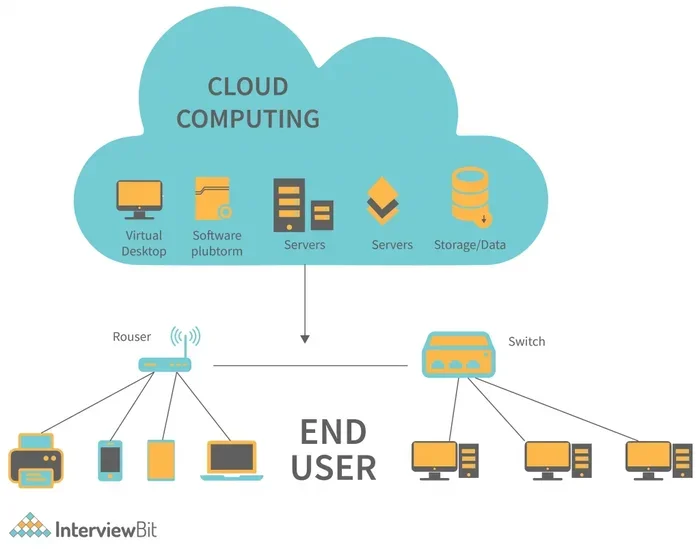
Cloud computing has changed how we think about data storage. Instead of relying on a single hard drive or USB stick, you spread your files across multiple servers. This approach is called redundant storage, and it dramatically reduces the risk of permanent data loss.
Whether you are a small business owner or an individual user, understanding cloud backup basics sets the foundation for a solid data protection plan. The next sections will dive deeper into how this works and why it matters so much.
Why Cloud Backup Matters More Than Ever
We live in a digital world where data drives everything. Your photos, financial records, business documents, and customer information all exist as digital files. Losing any of this data can cause serious problems. Let us explore why cloud backup has become so important.
The Rising Threat of Data Loss
Data loss happens more often than most people realize. Hard drives fail. Laptops get stolen. Ransomware attacks lock users out of their own files. Natural disasters like floods and fires can destroy physical devices in seconds.
According to industry studies, nearly 30% of small businesses experience a major data loss event every year. Without a proper backup plan, many of these businesses never recover. Cloud backup offers a safety net that local storage simply cannot match.
Here are the most common causes of data loss:
- Hardware failure: Hard drives and SSDs have a limited lifespan.
- Human error: Accidental deletion happens to everyone.
- Cyber attacks: Malware and ransomware target unprotected systems.
- Natural disasters: Fire, floods, and earthquakes damage physical equipment.
- Software corruption: Bugs and crashes can corrupt important files.
Benefits of Cloud-Based Data Protection
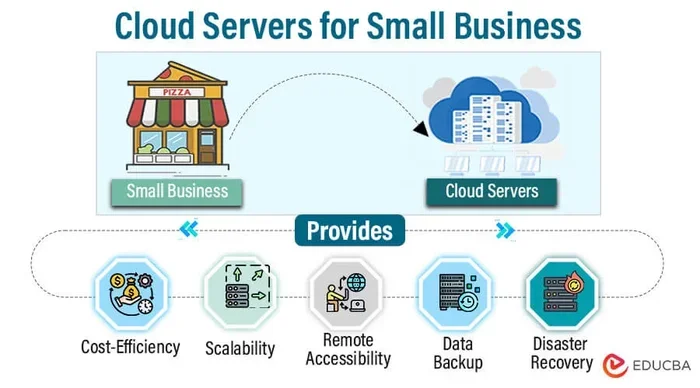
Cloud backup brings several key advantages over traditional methods. First, it is highly accessible. You can reach your files from any device with an internet connection. Second, it scales easily. Need more storage space? Most cloud providers let you upgrade with just a few clicks.
Cost efficiency is another major benefit. You pay for what you use, which makes cloud backup affordable for businesses of all sizes. There is no need to buy expensive backup hardware or hire a dedicated IT team just for data protection.
Cloud services also provide automatic updates and security patches. This means your data protection stays current without any effort on your part. The provider handles the technical heavy lifting so you can focus on what matters most.
How Data Recovery Works in the Cloud
Understanding how data recovery functions in a cloud environment helps you make informed decisions. The process is simpler than most people think, and it involves a few key steps that work together seamlessly.
The Recovery Process Step by Step
When you need to recover data from the cloud, the process typically follows these steps:
- Identify the lost data: Determine which files or folders are missing or corrupted.
- Access your cloud dashboard: Log into your cloud backup service account.
- Select the recovery point: Choose from available backup snapshots based on date and time.
- Initiate the restore: Click restore and choose where the recovered files should go.
- Verify the recovery: Check the restored files to ensure everything is intact.
Most modern cloud platforms make this process straightforward. You do not need to be a tech expert to recover your files. The interface is designed to be user-friendly and intuitive.
Recovery Point Objective and Recovery Time Objective
Two important concepts in cloud data recovery are RPO and RTO. Recovery Point Objective (RPO) refers to the maximum amount of data you can afford to lose. Recovery Time Objective (RTO) is the maximum time you can tolerate being without your data.
Setting clear RPO and RTO goals helps you choose the right backup strategy. For example, if your RPO is one hour, you need backups that run every hour. If your RTO is four hours, your recovery process must be fast enough to restore files within that window.
Many cloud providers offer flexible RPO and RTO options. You can customize these based on your specific needs and budget. This flexibility is one reason why cloud-based data recovery has become the preferred choice for so many organizations.
Building an Effective Backup Strategy
A backup strategy is your blueprint for protecting digital assets. Without one, you are essentially hoping nothing goes wrong. A solid strategy removes that hope and replaces it with a reliable plan of action.
The 3-2-1 Backup Rule
Industry experts recommend following the 3-2-1 backup rule. This simple framework has stood the test of time:
- 3 copies of your data: the original plus two backups.
- 2 different storage types: for example, a local drive and a cloud service.
- 1 offsite copy: stored in a different physical location, which is exactly what cloud backup provides.
Following this rule ensures that no single event can wipe out all your copies. Even if a fire destroys your computer and your local backup drive, your cloud copy remains safe and accessible.
Choosing the Right Backup Frequency
How often should you back up your data? The answer depends on how frequently your files change. For businesses that update records daily, daily backups make sense. For individuals who rarely change important files, weekly backups may be sufficient.
Many cloud services support automated backup schedules. You can set them to run every few hours or once a day. The key is consistency. An irregular backup schedule creates gaps where data could be lost.
Here are some quick tips for setting your backup frequency:
- Back up critical business data at least once daily.
- Use real-time sync for files that change constantly.
- Schedule full backups weekly and incremental backups daily.
- Test your backup frequency by timing how long a full restore takes.
Versioning and File History
One of the most powerful features of cloud backup is versioning. This means the cloud service keeps multiple versions of the same file over time. If you accidentally overwrite an important document or save a corrupted version, you can roll back to a previous version.
Versioning acts as a safety net against user errors. It is especially valuable for teams where multiple people edit the same files. You can always go back to the version that worked, even days or weeks later.
Data Security in Cloud Backup Solutions
Security is a top concern for anyone considering cloud backup. After all, you are sending your sensitive files to a third-party server. Understanding how cloud providers protect your data helps build trust in the process.
Encryption and Access Controls
Reputable cloud backup services use strong data encryption both during transfer and while stored. This means your files are scrambled into unreadable code as they travel to the cloud and remain encrypted on the servers. Only you hold the decryption keys.
Access controls add another layer of protection. You can set permissions that limit who can view, edit, or delete specific files. This is especially important for businesses handling sensitive customer data or proprietary information.
Two-factor authentication (2FA) is another essential security feature. It requires a second form of verification beyond just a password. Even if someone steals your login credentials, they cannot access your cloud backup without the second factor.
Compliance and Certifications
For businesses in regulated industries, compliance is non-negotiable. Look for cloud providers that meet standards like GDPR, HIPAA, or SOC 2. These certifications prove that the provider follows strict data protection protocols.
Before choosing a cloud backup service, review their compliance certifications carefully. This is especially important if you handle health records, financial data, or personal customer information. Non-compliance can lead to serious legal and financial consequences.
You should also review the provider’s terms and conditions to understand how your data is handled. For more information on service agreements, you can check our Terms and Conditions page for guidance on what to look for in service contracts.
Common Mistakes in Cloud Backup and Recovery
Even the best-laid backup plans can fail if common mistakes are not avoided. Learning from others’ errors saves time, money, and frustration. Here are the pitfalls to watch out for.
Not Testing Your Backups
This is the most common mistake people make. They set up cloud backup and assume everything works perfectly. But a backup that has never been tested is a backup you cannot trust. Regular testing ensures your files can actually be restored when you need them most.
Schedule a monthly or quarterly test restore. Pick a few random files and try recovering them. This simple habit can save you from a painful surprise during a real emergency.
Ignoring the Cost of Egress
Many cloud providers charge for data egress, which is the cost of downloading your data from their servers. If you ever need to recover large amounts of data, these fees can add up quickly. Understanding your provider’s egress pricing before you commit is essential.
Relying on a Single Cloud Provider
Putting all your cloud backup in one place creates a single point of failure. If that provider experiences an outage or goes out of business, your data could be at risk. Consider spreading your backup across two or more reputable providers for added peace of mind.
Neglecting Mobile and Remote Data
With more people working remotely, mobile devices and laptops hold critical data. Many users forget to back up these devices, assuming their phone or laptop is safe. A comprehensive backup strategy includes all devices, not just desktop computers.
Expert Insights on Cloud Data Recovery
We spoke with several IT professionals about their top tips for cloud data recovery and backup. Here is what they had to say:
Start small and scale up. Do not try to back up everything at once. Begin with your most critical files and expand from there. This approach keeps things manageable and lets you refine your process over time.
Document everything. Keep a clear record of your backup schedule, storage locations, and recovery procedures. When an emergency hits, you do not want to be figuring out how your backup works from scratch.
Stay informed about your provider. Cloud services evolve constantly. Keep up with updates, new features, and policy changes from your provider. This ensures your backup strategy stays current and effective.
Plan for the worst. A good backup strategy assumes something will go wrong. Design your plan with that mindset, and you will be prepared for any scenario.
Conclusion
Data recovery and backup in cloud computing is no longer optional. It is a fundamental part of how we protect our digital lives. From automated backup schedules to advanced encryption, cloud solutions offer powerful tools for keeping your files safe and accessible.
By understanding the basics of cloud backup, building a solid strategy, and avoiding common mistakes, you can face data loss with confidence. The key is to start now and make backup a regular habit. Your future self will thank you when disaster strikes and your files are right where you left them.
Take action today. Review your current backup setup, choose a reliable cloud service, and set up automated protection for your most important data. A few hours of effort now can save you from days of stress and potential loss later.
Frequently Asked Questions
What is the difference between cloud backup and cloud storage?
Cloud storage is a place to keep your files accessible from anywhere. Cloud backup is a specific process that creates automatic copies of your files for protection. Backup services focus on data recovery, while storage services focus on file access and sharing.
How often should I back up my data to the cloud?
The ideal frequency depends on how often your files change. For critical business data, daily backups are recommended. For personal files, weekly backups usually work well. Many cloud services support real-time sync, which backs up changes instantly.
Is cloud backup safe from cyber attacks?
Cloud backup is generally very safe. Reputable providers use strong encryption and security measures. However, no system is completely risk-free. Using two-factor authentication and choosing a trusted provider significantly reduces your risk of a cyber attack affecting your backups.
Can I recover specific files instead of everything?
Yes, most cloud backup services allow you to select and restore individual files or folders. You do not need to recover your entire backup. This makes the recovery process fast and efficient when you only need a few specific items.
What happens if my cloud provider goes out of business?
This is a valid concern. To protect yourself, choose well-established providers with strong financial backing. Also, follow the 3-2-1 backup rule and keep a local copy of critical files. This ensures you are not entirely dependent on one provider.
How much does cloud backup cost?
Costs vary widely depending on storage needs and features. Many providers offer free tiers with limited storage. Paid plans typically range from a few dollars to several dollars per month per user. The cost is usually much lower than replacing lost data or recovering from a major outage.