What Is Cloud Computing Architecture Explained Simply
Cloud computing architecture is the blueprint that shows how cloud services are built and delivered. It combines cloud infrastructure, virtualization, and networking to power everything from email apps to massive data platforms. Understanding this setup helps businesses choose the right cloud services for their needs. This guide breaks it all down in plain, simple language so anyone can follow along.
Have you ever wondered how your favorite apps stay online 24/7? How do companies store millions of photos, process billions of transactions, and serve content to users worldwide without a single server sitting in their office? The answer lies in cloud computing architecture. This is the invisible framework that makes all of it possible.
Think of cloud computing architecture as the blueprint for how cloud services are designed, built, and delivered. It brings together servers, storage, software, and networks into one seamless system. Whether you are streaming a movie, checking email on your phone, or running a global business, cloud infrastructure is working behind the scenes. In this article, we will break it all down in the simplest way possible.
Key Takeaways
- Cloud computing architecture is the framework that connects hardware, software, and networks in the cloud.
- Three main service models — IaaS, PaaS, and SaaS — define how you use cloud resources and build applications.
- Deployment models like public, private, hybrid, and multi-cloud offer different levels of control, security, and scalability.
- Scalability and cost efficiency are the biggest reasons businesses adopt cloud infrastructure and move away from on-premise setups.
- Cloud security remains a top concern, but providers invest heavily in encryption, monitoring, and protection for cloud storage and cloud services.
- Edge computing and serverless computing are shaping the future of cloud computing architecture and making apps faster and smarter.
📑 Table of Contents
What Is Cloud Computing Architecture?
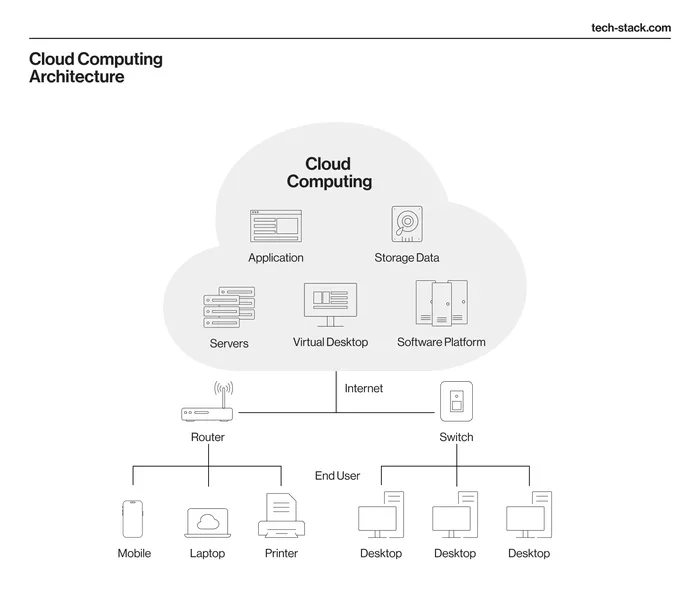
Cloud computing architecture refers to the components and subcomponents needed for cloud computing. It includes the front end, the back end, and the network that connects them. Together, these parts create the environment where cloud services live and operate.
The front end is what users see and interact with. This could be a web browser, a mobile app, or a desktop application. The back end is where the magic happens. It includes servers, databases, storage systems, and software that run in data centers around the world. The network — usually the internet — ties everything together and keeps cloud computing architecture running smoothly.
Why Does It Matter?
Understanding cloud computing architecture helps you make smarter technology decisions. When you know how the cloud is structured, you can choose the right cloud services for your business. You can also spot potential issues before they become big problems. For small businesses and large enterprises alike, this knowledge is a real advantage.
Cloud deployment models also play a big role. They determine who can access cloud resources and how secure they are. More on that in a moment. But first, let us look at how this architecture actually works in practice.
How Cloud Computing Architecture Works
At its core, cloud computing architecture relies on a concept called virtualization. Virtualization creates a digital version of something — like a server or a storage device. This allows one physical machine to act like many virtual machines. Each virtual machine can run its own operating system and applications independently.
Here is how the process works in simple steps:
- A user sends a request through a device — like a laptop or smartphone.
- The request travels over the internet to a cloud provider.
- The cloud provider routes the request to the right cloud infrastructure component.
- The back end processes the request and pulls data from cloud storage or runs the needed application.
- The result is sent back to the user’s device through the network in milliseconds.
This whole process happens almost instantly. Users never see the complexity behind it. They just click a button and get what they need. The beauty of cloud computing architecture is that this complexity is hidden from everyday users.
The Role of Data Centers
Data centers are the physical buildings that house all the servers and storage equipment. Cloud providers like Amazon Web Services, Microsoft Azure, and Google Cloud operate massive data centers worldwide. These facilities are designed with redundancy, meaning if one server fails, another takes over instantly.
Each data center has thousands of servers connected by high-speed networks. They also have advanced cooling systems, backup power supplies, and strict physical security. All of this supports the cloud services that millions of people use every single day. Without these data centers, the entire cloud computing architecture would not exist.
The Main Components of Cloud Computing Architecture
Cloud computing architecture is made up of several key parts. Each part plays a specific role in delivering cloud services to users. Let us walk through them one by one so you can see how they all fit together.
Infrastructure Layer (IaaS)
The infrastructure layer is the foundation. It includes physical servers, storage devices, and networking equipment. This is also called Infrastructure as a Service, or IaaS. With IaaS, you rent raw computing resources instead of buying your own hardware. Cloud computing architecture at this level gives you the most flexibility.
IaaS lets you configure servers, choose operating systems, and manage applications yourself. Popular IaaS providers include Amazon Web Services, Microsoft Azure, and Google Cloud Platform. This model is ideal for businesses that want full control over their cloud infrastructure without the cost of physical hardware.
Platform Layer (PaaS)
The platform layer sits on top of the infrastructure. It provides tools and environments for developers to build applications. This is known as Platform as a Service, or PaaS.
With PaaS, developers do not need to worry about managing servers or storage. They focus on writing code and building features. The cloud provider handles the underlying cloud infrastructure. This speeds up development and reduces costs significantly. Cloud computing architecture at the platform level makes it easier for teams to collaborate and ship apps faster.
Software Layer (SaaS)
The software layer is the top of the stack. It delivers fully finished applications to users over the internet. This model is called Software as a Service, or SaaS.
Examples of SaaS are everywhere in daily life. Gmail, Netflix, Salesforce, and Dropbox are all SaaS products. Users access them through a browser or app without installing anything on their devices. The cloud provider manages everything — updates, security, and maintenance. This is why cloud computing architecture at the software level is so powerful and convenient for everyday users.
Cloud Networking
Cloud networking connects all the pieces together. It includes routers, switches, firewalls, and load balancers that direct traffic within the cloud infrastructure. Good cloud networking ensures fast, reliable access to cloud services no matter where users are located.
Cloud networking also handles security. Firewalls filter incoming and outgoing traffic. Virtual private networks create secure connections. Load balancers distribute work evenly across servers so no single machine gets overwhelmed. Strong cloud networking is essential for keeping cloud computing architecture fast and secure at all times.
Cloud Deployment Models
Not all cloud setups are the same. Cloud deployment models define how cloud resources are organized and who can access them. There are four main types, and each one serves different needs.
Public Cloud
A public cloud is owned and operated by a cloud provider. Resources are shared among many users, which keeps costs low. This model is perfect for startups, small businesses, and projects that need scalability without a big upfront investment. Popular public cloud providers include AWS, Azure, and Google Cloud. Most cloud services you use daily — like email, streaming, and social media — run on public cloud infrastructure.
Private Cloud
A private cloud is dedicated to a single organization. It can be hosted on-site or by a third-party provider. Private cloud setups offer more control and stronger cloud security. They are common in industries like healthcare, finance, and government where data protection is critical.
The trade-off is cost. Private cloud requires more investment in hardware and maintenance. However, for organizations with strict compliance rules, the extra control and cloud security are well worth it.
Hybrid Cloud
A hybrid cloud combines public and private clouds. Businesses can keep sensitive data in the private cloud while using the public cloud for less critical work. This gives the best of both worlds — scalability and security in one cloud computing architecture setup.
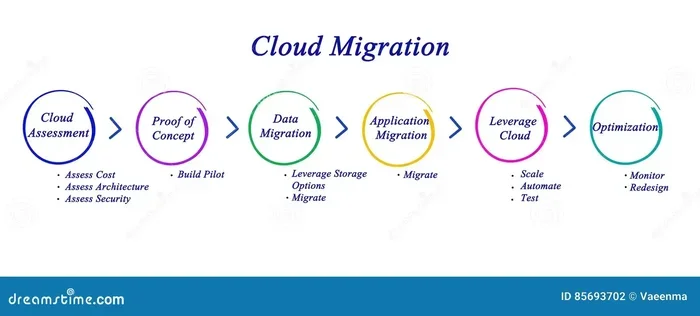
Hybrid cloud is growing fast. Many enterprises use it to balance costs, performance, and compliance requirements. It also makes cloud migration easier because you can move workloads gradually between environments. This flexibility is one reason hybrid cloud has become so popular.
Multi-Cloud
Multi-cloud means using services from multiple cloud providers at the same time. For example, a company might use AWS for storage and Azure for analytics. Multi-cloud strategies reduce dependence on a single provider and improve reliability across the cloud infrastructure.
However, multi-cloud can be complex to manage. Different providers have different tools, pricing models, and interfaces. Organizations need skilled teams or specialized tools to make multi-cloud work smoothly. But for companies that need maximum scalability and uptime, the effort pays off.
Benefits of Cloud Computing Architecture
Cloud computing architecture offers many advantages that drive its rapid growth worldwide. Let us look at the biggest benefits that make the cloud so appealing.
Scalability
Scalability is one of the top reasons businesses move to the cloud. With cloud infrastructure, you can increase or decrease resources based on demand. During a big sales event, you might need more servers. After the event, you scale back down. This flexibility saves money because you only pay for what you use. There is no need to buy expensive hardware that sits idle most of the time.
Cost Efficiency
Cloud computing eliminates the need for large upfront investments. You do not have to buy servers, build data centers, or hire a big IT team from scratch. Cloud services operate on a pay-as-you-go model. This makes technology accessible to businesses of all sizes. Even a small startup can access world-class cloud infrastructure without breaking the bank.
Disaster Recovery
Cloud providers build redundancy into their cloud infrastructure. Data is backed up across multiple data centers in different locations. If one facility goes down, your data and applications stay online. This level of disaster recovery would be extremely expensive for most companies to build on their own. The cloud makes it affordable and reliable for everyone.
Collaboration and Remote Work
Cloud services make it easy for teams to work together from anywhere. Files, applications, and communication tools are all accessible through the internet. This has become especially important as remote work continues to grow across industries. Teams can edit documents in real time, share feedback instantly, and stay connected no matter where they are. Cloud computing architecture makes this seamless experience possible for millions of workers worldwide.
Common Challenges and How to Overcome Them
While cloud computing architecture has many benefits, it also comes with challenges. Being aware of these helps you plan better and avoid common pitfalls.
Cloud Security Concerns
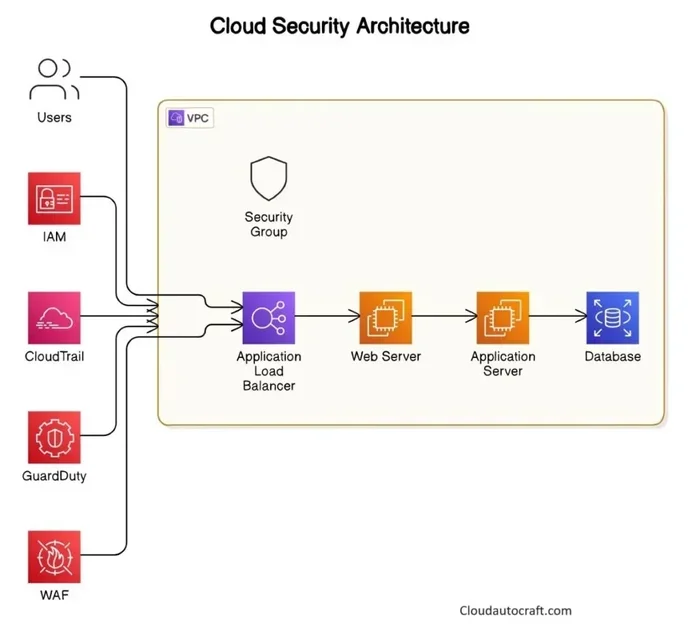
Cloud security is the number one concern for most organizations. When data lives outside your own walls, it can feel risky. However, top cloud providers invest billions in security measures. They use encryption, firewalls, and constant monitoring to protect cloud storage and cloud services. To stay safe, follow best practices. Use strong passwords, enable multi-factor authentication, and limit access to sensitive data. Regular security audits also help catch vulnerabilities early.
Vendor Lock-In
Vendor lock-in happens when your cloud services become so tied to one provider that switching is difficult. Each cloud provider has its own tools, APIs, and pricing structures. Moving away can be costly and time-consuming. You can avoid this by using open standards and portable cloud services. Containerization and microservices make it easier to move workloads between providers. Planning for flexibility from the start is the best strategy.
Latency and Performance
Cloud computing architecture depends on the internet. If your connection is slow or unstable, cloud services may feel sluggish. This is called latency. For applications that need real-time responses, high latency can be a real problem. Edge computing is one solution. It brings cloud services closer to users by processing data at local nodes instead of distant data centers. This reduces latency and improves performance for time-sensitive applications.
Conclusion
Cloud computing architecture is the backbone of the modern digital world. It connects users, applications, and data through a smart, scalable framework. From IaaS and PaaS to SaaS, each layer plays a vital role in delivering cloud services that we rely on every day.
Whether you are a business leader evaluating cloud migration or a curious learner exploring cloud computing, understanding the architecture gives you a real edge. The cloud is not just a trend — it is the foundation of how modern technology works. And as edge computing and serverless computing continue to evolve, cloud computing architecture will only become more powerful and essential.
Now that you understand the basics, you are better equipped to make informed decisions about your own cloud strategy. Start small, learn as you go, and let the cloud work for you.
Frequently Asked Questions
What is cloud computing architecture in simple terms?
Cloud computing architecture is the blueprint that shows how cloud services are built and connected. It includes the front end (what users see), the back end (servers and storage), and the network that links them together. Think of it as the skeleton that supports all cloud services.
What are the three main layers of cloud computing architecture?
The three main layers are IaaS (Infrastructure as a Service), PaaS (Platform as a Service), and SaaS (Software as a Service). IaaS provides raw computing resources, PaaS gives developers tools to build apps, and SaaS delivers finished software to users. Together, these layers make up the full cloud computing architecture.
What is the difference between public and private cloud?
A public cloud is shared among many users and owned by a cloud provider. It is cost-effective and highly scalable. A private cloud is dedicated to one organization and offers more control and stronger cloud security. The choice depends on your budget, security needs, and compliance requirements.
Why is cloud security important in cloud computing architecture?
Cloud security protects data, applications, and infrastructure from unauthorized access and attacks. Since cloud services store sensitive information in data centers managed by providers, strong security is essential. Top providers use encryption, firewalls, and constant monitoring to keep cloud storage safe and secure.
How does scalability work in cloud computing architecture?
Scalability allows you to increase or decrease cloud resources based on demand. During high-traffic periods, you can add more servers instantly. When demand drops, you scale back down. This pay-as-you-go model saves money and ensures cloud services always perform well.
What role does virtualization play in cloud computing architecture?
Virtualization is the technology that creates digital versions of physical resources like servers and storage. It allows one physical machine to run many virtual machines at the same time. This is the foundation of cloud computing architecture because it maximizes efficiency and reduces costs for cloud providers and users alike.
=== CONCLUSION ===
Cloud computing architecture is the framework that powers the modern digital world. From IaaS and PaaS to SaaS, each layer works together to deliver fast, flexible cloud services. Understanding cloud deployment models, cloud networking, and cloud security helps you make smarter technology choices. Whether you are exploring cloud migration, evaluating multi-cloud strategies, or just curious about how the cloud works, this guide gives you a solid foundation. Start applying what you have learned today, and you will see the cloud in a whole new light.