Cloud Computing Security Architecture Diagram Explained
A cloud computing security architecture diagram is a visual blueprint that maps out every layer of protection in your cloud environment. It helps teams spot weaknesses, plan defenses, and stay compliant with industry standards. This guide breaks down the core components, diagram types, and best practices you need to know. Whether you are a beginner or an experienced IT pro, you will find practical tips to strengthen your cloud security posture.
A cloud computing security architecture diagram is more than just a pretty picture. It is a powerful tool that shows you exactly how your cloud environment stays safe. Think of it as a map that guides your team through the complex world of cloud protection. Without one, you are essentially flying blind when it comes to spotting vulnerabilities. In this article, we will walk you through everything you need to know about building and using these diagrams effectively.
Cloud security is not just about one tool or one setting. It involves many layers working together. From network firewalls to identity checks, every piece plays a role. A well-designed diagram ties all of these pieces into one clear visual story. Let us dive into why this matters and how you can create one that truly works for your organization.
Key Takeaways
- Visual clarity: A cloud computing security architecture diagram gives you a clear picture of how all your security tools and layers work together.
- Threat prevention: Mapping out your defenses helps you find gaps before attackers do.
- Compliance made easier: Diagrams simplify audits by showing exactly how you meet cloud compliance standards.
- Team alignment: Security diagrams help developers, IT ops, and leadership speak the same language.
- Multiple diagram types: From logical diagrams to deployment models, each serves a unique purpose in cloud infrastructure security.
- Right tools matter: Using the proper diagramming software saves time and improves accuracy.
- Zero trust is key: Modern cloud security architecture diagrams embrace a zero trust approach to protect every layer.
📑 Table of Contents
- What Is a Cloud Computing Security Architecture Diagram?
- Why a Security Architecture Diagram Matters for Cloud Environments
- Core Components of a Cloud Security Architecture Diagram
- Common Cloud Security Architecture Diagram Types
- Best Practices for Designing Your Cloud Security Architecture Diagram
- Tools and Software for Creating Cloud Security Diagrams
- Common Mistakes to Avoid When Building Cloud Security Diagrams
- Expert Insights: The Future of Cloud Security Diagrams
- Conclusion
What Is a Cloud Computing Security Architecture Diagram?
A cloud security architecture diagram is a visual representation of how security controls are arranged within a cloud environment. It shows the relationships between different security components, such as firewalls, encryption tools, and access management systems. These diagrams help teams understand where data flows, where threats might enter, and how defenses are positioned to block them.
Most diagrams use standard symbols and shapes to represent different elements. For example, a cloud icon might show your cloud provider, while lock icons represent encryption points. Arrows often indicate data movement. This visual approach makes it much easier for technical and non-technical team members to grasp complex security setups.
The main goal is simple: give stakeholders a clear view of the entire security landscape. When everyone can see the big picture, making decisions becomes faster and more accurate. A cloud computing security architecture diagram serves as both a planning tool and a communication asset across teams.
Why a Security Architecture Diagram Matters for Cloud Environments
Cloud environments are dynamic. Servers spin up and shut down constantly. Data moves between regions and services. Without a visual guide, tracking all of this activity is nearly impossible. A cloud infrastructure security diagram solves this problem by providing a single source of truth for your security setup.
Here are some key reasons why these diagrams are essential:
- Visibility: You can see every security layer at a glance, from perimeter defenses to internal controls.
- Risk identification: Gaps in protection become obvious when you lay everything out visually.
- Incident response: During a breach, your team can quickly reference the diagram to understand the attack path.
- Compliance reporting: Auditors love diagrams because they demonstrate that security controls are thoughtfully designed and documented.
- Onboarding: New team members get up to speed faster when they can see the security layout.
Visualizing Threats and Defenses
One of the biggest benefits of a cloud computing security architecture diagram is the ability to visualize both threats and defenses. You can map out potential attack vectors and show exactly where your defenses intercept them. For example, you might illustrate how a cloud firewall configuration blocks unauthorized traffic before it reaches your servers.
This kind of visualization is incredibly valuable during threat modeling sessions. Your security team can walk through the diagram and ask, “What happens if someone bypasses this firewall?” By thinking through each layer, you uncover weaknesses that might otherwise go unnoticed.
Core Components of a Cloud Security Architecture Diagram
Every effective cloud security architecture diagram includes several key components. Let us break them down so you know exactly what to include in your own diagrams.
Network Security Layers
The network layer forms the outer shell of your cloud defense. This is where cloud network segmentation comes into play. You divide your cloud network into smaller, isolated segments so that a breach in one area does not spread to others.
Key elements to include in this section of your diagram:
- Virtual private clouds (VPCs): These create isolated network environments within your cloud provider.
- Subnets: Separate public-facing resources from private, sensitive data stores.
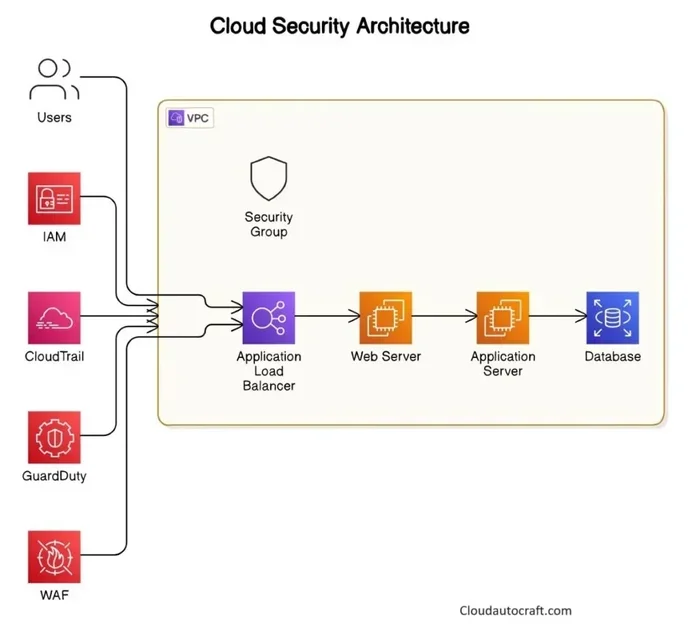
- Security groups and network ACLs: These act as virtual firewalls controlling traffic at the instance and subnet level.
- Perimeter security: Show how your cloud firewall or web application firewall guards the entry points.
When you map these layers, you give your team a clear understanding of how traffic flows and where it gets filtered. This is a critical part of any cloud computing security architecture diagram.
Identity and Access Management
Identity and access management, or IAM, is the backbone of cloud security. It controls who can access what resources and under what conditions. A strong cloud computing security architecture diagram should clearly show your IAM setup.
Include elements like:
- User roles and permissions: Show how different teams have different levels of access.
- Multi-factor authentication (MFA): Indicate where MFA adds an extra layer of protection.
- Single sign-on (SSO) integration: Show how users authenticate across multiple cloud services.
- Principle of least privilege: Highlight that users only get the minimum access they need.
By visualizing IAM in your diagram, you make it easier to enforce zero trust architecture principles. Zero trust means never trusting any user or device by default, even if they are inside the network. This approach has become a cornerstone of modern cloud security architecture design.
Data Protection and Encryption
Data is the most valuable asset in any cloud environment. Protecting it requires encryption at multiple stages. Your cloud computing security architecture diagram should show where data gets encrypted and how keys are managed.
Important elements to include:
- Encryption at rest: Show how stored data is encrypted using tools like AWS KMS or Azure Key Vault.
- Encryption in transit: Illustrate how data moving between services is protected through TLS/SSL protocols.
- Key management: Map out where encryption keys are stored and who has access to them.
- Data classification labels: Use visual indicators to show which data is public, internal, or highly sensitive.
When you include these elements, your diagram tells a complete story about data encryption in cloud practices. Auditors and stakeholders can quickly see that you take data protection seriously.
Common Cloud Security Architecture Diagram Types
Not all diagrams are the same. Different types serve different purposes, and understanding them helps you choose the right one for your needs. Let us explore the most common types used in cloud infrastructure security.
Logical Security Architecture Diagram
A logical diagram focuses on how security controls work in relation to each other, without worrying about specific physical hardware. It shows abstract components like security groups, IAM policies, and encryption layers. This is the most common type of cloud computing security architecture diagram and is perfect for planning and documentation.
Physical Network Security Diagram
A physical diagram shows the actual hardware and data centers involved in your cloud setup. While less common in pure cloud environments, it is useful when you need to show how on-premises systems connect to cloud services. This type helps teams understand the physical data center security measures that support your cloud deployment.
Threat Model Diagram
A threat model diagram specifically focuses on potential attack paths and vulnerabilities. It maps out how a threat actor might try to penetrate your system and where each defense layer intercepts the attack. This type is invaluable for cloud threat modeling exercises and penetration testing planning.
Compliance Architecture Diagram
Compliance diagrams show how your cloud setup meets specific regulatory requirements. They map security controls to standards like SOC 2, HIPAA, or GDPR. These diagrams are especially useful during audits and for demonstrating security compliance framework adherence to stakeholders.
| Diagram Type | Primary Purpose | Best For |
|---|---|---|
| Logical Security Diagram | Show abstract security controls and their relationships | Planning, documentation, team alignment |
| Physical Network Diagram | Map hardware and physical connections | Hybrid cloud setups, data center planning |
| Threat Model Diagram | Visualize attack paths and defenses | Penetration testing, risk assessment |
| Compliance Diagram | Map controls to regulatory standards | Audits, regulatory reporting |
Best Practices for Designing Your Cloud Security Architecture Diagram
Creating a cloud computing security architecture diagram is only useful if it is done right. Following best practices ensures your diagram remains accurate, readable, and actionable over time.
Here are proven tips to keep in mind:
- Start with the data flow: Before adding security controls, map out how data moves through your cloud environment. Understanding the flow helps you place defenses where they matter most.
- Keep it simple: Resist the urge to overload your diagram with every single detail. Focus on the security components that matter most. A cluttered diagram defeats the purpose.
- Use standard symbols: Stick to widely recognized shapes and icons. This makes your diagram easy to read for anyone, regardless of their technical background.
- Update regularly: Cloud environments change constantly. Set a schedule to review and update your diagram at least every quarter or whenever a major change occurs.
- Include a legend: A simple legend explaining your symbols and color codes makes the diagram much more accessible to new viewers.
- Share across teams: Make the diagram available to security, development, and operations teams. Collaboration leads to better security outcomes.
Quick Tips for Better Diagrams
- Use color coding to distinguish between different security layers, such as green for network defenses and blue for data protection.
- Add version numbers and dates so your team always knows which version is current.
- Include a brief description of each component directly on the diagram to reduce the need for separate documentation.
- Test your diagram with someone unfamiliar with the setup. If they can understand it, your diagram is doing its job.
Tools and Software for Creating Cloud Security Diagrams
You do not need to draw diagrams from scratch. Many tools exist that make creating a cloud computing security architecture diagram faster and more accurate. The right tool depends on your team size, budget, and specific needs.
Here are some popular options:
- Draw.io (diagrams.net): A free, browser-based tool with templates specifically designed for cloud architecture diagrams. It integrates with Google Drive and GitHub.
- Lucidchart: A polished diagramming platform with cloud-specific templates and real-time collaboration features. Great for teams that need professional-looking outputs.
- Microsoft Visio: A classic choice with extensive shape libraries and strong integration with Microsoft 365 products.
- AWS Architecture Icons: If you use AWS, their free icon library helps you create accurate AWS-specific security diagrams with official symbols.
- Azure Architecture Center: Microsoft provides templates and guidance for creating Azure-focused security architecture diagrams.
When choosing a tool, consider how easily your team can collaborate on it. The best cloud security architecture diagram is one that everyone can access, edit, and keep up to date. A tool that supports version history is especially helpful for tracking changes over time.
Common Mistakes to Avoid When Building Cloud Security Diagrams
Even experienced professionals make mistakes when creating security diagrams. Being aware of these pitfalls helps you build better, more useful diagrams.
Here are the most common errors:
- Overcomplicating the diagram: Adding too many details makes the diagram hard to read. Focus on clarity over completeness.
- Skipping the legend: Without a legend, your diagram becomes a guessing game for anyone who did not create it.
- Forgetting to update: A stale diagram is worse than no diagram at all. It creates a false sense of security.
- Ignoring external connections: Many breaches come from third-party integrations. Make sure your diagram shows how external services connect to your cloud environment.
- Neglecting the human element: IAM and user behavior are critical security components. Do not focus only on technical tools and forget about people and processes.
By avoiding these mistakes, you ensure your cloud computing security architecture diagram remains a trusted and accurate resource for your entire organization.
Expert Insights: The Future of Cloud Security Diagrams
Cloud security is evolving rapidly. New threats emerge constantly, and security tools are becoming more sophisticated. Experts predict that cloud computing security architecture diagram practices will continue to adapt in several exciting ways.
Automation is one major trend. Tools are increasingly capable of auto-generating security diagrams by scanning your live cloud environment. This means diagrams stay current without manual effort. Security monitoring tools and threat detection systems are also being integrated directly into diagramming platforms, giving teams real-time visibility into their security posture.
Another growing trend is the adoption of cloud workload protection platforms that provide visual dashboards of security health across all cloud workloads. These tools blur the line between diagrams and live monitoring, creating a more dynamic approach to cloud security architecture.
As more organizations adopt cloud deployment models like multi-cloud and hybrid cloud, the need for comprehensive, unified security diagrams will only grow. Staying ahead of these trends positions your team for long-term success.
Conclusion
A cloud computing security architecture diagram is one of the most valuable assets you can build for your organization. It brings clarity to complex security setups, helps teams collaborate effectively, and strengthens your overall defense posture. From network layers to identity management and data encryption, every component deserves a place in your diagram.
Start by choosing the right diagram type for your needs, use the best practices outlined in this guide, and keep your diagram updated as your cloud environment evolves. The tools available today make it easier than ever to create professional, accurate security diagrams that serve your entire team. Take the time to invest in this visual asset, and you will see the benefits in better security awareness, faster incident response, and smoother compliance audits.
Your cloud environment is only as secure as your understanding of it. A well-crafted diagram ensures that understanding is clear, shared, and actionable. Start building your cloud computing security architecture diagram today and take a major step toward a stronger, more resilient cloud security posture.
Frequently Asked Questions
What is the purpose of a cloud computing security architecture diagram?
A cloud computing security architecture diagram serves as a visual blueprint of all security controls within your cloud environment. It helps teams understand how defenses are arranged, identify gaps in protection, and communicate security strategies to stakeholders. It is an essential tool for planning, documentation, and incident response.
How often should I update my cloud security architecture diagram?
You should update your diagram at least every quarter or whenever a significant change occurs in your cloud environment. This includes adding new services, changing network configurations, or updating security policies. A stale diagram can create a false sense of security and lead to overlooked vulnerabilities.
What tools are best for creating cloud security architecture diagrams?
Popular tools include Draw.io, Lucidchart, Microsoft Visio, and provider-specific options like AWS Architecture Icons and Azure Architecture Center. The best tool for you depends on your team size, budget, and the cloud platforms you use. Look for tools that support collaboration and version history.
How does a cloud computing security architecture diagram support compliance?
A well-designed diagram maps your security controls to specific compliance standards like SOC 2, HIPAA, or GDPR. During audits, it provides visual evidence that your organization has thoughtfully designed its cloud security architecture. This simplifies the audit process and demonstrates your commitment to cloud compliance standards.
What is the difference between a logical and physical cloud security diagram?
A logical diagram shows abstract security components like firewalls, IAM policies, and encryption layers without focusing on physical hardware. A physical diagram shows actual hardware, data centers, and network connections. Most cloud teams use logical diagrams for day-to-day planning and physical diagrams when dealing with hybrid or on-premises setups.
Can a small business benefit from a cloud security architecture diagram?
Absolutely. In fact, small businesses often benefit the most because they typically have fewer resources and need to maximize every security dollar. A cloud computing security architecture diagram helps small teams prioritize their defenses, ensure proper cloud network segmentation, and avoid common security mistakes. It is a cost-effective way to build a strong security foundation from the start.