Benefits and Challenges of Cloud Computing Explained
Cloud computing has transformed how businesses and individuals store, manage, and access data. This guide covers the benefits and challenges of cloud computing, from cost savings and scalability to security risks and compliance concerns. Whether you are a small business owner or a tech enthusiast, you will find practical insights to help you make informed decisions about cloud adoption.
Key Takeaways
- Cost Efficiency: Cloud computing reduces the need for expensive hardware and upfront IT investments.
- Scalability on Demand: You can scale resources up or down based on real-time needs, making cloud services highly flexible.
- Security Concerns Persist: Data breaches and compliance issues remain top challenges for organizations using cloud-based solutions.
- Downtime Risks Exist: Even major providers experience outages, so understanding cloud reliability is essential.
- Migration Can Be Complex: Moving existing systems to the cloud requires careful planning and strategy.
- Vendor Lock-In Is Real: Switching providers later can be difficult and costly if you do not plan ahead.
📑 Table of Contents
- What Is Cloud Computing and Why Does It Matter?
- Key Benefits of Cloud Computing
- Key Challenges of Cloud Computing
- Cloud Computing Cost Breakdown
- Cloud Security: How to Protect Your Data
- Choosing the Right Cloud Model
- Expert Insights on Cloud Computing Trends
- Common Mistakes to Avoid in Cloud Adoption
- Quick Tips for Getting Started with Cloud Computing
- Conclusion
What Is Cloud Computing and Why Does It Matter?
Cloud computing is the delivery of computing services over the internet. These services include storage, processing power, databases, networking, and software. Instead of owning physical servers, you rent access to these resources from a cloud provider.
The idea is simple yet powerful. You pay for what you use, much like a utility bill. This model has reshaped how startups and large enterprises alike build and run their operations. Cloud technology is no longer a futuristic concept. It is the backbone of modern digital business.
Understanding the benefits and challenges of cloud computing helps you make smarter decisions. Whether you are migrating an existing system or building something new from scratch, knowing what to expect saves time and money.
Key Benefits of Cloud Computing
Cost Savings and Reduced IT Overhead
One of the biggest advantages of cloud computing is cost reduction. Traditional IT setups require buying servers, cooling systems, and hiring a dedicated team. Cloud infrastructure eliminates most of these expenses.
With cloud hosting, you shift from capital expenditure to operational expenditure. You pay a monthly or annual fee instead of making large upfront purchases. This is especially helpful for small businesses with tight budgets.
Scalability and Flexibility
Cloud scalability is a game-changer. Your business needs can change overnight. Cloud platforms let you adjust resources instantly. Need more storage during a sales event? Just scale up. Traffic drops after the event? Scale back down.
This flexibility means you never overpay for idle resources. Cloud-based solutions grow with your business, whether you are a solo freelancer or a global enterprise.
Disaster Recovery and Data Backup
Data loss can be catastrophic. Cloud providers invest heavily in cloud reliability and backup systems. Your data gets replicated across multiple data centers in different locations.
This means even if one server fails, your data stays safe. Traditional backup methods simply cannot match this level of protection without enormous investment.
Remote Work and Collaboration
The rise of remote work made cloud services essential. Teams can access files and applications from anywhere in the world. Collaboration tools hosted in the cloud make real-time editing and communication seamless.
During the pandemic, businesses that already used cloud deployment adapted quickly. Those without it struggled to keep operations running.
Automatic Updates and Maintenance
Cloud providers handle maintenance and updates for you. This frees your IT team to focus on strategic tasks instead of routine upkeep. Software patches, security fixes, and performance improvements happen automatically.
Key Challenges of Cloud Computing
Security and Privacy Risks
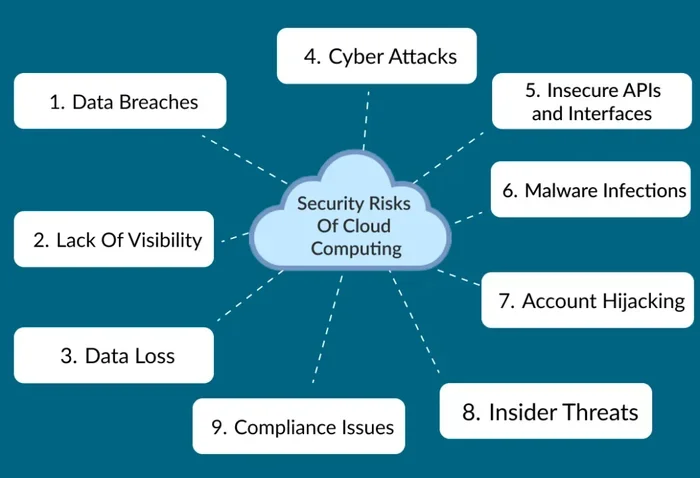
Security is the number one concern for most organizations. When you store data on someone else’s servers, you are trusting a third party. Data breaches, unauthorized access, and insider threats are real risks.
While top providers invest billions in security, no system is completely immune. You must also consider how your data is handled across borders. Some regulations require data to stay within specific countries. Always review the provider’s terms and conditions carefully before committing. You can read more about standard service agreements at Terms and Conditions to understand what to look for in cloud service contracts.
Downtime and Service Outages
Even the biggest cloud providers face outages. When a cloud platform goes down, your business can grind to a halt. These outages can last minutes or sometimes hours.
The key is to plan for them. Use multi-cloud strategies or backup systems to reduce the impact. Do not assume any single provider offers 100% uptime.
Cloud Migration Complexity
Moving existing systems to the cloud is not always smooth. Legacy applications may not be compatible with modern cloud architecture. Data transfer can take a long time, especially for large databases.
Migration also requires retraining staff and updating processes. A rushed migration can lead to data loss and extended downtime. A phased approach works best for most organizations.
Vendor Lock-In
Once you commit to a specific provider, switching becomes difficult. Each cloud platform has its own tools, APIs, and data formats. Moving your workloads to a different provider can be expensive and time-consuming.
This cloud computing risk is often overlooked during the planning phase. To avoid it, use open standards and containerized applications where possible.
Ongoing Costs Can Add Up
While cloud computing costs start low, they can grow quickly. Egress fees, additional storage, and premium features all add up. Without proper monitoring, your monthly bill can surprise you.
Regularly review your usage and set budget alerts. Choose the right pricing model for your needs from the start.
Cloud Computing Cost Breakdown
| Cost Factor | Description | Impact Level |
|---|---|---|
| Compute Pricing | Pay per hour or minute for processing power | High |
| Storage Fees | Monthly charges based on data volume | Medium |
| Data Transfer (Egress) | Cost of moving data out of the cloud | Medium |
| Support Plans | Premium support tiers for faster response | Low to Medium |
| Additional Services | AI tools, analytics, and advanced features | Varies |
Understanding these cost factors helps you budget effectively. Always request a detailed cost estimate before signing a contract with any cloud provider.
Cloud Security: How to Protect Your Data
Cloud security is a shared responsibility. Your provider secures the infrastructure, but you are responsible for protecting your data and access controls.
Here are practical steps to improve your cloud security:
- Enable multi-factor authentication for all user accounts.
- Encrypt sensitive data both at rest and in transit.
- Conduct regular security audits and vulnerability assessments.
- Limit user access based on the principle of least privilege.
- Use a dedicated cloud security tool for monitoring and alerts.
Taking these steps reduces your risk significantly. Security should be part of your cloud adoption strategy from day one.
Choosing the Right Cloud Model
Public Cloud
Public clouds are owned and operated by third-party providers. Resources are shared across multiple customers. This model offers the lowest cost and highest scalability. It is ideal for startups and small businesses.
Private Cloud
A private cloud is dedicated to a single organization. It offers greater control and customization. This model suits businesses with strict compliance or security requirements.
Hybrid Cloud
A hybrid cloud combines public and private environments. You get the flexibility of the public cloud with the control of a private setup. Many enterprises prefer this model for its balance of cost and security.
Multi-Cloud
Multi-cloud means using services from multiple providers simultaneously. This approach reduces dependency on a single vendor and improves redundancy. However, it also increases complexity and management overhead.
Expert Insights on Cloud Computing Trends
The cloud computing trends for 2024 and beyond are exciting. Edge computing is gaining traction, bringing processing closer to the data source. Artificial intelligence and machine learning are being integrated directly into cloud platforms.
Sustainability is also becoming a focus. Many providers are investing in renewable energy to power their data centers. Green cloud computing is not just good for the planet, it also appeals to environmentally conscious customers.
Serverless computing is another trend worth watching. It lets developers build and run applications without managing servers. This further reduces operational overhead and speeds up development cycles.
Common Mistakes to Avoid in Cloud Adoption
- Skipping the planning phase. Rushing into cloud migration without a clear strategy leads to problems.
- Ignoring security from the start. Retrofitting security after deployment is far more expensive and risky.
- Underestimating ongoing costs. Cloud pricing can be deceptive without proper monitoring.
- Not training your team. New tools and workflows require proper onboarding for staff.
- Neglecting to back up data. Even cloud providers can experience failures. Always have a backup plan.
Avoiding these mistakes sets you up for a smoother and more successful cloud migration experience.
Quick Tips for Getting Started with Cloud Computing
- Start small. Migrate one application or workload first to test the waters.
- Set clear goals. Know what you want to achieve before you begin.
- Choose a provider that matches your needs. Compare features, pricing, and support options.
- Monitor usage from day one. Set up alerts and dashboards to track spending.
- Invest in training. Your team needs to understand the new tools and processes.
- Review and optimize regularly. Cloud environments need ongoing tuning for best performance and cost.
Conclusion
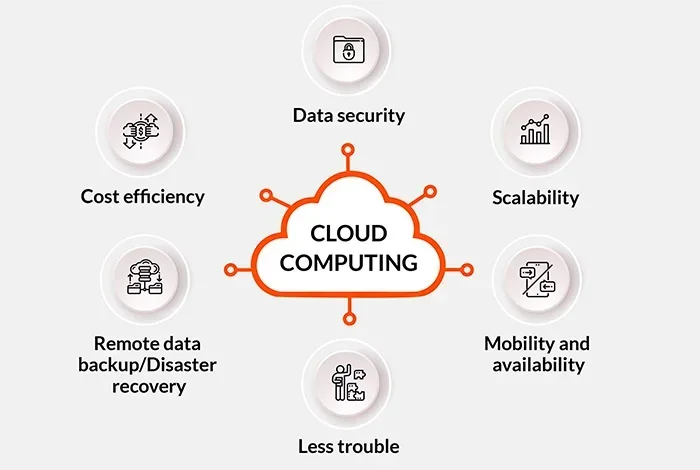
The benefits and challenges of cloud computing are real and significant. Cloud computing advantages like cost savings, scalability, and remote accessibility make it a powerful choice for businesses of all sizes. At the same time, challenges like security risks, migration complexity, and vendor lock-in require careful planning and management.
The key is to approach cloud adoption with a clear strategy. Understand your needs, evaluate your options, and start small. With the right approach, cloud technology can transform the way you work and grow.
Stay informed, keep learning, and always prioritize security. The cloud is a powerful tool, and when used wisely, it delivers incredible value for years to come.
Frequently Asked Questions
What are the main benefits of cloud computing?
The main benefits include cost savings, scalability, improved disaster recovery, remote accessibility, and automatic updates. Cloud services allow businesses to pay only for what they use, making them highly cost-effective.
What are the biggest challenges of cloud computing?
The biggest challenges include security and privacy risks, service outages, complex migration processes, vendor lock-in, and rising ongoing costs. Understanding these risks helps you plan better and choose the right cloud provider.
Is cloud computing safe for sensitive data?
Yes, when implemented correctly. Top providers offer strong encryption and security features. However, you must also follow best practices like enabling multi-factor authentication and conducting regular audits to keep your cloud-based solutions secure.
How much does cloud computing cost?
Costs vary based on usage, storage, and services. Most providers offer pay-as-you-go pricing. Small businesses can often start for under $100 per month, but costs can grow as usage increases.
What is the difference between public and private cloud?
A public cloud shares resources across multiple customers and is more affordable. A private cloud is dedicated to a single organization and offers greater control. Many businesses use a hybrid cloud to get the best of both worlds.
How long does cloud migration take?
Migration timelines vary widely. Simple workloads can move in weeks, while complex systems may take months. A phased approach with proper planning helps ensure a smoother cloud migration process.