Cloud Computing for Business Will Transform Your Work
Cloud computing for business is changing how companies of all sizes operate. It lets you access powerful tools and data from anywhere with an internet connection. Cloud computing solutions save money, boost teamwork, and help you grow without big upfront costs. This guide covers everything you need to know to make the switch confidently.
Cloud computing for business has become one of the biggest shifts in how companies work today. Gone are the days when you needed a room full of servers just to run basic operations. Now, powerful tools live online and you can access them from anywhere in the world.
If you have ever used Google Docs, Zoom, or Slack, you have already used the cloud. These tools store your data and let you work with others in real time. Cloud computing for business takes this idea and scales it up to handle everything from email to complex data analysis.
The beauty of cloud computing solutions is that they fit almost any type of business. A small startup and a large corporation can both benefit. You pay for what you use, scale as you grow, and avoid the headaches of managing physical equipment. Let us explore how this technology can change the way you work.
Key Takeaways
- Cloud computing for business cuts IT costs and removes the need for expensive hardware.
- Cloud services for business improve team collaboration and enable remote work from anywhere.
- Cloud migration is easier than most people think, and you can move step by step.
- Cloud security is a top priority, but modern providers offer strong protection tools.
- Cloud scalability lets you grow or shrink resources based on real-time demand.
- Cloud computing ROI is strong, with most businesses seeing savings within the first year.
- Choosing the right cloud deployment model (public, private, or hybrid) is key to success.
📑 Table of Contents
What Is Cloud Computing for Business?
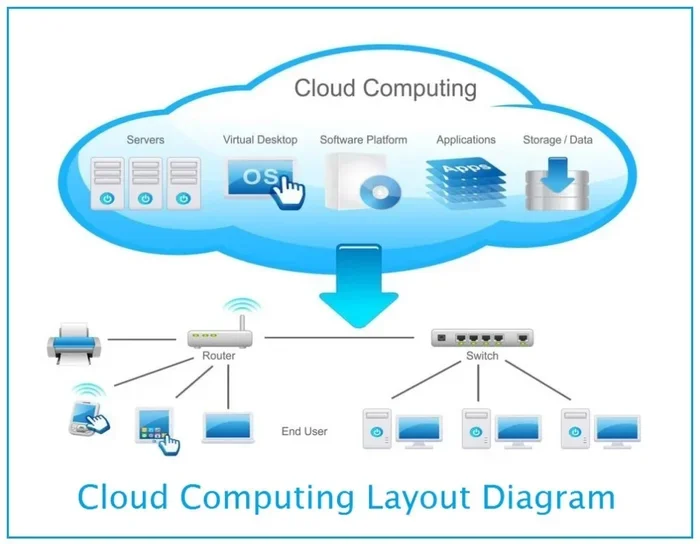
At its core, cloud computing for business means using remote servers hosted on the internet to store, manage, and process data. Instead of keeping everything on your own computers or local servers, you access it through the web.
Think of it like renting a workspace instead of buying a building. You get the space you need, you pay a monthly fee, and the landlord handles all the maintenance. That is essentially how cloud infrastructure works for businesses.
How Does It Work?
When you use cloud services for business, your data travels over the internet to data centers owned by cloud providers. These centers have massive, secure servers that store and process your information. You access everything through a browser or an app on your phone or laptop.
You do not need to be a tech expert to use it. Most cloud computing for business platforms are designed to be simple and intuitive. You log in, and your files, apps, and tools are right there waiting for you.
Why Is It So Popular Now?
The rise of remote work and digital tools has made cloud adoption explode. Companies need their teams to stay connected no matter where they are. The cloud makes this possible without huge investments in IT equipment.
Also, the COVID-19 pandemic pushed many businesses to go digital fast. Those that already used cloud computing explained simply in simple terms had a much easier time switching to remote work. This trend has only grown since then.
Key Benefits of Cloud Computing for Business
Switching to the cloud offers many real advantages. Here are the biggest reasons businesses make the move.
Cost Savings
One of the first things people notice about cloud computing for business is the cost reduction. You do not need to buy expensive servers or hire a full IT team to manage them. Cloud providers handle all of that for you.
Instead of large upfront costs, you pay a predictable monthly fee. This cloud computing costs model makes it easier to budget and plan. Many small businesses have saved thousands of dollars by making the switch.
Scalability and Flexibility
Cloud scalability is a game-changer. If your business grows quickly, the cloud grows with you. You can add more storage, users, or features in minutes. And if things slow down, you can scale back just as easily.
This flexibility means you never pay for what you do not need. It is one of the main reasons cloud computing for small business has become so popular.
Better Collaboration
Teams can work together on the same files at the same time. No more emailing documents back and forth. Cloud productivity tools like Google Workspace and Microsoft 365 make teamwork smoother than ever.
When everyone has access from any device, communication improves. Projects move faster, and people stay more connected.
Disaster Recovery
What happens if your office loses power or a hard drive crashes? With cloud disaster recovery, your data is safe in the cloud. You can get back to work quickly without losing important files.
This peace of mind is worth a lot. Many businesses have avoided major losses because their data was backed up in the cloud.
Types of Cloud Computing Services
Not all cloud services are the same. Understanding the different models helps you choose what fits your business best.
IaaS (Infrastructure as a Service)
IaaS gives you the basic building blocks. You get virtual servers, storage, and networking. You control the software and applications, while the provider manages the hardware. This is great for businesses that want full control without buying physical equipment.
PaaS (Platform as a Service)
PaaS goes a step further. It gives you a platform to build and deploy your own apps. Developers love PaaS because they do not have to worry about managing servers or operating systems. They just focus on writing code and building products.
SaaS (Software as a Service)
SaaS is the most common type of cloud computing for business. You use ready-made software over the internet. Examples include Gmail, Salesforce, and Dropbox. You do not install anything. You just log in and start working.
Most businesses start with SaaS because it is the easiest to adopt. You can add more services as your needs grow.
Public vs. Private vs. Hybrid Cloud
Public cloud means your data is stored on servers shared by many businesses. It is cost-effective and easy to set up. Private cloud means you have your own dedicated servers. It offers more control and security. Hybrid cloud combines both, giving you the best of each world.
The right choice depends on your budget, security needs, and how much control you want. Many businesses start with public cloud and move to hybrid as they grow.
How to Choose the Right Cloud Solution
Not every cloud computing solution is the right fit for every business. Here is how to make a smart choice.
Assess Your Needs
Start by asking what you need the cloud for. Do you need more storage? Better team tools? A place to run apps? Write down your priorities before you talk to any provider.
Think about your team size, your budget, and your future goals. This will help you narrow down your options.
Check Security Features
Cloud security is non-negotiable. Look for providers that offer encryption, two-factor authentication, and regular security updates. Make sure they comply with industry standards like GDPR or HIPAA if those apply to your business.
A good provider will be transparent about their security practices. Do not be afraid to ask questions before you commit.
Consider Ease of Use
The best cloud computing for business platform is one your team will actually use. Look for tools with clean interfaces and good training resources. If it is too complicated, your team will resist it.
Many providers offer free trials. Take advantage of these to test the platform before you sign a long-term contract.
Think About Integration
Your cloud tools should work well with your existing software. If you already use a specific CRM or accounting tool, make sure the cloud platform can connect with it. Smooth integration saves time and reduces frustration.
Cloud Computing Costs and ROI
One of the biggest concerns business owners have is the cloud computing costs. Let us break this down honestly.
Most cloud services work on a pay-as-you-go model. You pay a monthly or annual fee based on how much storage and computing power you use. This is much more predictable than buying and maintaining your own servers.
When you add up the savings from not buying hardware, not hiring extra IT staff, and not paying for office space for servers, the numbers add up fast. Cloud computing ROI is often positive within the first six to twelve months.
Here are some quick tips to keep costs under control:
- Set usage alerts so you do not get surprise bills.
- Review your plan regularly and downgrade if you are paying for features you do not use.
- Take advantage of free tiers offered by major providers.
- Train your team to use cloud tools efficiently.
Smart spending is the key to getting the most value from cloud computing for business.
Overcoming Common Cloud Adoption Challenges
Switching to the cloud is not always smooth. Here are some challenges you might face and how to handle them.
Fear of Data Loss
Many business owners worry about losing data during cloud migration. The truth is that reputable providers have multiple backup systems in place. Your data is often safer in the cloud than on a local hard drive.
To ease your mind, start with a small migration. Move non-critical files first and build confidence before moving everything over.
Team Resistance
Some employees are hesitant to change how they work. This is normal. The best way to overcome this is through training and clear communication.
Show your team the benefits. Let them see how much easier their daily tasks become. When people understand the value, they are much more willing to adapt.
Internet Dependency
The cloud needs a reliable internet connection. If your office has spotty Wi-Fi, that can be a problem. Invest in a good internet plan and consider a backup connection for critical operations.
Some cloud services for business also offer offline modes, so your team can work without internet and sync later.
Vendor Lock-In
You do not want to feel trapped with one provider forever. Choose platforms that make it easy to export your data. Read the fine print before signing any contract.
A good rule of thumb is to keep your data in standard formats that any system can read. This gives you freedom and peace of mind.
Cloud Computing Trends to Watch
The world of cloud computing trends is always evolving. Here are a few developments to keep on your radar.
AI and machine learning are being built directly into cloud platforms. This means you can use powerful AI tools without needing a data science team. Cloud providers are making smart technology accessible to every business.
Edge computing is another big trend. It brings data processing closer to where it is needed, which speeds things up. This is especially useful for businesses that rely on real-time data.
Multi-cloud strategies are also gaining popularity. Instead of relying on one provider, some businesses spread their work across multiple clouds. This reduces risk and gives them more flexibility.
Staying informed about these trends helps you make smarter decisions about your cloud computing for business strategy.
Final Thoughts
Cloud computing for business is no longer a luxury. It is a necessity for companies that want to stay competitive and agile. The benefits are clear: lower costs, better collaboration, stronger security, and the ability to scale on demand.
Whether you are a small business just starting out or a growing company looking to modernize, the cloud has something to offer you. Start small, learn as you go, and build your cloud computing strategy step by step.
The best time to make the switch was yesterday. The second best time is right now. Embrace cloud computing solutions and watch your business transform.
Frequently Asked Questions
What is cloud computing for business in simple terms?
Cloud computing for business means using internet-based servers to store data and run applications instead of relying on your own physical computers or servers. It lets you access your tools and files from anywhere with an internet connection.
How much does cloud computing cost for a small business?
Cloud computing costs vary based on your needs, but most small businesses pay between $50 and $500 per month. Many providers offer free tiers or trial periods so you can test the waters before committing to a paid plan.
Is cloud computing safe for business data?
Yes, reputable cloud providers invest heavily in cloud security. They use encryption, regular backups, and strict access controls. In many cases, data stored in the cloud is safer than data kept on a local computer or server.
How long does cloud migration take?
The timeline depends on the size of your business and how much data you need to move. Small businesses can often complete a cloud migration in a few weeks. Larger companies may take several months, especially if they move in stages.
Can cloud computing help remote teams?
Absolutely. Cloud productivity tools are built for remote collaboration. Team members can access files, join video meetings, and work on shared documents from anywhere in the world. This is one of the biggest reasons cloud computing for business has grown so fast.
What is the difference between public and private cloud?
A public cloud shares resources among many businesses and is more affordable. A private cloud dedicates resources to just your business for more control and security. A hybrid cloud combines both approaches for maximum flexibility.