Application Security in Cloud Computing Explained Simply
Application security in cloud computing is all about keeping your apps safe when they live in the cloud. You will learn the top threats, best practices, and tools that actually work. This guide breaks down complex topics into simple, actionable steps anyone can follow. Whether you are a developer or a business owner, you will find practical advice you can use right away. Read on to build a stronger defense for your cloud applications.
When you move your apps to the cloud, you gain flexibility and scale. But you also open the door to new risks. Application security in cloud computing is the practice of protecting those apps from threats while they run in cloud environments. It covers everything from data protection to access control and threat detection.
Whether you are a developer, a small business owner, or an IT manager, understanding cloud app security is essential. Cyberattacks on cloud platforms have grown sharply in recent years. In fact, misconfigurations alone account for a huge share of cloud security incidents every year. This guide will walk you through the what, why, and how of keeping your cloud applications safe.
Key Takeaways
- Understand the basics: Cloud apps face unique security challenges that differ from traditional on-premise setups.
- Know the threats: Data breaches, misconfigurations, and unauthorized access are the biggest risks you need to watch for.
- Follow best practices: Encryption, multi-factor authentication, and regular scanning keep your cloud apps safe.
- Know your role: The shared responsibility model means both you and your cloud provider share security duties.
- Use the right tools: Cloud security posture management and vulnerability scanning tools make protection easier.
- Stay compliant: Following standards like GDPR and SOC 2 builds trust and avoids penalties.
📑 Table of Contents
- What Is Application Security in Cloud Computing?
- Why Application Security in Cloud Computing Matters
- Common Security Threats in Cloud Environments
- Best Practices for Securing Cloud Applications
- The Shared Responsibility Model Explained
- Tools and Technologies for Cloud App Security
- Securing Cloud Applications During Migration
- Conclusion
What Is Application Security in Cloud Computing?
Application security in cloud computing refers to the measures and practices used to protect cloud-based apps from unauthorized access, data theft, and other security threats. Unlike traditional apps that run on local servers, cloud applications operate across shared cloud infrastructure managed by providers like AWS, Microsoft Azure, or Google Cloud.
This means your app’s data and code live on servers you do not physically control. That shift changes the security landscape significantly. You must think about data protection differently when your app is in the cloud.
Why Cloud Apps Are Different
Traditional apps run behind your own firewalls. You control the hardware, the network, and the software stack. Cloud apps spread across multiple servers and data centers worldwide. They rely on APIs, web interfaces, and shared resources. This creates a broader attack surface for application security in cloud computing.
Here is what makes cloud app security unique:
- Shared infrastructure: Your app shares resources with other tenants on the same cloud infrastructure.
- Dynamic environments: Cloud resources spin up and down automatically based on demand.
- API-driven access: Most cloud apps communicate through APIs, which can be exploited if not secured.
- Global reach: Your app may be accessed from anywhere in the world, increasing exposure.
Understanding these differences helps you build a stronger security best practices strategy from day one. The more you know about how cloud environments work, the better you can defend them.
Why Application Security in Cloud Computing Matters
Security is not just an IT concern. It directly impacts your business reputation, customer trust, and bottom line. A single breach can cost millions of dollars and destroy years of brand building. That is why investing in cloud security is one of the smartest decisions you can make.
The Rising Cost of Cloud Breaches
Studies show that the average cost of a data breach in cloud environments continues to climb. Companies face regulatory fines, legal fees, and lost revenue. But the damage goes deeper. Customers lose trust, and rebuilding that trust takes years.
Small businesses are especially vulnerable. They often lack dedicated security teams and advanced tools. Yet they store just as much sensitive data as larger companies. This makes cloud security a must for businesses of every size. No company is too small to be a target.
Regulatory Compliance
Governments around the world have introduced strict data protection laws. Regulations like GDPR in Europe and CCPA in California require companies to protect user data. If your cloud apps handle personal information, you must meet these standards.
Failing to comply can result in heavy penalties. More importantly, it can erode customer confidence. Strong application security in cloud computing helps you stay compliant and maintain trust with your users. Compliance is not just a legal checkbox. It is a sign that you take your users’ privacy seriously.
Common Security Threats in Cloud Environments
Knowing what threats to look for is the first step in defending against them. Cloud environments face several unique security threats that you need to understand.
Data Breaches
A data breach happens when unauthorized users gain access to sensitive information. In cloud settings, this can occur through weak passwords, unpatched vulnerabilities, or exposed APIs. Stolen data might include customer records, financial details, or intellectual property.
Data breaches are one of the most common and damaging cloud security incidents. They can affect millions of users at once. The fallout can last for months or even years after the initial attack.
Misconfigurations
Misconfigurations are the leading cause of cloud security incidents. This happens when cloud resources are set up incorrectly. For example, an open storage bucket or overly permissive access rules can expose your data to the public internet.
Common misconfiguration mistakes include:
- Leaving default passwords unchanged
- Granting excessive permissions to users or services
- Failing to enable encryption for stored data
- Exposing admin panels to the public internet
These errors are easy to make but can have serious consequences. Regular vulnerability scanning helps catch them early before attackers find them.
Insider Threats
Not all threats come from outside. Insider threats involve people within your organization who misuse their access. This could be a disgruntled employee or a careless team member who accidentally shares sensitive data.
Implementing strong identity and access management (IAM) policies reduces this risk. You should follow the principle of least privilege, giving users only the access they need. This limits the damage even if an insider goes rogue.
Denial-of-Service Attacks
A denial-of-service (DoS) attack floods your application with traffic until it crashes. In the cloud, these attacks can be even more disruptive because they can drive up your cloud bills while taking your app offline.
Distributed denial-of-service (DDoS) attacks use multiple sources to overwhelm your systems. Cloud providers offer built-in DDoS protection, but you should also implement application-level defenses. Network security measures like rate limiting and traffic filtering add an extra layer of defense.
Best Practices for Securing Cloud Applications
Now that you know the threats, let us look at how to protect your cloud apps. These security best practices form the foundation of a strong defense against security threats in the cloud.
1. Implement Strong Encryption
Encryption scrambles your data so that only authorized parties can read it. You should encrypt data both at rest and in transit. Most cloud providers offer built-in encryption tools. Use them.
For sensitive applications, consider adding an extra layer of encryption at the application level. This way, even if the cloud infrastructure is compromised, your data remains protected. Data protection through encryption is one of the most effective measures available.
2. Enable Multi-Factor Authentication
Multi-factor authentication (MFA) adds a second layer of verification beyond just a password. Even if a hacker steals a password, they still cannot access the account without the second factor.
MFA should be required for all users, especially those with admin privileges. It is one of the simplest and most effective security best practices available. Do not skip this step, no matter how small your setup is.
3. Conduct Regular Security Audits
Security is not a set-it-and-forget-it task. You need to regularly review your cloud setup and application code. Vulnerability scanning tools can automate much of this work and save you hours of manual review.
Aim to perform full security audits at least every quarter. After any major update or configuration change, run an additional check. Staying proactive is the key to staying ahead of attackers.
4. Adopt a Zero Trust Approach
Zero trust security operates on the principle of “never trust, always verify.” Every user and device must be authenticated and authorized before accessing any resource, regardless of their location.
This approach is especially important in cloud environments where users access apps from various devices and networks. Zero trust security minimizes the damage even if one account is compromised. It assumes that threats can come from anywhere, including inside your network.
5. Secure Your APIs
APIs are the backbone of most cloud applications. They allow different services to communicate. But poorly secured APIs are a favorite target for attackers looking to exploit application security in cloud computing weaknesses.
To secure your APIs, follow these steps:
- Use authentication tokens for every API call
- Rate-limit requests to prevent abuse and overload
- Validate all input data to prevent injection attacks
- Keep API documentation private and access-controlled
Treating your APIs with the same care as your core application code is essential for overall cloud security.
6. Train Your Team
Your security is only as strong as your weakest link. Human error causes a large percentage of cloud security incidents. Regular training helps your team recognize phishing emails, avoid risky behavior, and follow security best practices.
Make security training a part of your onboarding process. Refresh it regularly with real-world examples and hands-on exercises. A well-trained team is your first and best line of defense.
The Shared Responsibility Model Explained
One of the most important concepts in application security in cloud computing is the shared responsibility model. This model defines who handles what when it comes to securing your cloud environment.
What the Cloud Provider Secures
Your cloud provider is responsible for the security of the cloud itself. This includes the physical data centers, the network infrastructure, and the core cloud services. They handle hardware maintenance, facility security, and basic network security. You can think of this as the foundation they build on.
What You Are Responsible For
You are responsible for securing everything inside the cloud. This includes your data, your applications, your access controls, and your configurations. If you misconfigure a storage bucket, that is your problem, not the provider’s.
Many people misunderstand this model. They assume the cloud provider handles everything. That assumption leads to gaps in cloud security that attackers can exploit. Understanding your side of the responsibility is critical.
| Responsibility | Cloud Provider | You |
|---|---|---|
| Physical security | Yes | No |
| Network infrastructure | Yes | No |
| Data encryption | Partial | Yes |
| Application code | No | Yes |
| Access management | Partial | Yes |
| Configuration | No | Yes |
Understanding this table helps you focus your efforts where they matter most. The shared responsibility model is at the heart of application security in cloud computing, and getting it right is essential.
Tools and Technologies for Cloud App Security
The right tools can make a huge difference in your security posture. Here are some essential categories of cloud security tools you should consider.
Cloud Security Posture Management (CSPM)
CSPM tools continuously monitor your cloud environment for misconfigurations and compliance violations. They alert you when something is wrong and often provide automated fixes. Popular CSPM solutions include AWS Security Hub, Azure Security Center, and third-party options like Prisma Cloud. These tools are a must for any team managing cloud applications at scale.
Web Application Firewalls (WAF)
A WAF sits between your application and the internet. It filters incoming traffic and blocks malicious requests. WAFs are especially effective against common attacks like SQL injection and cross-site scripting (XSS). They add a protective layer that catches threats before they reach your app.
Intrusion Detection and Threat Detection
Threat detection tools monitor your cloud environment for suspicious activity. They use machine learning and pattern recognition to identify potential attacks in real time. Early detection gives you a critical advantage in responding to incidents quickly and effectively.
DevSecOps and Secure Coding Tools
Secure coding practices start in the development phase. DevSecOps integrates security into your CI/CD pipeline. Tools like static application security testing (SAST) and dynamic application security testing (DAST) scan your code for vulnerabilities before deployment.
By catching issues early, you reduce the risk of shipping vulnerable cloud applications to production. Secure coding is not just a developer task. It is a team-wide mindset that should be part of your culture.
Securing Cloud Applications During Migration
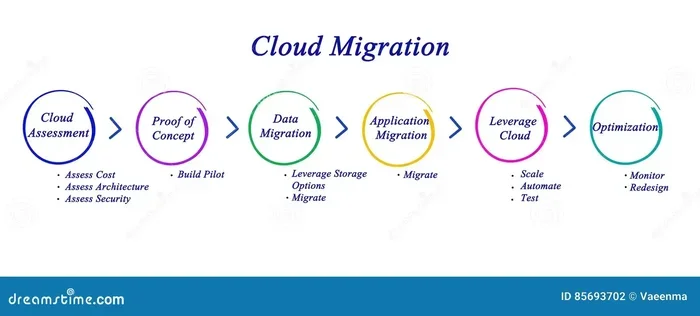
Cloud migration is a complex process that introduces its own security challenges. Moving your apps to the cloud requires careful planning and execution. Many organizations rush this process and overlook critical security steps.
Assess Before You Migrate
Before you move anything to the cloud, conduct a thorough security assessment. Identify which apps handle sensitive data. Map out your current security controls and determine what needs to change. This assessment phase is where you lay the groundwork for strong data protection going forward.
Secure During Migration
During the migration process, your data is in transit. This is a vulnerable window. Use encrypted connections and verify data integrity throughout the move. Do not rush this process. Taking extra time during cloud migration can save you from serious security problems later.
Test After Migration
Once your apps are in the cloud, run comprehensive security tests. Check for new vulnerabilities introduced by the migration. Verify that all security best practices are in place and working correctly. Post-migration testing is often overlooked but is absolutely essential.
Conclusion
Application security in cloud computing is not optional. It is a fundamental requirement for any business that operates in the cloud. The threats are real, but the defenses are within your reach. By understanding the unique challenges of cloud environments, following proven best practices, and using the right tools, you can protect your applications and your users.
Start with the basics. Implement encryption, enable MFA, and train your team. Then build on that foundation with advanced strategies like zero trust and DevSecOps. Cloud security is an ongoing journey, not a one-time fix. Stay vigilant, stay informed, and keep your cloud apps safe. Your users trust you with their data. Honor that trust by taking application security in cloud computing seriously today.
Frequently Asked Questions
What is application security in cloud computing?
Application security in cloud computing refers to the practices and tools used to protect cloud-based applications from threats like unauthorized access, data theft, and attacks. It covers encryption, access control, vulnerability scanning, and ongoing monitoring to keep your cloud apps safe and compliant.
Why is cloud application security different from traditional app security?
Cloud apps run on shared infrastructure managed by providers, which means you do not control the physical servers or network hardware. They rely heavily on APIs, dynamic scaling, and global access. These factors create a broader attack surface and require different security best practices compared to traditional on-premise applications.
What is the shared responsibility model in cloud security?
The shared responsibility model divides security duties between the cloud provider and the customer. The provider secures the underlying cloud infrastructure, while you are responsible for securing your data, applications, and configurations. Understanding this division is essential to avoid gaps in your cloud security posture.
How can I protect my cloud apps from data breaches?
You can protect your cloud apps by implementing strong encryption, enabling multi-factor authentication, conducting regular vulnerability scanning, and securing your APIs. Following security best practices like zero trust principles and regular security audits also significantly reduces the risk of a data breach.
What tools are essential for application security in cloud computing?
Essential tools include Cloud Security Posture Management (CSPM) for monitoring misconfigurations, Web Application Firewalls (WAF) for filtering malicious traffic, threat detection systems for real-time alerts, and DevSecOps tools for secure coding during development. Together, these tools form a comprehensive cloud security defense.
How does cloud migration affect application security?
Cloud migration introduces security challenges because your data and apps move through vulnerable transit states. You need to assess risks before migrating, use encrypted connections during the move, and run thorough security tests after migration. Proper planning ensures your application security in cloud computing remains strong throughout the transition.