Cloud Data Storage for Small Business Made Simple
Cloud data storage for small business is a game-changer that lets you store files online instead of on messy hard drives. It keeps your data safe, helps teams work together, and costs much less than old-school servers. This guide breaks everything down in plain language so you can make the right choice for your business today.
Running a small business means wearing a dozen hats at once. You handle sales, manage staff, balance books, and still try to keep your files organized. cloud data storage for small business takes one big weight off your shoulders. Instead of stacking filing cabinets or relying on a single hard drive, you can store everything online. It is simpler, safer, and surprisingly affordable.
You might be thinking, “I have been getting by just fine without the cloud.” And that is fair. But here is the truth. The way small businesses store and share information has changed dramatically. Companies that switch to online file storage save time, reduce stress, and stay prepared for the unexpected. Whether you run a bakery or a consulting firm, this technology works for you.
Key Takeaways
- Easy Access: Cloud storage lets you reach your files from anywhere, on any device, as long as you have internet.
- Cost Savings: You skip expensive hardware and pay only for the space you actually use each month.
- Built-In Security: Reputable providers use strong encryption and backups to protect your important business files.
- Team Collaboration: Multiple people can work on the same documents at the same time, making teamwork smoother.
- Scalability: You can upgrade or downgrade your plan as your business grows or changes.
- Disaster Recovery: Your data stays safe even if your office faces a fire, flood, or hardware failure.
📑 Table of Contents
What Is Cloud Data Storage for Small Business?
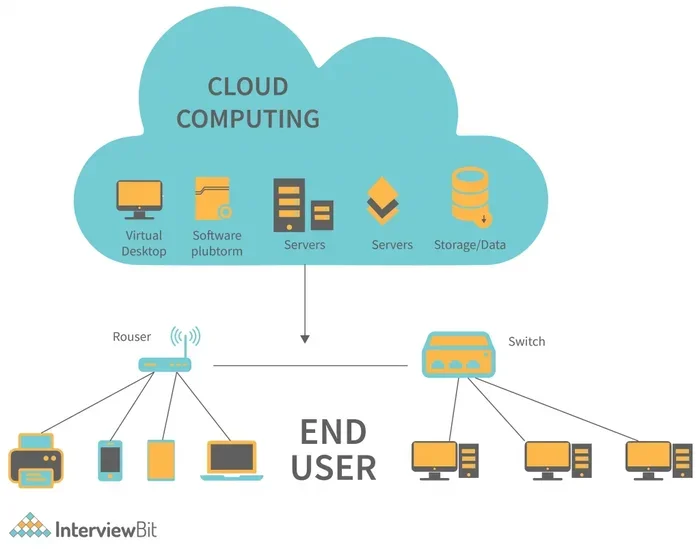
At its core, cloud data storage means keeping your files on remote servers instead of your computer’s hard drive. These servers live in massive data centers around the world. You access them through the internet, not through a physical cable or USB stick.
Think of it like renting a storage unit. You do not own the building, but you pay a small fee to keep your things there safely. You can visit them anytime. The same idea applies to business cloud storage. Your files sit in a secure facility, and you reach them through your laptop, phone, or tablet.
How Does It Actually Work?
When you upload a file to the cloud, it travels over the internet to a data center. The provider saves a copy on their servers. Most providers also create a backup copy, so your data survives even if one server fails. This process is called cloud backup, and it is one of the biggest reasons small businesses trust cloud computing for their file needs.
You do not need to be a tech expert to use it. Most cloud service providers offer simple apps. You drag and drop files just like you would on your desktop. The whole process feels familiar, even if you have never used the cloud before.
Why Small Businesses Need Cloud Storage
You might wonder why cloud data storage for small business deserves your attention. The answer comes down to practical benefits that affect your daily operations and long-term growth.
1. Save Money on Hardware
Traditional storage means buying servers, external hard drives, and USB sticks. Those costs add up fast. A basic server can cost thousands of dollars. And you still need someone to maintain it. With cloud storage pricing, you pay a monthly fee that is far lower. Many plans start at just a few dollars per month for a small team.
2. Work From Anywhere
Remote work is no longer a trend. It is a reality for millions of small business owners. cloud storage gives you remote access to all your files. You can check an invoice from your couch, review a contract at a coffee shop, or share a presentation with your team from another city. All you need is an internet connection.
3. Protect Your Data
Hard drives crash. Laptops get stolen. Coffee spills on keyboards. These things happen every day in small businesses. data backup solutions in the cloud mean your files are safe even if your physical devices break or disappear. business continuity depends on having copies of your work stored somewhere else. Cloud storage provides that safety net.
4. Boost Team Collaboration
Sharing files through email attachments is slow and confusing. With cloud collaboration tools, your team can work on the same document at the same time. You see changes in real time. No more “final_v2_FINAL.docx” emails clogging up inboxes. file sharing becomes clean, fast, and organized.
Top Cloud Storage Providers Compared
Not all cloud storage providers are the same. Some focus on simplicity. Others offer powerful features for growing teams. Here is a look at some of the most popular options for small businesses.
| Provider | Starting Price | Free Plan | Best For |
|---|---|---|---|
| Google Workspace | $6/user/month | Yes (15 GB) | Teams that use Google tools |
| Dropbox Business | $15/user/month | No | Simple file sharing |
| Microsoft 365 | $6/user/month | Yes (5 GB) | Office document users |
| OneDrive | $5/user/month | Yes (5 GB) | Windows users |
| Box | $15/user/month | No | Security-focused businesses |
Each provider has strengths. Google Workspace shines if your team already uses Gmail and Google Docs. Microsoft 365 fits well if you rely on Word and Excel. Dropbox is great for straightforward file sharing without extra complexity. Box offers top-tier security for businesses that handle sensitive client data.
What Should You Look For?
When comparing plans, focus on these factors:
- Storage space: How much room do you need now, and how fast will you grow?
- User limits: Can you add or remove team members easily?
- Security features: Look for two-factor authentication and encryption.
- Integration: Does the service work with the tools you already use?
- Customer support: What happens when something goes wrong?
How to Choose the Right Cloud Storage Plan
Choosing the right plan for cloud data storage for small business does not have to be overwhelming. Follow these steps to find the best fit.
Step 1: Assess Your Storage Needs
Start by figuring out how much space you use today. Count up all your documents, photos, videos, and backups. A small business with a few employees might only need 100 GB to 500 GB. A business that works with large video files or design projects may need 1 TB or more. Cloud scalability means you can always upgrade later, so do not stress too much about getting the exact number right.
Step 2: Set a Budget
Cloud storage pricing varies widely. Some providers charge per user. Others charge a flat rate for a set amount of space. Figure out what you can afford each month. Remember that the cheapest option is not always the best. Look at what features you get for the price.
Step 3: Test Before You Commit
Most providers offer a free trial or a free tier. Use it. Upload some real files. Try sharing a document with a coworker. See how the interface feels. Testing helps you avoid surprises later. It also gives you a hands-on feel for cloud productivity tools before you sign up.
Step 4: Plan for Growth
Your business will change over time. Maybe you will hire new staff. Maybe you will start a new project that requires more space. Pick a provider that makes it easy to adjust your plan. Cloud scalability is one of the biggest advantages of cloud computing for small businesses.
Cloud Storage Security: Keeping Your Data Safe
Security is the number one concern for small business owners thinking about cloud data storage for small business. And it should be. You are putting your company’s sensitive information into someone else’s hands. But here is the good news. Reputable providers invest heavily in protecting your data.
Encryption
Cloud storage security starts with encryption. This means your files are scrambled into unreadable code while they travel to the cloud and while they sit on the server. Even if someone intercepted the data, they could not read it. Look for providers that offer end-to-end encryption. This is the strongest level of protection available.
Two-Factor Authentication
Two-factor authentication (2FA) adds an extra layer of safety. When you log in, you enter your password and then a code sent to your phone. This means that even if someone steals your password, they still cannot access your files without your phone. Turn on 2FA for every business cloud storage account you create.
Regular Backups
Good providers automatically back up your data multiple times a day. If a server fails, your files are still safe on another server. This is part of why data backup solutions in the cloud are so reliable. You do not need to remember to back up your files manually. The provider handles it for you.
Compliance Standards
If your business handles customer data, you may need to follow specific rules. Healthcare businesses follow HIPAA. E-commerce stores follow PCI DSS. Check whether your cloud service provider meets the compliance standards that apply to your industry. Most major providers publish their compliance certifications on their websites.
Making the Switch to Cloud Storage
Moving your files to the cloud might sound intimidating, but it is easier than you think. Thousands of small businesses make the switch every month. Here is how to do it smoothly.
Step 1: Pick a Provider
Go back to the comparison table above. Choose the provider that best matches your needs and budget. Sign up for a free trial if one is available.
Step 2: Organize Before You Upload
Do not just dump everything into the cloud at once. Create a clear folder structure. Use names like “Invoices,” “Contracts,” and “Marketing Materials.” This makes finding files much easier later. Good organization is the foundation of a smooth cloud migration.
Step 3: Upload in Batches
You do not need to move everything in one day. Start with your most important files. Then add the rest over the next week or two. This keeps things manageable and lets you check that everything works as you go.
Step 4: Train Your Team
If you have employees, take time to show them how the new system works. Walk through how to upload, share, and find files. A quick training session saves hours of confusion later. Most providers also offer tutorials and guides to help.
Step 5: Set Rules and Habits
Create simple guidelines for your team. For example, always save new files to the cloud instead of a local drive. Always use file sharing links instead of email attachments. These small habits make a big difference over time.
Common Mistakes to Avoid
- Skipping security settings: Always turn on two-factor authentication and review who has access to sensitive folders.
- Ignoring storage limits: Keep an eye on your usage. Upgrade before you hit the cap to avoid disruptions.
- Not training your team: Cloud storage only works if everyone uses it correctly.
- Choosing based on price alone: The cheapest plan may lack features you will need as your business grows.
Quick Tips for Success
- Use the desktop app so files sync automatically in the background.
- Set up a shared folder for team documents everyone needs to access.
- Review your storage usage once a month to stay on track.
- Use version history to recover earlier drafts of important files.
- Enable notifications so you know when someone uploads or edits a shared file.
Expert Insights on Cloud Data Storage
Industry experts agree that cloud data storage for small business is no longer optional. It is essential. According to recent surveys, over 60 percent of small businesses now use some form of cloud computing for their operations. The trend continues to grow as providers improve security, lower prices, and add new features.
Experts also emphasize that the best time to switch is now. The longer you wait, the more you risk data loss or disorganization. Even if your current setup works, online file storage offers benefits you cannot get from local drives. Think of it as an investment in your business’s future.
Conclusion
Cloud data storage for small business is one of the smartest moves you can make. It saves money, protects your files, and helps your team work together more effectively. The technology is simple, the costs are low, and the benefits are real. Whether you are just starting out or looking to upgrade your current setup, cloud storage gives you the tools to succeed. Start small, pick a trusted provider, and take the first step today. Your business will thank you.
Frequently Asked Questions
Is cloud data storage safe for small business?
Yes, it is very safe when you choose a reputable provider. Leading platforms use strong encryption, regular backups, and strict security protocols. Always enable two-factor authentication to add an extra layer of protection to your account.
How much does cloud storage cost for a small business?
Costs vary by provider and plan. Most small business plans range from $5 to $15 per user per month. Many providers also offer free tiers with limited storage that work well for very small teams or solo entrepreneurs.
Can I access my files if I lose internet connection?
Most cloud storage apps let you access files you have already synced to your device. You can view and edit them offline, and they will upload automatically once your internet connection returns.
How much storage do I need as a small business?
It depends on the type of files you work with. A text document uses very little space, but videos and high-resolution images take up more. Start by measuring your current usage and add about 30 percent extra room for growth.
Can I switch providers after I start using one?
Yes, you can. Most providers allow you to export your files easily. The process is smoother if you use standard file formats like PDFs, documents, and spreadsheets. Plan the switch during a slow period to avoid disruptions.
What is the difference between cloud storage and cloud backup?
Cloud storage is where you keep and organize your active files. Cloud backup automatically copies your files to protect them in case of loss. Many providers offer both features, so check what is included in your plan.