Business Continuity Cloud Computing Explained Simply
Business continuity cloud computing is the use of cloud technology to keep your company running during disruptions. It helps you protect data, maintain access, and recover fast. This guide covers everything you need to know in simple terms. You will learn how cloud backup, failover, and disaster recovery work together to keep your business safe.
Running a business means dealing with the unexpected. Power outages, cyberattacks, natural disasters, and system crashes can hit without warning. When they do, every minute of downtime costs money and trust. This is where business continuity cloud computing steps in. It is a smart approach that uses cloud technology to keep your company running no matter what happens.
If you have ever wondered how big companies stay online during major disruptions, the answer is simple. They rely on cloud-based continuity plans. And the good news is that you do not need to be a large corporation to benefit from this. Whether you run a small shop or a growing company, understanding business continuity cloud computing can save you from serious trouble.
Key Takeaways
- Cloud-based continuity keeps you running: business continuity cloud computing ensures your operations stay online even during outages or disasters.
- Disaster recovery is easier with the cloud: tools like DRaaS and automatic failover reduce downtime and data loss significantly.
- You do not need a big budget: small and mid-sized businesses can use scalable cloud plans that fit their needs and costs.
- Key features matter: look for data redundancy, multi-region support, and strong SLAs when choosing a cloud provider.
- Planning is essential: a solid business continuity plan combined with cloud infrastructure gives you operational resilience.
- Common mistakes are avoidable: skipping testing, ignoring compliance, and poor communication can undermine your cloud continuity efforts.
📑 Table of Contents
- What Is Business Continuity Cloud Computing?
- Why Business Continuity Matters for Every Company
- How Cloud Computing Powers Business Continuity
- Key Features to Look For in a Business Continuity Cloud Solution
- Common Challenges and How to Overcome Them
- How to Build Your Business Continuity Cloud Strategy
- Expert Insights on Cloud Business Continuity
- Conclusion
What Is Business Continuity Cloud Computing?
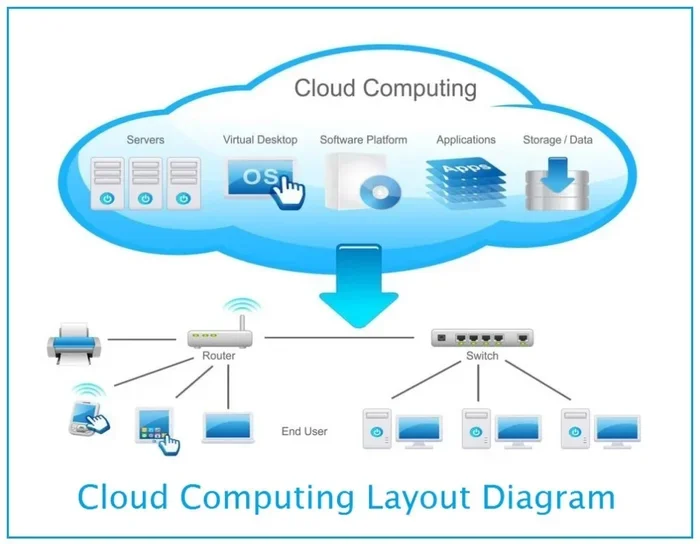
Let us start with the basics. Business continuity cloud computing means using cloud services to make sure your business keeps running during and after a disruption. Instead of relying only on physical servers and on-site equipment, you store your data and applications in the cloud. This gives you a safety net that works from anywhere.
Think of it like this. Imagine your office loses power due to a storm. With traditional setups, everything goes dark. But with cloud-based continuity, your team can access files, apps, and systems from home or any other location. The cloud acts as a backup world for your business that stays online even when the real world has problems.
Why the Cloud Makes a Difference
Traditional disaster recovery meant buying extra hardware, paying for maintenance, and hiring experts to manage it all. Cloud computing changes the game. You rent resources from a cloud provider instead of owning everything yourself. This means lower costs, faster setup, and easier scaling. When you use cloud infrastructure for continuity, you get access to data centers spread across multiple regions. If one location goes down, another takes over automatically.
Why Business Continuity Matters for Every Company
Some business owners think continuity planning is only for large enterprises. That is a big mistake. Small businesses are often hit harder by disruptions because they have fewer resources to recover. A study shows that nearly half of small businesses never reopen after a major disaster. This is exactly why business continuity cloud computing matters for every company, no matter the size.
The Real Cost of Downtime
Downtime hurts more than just your wallet. Every hour your systems are offline, customers get frustrated. They may turn to a competitor and never come back. Lost revenue adds up fast. But beyond money, there is damage to your reputation. People trust businesses that can handle problems gracefully. If your systems stay down for days, customers start to doubt whether you are reliable.
Here are some real numbers that show why continuity matters:
- Average cost of downtime: Small businesses can lose thousands of dollars per hour.
- Data loss risk: Without proper backup, recovering lost files can take days or weeks.
- Customer trust: 80% of customers say they will switch to a competitor after a bad experience with downtime.
- Employee productivity: When systems go down, your team cannot do their work, leading to missed deadlines and stress.
How Cloud Computing Powers Business Continuity
Now that you understand the “why,” let us look at the “how.” Cloud computing powers business continuity through several key mechanisms. Each one plays an important role in keeping your operations alive during tough times.
Cloud Backup and Data Redundancy
The foundation of any continuity plan is cloud backup. This means copying your data and storing it in secure remote servers. Unlike a USB drive or a local hard drive, cloud backup keeps your data safe even if your office is destroyed. Data redundancy takes this a step further. Your data is stored in more than one location, so even if one server fails, another copy is ready to go.
Most cloud providers handle this automatically. You do not need to remember to back up your files every night. The system does it for you. This is one of the biggest advantages of using the cloud for continuity.
Automatic Failover and Recovery
Automatic failover is a fancy term for a simple idea. When your main system goes down, the cloud automatically switches to a backup system. Your customers may not even notice there was a problem. This is called failover, and it is one of the most powerful tools in business continuity cloud computing.
Recovery time, also known as RTO (Recovery Time Objective), measures how fast you can get back online. Cloud-based failover can reduce recovery time from days to minutes. Similarly, RPO (Recovery Point Objective) tells you how much data you might lose. With cloud backup, the RPO can be as low as a few minutes.
Disaster Recovery as a Service (DRaaS)
DRaaS, or Disaster Recovery as a Service, is a cloud-based solution that handles your entire recovery process. Instead of building your own recovery plan from scratch, you subscribe to a service that does it for you. This is one of the most popular forms of business continuity cloud computing today. DRaaS providers manage everything from data replication to automatic failover, so you can focus on running your business.
Key Features to Look For in a Business Continuity Cloud Solution
Not all cloud continuity solutions are the same. When you are choosing a provider, you need to know what to look for. Here are the most important features that make a cloud continuity plan effective.
Uptime Guarantees and SLAs
Uptime is the percentage of time your systems stay online. Look for providers that offer at least 99.9% uptime. This is usually spelled out in a Service Level Agreement (SLA). The SLA is a contract that promises a certain level of performance. If the provider fails to meet the uptime promise, you may get a refund or credit. Always read the SLA carefully before signing up.
Multi-Region and Hybrid Cloud Support
Multi-region deployment means your data and applications are spread across data centers in different geographic areas. If a hurricane or earthquake hits one region, your systems keep running in another. Hybrid cloud setups combine on-site servers with cloud resources. This gives you the best of both worlds: fast local access and secure cloud backup.
Scalability and Flexibility
Your business needs change over time. A good business continuity cloud computing solution grows with you. Scalability means you can increase or decrease your cloud resources as needed. During a crisis, you might need more computing power to handle extra traffic. A flexible cloud setup lets you scale up quickly and scale back down when things return to normal.
Security and Compliance
Security is non-negotiable. Your cloud provider should offer strong encryption, access controls, and regular security updates. Depending on your industry, you may also need to meet compliance standards like HIPAA, GDPR, or SOC 2. Make sure your chosen provider supports the regulations that apply to your business.
Monitoring and Alerts
A good continuity solution keeps an eye on your systems 24/7. It sends alerts if something goes wrong so you can act fast. Real-time monitoring helps you catch problems before they turn into full-blown outages. Look for providers that offer dashboards and mobile alerts for easy tracking.
| Feature | Why It Matters | What to Look For |
|---|---|---|
| Uptime Guarantee | Keeps systems online during disruptions | 99.9% or higher SLA |
| Multi-Region Support | Protects against regional disasters | Data centers in 3+ regions |
| Automatic Failover | Reduces downtime to minutes | Near-zero RTO and RPO |
| DRaaS | Simplifies recovery planning | Full managed recovery service |
| Scalability | Grows with your business | Pay-as-you-go pricing |
| Security and Compliance | Protects sensitive data | Encryption, certifications |
Common Challenges and How to Overcome Them
Setting up business continuity cloud computing is not always smooth. Many businesses face challenges along the way. Knowing what these challenges are helps you prepare and avoid common pitfalls.
Underestimating the Cost of Downtime
Many business owners only think about the direct cost of downtime, like lost sales. But there are hidden costs too. Employee productivity drops, customer trust erodes, and your brand reputation suffers. When you calculate the true cost, it becomes clear that investing in cloud continuity is not an expense. It is a smart business decision.
Ignoring Regular Testing
Having a plan is not enough. You need to test it regularly. Many companies set up their cloud continuity solution and then forget about it. Over time, systems change, new apps are added, and old backups become outdated. Regular testing ensures everything works when you need it most. Schedule tests at least twice a year.
Poor Communication During a Crisis
When a disruption hits, your team needs to know what to do. Without clear communication, chaos follows. Make sure your continuity plan includes contact lists, roles, and step-by-step instructions. Use cloud-based communication tools so your team can stay connected even if the office is unavailable.
Choosing the Wrong Cloud Provider
Not every provider is built for continuity. Some offer basic storage but lack failover or disaster recovery features. Before you commit, ask tough questions. What is their uptime record? Do they offer automatic failover? Where are their data centers located? Take your time to choose a provider that truly supports your continuity goals.
How to Build Your Business Continuity Cloud Strategy
Building a strong continuity strategy does not have to be complicated. Follow these steps to create a plan that works for your business.
Step 1: Identify Your Critical Systems
Start by listing the systems and data your business cannot live without. This might include your email, customer database, point-of-sale system, or inventory management tools. Prioritize them based on how much impact their loss would have.
Step 2: Define Your RTO and RPO
Next, set your Recovery Time Objective and Recovery Point Objective. RTO answers the question: how fast must we be back online? RPO answers: how much data can we afford to lose? These numbers guide your choice of cloud tools and services.
Step 3: Choose the Right Cloud Model
Decide whether a public cloud, private cloud, or hybrid cloud makes the most sense for your needs. Public clouds offer lower costs and easy scalability. Private clouds give you more control. Hybrid clouds combine the best of both. Consider your budget, security needs, and IT expertise when making this choice.
Step 4: Implement and Test
Set up your cloud backup, failover, and DRaaS tools. Then test everything. Run simulated disaster scenarios to see how your systems respond. Fix any issues you find. Repeat this process regularly to keep your plan sharp and effective.
Step 5: Train Your Team
Your continuity plan is only as good as your team’s ability to follow it. Train employees on how to access cloud systems during an outage. Make sure everyone knows their role. Hold regular drills so the process becomes second nature.
Expert Insights on Cloud Business Continuity
Operational resilience is more than just bouncing back from a disruption. It is about building a business that can adapt and keep going no matter what. Experts in the field agree that cloud computing has transformed the way companies approach continuity. Here are a few insights from industry professionals.
First, cloud-based continuity is no longer a luxury. It has become a necessity. With more businesses operating online and relying on digital tools, even a short outage can cause major damage. Second, the best plans combine technology with people. Tools like cloud backup and automatic failover are powerful, but they work best when your team knows how to use them. Finally, start small and grow. You do not need to implement everything at once. Begin with cloud backup and basic failover, then expand your plan as your business grows.
Conclusion
Business continuity cloud computing is one of the smartest investments you can make for your company. It protects your data, keeps your team productive, and builds trust with your customers. From cloud backup and automatic failover to DRaaS and multi-region deployment, the cloud offers powerful tools that make continuity planning simpler and more affordable than ever before.
The key is to start now. Do not wait for a disaster to show you how vulnerable your business is. Build your business continuity plan today, choose the right cloud tools, and test your setup regularly. With the right approach, you can face any disruption with confidence and keep your business moving forward.
Frequently Asked Questions
What is business continuity cloud computing?
Business continuity cloud computing is the use of cloud technology to keep your business running during disruptions like outages, cyberattacks, or natural disasters. It involves cloud backup, automatic failover, and disaster recovery tools hosted in remote data centers.
How does cloud computing help with disaster recovery?
The cloud stores copies of your data and applications in multiple locations. If your primary system goes down, the cloud automatically switches to a backup system. This reduces downtime from days to minutes and ensures you do not lose critical data.
Is business continuity cloud computing expensive?
Not necessarily. Many cloud providers offer pay-as-you-go plans that fit small and mid-sized budgets. The cost of downtime is usually far higher than the cost of cloud continuity tools, making it a smart investment for any business.
What is DRaaS and how does it relate to business continuity?
DRaaS stands for Disaster Recovery as a Service. It is a cloud-based solution that manages your entire recovery process. DRaaS is a key part of business continuity cloud computing because it handles data replication, failover, and restoration automatically.
How often should I test my cloud continuity plan?
Experts recommend testing your plan at least twice a year. Regular testing helps you find weaknesses, update your procedures, and make sure your team knows exactly what to do when a disruption happens.
Can small businesses benefit from business continuity cloud computing?
Absolutely. In fact, small businesses often benefit the most because they have fewer resources to recover from a disaster. Cloud continuity tools level the playing field, giving small companies the same protection that large enterprises enjoy.