Challenges of Cloud Computing and How to Overcome Them
The challenges of cloud computing can slow down businesses, but they are manageable with the right approach. This article breaks down the biggest hurdles — from security risks to hidden costs — and gives you clear, actionable solutions. You will learn how to navigate cloud migration, avoid vendor lock-in, and keep your data safe while enjoying the benefits of the cloud.
The challenges of cloud computing are real, but they are far from impossible to solve. Every day, businesses of all sizes move their operations to the cloud. They want speed, flexibility, and savings. Yet many hit roadblocks along the way. Security worries, unexpected costs, and technical complexity top the list. The good news? Most of these problems have clear solutions. This guide walks you through each major challenge and shows you exactly how to overcome it. Whether you are a small startup or a large enterprise, you will find practical advice that works.
Cloud computing has transformed how we build, deploy, and manage software. It offers incredible benefits like on-demand resource provisioning and global scalability. But it also introduces new risks and complexities. Understanding these challenges upfront saves time, money, and frustration. Let us dive into the most common problems businesses face and the proven strategies to tackle them head-on.
Key Takeaways
- Security and compliance remain the top concerns for businesses moving to the cloud, but proper strategies can mitigate most risks.
- Cloud cost management is tricky without clear monitoring and budgeting practices in place.
- Vendor lock-in limits flexibility, making multi-cloud and hybrid approaches worth considering.
- Internet dependency and downtime can disrupt operations, so redundancy planning is essential.
- Training and skill gaps slow cloud adoption, but investing in upskilling pays off fast.
- Data sovereignty and privacy regulations vary by region and require careful planning.
- Scalability and performance issues are solvable with the right architecture and monitoring tools.
📑 Table of Contents
- 1. Security and Compliance Challenges in the Cloud
- 2. Cloud Cost Management and Budgeting
- 3. Vendor Lock-In and Portability Issues
- 4. Internet Dependency and Downtime
- 5. Cloud Performance and Latency Issues
- 6. Skill Gaps and Training Challenges
- 7. Data Sovereignty and Privacy Concerns
- 8. Cloud Migration Complexities
- Conclusion
1. Security and Compliance Challenges in the Cloud
Security is the number one concern for businesses exploring the cloud. When your data lives on someone else’s servers, you naturally worry about who can access it. The challenges of cloud computing in this area are significant, but they are not insurmountable.
Data Breaches and Unauthorized Access
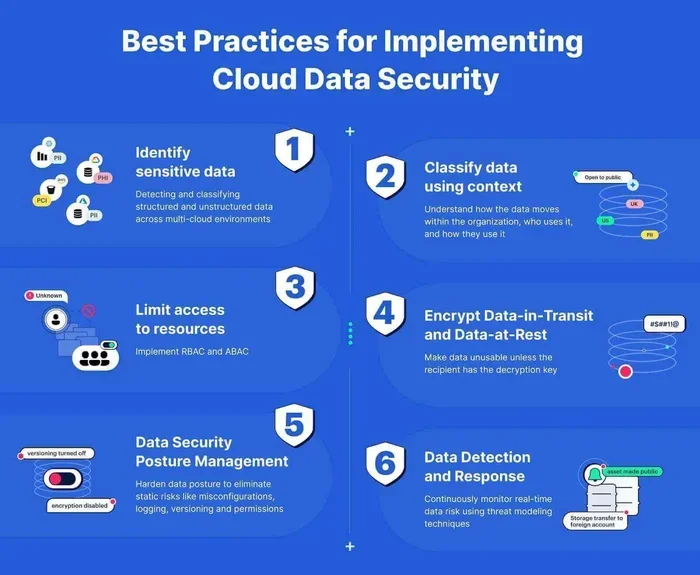
Data breaches happen when hackers gain access to sensitive information stored in the cloud. These breaches can expose customer data, financial records, and intellectual property. The root cause is often misconfigured access controls or weak authentication. To prevent this, use multi-factor authentication everywhere. Limit access based on roles and responsibilities. Regularly audit who has permission to what. A strong identity and access management strategy is your first line of defense.
Compliance and Regulatory Requirements
Different industries face different compliance rules. Healthcare must follow HIPAA. Financial institutions must meet PCI DSS standards. European companies deal with GDPR. These compliance requirements can be hard to meet in a shared cloud environment. The key is choosing a cloud provider that offers built-in compliance certifications. Look for providers with clear data handling policies. Also, maintain full visibility into where your data lives at all times.
Shared Responsibility Model Confusion
Many businesses misunderstand the shared responsibility model. They assume the cloud provider handles everything. In reality, the provider secures the infrastructure, but you are responsible for securing your data and applications. This confusion leads to dangerous gaps in protection. Understand exactly what your provider covers and what falls on your team. Create a clear security plan that addresses both sides.
Quick Tip: Use a cloud security posture management tool to continuously monitor your configurations. These tools flag misconfigurations before they become breaches.
2. Cloud Cost Management and Budgeting
One of the biggest promises of the cloud is cost savings. But many businesses find the opposite happening. Without careful management, cloud bills can spiral out of control. The challenges of cloud computing around cost are frustrating but very common.
Hidden Costs and Unexpected Charges
Cloud pricing models are complex. You pay for compute, storage, data transfer, API calls, and more. Each of these can add up quickly. A common mistake is not tracking data egress costs. When you move large amounts of data out of the cloud, the fees can be shocking. Another hidden cost is idle resources. Virtual machines or databases that run 24/7 but are barely used waste money fast.
Cost Optimization Strategies
Start by setting up a detailed budget and tracking system. Most cloud providers offer cost management dashboards. Use them religiously. Here are proven strategies to keep costs under control:
- Right-size your instances. Match your resources to actual workload needs.
- Use reserved instances or savings plans. Commit to longer terms for lower rates.
- Enable auto-scaling. Scale resources up and down based on demand.
- Set billing alerts. Get notified before costs exceed thresholds.
- Review your bill monthly. Identify and eliminate waste every single month.
FinOps: A Culture of Cost Awareness
FinOps is a practice that brings finance and engineering teams together. It treats cloud spending like a business metric, not just an IT expense. Teams that adopt FinOps practices see better cost visibility and control. Everyone takes ownership of their cloud usage and its cost impact. This cultural shift is one of the most effective ways to manage cloud spending long-term.
Quick Tip: Tag every resource with a project or department label. This makes it easy to trace costs back to their source and hold teams accountable.
3. Vendor Lock-In and Portability Issues
Vendor lock-in happens when your infrastructure becomes so tied to one provider that switching becomes painful and expensive. This is one of the most debated challenges of cloud computing today.
Why Vendor Lock-In Happens
Cloud providers offer proprietary services that are tightly integrated. AWS has its own database services, AI tools, and serverless functions. Azure has its unique identity and networking features. Google Cloud offers specialized data analytics tools. While these services are powerful, they make it hard to move to another provider. Your team builds deep expertise in one ecosystem, and migrating away means rebuilding everything from scratch.
How to Avoid Vendor Lock-In
The best defense is a multi-cloud or hybrid cloud strategy. Here is how to approach it:
- Use open standards and open-source tools. Kubernetes, Terraform, and PostgreSQL work across all major providers.
- Abstract your infrastructure. Use containerization and infrastructure-as-code to keep your workloads portable.
- Keep your data portable. Choose cloud-agnostic storage formats and APIs wherever possible.
- Design for failure. Build systems that can survive a provider outage or migration with minimal disruption.
Expert Insight: You do not need to avoid a single provider entirely. Just make sure your core applications are not dependent on proprietary services you cannot replicate elsewhere. Keep your critical workloads portable and your non-critical ones flexible.
4. Internet Dependency and Downtime
Cloud computing relies entirely on internet connectivity. When your connection goes down, so does your access to applications and data. This dependency is one of the often-overlooked challenges of cloud computing.
The Impact of Downtime
Even the biggest cloud providers experience outages. When AWS, Azure, or Google Cloud goes down, thousands of businesses are affected simultaneously. For companies that depend on cloud-hosted applications for daily operations, even a short outage can mean lost revenue, frustrated customers, and damaged reputation. Downtime is not just an inconvenience; it is a business risk.
Building Resilience Against Downtime
You cannot eliminate internet dependency entirely, but you can build systems that withstand outages. Here is how:
- Use multi-region deployments. Spread your workloads across different geographic regions so one outage does not take everything down.
- Implement failover mechanisms. Automatically redirect traffic to a healthy region when one goes offline.
- Maintain local backups. Keep critical data cached locally so essential functions can continue during outages.
- Use content delivery networks. CDNs reduce latency and provide redundancy for static content.
Quick Tip: Test your disaster recovery plan regularly. Schedule quarterly failover drills to make sure your team knows exactly what to do when an outage hits.
5. Cloud Performance and Latency Issues
Performance matters. Users expect fast load times and responsive applications. The challenges of cloud computing around performance can affect user experience and business outcomes.
Latency and Distance
Latency is the delay between a user request and the server response. In cloud environments, this delay increases when data has to travel long distances. A user in Tokyo accessing a server in Virginia will experience higher latency than someone accessing a nearby server. For real-time applications like gaming, video calls, and financial trading, even small delays matter a lot.
Optimizing Cloud Performance
Performance optimization starts with smart architecture decisions. Here are strategies that make a real difference:
- Deploy resources closer to your users. Use edge computing or regional data centers to reduce physical distance.
- Optimize your database queries. Slow queries are a common performance bottleneck in cloud environments.
- Use caching layers. Cache frequently accessed data to reduce repeated calls to the origin server.
- Monitor performance continuously. Use tools like CloudWatch, Azure Monitor, or Datadog to track response times and identify bottlenecks.
Expert Insight: Performance is not just a technical issue; it is a business issue. Studies show that even a one-second delay in page load time can reduce conversions by 7%. Investing in performance optimization directly impacts your bottom line.
6. Skill Gaps and Training Challenges
The cloud moves fast. New services, tools, and best practices emerge constantly. Keeping your team’s skills up to date is one of the most underestimated challenges of cloud computing.
The Growing Demand for Cloud Skills
Every company wants cloud talent, but the supply has not caught up. Roles like cloud architect, DevOps engineer, and cloud security specialist are in high demand. Many IT teams struggle to find qualified professionals. Even teams that already use the cloud may lack deep expertise in specific areas like cost optimization or advanced security configurations.
Bridging the Skill Gap
You do not need to hire an entire new team to close these gaps. Start with these practical steps:
- Invest in certifications. AWS, Azure, and Google Cloud all offer certification paths for different skill levels.
- Create internal training programs. Dedicate time each week for cloud skill development.
- Leverage cloud provider documentation and training. Most providers offer free learning paths and labs.
- Hire for potential, not just experience. Bright engineers can learn cloud skills faster than you think.
Quick Tip: Start small. Pick one cloud service or concept and build a hands-on project around it. Learning by doing is far more effective than reading alone.
7. Data Sovereignty and Privacy Concerns
Where your data lives matters. Different countries have different laws about data storage and processing. This is one of the most complex challenges of cloud computing for global businesses.
What Is Data Sovereignty?
Data sovereignty refers to the idea that data is subject to the laws of the country where it is stored. For example, European Union citizens’ data must comply with GDPR rules. Some countries require that certain types of data remain within their borders. If your cloud provider stores data in a data center in another country, you may unknowingly violate local laws.
How to Stay Compliant
Start by understanding the regulations that apply to your business. Then choose cloud regions that align with those requirements. Most major providers let you select the geographic location of your data centers. Use this feature intentionally. Also, implement strong encryption for data both at rest and in transit. Regular compliance audits help you stay on track and catch issues early.
Expert Insight: Data sovereignty is not just a legal concern. It is also a trust issue. Customers and partners want to know their data is handled responsibly. Demonstrating strong data governance builds confidence and strengthens business relationships.
8. Cloud Migration Complexities
Moving from on-premises infrastructure to the cloud is not a simple lift-and-shift exercise. Migration is one of the most challenging phases of the cloud journey, and it is where many challenges of cloud computing surface.
Common Migration Pitfalls
Businesses often underestimate the complexity of migration. Applications built for on-premises environments may not work well in the cloud without significant re-architecture. Legacy systems can be especially problematic. Other common pitfalls include:
- Underestimating data transfer times. Moving terabytes of data takes longer than expected.
- Incomplete dependency mapping. Teams miss hidden connections between applications and databases.
- Skipping the testing phase. Rushing through migration without thorough testing leads to post-migration issues.
- Ignoring team readiness. The people running the new environment need proper training before go-live.
A Smarter Migration Approach
Take a phased approach instead of trying to move everything at once. Start with less critical workloads to build confidence and learn from the process. Use the six Rs of migration as a framework:
- Rehost (lift and shift)
- Replatform (make minor optimizations)
- Refactor (re-architect for cloud-native)
- Repurchase (switch to a SaaS solution)
- Retain (keep some workloads on-premises)
- Retire (decommission what you no longer need)
Each application gets the approach that fits best. This flexible strategy reduces risk and helps your team build cloud expertise gradually.
Conclusion
The challenges of cloud computing are significant, but they are far from dealbreakers. Security risks, cost surprises, vendor lock-in, and performance issues all have proven solutions. The key is to approach cloud adoption with open eyes and a clear plan. Invest in your team’s skills. Choose your tools and providers wisely. Monitor your spending and performance continuously. Build resilience into your architecture from day one. Every challenge discussed in this article has a path forward. The businesses that succeed with the cloud are not the ones that avoid problems. They are the ones that solve problems quickly and learn from every step of the journey. Start applying these strategies today, and you will be well on your way to a secure, cost-effective, and high-performing cloud environment.
Frequently Asked Questions
What are the biggest challenges of cloud computing?
The biggest challenges include security and compliance risks, unexpected cloud costs, vendor lock-in, internet dependency, performance and latency issues, and skill gaps within teams. Each of these can be managed with the right strategies and planning.
How can businesses reduce cloud computing costs?
Businesses can reduce costs by right-sizing instances, using reserved pricing, enabling auto-scaling, setting billing alerts, and adopting FinOps practices. Regular cost reviews and resource tagging also help identify and eliminate waste.
Is cloud security a real concern for small businesses?
Yes, cloud security is a concern for businesses of all sizes. Small businesses often have fewer resources to dedicate to security, making them attractive targets. However, cloud providers offer robust security tools, and following best practices like multi-factor authentication and encryption can significantly reduce risk.
What is vendor lock-in and why is it a problem?
Vendor lock-in happens when your infrastructure becomes heavily dependent on a single cloud provider’s proprietary services. This makes it difficult and expensive to switch providers. It limits flexibility and can lead to higher costs over time.
How long does cloud migration typically take?
Cloud migration timelines vary widely based on the size and complexity of the environment. Small migrations can take a few weeks, while large enterprise migrations may take several months or even over a year. A phased approach helps manage the timeline effectively.
Can latency issues in the cloud be completely eliminated?
Latency cannot be completely eliminated because data still has to travel over networks. However, you can significantly reduce it by deploying resources closer to users, using edge computing, implementing caching layers, and optimizing application code and database queries.
=== SEO TITLE ===
Challenges of Cloud Computing and How to Overcome Them
=== META TITLE ===
Challenges of Cloud Computing & How to Overcome Them (2025)
=== URL SLUG ===
challenges-of-cloud-computing-and-how-to-overcome-them