Cloud Computing Readiness Assessment for Your Business
A cloud computing readiness assessment is a structured evaluation that helps businesses determine if they are prepared for cloud adoption. It covers IT infrastructure, security, costs, and workforce skills to ensure a smooth transition. This guide walks you through every step of the process with practical tips and real-world insights.
Key Takeaways
- Clear Evaluation Framework: A cloud computing readiness assessment gives you a clear picture of where your business stands before migrating.
- Risk Reduction: Identifying gaps early helps you avoid costly downtime and security issues during cloud adoption.
- Cost Savings: A proper assessment ensures you choose the right cloud service model and avoid overspending.
- Workforce Readiness: Training and stakeholder alignment are critical parts of any successful cloud strategy.
- Actionable Steps: The guide provides a step-by-step process you can start using immediately.
- Expert-Backed Insights: Real-world tips and common mistakes help you navigate the transition with confidence.
📑 Table of Contents
- What Is a Cloud Computing Readiness Assessment?
- Why Your Business Needs a Cloud Computing Readiness Assessment
- Key Areas to Evaluate in Your Cloud Computing Readiness Assessment
- Step-by-Step Guide to Conducting a Cloud Computing Readiness Assessment
- Common Mistakes to Avoid During Your Cloud Computing Readiness Assessment
- Quick Tips for a Successful Cloud Computing Readiness Assessment
- Expert Insights on Cloud Computing Readiness
- Comparison: Key Factors in a Cloud Computing Readiness Assessment
- Conclusion
What Is a Cloud Computing Readiness Assessment?
A cloud computing readiness assessment is a thorough evaluation of your business’s current technology, processes, and team skills. It tells you whether your organization is ready to move to the cloud. Think of it as a health check before a big journey.
Every business has different needs. Some companies run on older systems that need a full upgrade. Others have modern tools but lack the right security policies. A readiness assessment looks at all of these areas. It gives you a clear picture of what works and what needs fixing.
The goal is simple. You want to know if your business can handle the shift to cloud services without major disruptions. You also want to spot problems before they become expensive mistakes. A well-planned cloud computing readiness assessment saves time, money, and stress.
During the assessment, teams review things like server capacity, internet speed, data security, and employee skills. They also look at your IT infrastructure and how well it supports cloud adoption. The result is a detailed report that guides your next steps.
Why Does It Matter?
Skipping this step is one of the biggest risks companies take. Without a proper evaluation, you might move to the cloud only to discover compatibility issues. You could also face unexpected costs or security gaps. A cloud computing readiness assessment removes the guesswork and sets a solid foundation for your cloud strategy.
Why Your Business Needs a Cloud Computing Readiness Assessment
More and more companies are moving to the cloud. The global shift toward digital transformation makes cloud services essential for staying competitive. But moving to the cloud is not just about buying new software. It requires planning, teamwork, and a clear understanding of your current setup.
A cloud computing readiness assessment helps you answer the big questions. Can your existing systems handle the change? Is your team trained and ready? Are your security measures strong enough? These are not small questions. They can make or break your cloud migration experience.
Let us look at some of the main reasons businesses invest in this assessment.
1. It Reduces Downtime Risk
Downtime costs businesses money. Every hour your systems are down means lost sales and unhappy customers. A readiness assessment identifies potential problems before migration day. This lets you fix issues ahead of time and reduce downtime risk significantly.
2. It Improves Cost Planning
Cloud services can save money, but only if you choose the right plan. A cost analysis during the assessment helps you understand your actual needs. You avoid paying for features you do not use. You also avoid surprise bills that come from underestimating your bandwidth assessment requirements.
3. It Ensures Compliance
Many industries have strict rules about data storage and privacy. Healthcare, finance, and government sectors all face compliance requirements. A readiness assessment checks whether your chosen cloud setup meets these rules. This protects your business from fines and legal trouble.
4. It Aligns Your Team
Cloud adoption is not just an IT project. It involves people from every department. A good assessment includes stakeholder alignment sessions. These sessions make sure everyone understands the goals, timelines, and their role in the process.
Key Areas to Evaluate in Your Cloud Computing Readiness Assessment
A thorough cloud computing readiness assessment covers several important areas. Each area plays a role in determining how well your business can transition to the cloud. Let us break them down.
IT Infrastructure and Systems
Your current technology setup is the foundation of any cloud move. You need to evaluate your servers, databases, and networking equipment. Ask yourself these questions:
- Are your servers outdated or nearing end of life?
- Do you have enough bandwidth to support cloud applications?
- Are your systems compatible with the cloud service model you plan to use?
- Do you need a hybrid cloud approach or a full cloud shift?
A data center evaluation helps you understand what to keep, what to retire, and what to move. This step is crucial for a smooth cloud migration.
Security and Data Protection
Security is a top concern for any business moving to the cloud. A security assessment reviews your current protections and identifies gaps. You need to evaluate encryption standards, access controls, and backup procedures.
Key areas to focus on include:
- Data encryption during transfer and storage
- Multi-factor authentication for user access
- Incident response plans for potential breaches
- Compliance with industry-specific regulations
Remember, your data is only as safe as your weakest link. A strong cloud computing readiness assessment leaves no stone unturned.
Cost and ROI Analysis
Every business wants to know the return on investment before making a big move. A cost analysis looks at both upfront and ongoing expenses. You should compare the cost of keeping your current systems versus moving to the cloud.
Factors to include in your ROI analysis:
- Hardware and maintenance savings
- Subscription and licensing costs
- Employee training expenses
- Expected productivity gains
- Long-term scalability savings
This analysis gives you a clear financial picture. It helps leadership make confident decisions about cloud adoption.
Workforce Skills and Training
Your team is just as important as your technology. A workforce training evaluation checks whether employees have the skills needed for cloud tools. If not, you need a training plan in place before migration begins.
Consider these questions during your assessment:
- Does your IT team understand cloud management platforms?
- Are non-technical staff comfortable with cloud-based tools?
- Do you have enough internal expertise, or will you need external support?
- Is there a clear plan for ongoing learning and development?
Investing in training early pays off big time. It reduces errors and speeds up the adoption process.
Vendor and Service Evaluation
Choosing the right cloud provider is a big decision. A vendor evaluation compares different providers based on your business needs. You should look at reliability, support quality, pricing, and features.
Popular options include public cloud providers like AWS, Microsoft Azure, and Google Cloud. Some businesses also consider private cloud or hybrid cloud setups. The right choice depends on your business readiness level and your long-term goals.
Scalability and Performance
One of the main benefits of the cloud is scalability. Your assessment should check whether the cloud setup you choose can grow with your business. Performance benchmarking tests how well cloud applications run compared to your current systems.
Key performance areas include:
- Application response times
- Data processing speeds
- User experience during peak usage
- Resource allocation flexibility
These benchmarks help you set realistic expectations and measure success after migration.
Step-by-Step Guide to Conducting a Cloud Computing Readiness Assessment
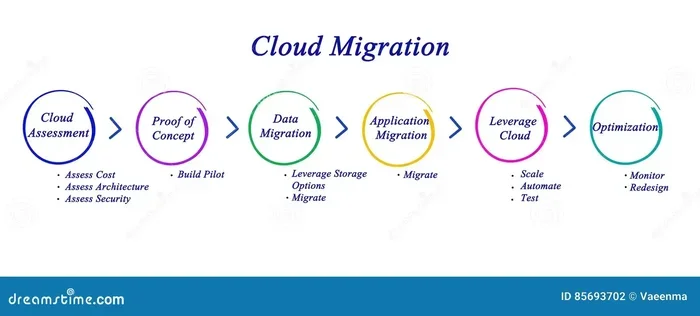
Now that you know what areas to evaluate, let us walk through the actual process. Following these steps makes the cloud computing readiness assessment manageable and effective.
Step 1: Define Your Goals
Start by writing down what you want to achieve. Are you looking to reduce costs? Improve scalability? Enhance security? Clear goals guide every decision that follows. Share these goals with all stakeholders so everyone is on the same page.
Step 2: Gather Current State Data
Collect information about your existing systems, costs, and processes. This includes server specs, application usage, network performance, and security policies. The more data you gather, the more accurate your assessment will be.
Step 3: Assess Skills and Training Needs
Evaluate your team’s current skills and identify gaps. Talk to managers and team leads to understand day-to-day challenges. Use surveys or interviews to gather honest feedback about readiness levels.
Step 4: Perform a Gap Analysis
Compare your current state with where you need to be. This is called a gap analysis. It highlights the differences between your existing setup and your cloud goals. Document every gap and prioritize them by impact and urgency.
Step 5: Develop an Action Plan
Create a detailed plan that addresses each gap. Include timelines, responsible team members, and budget estimates. Your action plan should cover technology changes, training programs, and policy updates. This plan becomes your roadmap for the entire cloud migration.
Step 6: Review and Adjust
No plan is perfect from the start. Review your assessment results with key stakeholders. Adjust priorities based on feedback and new information. Regular reviews keep your cloud strategy on track and responsive to changing needs.
Common Mistakes to Avoid During Your Cloud Computing Readiness Assessment
Even well-planned assessments can go wrong if you skip important steps. Here are common mistakes businesses make and how to avoid them.
Mistake 1: Skipping the Assessment Entirely
Some companies jump straight into cloud adoption without any planning. This is the fastest way to run into serious problems. Always complete a full cloud computing readiness assessment before committing to a migration plan.
Mistake 2: Ignoring Employee Input
Your front-line employees know more about daily operations than anyone else. Ignoring their feedback leads to poor adoption and frustration. Include them in the assessment process through surveys and open discussions.
Mistake 3: Underestimating Costs
Many businesses focus only on the upfront migration cost. They forget about ongoing expenses like subscriptions, training, and support. A thorough cost analysis prevents unpleasant financial surprises later on.
Mistake 4: Overlooking Security
Security should never be an afterthought. Skipping the security assessment phase leaves your data vulnerable. Make security a core part of your evaluation from day one.
Mistake 5: Choosing the Wrong Cloud Model
Not every business needs the same type of cloud setup. Some do well with a public cloud. Others need the control of a private or hybrid cloud environment. Choose based on your specific needs, not what competitors are doing.
Quick Tips for a Successful Cloud Computing Readiness Assessment
Here are some practical tips to make your assessment smooth and productive:
- Start early. Give yourself plenty of time before any migration deadline. Rushing leads to oversights.
- Use a checklist. A structured checklist keeps your team focused and ensures nothing gets missed.
- Involve leadership. Executive support makes it easier to secure budget and resources for the assessment and beyond.
- Document everything. Keep detailed records of findings, decisions, and action items. This creates a valuable reference for the future.
- Get external help if needed. Consultants bring fresh perspectives and specialized expertise that internal teams may lack.
- Test before you commit. Run small pilot projects to validate your findings before a full-scale migration.
Expert Insights on Cloud Computing Readiness
Expert Insight 1: “The most successful cloud migrations start with honest self-assessment. Companies that skip this step often face higher costs and longer timelines. A thorough cloud computing readiness assessment is not optional. It is essential.”
Expert Insight 2: “Many businesses underestimate the cultural shift that comes with cloud adoption. Technology is only one piece of the puzzle. People, processes, and policies need equal attention during the business readiness phase.”
Expert Insight 3: “Look at your digital transformation journey holistically. The cloud is a tool, not a destination. Your assessment should align with broader business goals, not just IT objectives.”
Expert Insight 4: “Performance benchmarking before migration gives you a baseline. Without it, you cannot measure whether the cloud is actually improving your operations. Always compare before and after numbers.”
Comparison: Key Factors in a Cloud Computing Readiness Assessment
Not sure what to compare? Here is a simple breakdown of the most important factors to evaluate:
| Factor | What to Evaluate | Why It Matters |
|---|---|---|
| IT Infrastructure | Servers, networks, legacy systems | Determines migration complexity |
| Security | Encryption, access controls, compliance | Protects data and meets regulations |
| Cost | Current vs. projected cloud expenses | Ensures financial viability |
| Workforce Skills | Team expertise and training needs | Drives adoption and reduces errors |
| Scalability | Growth potential and resource flexibility | Supports long-term business goals |
| Vendor Fit | Provider features, support, and pricing | Ensures reliable ongoing service |
Use this table as a starting point for your own cloud computing readiness assessment. Customize it based on your industry and business size.
Conclusion
A cloud computing readiness assessment is one of the smartest investments your business can make before moving to the cloud. It gives you clarity, reduces risk, and sets realistic expectations. By evaluating your IT infrastructure, security, costs, and team skills, you create a solid foundation for cloud adoption.
Remember, every business is different. Your assessment should reflect your unique goals, challenges, and resources. Use the steps and tips in this guide to build a process that works for you. Do not skip the assessment. It is the difference between a smooth transition and a costly, stressful migration.
Start your cloud computing readiness assessment today. Your future self and your team will thank you for the preparation. The cloud offers incredible opportunities, but only for businesses that approach the move with care and confidence.
Frequently Asked Questions
What exactly is a cloud computing readiness assessment?
A cloud computing readiness assessment is a structured evaluation of your business’s technology, processes, and team skills to determine if you are prepared for cloud adoption. It reviews your IT infrastructure, security, costs, and workforce capabilities to identify gaps and create a clear action plan.
How long does a cloud computing readiness assessment take?
The timeline varies depending on the size and complexity of your business. Small companies may complete the assessment in two to four weeks. Larger organizations with complex IT infrastructure might need six to eight weeks. The investment of time pays off by preventing costly mistakes during migration.
Who should be involved in the assessment process?
A successful cloud computing readiness assessment involves people from multiple departments. IT staff provide technical insights, finance teams handle cost analysis, and department managers share operational needs. Executive leadership should also be involved to ensure alignment with company goals and stakeholder alignment.
Can small businesses benefit from a cloud computing readiness assessment?
Absolutely. In fact, small businesses often benefit the most because they have fewer resources to absorb mistakes. A well-conducted assessment helps small companies choose the right cloud service model, avoid overspending, and build a scalable foundation for growth through digital transformation.
What is the difference between a readiness assessment and a cloud migration plan?
A cloud computing readiness assessment evaluates where you are now and identifies gaps. A migration plan is the detailed roadmap that tells you how to close those gaps. The assessment comes first and directly informs the migration plan. Think of it as the research phase before building the strategy.
How often should a business reassess its cloud readiness?
Businesses should reassess their cloud strategy at least once a year or whenever there are major changes. Mergers, new regulations, or significant growth can all impact your business readiness. Regular reassessments ensure your cloud setup continues to meet your evolving needs and supports ongoing digital transformation efforts.