The Hidden Cons of Cloud Computing You Should Know
The cons of cloud computing go far beyond what most businesses expect. From security vulnerabilities and internet dependency to surprise costs and vendor lock-in, these hidden drawbacks can seriously impact your operations. Understanding these risks helps you make smarter technology decisions and avoid costly mistakes.
Cloud computing has transformed how businesses operate. It offers flexibility, scalability, and cost savings that traditional IT setups simply cannot match. But here is the thing most people skip over. The cons of cloud computing are real, and they can hit you hard if you are not prepared.
Many companies rush into cloud adoption without fully understanding the risks involved. They hear the benefits and jump in headfirst. Then they face unexpected downtime, security breaches, and bill shocks. This article breaks down the disadvantages of cloud computing that deserve your attention. Whether you are a small business owner or an IT leader, these insights will help you make smarter choices.
Let us be clear. Cloud computing is not all bad. It has changed the tech world for the better. But knowing the downsides gives you an edge. You can plan around them, set proper expectations, and protect your business. So let us dive into the hidden cons of cloud computing you should absolutely know about.
Key Takeaways
- Security risks: Cloud environments expose your data to breaches and compliance challenges.
- Internet dependency: Without a stable connection, cloud services become unusable.
- Hidden costs: Subscription models often include fees you don’t see coming.
- Vendor lock-in: Switching providers can be painful and expensive.
- Performance limits: Shared resources mean less control over speed and reliability.
- Compliance concerns: Meeting regulatory standards in the cloud is complex.
📑 Table of Contents
- Security and Privacy Risks
- Internet Dependency and Downtime
- Cost Surprises and Hidden Fees
- Vendor Lock-In and Migration Challenges
- Loss of Control and Customization Limits
- Environmental and Sustainability Concerns
- Common Mistakes Companies Make with Cloud Computing
- Final Thoughts on the Cons of Cloud Computing
Security and Privacy Risks
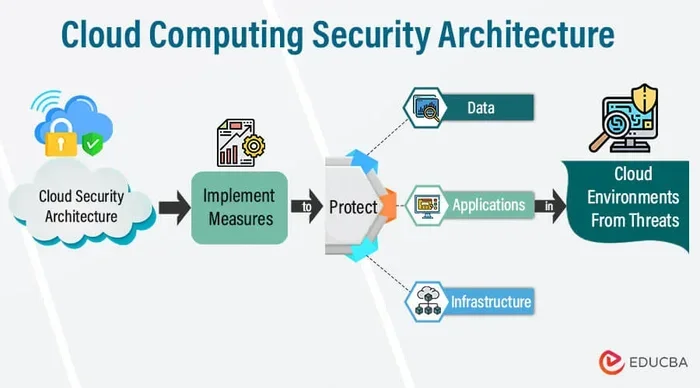
Security tops the list when people discuss cloud computing disadvantages. Your data lives on servers you do not own. You do not physically control it. This creates vulnerabilities that can put your entire business at risk.
When you store sensitive information in the cloud, you trust your cloud provider to keep it safe. But no system is perfect. Data breaches happen. Misconfigurations occur. And when they do, the consequences can be severe.
Data Breaches and Unauthorized Access
Hackers target cloud environments because they hold massive amounts of valuable data. A single breach can expose customer records, financial data, or proprietary business information. Even large cloud providers with top-tier security teams have experienced major incidents.
Think about it. Your data shares server space with other companies data. This is called a multi-tenant environment. While providers use strong isolation methods, the risk of cross-contamination exists. A vulnerability in one tenants account could potentially affect yours.
Compliance and Regulatory Headaches
If your business operates in healthcare, finance, or government, compliance matters a lot. Regulations like HIPAA, GDPR, and PCI-DSS demand strict data handling. Moving to the cloud adds complexity to meeting these requirements.
You need to verify that your cloud provider meets all relevant compliance standards. Not every provider offers the same level of certification. And even if they do, you still share responsibility for compliance. This shared responsibility model confuses many businesses and leads to costly mistakes.
Data Loss and Recovery Challenges
What happens if your data gets deleted accidentally or corrupted? In a traditional setup, you control backups. In the cloud, you rely on the provider’s recovery systems. While most cloud providers offer backup solutions, recovery is not always instant or guaranteed.
Some businesses have lost critical data due to provider errors or service interruptions. The recovery process can take days or even weeks. During that time, your operations stall. Planning for data recovery scenarios before migration is essential.
Internet Dependency and Downtime
Cloud computing requires a constant internet connection. No internet means no access to your applications, files, or systems. This internet dependency is one of the most overlooked cons of cloud computing.
Your business depends on the cloud being available 24/7. But cloud service outages happen. They happen more often than most people realize. Even major providers experience downtime that affects millions of users worldwide.
When the Cloud Goes Down
Imagine your team cannot access customer records, email, or project files. Sales stops. Communication halts. Productivity drops to zero. This is the reality during a cloud outage. And it happens more frequently than you might think.
Major outages have affected companies like AWS, Google Cloud, and Microsoft Azure. When these giants go down, thousands of businesses suffer. Your operations are only as reliable as your internet connection and your providers uptime guarantee.
Latency and Performance Issues
Cloud latency refers to the delay between sending a request and getting a response. If your users are far from the data center, latency increases. This slows down applications and frustrates employees and customers alike.
Real-time applications like video conferencing, trading platforms, and gaming suffer most from latency issues. Cloud performance depends heavily on network infrastructure. If your internet connection is slow or unstable, the cloud will feel sluggish and unreliable.
Bandwidth Limitations
Cloud computing requires significant bandwidth. Uploading and downloading large files constantly eats into your internet capacity. If your team works with large datasets, media files, or backups, bandwidth becomes a bottleneck.
Limited bandwidth leads to slow sync times and frustrated users. It also increases your internet costs. Many businesses underestimate how much bandwidth cloud migration demands. Testing your current infrastructure before moving to the cloud is a smart step.
Cost Surprises and Hidden Fees
One of the biggest myths about cloud computing is that it is always cheaper. While it can reduce upfront costs, the hidden costs of cloud computing often surprise businesses. The pay-as-you-go model sounds simple, but it gets complicated fast.
Your cloud bill can spiral out of control if you do not monitor it closely. What starts as an affordable subscription can become a financial burden within months. Understanding how cloud pricing works is critical before you commit.
Egress Fees and Data Transfer Costs
Most cloud providers charge for data that leaves their network. These are called egress fees. Every time you download data from the cloud or transfer it between services, you pay. These fees add up quickly, especially for data-heavy operations.
Many businesses do not realize this until they see their first month-end bill. A company that moves terabytes of data in and out of the cloud can face shocking charges. Always ask your provider about egress pricing before signing up.
Scaling Costs
Cloud scalability is a major benefit. But scaling comes at a price. When your usage spikes, so does your bill. During peak seasons or traffic surges, costs can multiply dramatically.
Auto-scaling features are convenient but expensive. You pay for every additional resource your system uses. Without proper monitoring and budget controls, subscription costs can quickly exceed what you would have spent on on-premises infrastructure.
Licensing and Support Fees
Cloud computing often requires software licenses that cost extra. Some cloud providers include licensing in their pricing. Others do not. You need to understand what is included and what is not.
Premium support plans also add to your expenses. Basic support is usually free, but it offers limited assistance. For mission-critical systems, you need higher-tier support. This comes with a higher monthly price tag that many businesses overlook.
| Cost Factor | What to Watch For | How to Avoid Surprises |
|---|---|---|
| Egress Fees | Charges for data leaving the cloud | Monitor data transfer and optimize storage |
| Scaling Costs | Price spikes during usage peaks | Set usage limits and alerts |
| Licensing | Hidden software license costs | Review all license terms before migration |
| Support Plans | Expensive premium support tiers | Evaluate if basic support meets your needs |
Vendor Lock-In and Migration Challenges
Vendor lock-in is one of the most frustrating cons of cloud computing. Once your business builds its infrastructure around a specific provider, switching becomes extremely difficult. Your data, applications, and workflows become tied to that platform.
This lack of flexibility limits your negotiating power. If your provider raises prices or changes terms, you have limited options. The cloud migration process to a new provider can be complex, time-consuming, and expensive.
Why Switching Is So Hard
Each cloud provider uses its own tools, APIs, and data formats. Moving from AWS to Azure or Google Cloud is not a simple copy-and-paste job. Applications need to be re-architected. Data needs to be reformatted. Downtime during migration is almost inevitable.
Custom integrations built for one platform often do not work on another. Your team must rebuild or replace these integrations. The time and cost involved make many businesses stay with their current provider even when they are unhappy.
The Risk of Proprietary Technologies
Many cloud providers offer proprietary services that do not exist elsewhere. These services can be powerful and convenient. But they also increase your dependency on that specific provider. The more proprietary tools you use, the harder it becomes to leave.
For example, if your business relies heavily on a specific cloud databases proprietary features, moving to a competitor means rebuilding your entire data layer. This is a major barrier that keeps businesses locked in.
Loss of Control and Customization Limits
When you move to the cloud, you give up a significant degree of control. Your cloud provider manages the infrastructure. You manage the applications and data. But even then, your control has limits.
You cannot physically access the servers. You cannot modify the underlying hardware or network setup. This control limitations bother businesses that need deep customization and full infrastructure visibility.
Shared Resources and Performance Variability
Most cloud services use shared resources. Your applications run on the same physical servers as other customers. While virtualization technology isolates your workloads, resource contention can still occur.
If another customer on the same server runs a heavy workload, your performance may suffer. This is called the noisy neighbor effect. It causes unpredictable slowdowns that are hard to diagnose and fix.
Limited Customization Options
Cloud platforms offer standard configurations. You can choose instance sizes, storage types, and network settings. But deep customization is often restricted. If your business needs a specific hardware setup or custom network topology, the cloud may not deliver.
Traditional on-premises setups allow complete control over every aspect of your infrastructure. The cloud trades that control for convenience and scalability. For some businesses, this trade-off is not worth it.
Environmental and Sustainability Concerns
Not many people think about the environmental impact of cloud computing. But data centers consume enormous amounts of energy. They require constant cooling, power, and maintenance. The environmental cost of cloud computing is a growing concern.
Major cloud providers are investing in renewable energy. But the reality is that data centers still have a significant carbon footprint. For businesses focused on sustainability, this is a factor worth considering.
Additionally, the rapid growth of cloud infrastructure means more data centers are being built. This drives increased energy demand and electronic waste. While cloud computing is more efficient than running individual servers, it is not without its environmental impact.
Common Mistakes Companies Make with Cloud Computing
Many businesses fall into the same traps when adopting cloud technology. Avoiding these mistakes can save you time, money, and headaches.
- Skipping a thorough needs assessment. Do not migrate to the cloud just because everyone else is. Evaluate whether cloud computing fits your specific business needs.
- Ignoring total cost of ownership. The upfront savings can be misleading. Factor in all costs including egress fees, licensing, and support plans.
- Underestimating security requirements. Cloud providers handle infrastructure security. But you are still responsible for securing your data and applications.
- Not planning for downtime. Even the best providers experience outages. Have a backup plan in place for when the cloud goes down.
- Choosing the wrong provider. Not all providers are equal. Compare features, pricing, support, and compliance capabilities before committing.
Final Thoughts on the Cons of Cloud Computing
Cloud computing offers incredible benefits. It empowers businesses to scale, innovate, and compete. But the disadvantages of cloud computing are real and significant. Security risks, internet dependency, hidden costs, vendor lock-in, and control limitations all deserve careful consideration.
The key is not to avoid the cloud altogether. The key is to go in with your eyes wide open. Understand the cons of cloud computing before you commit. Plan for the risks. Set realistic expectations. And build safeguards into your strategy.
Every business is different. What works for one company may not work for another. Weigh the pros and cons carefully. Consider your industry, budget, team, and long-term goals. When you approach cloud adoption with a clear understanding of the risks, you can harness the benefits while avoiding the pitfalls.
Take the time to research providers, read reviews, and consult with experts. A well-planned cloud migration sets your business up for success. A rushed one sets you up for frustration. The choice is yours. Make it an informed one.
Frequently Asked Questions
What are the biggest security risks of cloud computing?
The biggest security risks include data breaches, unauthorized access, misconfigurations, and compliance violations. Since your data lives on shared infrastructure, a vulnerability in another tenants account could potentially affect yours. Always choose a provider with strong security certifications and audit their practices regularly.
Is cloud computing really cheaper than on-premises solutions?
Not always. While cloud computing reduces upfront hardware costs, hidden fees like egress charges, licensing, and premium support can drive up expenses. Many businesses find that their cloud bill grows significantly over time. Always calculate total cost of ownership before migrating.
What happens during a cloud service outage?
During a cloud outage, you lose access to your applications, data, and systems until service is restored. This can halt business operations completely. Having a backup plan, such as local backups or a secondary provider, helps minimize the impact of downtime.
Can I switch cloud providers easily?
Switching providers is difficult and expensive. This is known as vendor lock-in. Each provider uses different tools, formats, and APIs. Migrating requires re-architecting applications, reformatting data, and dealing with downtime. Using open standards reduces this risk.
How does internet dependency affect cloud computing?
Internet dependency means you need a stable, fast connection to access cloud services. If your internet goes down, your cloud resources become inaccessible. Businesses in areas with unreliable internet should plan for offline capabilities or consider hybrid solutions.
Are there environmental concerns with cloud computing?
Yes. Data centers consume massive amounts of energy for power and cooling. While major cloud providers are investing in renewable energy, the overall environmental footprint remains significant. Businesses focused on sustainability should evaluate providers green initiatives and carbon offset programs.