DaaS in Cloud Computing Explained Simply for Everyone
DaaS in cloud computing is a model that lets users access a full desktop environment from any device through the internet. Instead of relying on expensive local hardware, Desktop as a Service delivers computing power and storage from remote servers. This guide covers how DaaS in cloud computing works, its key benefits, and how to get started today.
Have you ever wondered how people work from home, coffee shops, or even beaches while still having access to their full computer setup? The answer lies in DaaS in cloud computing. This technology has changed the way businesses and individuals think about their computers. Instead of buying expensive machines, you can rent a cloud desktop and access it from almost any device. It sounds like science fiction, but it is very real and very practical.
DaaS in cloud computing stands for Desktop as a Service. It means your desktop environment lives on a remote server in a data center. You connect to it through the internet. Think of it like streaming a movie, but the movie is your entire computer. You can run apps, save files, and do everything you normally would on a physical computer. The difference is that the heavy lifting happens in the cloud, not on your local machine.
In this article, we will break down everything you need to know about DaaS in cloud computing. We will look at how it works, who benefits most, and what to watch out for. Whether you are a business owner, an IT professional, or just curious about cloud computing, this guide has you covered. Let us dive in.
Key Takeaways
- DaaS in cloud computing removes the need for expensive local hardware and simplifies IT management
- Desktop as a Service enables remote work from any device, anywhere in the world
- Cloud desktop solutions offer better data security and centralized control for organizations
- Cost savings come from a subscription-based model instead of large upfront purchases
- Scalability makes it easy to add or remove users as your business grows
- Virtual desktop infrastructure powers the technology behind DaaS in cloud computing
- End-user computing experiences improve with cloud desktop delivery and centralized management
📑 Table of Contents
- What Is DaaS in Cloud Computing?
- How Does DaaS in Cloud Computing Work?
- Key Benefits of DaaS in Cloud Computing
- Who Should Use DaaS in Cloud Computing?
- DaaS in Cloud Computing vs. Traditional Desktop Setup
- Expert Insights on DaaS in Cloud Computing
- How to Choose the Right DaaS Provider
- Getting Started with DaaS in Cloud Computing
- Conclusion
What Is DaaS in Cloud Computing?
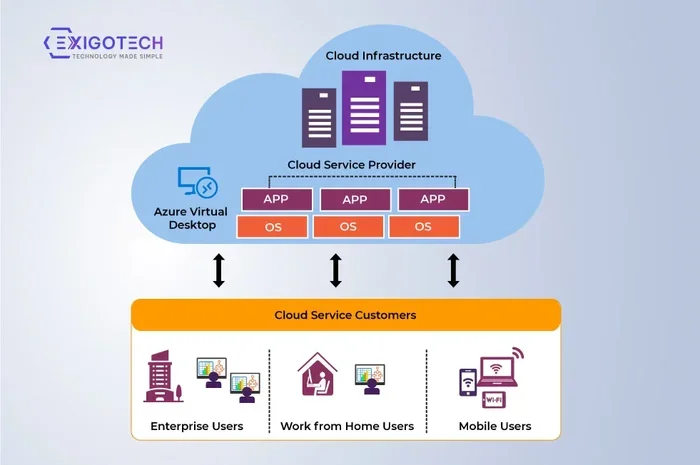
DaaS in cloud computing is a service model where a provider hosts a virtual desktop on their servers and delivers it to users over the internet. Instead of installing an operating system on your own computer, you access a fully functional desktop that runs remotely. This is also known as desktop virtualization or cloud desktop technology.
The concept is simple but powerful. A cloud desktop provider maintains the hardware, software, and security in their data centers. You simply log in from your device and your desktop appears on your screen. It feels just like using a regular computer, but all the processing happens far away.
How Desktop as a Service Differs from Traditional Computing
In a traditional setup, your computer does all the work. The operating system, applications, and files live on your hard drive. If your computer breaks or gets stolen, you lose everything unless you backed it up. With DaaS in cloud computing, your desktop exists in the cloud. Your device becomes more like a window or a thin client. It just displays what is happening on the remote server.
This shift has big implications. Your local device does not need to be powerful. Even an old laptop or a basic tablet can run a cloud desktop smoothly. The cloud desktop provider handles updates, backups, and maintenance. You do not need a large IT team to manage everything.
Key Components of DaaS Architecture
Understanding DaaS in cloud computing requires knowing a few key pieces. First, there is the cloud infrastructure. This is where the virtual desktop actually runs. It includes servers, storage, and networking equipment managed by the provider.
Second, there is the delivery mechanism. This is the software or protocol that sends your desktop screen to your device and sends your keystrokes and mouse clicks back. Popular protocols include RDP and PCoIP. Third, there is the end-user computing layer. This is what you, the user, actually interacts with. It looks and feels like a normal desktop.
Finally, there is the management console. This is where IT administrators control user access, set up policies, and monitor performance. Centralized management is one of the biggest advantages of DaaS in cloud computing. Instead of fixing each computer one by one, admins can update hundreds of cloud desktops at once.
How Does DaaS in Cloud Computing Work?
Now that you understand what DaaS in cloud computing is, let us look at how it actually works in practice. The process is simpler than you might think.
When you sign up for a cloud desktop service, the provider creates a virtual desktop for you on their servers. This virtual machine runs a full operating system, usually Windows or Linux. You then use a client application or a web browser to connect to your desktop from any device.
Here is the step-by-step flow of how DaaS in cloud computing delivers your desktop:
- You open the DaaS client on your device and enter your credentials.
- The cloud desktop provider authenticates you and starts your virtual desktop.
- The desktop environment streams to your screen in real time.
- You work as usual. Every click and keystroke is sent to the cloud server.
- The server processes your actions and sends back the updated screen.
- When you log out, your session ends but your data and settings remain saved.
Because everything runs in the cloud, your remote desktop experience depends mainly on your internet connection. A stable and fast connection makes everything smooth. A slow connection can cause lag or delays. Most modern DaaS in cloud computing platforms are optimized to work well even on moderate connections.
The Role of Virtual Desktop Infrastructure
You may have heard the term Virtual Desktop Infrastructure, or VDI. VDI is the underlying technology that makes DaaS in cloud computing possible. VDI refers to hosting desktop environments on a central server. DaaS takes VDI a step further by making it a managed service. With VDI, you would need to manage the infrastructure yourself. With DaaS, the provider handles all of that for you.
Think of it this way. VDI is like owning a car. You are responsible for maintenance, insurance, and fuel. DaaS is like using a ride-sharing service. Someone else handles the car, and you just enjoy the ride. Both get you where you need to go, but the responsibilities are very different.
Key Benefits of DaaS in Cloud Computing
DaaS in cloud computing offers many advantages for both businesses and individuals. Let us explore the most important ones in detail.
Cost Savings and Lower Upfront Expenses
One of the biggest draws of DaaS in cloud computing is the cost savings. Traditional computing requires buying expensive computers, software licenses, and IT equipment. With DaaS, you pay a monthly subscription instead. This subscription-based model spreads costs over time and makes budgeting much easier.
Small businesses especially benefit from this approach. They do not need to invest in powerful hardware. They can use affordable devices and still deliver a full desktop experience to their employees. Cost savings also come from reduced IT maintenance. The cloud desktop provider handles server upkeep, security patches, and hardware replacements.
Scalability and Flexibility
Scalability is where DaaS in cloud computing truly shines. If your business grows, adding new users is as simple as creating new accounts. If you need to scale down, you can remove users just as easily. There is no need to buy new computers or install software on each machine.
This flexibility also supports remote work and BYOD policies. Employees can use their own devices to access company desktops. They can work from home, on the road, or from a coworking space. DaaS in cloud computing makes it all possible without compromising security or performance.
Enhanced Data Security
Data security is a top concern for every organization. With DaaS in cloud computing, your data stays in the cloud, not on a local device. This means if a laptop is lost or stolen, the data is still safe. The cloud desktop provider implements zero trust security measures, encryption, and regular backups.
IT teams can enforce strict access controls and monitor activity from a single dashboard. Centralized management makes it easy to apply security policies across all cloud desktops. This level of control is much harder to achieve with traditional setups.
Improved Business Continuity
Natural disasters, power outages, or hardware failures can shut down a traditional office. With DaaS in cloud computing, employees can simply log in from another device and continue working. The virtual desktop is always available as long as there is an internet connection.
This resilience is a major advantage for businesses that cannot afford downtime. Cloud migration to a DaaS model ensures that critical work continues no matter what happens to physical office equipment.
Who Should Use DaaS in Cloud Computing?
DaaS in cloud computing is not just for large enterprises. Many different types of users can benefit from this technology. Let us look at the groups that get the most value from Desktop as a Service.
Remote and Hybrid Work Teams
Teams that work remotely or in hybrid setups are ideal candidates for DaaS in cloud computing. Every team member gets the same desktop experience regardless of their location. Collaboration becomes easier when everyone has access to the same tools and files.
Remote work has grown rapidly in recent years. DaaS supports this trend by giving employees a secure, consistent workspace. They do not need to worry about setting up their own IT environment. A cloud desktop gives them everything they need right at their fingertips.
Small and Medium Businesses
Small businesses often have limited IT budgets. DaaS in cloud computing allows them to provide professional-grade desktops without the high costs. They can start with a few users and scale up as they grow.
The subscription-based model is especially attractive for startups and small teams. There are no large upfront investments. You pay for what you use, and you can adjust your plan at any time. This makes DaaS one of the most accessible cloud computing solutions for growing businesses.
Educational Institutions and Healthcare
Schools and universities use DaaS to provide students with access to specialized software. Labs do not need expensive hardware. Students can use any device to run demanding applications like design tools or statistical software.
Healthcare providers also benefit from DaaS in cloud computing. Doctors and nurses can access patient records and medical software from any authorized device. Data security and compliance with regulations like HIPAA become much more manageable when data stays in the cloud rather than on individual workstations.
DaaS in Cloud Computing vs. Traditional Desktop Setup
To truly understand the value of DaaS in cloud computing, it helps to compare it directly with a traditional desktop setup. Here is a side-by-side look at the key differences.
| Feature | Traditional Desktop | DaaS in Cloud Computing |
|---|---|---|
| Hardware Cost | High upfront cost | Low upfront cost |
| Maintenance | Handled locally | Managed by provider |
| Access Location | Single device only | Any device with internet |
| Scalability | Requires new hardware | Add users instantly |
| Data Security | Depends on local setup | Centralized and encrypted |
| Disaster Recovery | Manual backups needed | Automatic and built-in |
| IT Management | Per-device management | Centralized dashboard |
As you can see from the table above, DaaS in cloud computing offers clear advantages in almost every category. Traditional setups still have a place, especially for users who need offline access or extremely high-performance computing. But for most businesses and individuals, the benefits of DaaS far outweigh the drawbacks.
One area where traditional desktops still win is offline capability. A cloud desktop requires an internet connection. If your internet goes down, you cannot access your desktop. However, many DaaS providers now offer offline modes that sync your work when the connection returns.
Expert Insights on DaaS in Cloud Computing
Industry experts consistently highlight several trends that make DaaS in cloud computing more relevant than ever. Let us look at what the professionals are saying.
Growing Adoption of End-User Computing
According to recent industry reports, end-user computing spending is shifting heavily toward cloud-based solutions. Organizations are moving away from managing physical desktops and embracing DaaS for its operational simplicity. The IT infrastructure of modern businesses is increasingly built around cloud services, and DaaS is a natural fit.
The Rise of Zero Trust Security
Security experts emphasize that zero trust security is no longer optional. With DaaS in cloud computing, implementing zero trust becomes much easier. Since data never lives on the local device, the attack surface shrinks significantly. Every access request is verified, and every session is monitored. This makes DaaS a strong choice for organizations handling sensitive information.
Future of Cloud Migration and DaaS
Experts predict that cloud migration will continue to accelerate. More organizations will move their hosted desktop environments to the cloud as part of broader digital transformation strategies. DaaS in cloud computing is positioned to be a cornerstone of these efforts, enabling seamless remote desktop access across global teams.
How to Choose the Right DaaS Provider
Not all cloud desktop providers are created equal. Choosing the right one for your needs requires careful consideration. Here are the factors you should evaluate before making a decision.
Security and Compliance
Security should be your top priority when selecting a DaaS in cloud computing provider. Look for providers that offer zero trust security, multi-factor authentication, and encryption. If your industry has specific compliance requirements, make sure the provider meets them.
Ask about their data center locations and how they handle data residency. Some regulations require data to stay within certain geographic boundaries. A good provider will be transparent about these details.
Performance and Reliability
The performance of your virtual desktop depends heavily on the provider’s infrastructure. Look for providers with strong uptime guarantees, ideally 99.9% or higher. Check if they use cloud computing data centers with redundant power and network connections.
Try before you buy. Most reputable providers offer free trials or demo sessions. Use these to test the speed, responsiveness, and overall user experience. A trial period helps you avoid costly mistakes.
Pricing and Scalability
Compare pricing models carefully. Some providers charge per user per month. Others offer tiered plans based on resources like CPU, RAM, and storage. Choose a model that aligns with your usage patterns and growth plans.
Make sure the provider allows easy scalability. As your needs change, you should be able to upgrade or downgrade without hassle. A good subscription-based model gives you this flexibility and keeps your costs predictable.
Getting Started with DaaS in Cloud Computing
If you are ready to try DaaS in cloud computing, here is a simple roadmap to get started. Following these steps will help you make a smooth transition to cloud desktop technology.
- Assess your needs. Determine how many users you need, what applications they will use, and what level of performance they require.
- Research providers. Compare at least three cloud desktop providers. Look at reviews, features, and pricing.
- Start with a pilot. Roll out DaaS to a small group first. Gather feedback and identify any issues before a full rollout.
- Train your team. Make sure users understand how to access and use their cloud desktop. Provide simple guides and support resources.
- Monitor and optimize. Use the provider’s management tools to track performance and make adjustments as needed.
Starting small is the best approach. It lets you learn the system without overwhelming your team. Once you see the benefits firsthand, scaling up becomes much easier.
Quick Tips for a Smooth DaaS Experience
- Use a wired internet connection when possible for the best remote desktop performance.
- Choose a thin client device if you want to save on hardware costs.
- Enable multi-factor authentication for all user accounts to boost data security.
- Regularly review user access and remove inactive accounts from the centralized management console.
- Back up important files to a separate cloud storage service as an extra precaution.
Common Mistakes to Avoid with DaaS
- Choosing a provider solely based on price without checking security features and compliance certifications.
- Ignoring internet requirements and assuming DaaS in cloud computing will work well everywhere without testing.
- Not training users on how to properly use and care for their cloud desktop environment.
- Overlooking industry-specific compliance requirements that your cloud desktop provider must meet.
- Failing to plan for scalability as your team grows and your IT infrastructure needs evolve.
Conclusion
DaaS in cloud computing is transforming the way we work and use computers. It offers cost savings, scalability, better data security, and unmatched flexibility. Whether you are a small business, a large enterprise, or an individual looking for a better computing setup, Desktop as a Service has something valuable to offer.
The technology behind DaaS in cloud computing continues to improve. Providers are making cloud desktops faster, more secure, and more accessible than ever before. As more people embrace remote work and BYOD policies, the demand for DaaS will only grow. The shift toward end-user computing in the cloud is not a trend, it is the future.
If you have not yet explored DaaS in cloud computing, now is a great time to start. Try a free trial, test the waters, and see how it can fit into your workflow. The future of computing is in the cloud, and DaaS is leading the way.
Frequently Asked Questions
What does DaaS stand for in cloud computing?
DaaS stands for Desktop as a Service. It is a cloud computing model where a provider hosts a full desktop environment on remote servers and delivers it to users over the internet. Users can access their virtual desktop from any device with an internet connection. This eliminates the need for powerful local hardware and simplifies IT management.
How is DaaS different from VDI?
VDI, or Virtual Desktop Infrastructure, is the technology that hosts desktops on a central server. DaaS in cloud computing takes VDI further by making it a fully managed service. With VDI, you handle the infrastructure yourself. With DaaS, the provider manages everything from servers to security updates. Think of VDI as the engine and DaaS as the complete car.
Is DaaS in cloud computing secure?
Yes, DaaS in cloud computing is generally very secure. Cloud desktop providers invest heavily in data security, encryption, and zero trust security measures. Your data stays in the cloud rather than on a local device, which reduces the risk of data loss from stolen or damaged hardware. Always choose a provider with strong security certifications and compliance standards.
What kind of internet connection do I need for DaaS?
A stable broadband connection is recommended for the best remote desktop experience. You do not need ultra-fast internet, but a reliable connection ensures smooth performance. Slow or unstable connections may cause lag or delays. Most DaaS platforms are optimized to work well on moderate connections, but wired connections are always better than Wi-Fi for consistent performance.
Can I use DaaS on a tablet or smartphone?
Yes, one of the great benefits of DaaS in cloud computing is device flexibility. You can access your cloud desktop from laptops, tablets, smartphones, and even thin clients. The end-user computing experience adapts to your device screen size. This makes it perfect for BYOD policies and remote work scenarios where you need to work from different devices throughout the day.
How much does DaaS typically cost?
Pricing for DaaS in cloud computing varies by provider and plan. Most providers use a subscription-based model that charges per user per month. Costs typically range from $20 to $100 or more per user monthly, depending on the resources and features included. Small businesses often find DaaS more affordable than maintaining traditional desktop infrastructure because there are no upfront hardware costs.