Disaster Recovery as a Service in Cloud Computing Explained
Disaster recovery as a service in cloud computing is a modern approach that helps businesses bounce back fast from outages, cyberattacks, and natural disasters. It uses the cloud to store copies of your data and applications so you can restore them quickly. DRaaS eliminates the need for expensive on-site backup systems and manual recovery processes. This guide covers everything you need to know, from how it works to choosing the right provider. You will walk away with clear, actionable steps to protect your business.
Key Takeaways
- DRaaS keeps your business running: Cloud-based disaster recovery ensures minimal downtime when disasters strike.
- It saves money: You avoid the high costs of building and maintaining a physical recovery site.
- Automation is a game-changer: Automated failover and backups reduce human error and speed up recovery.
- Not all providers are equal: Choosing the right DRaaS partner requires evaluating SLAs, security, and scalability.
- Small businesses benefit too: DRaaS levels the playing field, giving startups access to enterprise-grade protection.
- Testing matters: Regular drills ensure your disaster recovery plan actually works when you need it most.
📑 Table of Contents
What Is Disaster Recovery as a Service in Cloud Computing?
Let us start with the basics. Disaster recovery as a service in cloud computing, often called DRaaS, is a cloud-based solution that lets you back up your data, applications, and entire IT systems. Then, when something goes wrong, it helps you restore everything quickly.
Think of it like an insurance policy for your digital life. You hope you never need it, but when disaster hits, you will be incredibly glad you have it. A disaster could be a cyberattack, a power outage, a flood, or even a simple human mistake that deletes critical files.
Traditional disaster recovery meant building a second physical data center. That cost a fortune. It required space, electricity, cooling, and a team of experts to keep it running. Cloud-based disaster recovery changes all of that. You rent the resources you need from a cloud provider, and they handle the heavy lifting.
The beauty of DRaaS is its simplicity. You do not need to be a tech genius to use it. Most providers offer dashboards that make managing your recovery plan straightforward. You set your rules, and the system takes care of the rest.
Why Does Every Business Need It?
Downtime is expensive. Studies show that the average cost of one hour of downtime can reach tens of thousands of dollars for small businesses. For larger companies, the number climbs into the millions. Beyond money, downtime damages your reputation. Customers lose trust when they cannot access your services.
Business continuity depends on how fast you can recover. DRaaS gives you that speed. It also gives you peace of mind. Knowing your data is safe in the cloud means you can focus on running your business instead of worrying about what might go wrong.
How Disaster Recovery as a Service in Cloud Computing Works
Now let us look under the hood. Understanding how DRaaS works helps you appreciate its value. The process is simpler than you might think.
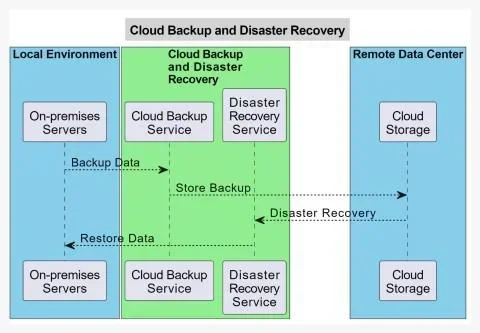
First, you choose the data and applications you want to protect. This could be your entire IT infrastructure or just the most critical parts. Next, the DRaaS provider copies your data and sends it to their cloud infrastructure. This process is called data replication.
The copies live in secure data centers located in different regions. This multi-region deployment ensures that even if one location goes down, your data survives elsewhere. Redundancy is at the heart of every good DRaaS platform.
The Failover Process
When a disaster strikes, the failover process kicks in. Failover means switching your operations from your primary system to the backup system in the cloud. With DRaaS, this can happen automatically or with a single click.
Here is a simple example. Imagine your office loses power due to a storm. Your servers go dark. But because your systems are replicated in the cloud, your team can log in from anywhere and keep working. The recovery time objective, or RTO, is how fast you get back online. The recovery point objective, or RPO, is how much data you might lose. Good DRaaS platforms offer RTOs measured in minutes, not hours or days.
Key Components of a DRaaS Setup
- Data replication engine: Copies your data continuously or on a schedule.
- Failover management: Automates the switch to backup systems.
- Monitoring dashboard: Lets you track the health of your backups in real time.
- Testing tools: Allows you to run practice recovery drills without disrupting operations.
- Encryption: Keeps your data safe during transit and while stored in the cloud.
Benefits of Using DRaaS for Your Business
Disaster recovery as a service in cloud computing offers many advantages over traditional methods. Let us walk through the biggest ones.
Cost Savings
Building a secondary data center is incredibly expensive. You pay for hardware, software, space, power, and staffing. With DRaaS, you pay a subscription fee based on how much you use. This cost-effective disaster recovery model lets small and medium businesses access the same level of protection that only large enterprises could afford before.
Scalability
Your business grows. Your DRaaS plan can grow with it. You simply add more resources as your needs change. No need to buy new hardware or expand a physical site. Cloud infrastructure scales up or down effortlessly.
Faster Recovery Times
Manual recovery is slow. DRaaS uses automation to speed things up dramatically. Automated backup systems ensure your data is always current. When disaster hits, the failover happens in minutes, not days. This speed is critical for maintaining uptime and customer trust.
Reduced IT Burden
Your IT team has enough to worry about. DRaaS takes disaster recovery off their plate. The provider handles maintenance, updates, and monitoring. Your team can focus on projects that drive growth instead of managing backup servers.
Expert Insights
Industry experts consistently highlight DRaaS as a cornerstone of modern IT resilience. According to Gartner, by 2025, over 90% of enterprises will adopt cloud-based recovery solutions. The shift from on-premises to cloud-based recovery is no longer a trend. It is the new standard.
“Cloud disaster recovery has moved from a luxury to a necessity,” says a leading analyst from Forrester Research. “Businesses that ignore it are gambling with their future.”
DRaaS vs. Traditional Disaster Recovery
How does disaster recovery as a service in cloud computing compare to the old-school approach? Let us break it down.
| Feature | Traditional DR | DRaaS (Cloud) |
|---|---|---|
| Cost | High upfront capital | Pay-as-you-go subscription |
| Setup Time | Weeks to months | Days to weeks |
| Recovery Speed | Hours to days | Minutes to hours |
| Maintenance | Requires dedicated team | Handled by provider |
| Scalability | Difficult and expensive | Easy and flexible |
| Testing | Complex and disruptive | Simple and non-disruptive |
| Location | Single physical site | Multi-region cloud |
As you can see, the advantages of DRaaS are clear. Traditional disaster recovery still has a place in some industries, but for most businesses, the cloud-based approach wins on nearly every metric.
Quick Tips for Comparing Options
- Always check the provider’s service level agreement (SLA) for guaranteed recovery times.
- Look for providers that offer automated testing so you can verify your backups regularly.
- Choose a provider with strong security certifications like SOC 2 or ISO 27001.
- Consider hybrid cloud options if you have a mix of on-premises and cloud systems.
How to Choose the Right DRaaS Provider
Picking a provider is one of the most important decisions you will make. Not all disaster recovery as a service in cloud computing platforms are created equal. Here is what to look for.
Evaluate Their Recovery Guarantees
Ask about RTO and RPO numbers. These metrics define how fast and how completely you can recover. A provider that guarantees RTO of under one hour is far better than one that promises eight hours. Make sure these numbers are written into the service level agreement, not just marketing promises.
Check Security and Compliance
Your backup data is just as sensitive as your live data. The provider must encrypt your information both in transit and at rest. If you operate in healthcare, finance, or government, look for compliance with HIPAA, PCI DSS, or GDPR.
Assess Ease of Use
You do not want a complicated system that only experts can manage. A good DRaaS platform offers a clean, intuitive dashboard. Your team should be able to launch a recovery test in minutes without reading a thick manual.
Consider Support and Responsiveness
When disaster hits, you need help fast. Choose a provider that offers 24/7 support with real humans, not just chatbots. Read reviews about their response times during actual emergencies.
Common Mistakes to Avoid
Many businesses make avoidable errors when setting up their disaster recovery plan. Here are the biggest ones:
- Skipping regular tests: A backup you have never tested is not a real backup. Run drills at least quarterly.
- Underestimating bandwidth: Restoring large amounts of data requires strong internet. Check your cloud backup bandwidth before you need it.
- Ignoring application dependencies: Your systems do not work in isolation. Make sure your DRaaS covers all connected applications.
- Choosing price over reliability: The cheapest option is not always the best. Look for proven track records.
- Forgetting to update the plan: Your IT environment changes constantly. Update your disaster recovery plan whenever you add new systems or applications.
Quick Tips for a Successful DRaaS Implementation
Getting started with disaster recovery as a service in cloud computing does not have to be overwhelming. Follow these practical tips to set yourself up for success.
- Start with your most critical systems. Do not try to protect everything at once. Identify what matters most and prioritize those.
- Define your RTO and RPO clearly. These numbers guide every decision you make with your provider.
- Document everything. Write down your recovery procedures step by step. Your team should know exactly what to do.
- Train your staff. Run practice recovery sessions so everyone knows their role when real trouble hits.
- Monitor your backups continuously. Use the provider’s dashboard to verify that automated backup jobs are completing successfully.
- Review and update regularly. Set a quarterly review to ensure your disaster recovery plan still matches your business needs.
Final Thoughts
Disaster recovery as a service in cloud computing is no longer optional. It is essential. Cyberattacks, natural disasters, and simple hardware failures can shut down any business in minutes. The difference between a temporary setback and a permanent closure is how fast you can recover.
DRaaS gives you that speed. It gives you simplicity. It gives you confidence. Whether you are a small startup or a growing enterprise, the cloud has the tools to protect what matters most. Start today. Your future self will thank you.
Take action now. Evaluate your current backup strategy. Identify gaps. Research DRaaS providers that fit your needs and budget. The best time to prepare for a disaster is before it happens.
Frequently Asked Questions
What is disaster recovery as a service in cloud computing?
Disaster recovery as a service in cloud computing is a cloud-based solution that backs up your data and applications, then restores them quickly when a disaster strikes. It replaces the need for expensive physical backup sites with scalable cloud resources.
How much does DRaaS cost?
Costs vary based on your data size, recovery needs, and the provider you choose. Most DRaaS platforms use a subscription model, so you pay only for what you use. This makes it far more affordable than building a traditional recovery site.
How fast can DRaaS restore my systems?
Recovery speed depends on your provider and your setup. Many cloud-based disaster recovery services offer recovery times measured in minutes. Look for providers that guarantee fast recovery time objectives in their service agreements.
Is DRaaS suitable for small businesses?
Absolutely. DRaaS levels the playing field. Small businesses get access to enterprise-grade data replication and failover capabilities without the massive upfront costs. It is one of the best investments a small business can make.
How often should I test my disaster recovery plan?
You should test your disaster recovery plan at least every quarter. Regular testing ensures your backups work and your team knows what to do. Many DRaaS providers offer automated testing tools that make this process easy.
What is the difference between RTO and RPO?
Recovery Time Objective (RTO) is how quickly you need to restore operations after a disaster. Recovery Point Objective (RPO) is how much data you can afford to lose. Both metrics are critical when choosing a disaster recovery as a service in cloud computing provider.
=== CONCLUSION ===
Disaster recovery as a service in cloud computing is a powerful tool that every business should have in its toolkit. It protects your data, keeps your operations running, and saves you money. The cloud makes recovery faster, simpler, and more reliable than ever before.
Do not wait for a disaster to realize you are not prepared. Take the steps today to build a strong disaster recovery plan. Choose a trusted DRaaS provider, test your setup regularly, and sleep better knowing your business is protected.