Distributed Computing in Cloud Computing Explained Simply
Distributed computing in cloud computing is the practice of spreading tasks across multiple machines to boost speed, reliability, and scalability. It lets businesses handle massive workloads without investing in expensive hardware. Cloud infrastructure makes this process seamless, flexible, and cost-effective. Whether you are a beginner or a tech professional, understanding this concept unlocks powerful insights into how modern apps and services actually work behind the scenes.
Have you ever wondered how Netflix streams movies to millions of people at the same time? Or how Google handles billions of searches every single day? The answer lies in distributed computing in cloud computing. It is the invisible engine that powers almost every major app and service you use online today.
In simple terms, distributed computing means splitting a big task into smaller pieces and spreading them across many computers. These computers work together as a team, often located in different places. When you add cloud infrastructure to the mix, you get a system that is incredibly powerful, flexible, and affordable. This guide breaks everything down in plain language, so you can understand the concept without needing a computer science degree.
Key Takeaways
- Load balancing ensures no single server gets overwhelmed, keeping systems fast and responsive.
- Scalability is one of the biggest advantages, allowing resources to grow or shrink on demand.
- Fault tolerance means the system keeps running even if one node fails, thanks to data replication.
- Microservices and containerization are popular models that make distributed systems easier to manage.
- Edge computing pushes processing closer to users, reducing network latency significantly.
- Cloud migration to distributed architectures can save money and improve performance for most businesses.
📑 Table of Contents
- What Is Distributed Computing in Cloud Computing?
- How Distributed Computing Works in the Cloud
- Key Benefits of Distributed Computing in the Cloud
- Common Distributed Computing Models
- Challenges and Solutions in Distributed Cloud Computing
- Real-World Applications of Distributed Computing
- Comparison: Centralized vs. Distributed Computing
- Getting Started with Distributed Computing in the Cloud
What Is Distributed Computing in Cloud Computing?
Distributed computing in cloud computing refers to a setup where multiple servers or machines work together to complete tasks over a network. Instead of one powerful computer doing all the work, many smaller machines share the load. This approach is at the heart of modern cloud architecture.
Think of it like a restaurant kitchen. One chef trying to cook 500 meals alone would be a disaster. But a team of 20 chefs, each handling different dishes, gets the job done quickly and efficiently. Cloud computing provides the “kitchen” — the servers, storage, and networking — while distributed computing is the “team strategy” that makes everything run smoothly.
The cloud gives businesses access to vast pools of computing resources on demand. You do not need to own physical servers. You simply rent what you need from providers like AWS, Google Cloud, or Microsoft Azure. Virtualization technology makes this possible by creating virtual versions of physical hardware, allowing many virtual machines to run on a single physical server.
Why Does This Matter for Everyday Users?
Even if you are not a developer, distributed computing affects your daily life. When you open a weather app, it pulls data from servers that might be spread across several countries. When you video call a friend, your data travels through distributed networks to keep the call clear and smooth. High availability ensures these services rarely go down, which is something we now take for granted.
How Distributed Computing Works in the Cloud
Understanding how distributed computing actually functions inside the cloud helps you appreciate its power. The process involves several key components working together in harmony.
The Role of Nodes and Clusters
In distributed systems, each individual computer is called a node. A group of nodes working together is called a cluster. Clusters can span a single data center or stretch across multiple continents. Cluster computing allows organizations to pool their resources and tackle problems that would be impossible for a single machine.
Each node in a cluster has its own processor, memory, and storage. They communicate with each other through fast networks. When a task arrives, the system decides which node should handle it based on current load and availability. This decision-making process is handled by resource allocation algorithms.
Data Replication and Consistency
Data replication means copying data across multiple nodes. This serves two important purposes. First, it improves fault tolerance — if one node goes down, another copy of the data is still available. Second, it reduces network latency because users can access data from the nearest replica.
Keeping all replicas consistent is a challenge, however. Different distributed databases use various strategies to handle this. Some prioritize consistency, while others favor speed. The choice depends on the specific use case and application requirements.
Load Balancing Explained
Load balancing is the process of distributing incoming traffic evenly across multiple servers. Without it, one server would get overwhelmed while others sit idle. A load balancer acts like a traffic cop, directing requests to the least busy server.
There are several methods for load balancing:
- Round Robin — requests are distributed in a fixed order.
- Least Connections — the server with the fewest active connections gets the next request.
- IP Hash — the client’s IP address determines which server handles the request.
Good load balancing is essential for maintaining high availability and fast response times. It is one of the first things engineers configure when building a cloud architecture.
Key Benefits of Distributed Computing in the Cloud
Distributed computing in cloud computing offers many advantages that make it the preferred choice for modern applications. Here are the most important benefits.
Scalability
Scalability is the ability to handle growing amounts of work by adding more resources. In a distributed cloud system, you can add more nodes whenever you need them. This is called elastic computing because the system expands and contracts like a rubber band based on demand.
During holiday shopping seasons, e-commerce platforms like Amazon handle massive traffic spikes. They add more servers temporarily and remove them after the rush. This would be impossible with traditional, single-server setups.
Cost Efficiency
Because you only pay for what you use, distributed cloud computing is incredibly cost-effective. Small startups can access the same powerful infrastructure as large enterprises. There is no need to buy expensive hardware upfront. Cloud migration to distributed models often reduces IT costs by 30 to 50 percent.
Reliability and Fault Tolerance
In a distributed system, if one machine fails, the others pick up the slack. This is called fault tolerance. Data replication and redundancy ensure that services stay online even during hardware failures.
This level of reliability is critical for applications like banking systems, healthcare platforms, and emergency services. Users expect these systems to work 99.99 percent of the time.
Performance and Speed
Parallel processing is a key advantage of distributed computing. Instead of processing data one step at a time, multiple nodes work on different parts of the same task simultaneously. This dramatically speeds up computation.
For example, processing a large dataset that would take one server 10 hours might take a distributed cluster just 30 minutes. Edge computing takes this further by processing data closer to the source, reducing delays and improving real-time performance.
Common Distributed Computing Models
Not all distributed systems work the same way. Different models suit different needs. Here are the most common ones used in cloud environments today.
Microservices Architecture
Microservices break a large application into small, independent services. Each service handles a specific function, like user authentication or payment processing. These services communicate through APIs and can be deployed, updated, and scaled independently.
This model is highly popular in cloud architecture because it allows teams to work on different parts of an application without interfering with each other. Companies like Netflix and Uber rely heavily on microservices to manage their complex platforms.
Serverless Computing
Serverless computing lets developers run code without managing servers. The cloud provider automatically handles resource allocation and scaling. You write the function, and the cloud runs it only when triggered by an event.
This model is perfect for tasks that run occasionally or unpredictably. You pay only for the compute time you actually use, which can lead to significant savings.
Containerization
Containerization packages an application and all its dependencies into a lightweight, portable unit called a container. Containers are more efficient than traditional virtual machines because they share the host operating system.
Tools like Docker and Kubernetes are the backbone of modern distributed computing. Kubernetes, in particular, automates the deployment and management of containers across clusters of machines, making it easier to build truly scalable systems.
MapReduce and Big Data Processing
MapReduce is a programming model for processing large datasets across distributed clusters. It works in two phases. The Map phase splits data and processes it in parallel. The Reduce phase combines the results into a final output.
This model is the foundation of technologies like Apache Hadoop and Apache Spark. It powers big data analytics, machine learning, and scientific research that would be impossible on a single machine.
Quick Tips for Choosing the Right Model
- Choose microservices if you have a large, complex application with multiple teams.
- Pick serverless for event-driven or sporadic workloads.
- Use containers when you need portability and consistent environments.
- Go with MapReduce or Spark for heavy data processing and analytics.
Challenges and Solutions in Distributed Cloud Computing
While distributed computing in cloud computing offers tremendous benefits, it also comes with challenges. Understanding these helps you plan better and avoid common pitfalls.
Network Latency
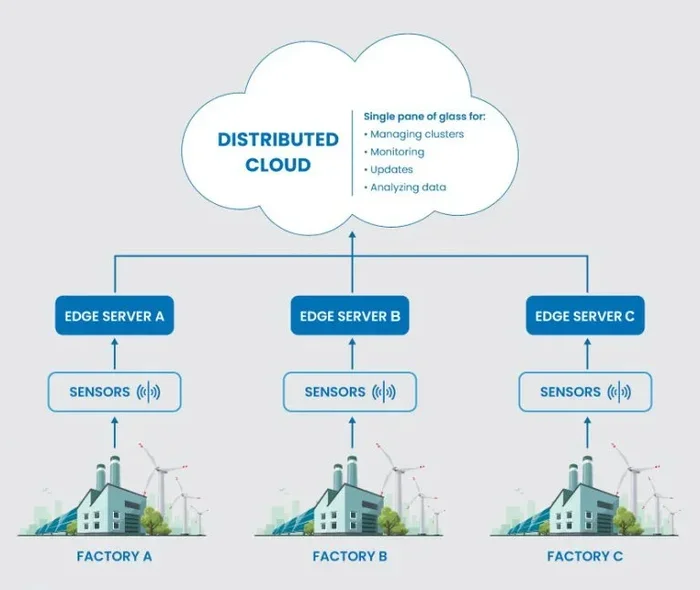
Network latency is the delay in data traveling between nodes. In a distributed system spread across regions, this delay can add up and slow down performance. Edge computing helps solve this by moving computation closer to end users.
Another solution is optimizing data transfer protocols and using content delivery networks (CDNs) to cache data near users. Choosing the right cloud provider with data centers close to your target audience also makes a big difference.
Security and Compliance
With data spread across many nodes and locations, security becomes more complex. Each node is a potential entry point for attackers. Cloud migration projects must include robust security planning from the start.
Encryption, access controls, and regular audits are essential. Compliance with regulations like GDPR and HIPAA adds another layer of complexity, especially when data crosses international borders.
Complexity of Management
Managing a distributed system is inherently more complex than managing a single server. You need to monitor many nodes, handle failures gracefully, and keep everything synchronized.
Tools like Kubernetes, Terraform, and cloud-native monitoring services simplify this significantly. They automate much of the heavy lifting, allowing teams to focus on building features rather than managing infrastructure.
Common Mistakes to Avoid
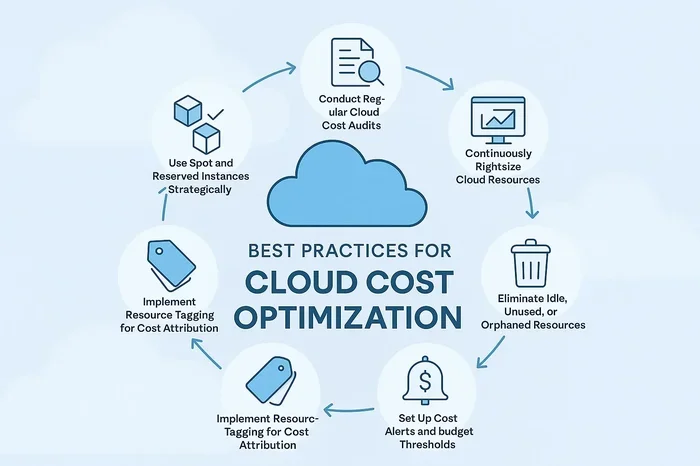
- Underestimating costs: Distributed systems can become expensive quickly if not monitored properly. Always set up billing alerts.
- Ignoring data consistency: Choosing the wrong consistency model can lead to data corruption or lost updates.
- Overcomplicating architecture: Start simple. You can always add complexity later, but removing it is much harder.
- Skipping testing: Distributed systems behave differently under failure conditions. Test for failure scenarios regularly.
Expert Insights on Building Distributed Systems
Industry experts consistently emphasize that distributed computing success depends on good design principles. Start with clear requirements and choose the simplest architecture that meets them. As Martin Kleppmann, author of “Designing Data-Intensive Applications,” often notes, understanding the fundamentals of distributed systems is more valuable than memorizing specific tools. The tools change, but the principles remain the same.
Another key insight is to embrace failure as a normal part of distributed systems. No system is immune to outages. The goal is to build systems that degrade gracefully and recover quickly. This mindset shift is critical for teams new to cloud architecture.
Real-World Applications of Distributed Computing
Distributed computing in cloud computing is not just theory. It powers some of the most important services and platforms in the world today.
E-Commerce and Retail
Platforms like Amazon and Alibaba use distributed systems to handle millions of transactions per second during peak shopping events. Load balancing and elastic computing ensure that the shopping experience remains smooth even under extreme traffic.
Streaming Services
Netflix, Spotify, and YouTube rely on distributed databases and content delivery networks to stream video and music to users worldwide with minimal buffering. Edge computing places content servers close to users, reducing network latency and improving quality.
Healthcare and Research
Genome sequencing, drug discovery, and medical imaging analysis require massive computational power. Parallel processing across distributed clusters accelerates research that could take years on a single machine. Cloud migration has made these capabilities accessible to hospitals and research institutions of all sizes.
Financial Services
Banks and trading platforms use distributed systems for real-time fraud detection, risk analysis, and high-frequency trading. Fault tolerance is critical here because even a few seconds of downtime can cost millions of dollars.
Social Media and Communication
Platforms like Facebook, Twitter, and WhatsApp process petabytes of data daily. Microservices allow them to update features independently and scale specific parts of the system based on demand.
Comparison: Centralized vs. Distributed Computing
Understanding the difference between centralized and distributed approaches helps clarify why distributed computing in cloud computing has become the industry standard.
| Feature | Centralized Computing | Distributed Computing |
|---|---|---|
| Architecture | Single server or mainframe | Multiple nodes across a network |
| Scalability | Limited by hardware | Highly scalable, on demand |
| Fault Tolerance | Single point of failure | Redundant, fault-tolerant |
| Cost Model | High upfront investment | Pay-as-you-go, lower entry cost |
| Performance | Good for small workloads | Excellent for large-scale workloads |
| Management Complexity | Simple to manage | More complex, requires orchestration |
| Use Case | Small apps, local systems | Large-scale apps, cloud services |
As the table shows, distributed computing clearly wins for modern, large-scale applications. The added management complexity is a fair trade-off for the massive gains in scalability, reliability, and cost efficiency.
Getting Started with Distributed Computing in the Cloud
If you are new to this space, here is a simple roadmap to get started with distributed computing in cloud computing.
- Learn the basics of cloud computing: Understand what IaaS, PaaS, and SaaS mean and how they relate to distributed systems.
- Explore virtualization: Get hands-on with virtual machines and understand how cloud infrastructure works under the hood.
- Try containerization: Install Docker and deploy a simple app in a container. Then use Kubernetes to orchestrate multiple containers.
- Experiment with serverless: Build a small function using AWS Lambda or Google Cloud Functions to see how serverless computing works.
- Study real-world architectures: Look at case studies from companies like Netflix, Airbnb, or Spotify to see how they use distributed systems in production.
The beauty of cloud computing is that you can experiment with these technologies using free tiers and low-cost services. You do not need a massive budget to start learning and building.
Distributed computing in cloud computing is the foundation of the modern digital world. It enables the scalable, reliable, and cost-effective services that billions of people use every day. From load balancing to edge computing, each component plays a vital role in making these systems work.
Whether you are a student, a developer, or a business leader, understanding these concepts gives you a significant advantage. The cloud is only growing, and distributed computing will continue to be at the center of that growth. Start small, experiment often, and keep learning. The world of cloud-native distributed systems is vast and exciting, and there has never been a better time to dive in.
Frequently Asked Questions
What is the main difference between distributed computing and cloud computing?
Distributed computing refers to the concept of splitting tasks across multiple machines. Cloud computing is the delivery of computing resources over the internet. They work together when cloud providers use distributed systems to offer scalable services to users.
Is distributed computing in the cloud expensive?
Not necessarily. One of the biggest advantages of distributed cloud computing is cost efficiency. You pay only for the resources you use, and you can scale down when demand drops. Many startups and small businesses benefit from this pay-as-you-go model.
What skills do I need to work with distributed systems in the cloud?
You need a solid understanding of networking, cloud architecture, and programming. Familiarity with containerization tools like Docker and Kubernetes is highly valuable. Knowledge of distributed databases and load balancing concepts is also important.
Can small businesses benefit from distributed computing?
Absolutely. Cloud migration to distributed architectures allows small businesses to access enterprise-grade scalability and reliability without large upfront investments. Elastic computing lets them handle traffic spikes without over-provisioning hardware.
What role does edge computing play in distributed cloud systems?
Edge computing brings processing closer to the data source, which reduces network latency and improves response times. It is especially useful for applications that require real-time processing, such as IoT devices, autonomous vehicles, and live streaming.
Are there any risks associated with distributed computing in the cloud?
The main risks include increased complexity, security challenges, and potential cost overruns if resources are not monitored. However, these risks can be managed with proper planning, strong security practices, and the right monitoring tools.