How to Secure Data in Cloud Computing for Beginners
Discover how to secure data in cloud computing with practical tips and strategies designed for beginners. This guide covers encryption, access control, and cloud security best practices to protect your information from breaches and threats. You will learn how to choose a safe cloud provider, set up strong passwords, and build a security plan that keeps your data protected every single day.
Cloud computing has changed the way we store, share, and manage information. Whether you are a small business owner or someone just starting to explore digital tools, you probably already use the cloud in some way. But with great convenience comes great responsibility. How to secure data in cloud computing is a question every beginner should ask before uploading a single file.
The truth is, cloud data breaches happen more often than most people realize. Hackers constantly look for weak spots in cloud systems. And while your cloud provider does a lot to keep things safe, you also play a big role. Securing data in cloud computing is not just about technology. It is about building smart habits and making thoughtful choices every day.
This guide will walk you through everything you need to know. We will cover the basics of cloud security, how to pick a safe provider, and the best practices that keep your data locked down. By the end, you will feel confident about protecting your information in the cloud.
Key Takeaways
- Encryption is essential: Always encrypt your data before uploading it to the cloud to keep it safe from unauthorized access.
- Choose a trusted cloud provider: Look for providers with strong security certifications, transparent policies, and reliable backup options.
- Use multi-factor authentication: Add an extra layer of protection beyond passwords to prevent unauthorized users from reaching your data.
- Back up your data regularly: A solid backup strategy ensures you can recover your files even if something goes wrong.
- Understand the shared responsibility model: Both you and your cloud provider share the duty of keeping data secure.
- Stay compliant with regulations: Follow data protection laws like GDPR and HIPAA to avoid fines and build trust with your users.
- Monitor and audit regularly: Keep watching your cloud environment for suspicious activity and fix vulnerabilities before they become problems.
📑 Table of Contents
Understanding Cloud Data Security Basics
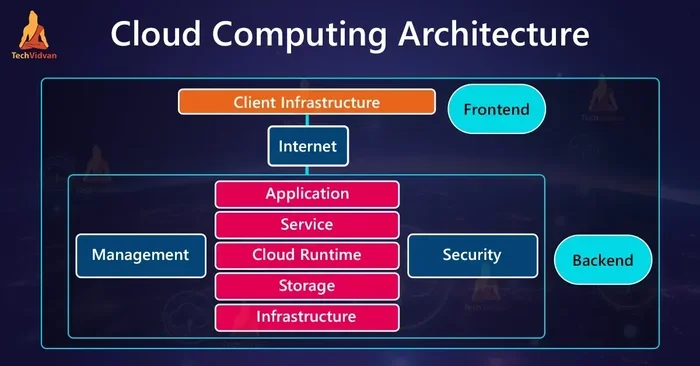
Before you dive into specific steps, it helps to understand what cloud data security actually means. At its core, it is the set of practices and tools that protect your digital information stored on remote servers. These servers are managed by a cloud provider, not on your own computer or office network.
When you use cloud storage, your files travel over the internet and land on servers owned by companies like Amazon, Google, or Microsoft. How to secure data in cloud computing starts with knowing who has access to those servers and what safeguards are in place.
The Shared Responsibility Model
One of the most important ideas in cloud security is the shared responsibility model. Your cloud provider handles the security of the physical servers, the network, and the data center. But you are responsible for protecting your own data, managing user access, and setting up security rules.
Think of it like renting an apartment. The landlord fixes the roof and locks the front door. But you still lock your personal safe and keep your valuables hidden. Both sides share the job of keeping things secure. Understanding this model is the first step toward securing data in cloud computing the right way.
Why Data Security in the Cloud Matters
Cloud environments store massive amounts of sensitive information. This includes personal records, financial data, medical files, and business documents. A single breach can expose millions of people’s private details. The damage goes beyond money. It can ruin trust and hurt reputations.
Here is why cloud data security matters so much:
- Data breaches cost a fortune. The average cost of a data breach keeps rising every year.
- Regulations demand protection. Laws like GDPR and HIPAA require businesses to follow strict data security rules.
- Customers expect safety. People will not trust a company that cannot protect their information.
- Cloud threats evolve fast. Cybercriminals constantly find new ways to attack cloud systems.
Choosing the Right Cloud Provider for Your Data
Not all cloud providers are created equal. Some invest heavily in security. Others cut corners to offer lower prices. When you are learning how to secure data in cloud computing, choosing the right provider is one of the most impactful decisions you will make.
What to Look for in a Cloud Provider
Before you sign up with any cloud service, ask these key questions:
- Does the provider offer end-to-end encryption for data at rest and in transit?
- Do they have certifications like SOC 2, ISO 27001, or FedRAMP?
- What is their track record with data breaches and incident response?
- Do they provide clear data retention and deletion policies?
- Where are their data centers located, and does that affect compliance?
A good provider will answer these questions openly. They should publish security white papers and transparency reports. If a provider hides their security practices, that is a red flag.
Comparing Popular Cloud Providers
| Provider | Encryption | Compliance Certs | Best For |
|---|---|---|---|
| Amazon Web Services | AES-256, TLS | SOC, ISO, HIPAA | Enterprise and scalable apps |
| Google Cloud | AES-256, TLS | SOC, ISO, GDPR | AI and data analytics |
| Microsoft Azure | AES-256, TLS | SOC, ISO, HIPAA | Business and hybrid setups |
| Dropbox Business | AES-256, TLS | SOC 2, GDPR | Small teams and file sharing |
Each provider has strengths. Your choice should match your specific needs, budget, and security requirements. Always read the fine print before committing.
Essential Security Practices for Cloud Data
Once you have chosen a provider, the real work begins. How to secure data in cloud computing depends on the daily habits and tools you put in place. These practices form the backbone of a strong cloud security setup.
Use Strong Authentication Methods
Passwords alone are not enough anymore. A weak or reused password can give hackers the keys to your entire cloud account. Multi-factor authentication, or MFA, adds a second step to the login process. You might need to enter a code from your phone or use a fingerprint scan.
Here is why MFA matters so much:
- It blocks over 99 percent of automated attacks.
- It protects your account even if your password gets leaked.
- It is easy to set up and usually free.
Turn on MFA for every cloud account you use. It is one of the simplest yet most effective steps in securing data in cloud computing.
Encrypt Your Data Before Upload
Encryption scrambles your data into unreadable code. Only someone with the right key can unscramble it. When your data is encrypted, even if a hacker intercepts it, they cannot read anything.
There are two main types of encryption to know about:
- Encryption at rest: This protects your data while it sits on the cloud server.
- Encryption in transit: This protects your data while it travels from your device to the cloud.
Most reputable cloud providers offer both types by default. But for extra protection, you can encrypt files on your own device before uploading them. This way, even the cloud provider cannot read your data without your key.
Control Access with Role-Based Permissions
Not everyone in your organization needs access to every file. Role-based access control, or RBAC, lets you assign permissions based on each person’s role. The marketing team can access campaign files, but they do not need access to financial records.
This approach limits the damage if one account gets compromised. It also makes it easier to track who did what inside your cloud environment. Good access control is a cornerstone of cloud security best practices.
Back Up Your Data Regularly
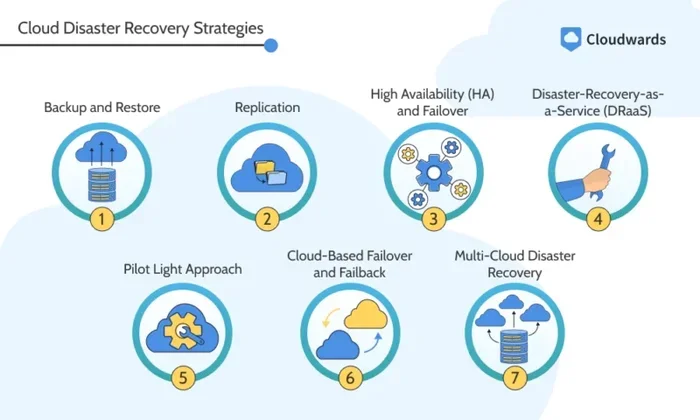
A solid backup strategy is your safety net. If your data gets corrupted, accidentally deleted, or hit by ransomware, backups let you recover quickly. Store backups in a different location or a different cloud region for extra safety.
Follow these backup tips:
- Automate backups so you never forget to do them manually.
- Test your backups regularly to make sure they actually work.
- Keep at least three copies of critical data using the 3-2-1 rule.
- Store one backup offline or in a separate cloud provider.
Common Cloud Data Security Threats
Understanding the threats helps you prepare for them. Cybercriminals use many tactics to target cloud data. Knowing what to watch for gives you a huge advantage.
Phishing Attacks
Phishing is one of the most common ways hackers gain access to cloud accounts. They send fake emails that look like they come from your cloud provider or your boss. The email tricks you into clicking a malicious link or entering your login details on a fake page.
Always double-check sender addresses. Never click links in unexpected emails. When in doubt, go directly to the cloud provider’s website by typing the URL yourself.
Misconfigured Cloud Settings
One of the biggest causes of cloud data breaches is simple human error. A misconfigured setting can leave your storage bucket open to the entire internet. Hackers scan for these open buckets constantly and steal whatever they find.
To avoid this, review your cloud settings regularly. Use automated tools that scan for misconfigurations. Many providers also offer security checkup tools that flag risky settings.
Insider Threats
Not every threat comes from outside your organization. Sometimes it comes from someone inside. This could be a disgruntled employee or someone who accidentally shares sensitive data. Limiting access and monitoring activity helps reduce insider risks.
Building a Strong Cloud Security Strategy
A security strategy is not a one-time setup. It is an ongoing process. How to secure data in cloud computing requires planning, monitoring, and adjusting over time. A well-built strategy covers all the bases and keeps your data safe as threats evolve.
Conduct Regular Vulnerability Assessments
A vulnerability assessment scans your cloud environment for weak spots. It checks for outdated software, open ports, weak passwords, and misconfigured settings. Running these assessments regularly helps you catch problems before attackers do.
You can use tools like Nessus, Qualys, or your cloud provider’s built-in security scanner. Schedule assessments at least once a month. After each assessment, create a plan to fix any issues you find.
Set Up Threat Detection and Monitoring
Threat detection tools watch your cloud environment 24 hours a day. They look for unusual behavior like logins from strange locations, sudden spikes in data downloads, or changes to security settings. When something suspicious happens, the tool sends you an alert.
Many cloud providers offer built-in monitoring services. AWS has GuardDuty, Azure has Sentinel, and Google Cloud has Security Command Center. These tools make it much easier to stay on top of potential threats.
Create an Incident Response Plan
Even with the best defenses, security incidents can still happen. An incident response plan tells your team exactly what to do when a breach occurs. It includes steps like isolating affected systems, notifying stakeholders, and restoring from backups.
Your incident response plan should cover:
- Who is responsible for what during a security event?
- How do you contain the damage quickly?
- How do you communicate with affected users or customers?
- What steps do you take to prevent it from happening again?
Having a plan in place reduces panic and minimizes damage when something goes wrong.
Educate Your Team on Security Awareness
Technology alone cannot protect your cloud data. Your team members are the first line of defense. Security awareness training teaches them how to spot phishing emails, create strong passwords, and follow safe browsing habits.
Hold regular training sessions. Share real-world examples of cloud breaches and what went wrong. Make security part of your company culture, not just an IT department problem.
Staying Compliant with Data Protection Regulations
Depending on your industry and location, you may need to follow specific data protection laws. Compliance is not optional in many cases. It is a legal requirement that carries serious penalties for non-compliance.
GDPR and Data Privacy
The General Data Protection Regulation, or GDPR, applies to any organization that handles the personal data of EU citizens. It requires strict data protection measures, clear consent processes, and the right for users to request data deletion. Fines for GDPR violations can reach millions of dollars.
To stay compliant, make sure your cloud provider offers data residency options and supports data subject access requests. Document your data processing activities and appoint a data protection officer if required.
HIPAA and Healthcare Data
If you handle healthcare information in the cloud, HIPAA compliance is mandatory. This means your cloud provider must sign a Business Associate Agreement and meet specific security standards for protecting health data. Encryption, access controls, and audit logs are all required under HIPAA.
Other Regulations to Know About
Beyond GDPR and HIPAA, other regulations may apply to your situation:
- PCI DSS: Required for businesses that process credit card payments.
- CCPA: Applies to businesses handling California residents’ data.
- SOC 2: A voluntary framework that many providers use to demonstrate security maturity.
Always check which regulations apply to your business. Choose a cloud provider that supports compliance with those specific rules.
Key Takeaways
- Encryption is essential: Always encrypt your data before uploading it to the cloud to keep it safe from unauthorized access.
- Choose a trusted cloud provider: Look for providers with strong security certifications, transparent policies, and reliable backup options.
- Use multi-factor authentication: Add an extra layer of protection beyond passwords to prevent unauthorized users from reaching your data.
- Back up your data regularly: A solid backup strategy ensures you can recover your files even if something goes wrong.
- Understand the shared responsibility model: Both you and your cloud provider share the duty of keeping data secure.
- Stay compliant with regulations: Follow data protection laws like GDPR and HIPAA to avoid fines and build trust with your users.
- Monitor and audit regularly: Keep watching your cloud environment for suspicious activity and fix vulnerabilities before they become problems.
Conclusion
How to secure data in cloud computing does not have to be overwhelming. You do not need to be a tech expert to take meaningful steps toward protecting your information. Start with the basics. Choose a trusted cloud provider. Turn on multi-factor authentication. Encrypt your data. Control who has access. Back up regularly.
Cloud security is a journey, not a destination. New threats emerge all the time, and the best practices evolve with them. But by staying informed and taking proactive steps, you can keep your data safe and your mind at peace. The most important thing is to start now. Every small step you take today makes your cloud environment safer tomorrow.
Remember, securing data in cloud computing is a shared effort between you and your provider. Do your part, stay vigilant, and never underestimate the power of a good security habit. Your data is valuable. Treat it that way.
Frequently Asked Questions
What is the most important step in how to secure data in cloud computing?
Using strong encryption and multi-factor authentication together is the most impactful step. Encryption protects your data from being read by unauthorized users, while MFA prevents them from even logging into your account. Together, they form a powerful defense against most common cloud threats.
Can my cloud provider see my encrypted data?
If you encrypt your data on your own device before uploading it, the cloud provider cannot read it. They only see scrambled, unreadable code. However, if the provider handles the encryption keys, they may have access. Always check how encryption keys are managed before trusting a provider with sensitive data.
What is the shared responsibility model in cloud security?
The shared responsibility model means your cloud provider secures the infrastructure, such as servers and data centers, while you are responsible for securing your own data, access settings, and user accounts. Both sides must do their part to keep the cloud environment safe and protected.
How often should I audit my cloud security settings?
You should review your cloud security settings at least once a month. More frequent checks are better if your organization handles sensitive data. Regular audits help you catch misconfigurations, outdated permissions, and potential vulnerabilities before they lead to a breach.
What should I do if my cloud data gets breached?
First, isolate the affected systems to stop the spread. Then, notify your cloud provider and follow their incident response procedures. Change all compromised passwords, inform affected users, and document everything. Having a pre-built incident response plan makes this process much faster and less stressful.
Is cloud computing safe for small businesses?
Yes, cloud computing can be very safe for small businesses when proper security measures are in place. Small businesses actually benefit greatly because major cloud providers invest billions in security that would be too expensive to build on their own. The key is following best practices like encryption, access control, and regular backups.