Kanban Board Project Management Strategies for Teams
Kanban board project management is a visual approach that helps teams organize tasks, track progress, and work more efficiently. This guide covers actionable strategies, setup tips, and best practices to transform how your team collaborates. You will learn how to build, scale, and optimize a kanban board for real-world results.
Key Takeaways
- Visual Workflow Clarity: A kanban board gives your team a bird’s-eye view of every task and its current status.
- Easy to Start: Setting up a basic kanban board project management system takes minutes, not weeks.
- WIP Limits Boost Focus: Limiting work in progress prevents bottlenecks and keeps teams productive.
- Scalable for Any Team: Whether you run a small startup or a large enterprise, kanban adapts to your needs.
- Continuous Improvement: The core philosophy of kanban encourages teams to refine their workflow over time.
- Cloud Integration Matters: Pairing your board with cloud-based tools like asset management in cloud computing enhances visibility and collaboration.
📑 Table of Contents
What Is Kanban Board Project Management?
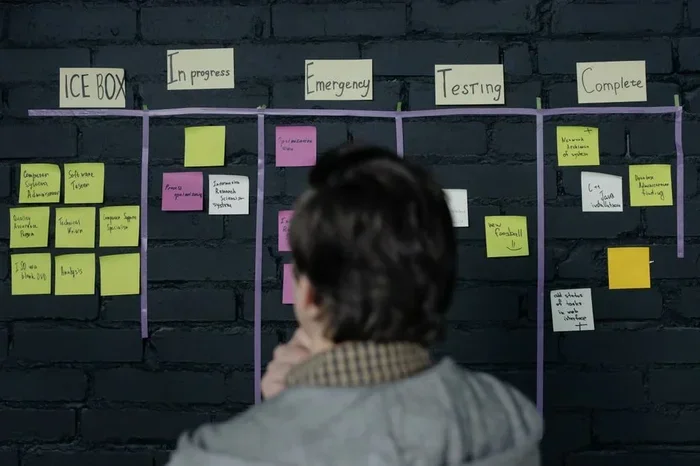
Kanban board project management is a visual method for organizing work as it moves through different stages. Think of it like a whiteboard with sticky notes. Each note represents a task. As work progresses, you slide the note from one column to the next.
The word “kanban” comes from Japanese. It means “signboard” or “billboard.” Toyota first developed this approach in the 1940s for manufacturing. Today, teams worldwide use it for software development, marketing, operations, and more. The beauty of kanban lies in its simplicity. You do not need complex training to get started.
At its core, kanban board project management focuses on three ideas. First, visualize the work. Second, limit work in progress. Third, improve flow. These principles help teams stay focused and avoid chaos. When your workflow is visible, everyone knows what needs attention right now.
Many teams start with a simple three-column board. The columns might be “To Do,” “In Progress,” and “Done.” From there, you can add as many stages as your process requires. The goal is clarity. When tasks pile up in one column, you instantly see a problem.
Kanban board project management also supports agile practices. It pairs well with scrum and other iterative methods. However, it does not force a rigid framework on your team. You adapt it to fit your unique workflow. That flexibility is a huge reason why so many teams love it.
Why Teams Choose Kanban Over Other Methods
Not every team needs a full agile transformation. Some just want a better way to track tasks. Kanban board project management offers that without the overhead. Here is why teams choose it:
- Low barrier to entry. Anyone can understand a board with columns and cards.
- Real-time visibility. The board shows exactly where work stands at any moment.
- Flexibility. You can change columns, add swimlanes, and adjust rules anytime.
- No sprint pressure. Unlike scrum, kanban does not enforce time-boxed iterations.
- Continuous delivery. Teams push work through as soon as capacity allows.
These benefits make kanban a favorite for teams that value simplicity and speed. Whether you manage a small project or a complex pipeline, a kanban board keeps everyone aligned.
How to Set Up a Kanban Board for Your Team
Setting up a kanban board project management system is straightforward. You do not need expensive software to begin. A whiteboard and some sticky notes work perfectly. That said, digital tools offer more power and flexibility. Let us walk through the setup process step by step.
Step 1: Define Your Workflow Stages
Start by mapping your actual process. Write down every stage a task goes through. For example, a software team might have these stages:
- Backlog
- To Do
- In Development
- In Review
- Testing
- Done
Each stage becomes a column on your board. Keep it simple at first. You can always add more columns later. The key is to reflect your real workflow, not an idealized version of it.
Step 2: Create Cards for Each Task
Every task gets its own card. On the card, write the task name, owner, and deadline. Some teams also add priority labels or color codes. For instance, red might mean urgent, and green might mean low priority. This visual cue helps everyone spot critical items fast.
Digital kanban board project management tools let you add even more detail. You can attach files, add comments, and link to related documents. This is especially useful when your team works with cloud-based resources, such as asset management in cloud computing platforms, where files and digital resources need to be tracked alongside tasks.
Step 3: Set Work in Progress Limits
This is the most important step. WIP limits tell your team how many tasks can be in a column at once. For example, you might set a limit of three tasks in “In Progress.” Once a third task enters that column, no new tasks can start until one moves forward.
WIP limits prevent overloading your team. They force focus and reduce context switching. When a column hits its limit, it signals a bottleneck. The team then addresses the blockage together. This is how kanban drives continuous improvement.
Step 4: Establish Clear Rules
Every team should agree on how the board works. Who moves cards? When do tasks get pulled to the next stage? What happens when a task is blocked? Write these rules down and keep them visible on the board. Clear rules eliminate confusion and keep the system running smoothly.
Core Principles of Kanban Board Project Management
Kanban board project management rests on a few core principles. These are not rigid rules but guiding ideas. Understanding them helps you get the most from your board.
Principle 1: Start With What You Do Now
You do not need to overhaul your entire process. Place your current workflow on the board and improve it gradually. This “start where you are” philosophy makes kanban easy to adopt. Teams resist change less when they see their existing work reflected on the board.
Principle 2: Pursue Incremental Change
Small, steady improvements beat big, disruptive changes. Encourage your team to suggest one small tweak at a time. Maybe the review stage always takes too long. Try moving the review step earlier in the workflow. Small adjustments compound into major gains over time.
Principle 3: Respect the Current Process
Your team already has a way of working. Even if it is not perfect, respect it. Kanban board project management asks you to observe and improve, not replace. When people feel their current process is valued, they engage more willingly in the improvement journey.
Principle 4: Encourage Leadership at Every Level
In kanban, everyone owns the process. A junior team member can spot a bottleneck just as well as a manager. This shared responsibility creates a culture of accountability. When people feel ownership, they take initiative to keep the workflow moving.
Advanced Strategies for Scaling Kanban
Once your team masters the basics, you can explore advanced techniques. These strategies help you scale kanban board project management across larger projects or multiple teams.
Use Swimlanes for Parallel Work
Swimlanes are horizontal rows on your board. They let you group tasks by category, team, or priority. For example, one swimlane might be for “Design” and another for “Development.” This layout helps you see parallel workstreams at a glance. It also prevents one team’s tasks from getting lost in another’s.
Implement Cumulative Flow Diagrams
A cumulative flow diagram (CFD) is a chart that shows how work accumulates over time. It reveals trends in your workflow. If the “In Progress” band keeps widening, you have a capacity problem. If the “Done” band grows steadily, your team is delivering consistently. CFDs turn raw board data into actionable insights.
Connect Kanban to Delivery Pipelines
For teams working in software or product development, connecting your kanban board to a delivery pipeline is powerful. Each card moves through build, test, and deploy stages automatically. This integration gives you end-to-end visibility from idea to production. It also helps teams working with asset management in cloud computing environments track how resources flow through the pipeline.
Run Regular Board Reviews
Set aside time each week to review the board as a team. Ask questions like: Where are tasks getting stuck? Are WIP limits being respected? Is the workflow balanced? These short reviews keep the system healthy and relevant. They also reinforce the culture of continuous improvement.
Common Challenges and How to Overcome Them
No system is perfect, and kanban board project management is no exception. Here are common challenges teams face and practical ways to solve them.
Challenge 1: Board Becomes Stale
Over time, boards can become outdated. Cards linger in columns, and no one updates them. The fix is simple: assign a board owner. This person ensures the board stays current. They also remind the team to move cards and update statuses regularly.
Challenge 2: WIP Limits Are Ignored
Teams sometimes ignore WIP limits when deadlines loom. This defeats the purpose of kanban. To fix this, make WIP limits non-negotiable. If the “In Progress” column is full, no one pulls new work. This discipline builds focus and prevents burnout.
Challenge 3: Poor Task Breakdown
Vague tasks like “work on the report” clutter the board and slow progress. Break every task into small, actionable steps. Instead of “work on the report,” write “draft section one” or “collect data for charts.” Small tasks move faster and are easier to track.
Challenge 4: Team Resistance
Some team members may resist using a kanban board. They might see it as extra work or micromanagement. Address this by showing the benefits. Run a short trial period. Let the team see how the board reduces confusion and saves time. When people experience the value firsthand, resistance fades.
Best Tools for Kanban Board Project Management
Digital tools make kanban board project management more powerful than ever. Here are some popular options to consider:
| Tool | Best For | Key Feature |
|---|---|---|
| Trello | Small teams and simple workflows | Drag-and-drop interface |
| Jira | Software development teams | Deep integration with dev tools |
| Asana | Cross-functional teams | Timeline and dependency tracking |
| Monday.com | Customizable workflows | Automations and dashboards |
| Microsoft Planner | Microsoft 365 users | Seamless Office integration |
Each tool has strengths. Choose one that fits your team size, budget, and workflow complexity. The best kanban board tool is the one your team will actually use consistently.
When evaluating tools, look for features like custom columns, WIP limit indicators, and reporting dashboards. These extras turn a basic board into a powerful project management system. Also consider integration capabilities. If your team uses cloud storage or collaboration tools, pick a kanban platform that connects seamlessly.
Remember, the tool is just a vehicle. The real power comes from how your team uses it. A simple board with strong discipline outperforms a complex tool with no process. Focus on building good habits first, then explore advanced features as your team matures.
Conclusion
Kanban board project management offers a clear, flexible path to better teamwork and faster delivery. By visualizing work, limiting WIP, and embracing continuous improvement, any team can boost productivity and reduce stress. The strategies in this guide give you a solid foundation to build from.
Start small. Set up a basic board with your team this week. Observe how it changes the way you work. Then refine it over time based on real feedback. Kanban is not a one-time fix. It is an ongoing journey toward better workflow and smarter collaboration. Your team deserves that clarity, and a well-designed board delivers it every single day.
Frequently Asked Questions
What is a kanban board used for in project management?
A kanban board is used to visualize tasks, track their progress, and manage workflow stages. It helps teams see what is in progress, what is done, and what is next. This visibility improves coordination and prevents work from falling through the cracks.
How is kanban different from scrum?
Kanban does not use fixed sprints or time-boxed iterations. It focuses on continuous flow and limiting work in progress. Scrum, on the other hand, works in sprints with defined roles and ceremonies. Both are agile methods, but kanban offers more flexibility with less structure.
Can a kanban board work for non-technical teams?
Absolutely. Kanban board project management works for marketing teams, HR departments, operations, and any team that manages tasks. The visual nature of the board makes it easy for everyone to understand, regardless of technical background.
How many columns should a kanban board have?
There is no fixed number. Start with three to five columns that reflect your actual workflow stages. You can add more as your process becomes more complex. The key is to keep the board clear and easy to read at a glance.
What are WIP limits and why do they matter?
WIP limits cap the number of tasks allowed in a workflow stage at one time. They matter because they prevent overloading, reduce multitasking, and highlight bottlenecks. When a column hits its limit, the team must resolve the blockage before pulling new work.
Is it better to use a physical or digital kanban board?
It depends on your team’s needs. Physical boards work great for co-located teams who benefit from a tangible, visual setup. Digital boards are better for remote teams and offer features like automation, reporting, and integrations. Many teams start with physical boards and migrate to digital tools as they grow.
=== SEO Title ===
Kanban Board Project Management Strategies for Teams
=== Meta Title ===
Kanban Board Project Management Strategies for Teams
=== URL Slug ===
kanban-board-project-management-strategies-for-teams


