What is CaaS in Cloud Computing and Why It Matters
CaaS in cloud computing stands for Container as a Service, a cloud model that lets you run and manage containers without handling the underlying infrastructure. It gives developers a fast, flexible way to deploy applications at scale. CaaS in cloud computing simplifies container orchestration, reduces costs, and speeds up delivery. Whether you are a startup or an enterprise, CaaS in cloud computing can transform how you build and ship software.
Let us start with the basics. CaaS in cloud computing stands for Container as a Service. It is a cloud delivery model where the provider handles container infrastructure for you. You get to build, deploy, and manage containers without worrying about servers or networking.
Think of it this way. You want to run an app. Instead of setting up servers, installing software, and configuring networks, you simply hand your container to a CaaS platform. The platform takes care of the rest. It runs your container, scales it up when traffic spikes, and shuts it down when it is not needed.
CaaS in cloud computing has become a big deal in recent years. More and more teams are moving away from traditional virtual machines and embracing containers. Why? Because containers are lightweight, fast, and portable. They work the same way on your laptop as they do in production. That consistency is a game changer.
But here is the real question. Why does CaaS in cloud computing matter for you? If you are a developer, it means less time managing infrastructure and more time writing code. If you are a business owner, it means faster time to market and lower costs. That is what this article covers in depth. We will walk through everything you need to know about CaaS in cloud computing, from the basics to advanced use cases.
Key Takeaways
- What CaaS Means: CaaS stands for Container as a Service, a cloud computing model focused on container management and deployment.
- How It Works: CaaS platforms handle container orchestration, scaling, and networking so developers can focus on code.
- Key Benefits: Faster deployment, lower costs, better scalability, and improved DevOps workflows are core advantages.
- Popular Tools: Docker, Kubernetes, Amazon ECS, Google Cloud Run, and Azure Container Instances lead the CaaS market.
- Who Benefits Most: Development teams, DevOps engineers, and businesses adopting microservices architecture gain the most from CaaS.
- Future Outlook: CaaS is growing fast and is a key building block of cloud-native application development.
📑 Table of Contents
- What Is CaaS in Cloud Computing?
- Key Features of CaaS Platforms
- Benefits of Using CaaS in Cloud Computing
- Popular CaaS Platforms and Tools
- Who Should Use CaaS in Cloud Computing?
- Common Mistakes to Avoid with CaaS
- How to Get Started with CaaS
- Expert Insights on CaaS Adoption
- Key Takeaways
- Conclusion
What Is CaaS in Cloud Computing?
CaaS in cloud computing is a model where a cloud provider offers container-based services over the internet. Containers are isolated packages that hold everything an application needs to run. That includes code, libraries, and system tools. Instead of provisioning full virtual machines, you run these lightweight containers on shared infrastructure.
The provider manages the underlying hardware, networking, and orchestration. You just submit your containers and let the platform do the work. This is different from Infrastructure as a Service (IaaS), where you control virtual machines directly. It is also different from Platform as a Service (PaaS), which focuses on application hosting without container-level control.
How Does CaaS Work?
CaaS in cloud computing relies on container engines and orchestration tools. Here is a simple breakdown of how it works:
- You build a container image. This is a snapshot of your application and its dependencies. Tools like Docker make this easy.
- You push the image to the CaaS platform. The platform stores it in a registry and prepares it for deployment.
- The platform runs your container. It allocates resources like CPU and memory and starts the container.
- The platform manages scaling and monitoring. If traffic increases, the platform spins up more container instances automatically.
This process is fast and automated. You do not need to manually configure servers or worry about operating system patches. The CaaS provider handles all of that behind the scenes.
CaaS vs IaaS vs PaaS vs SaaS
It helps to understand where CaaS in cloud computing fits among other cloud models. Each model gives you a different level of control and responsibility.
Infrastructure as a Service (IaaS) gives you virtual machines and storage. You manage the operating system and applications. Platform as a Service (PaaS) gives you a runtime environment for apps. You focus on code, not infrastructure. Software as a Service (SaaS) delivers ready-to-use applications over the internet. Think of Gmail or Salesforce.
CaaS in cloud computing sits between IaaS and PaaS. It gives you more control than PaaS but less overhead than IaaS. You manage containers, but the provider handles the underlying infrastructure.
| Feature | IaaS | PaaS | CaaS | SaaS |
|---|---|---|---|---|
| Control Level | High | Medium | Medium-High | Low |
| User Manages | OS, Apps | Apps Only | Containers, Apps | Nothing |
| Provider Manages | Hardware | OS, Hardware | Hardware, Networking | Everything |
| Best For | Full Control Needs | App Development | Containerized Apps | End Users |
As you can see, CaaS in cloud computing offers a sweet spot. You get container-level flexibility without the burden of managing physical or virtual servers.
Key Features of CaaS Platforms
CaaS in cloud computing platforms come packed with features that make container management easier. Let us look at the most important ones.
Container Orchestration
Orchestration is the backbone of any CaaS in cloud computing platform. It automatically manages the lifecycle of your containers. This includes scheduling, starting, stopping, and restarting containers based on rules you define.
Most CaaS platforms use Kubernetes under the hood. Kubernetes is an open-source container orchestration tool that has become the industry standard. It handles complex tasks like load balancing, service discovery, and self-healing. If a container crashes, Kubernetes restarts it automatically.
Auto-Scaling
Auto-scaling is one of the biggest advantages of CaaS in cloud computing. When your application gets more traffic, the platform adds more container instances. When traffic drops, it scales down. This ensures you only pay for what you use.
Manual scaling is a thing of the past. With CaaS, scaling happens in seconds. Your application stays responsive even during traffic spikes. This is especially valuable for e-commerce sites, streaming platforms, and SaaS applications.
Networking and Load Balancing
CaaS platforms handle networking for your containers. They assign IP addresses, manage DNS, and set up load balancers. Load balancers distribute incoming traffic across multiple container instances. This prevents any single container from becoming a bottleneck.
Good networking is essential for cloud-native applications. CaaS platforms make it simple to set up secure, reliable networks without deep networking expertise.
Monitoring and Logging
Most CaaS in cloud computing providers include built-in monitoring and logging tools. You can track container performance, view logs, and set up alerts. These tools help you catch issues before they affect users.
Popular monitoring integrations include Prometheus, Grafana, and cloud-native dashboards. You get real-time visibility into your container health and resource usage.
Benefits of Using CaaS in Cloud Computing
CaaS in cloud computing offers many advantages for teams of all sizes. Here are the key benefits that make it worth considering.
Faster Deployment Cycles
Containers package your application and all its dependencies into one unit. This means you can deploy the same container in development, testing, and production. No more “it works on my machine” problems.
With CaaS in cloud computing, deployment becomes a breeze. Push your container image, and the platform handles the rest. Deployments that used to take hours now take minutes. This speed gives your team a competitive edge.
Cost Efficiency
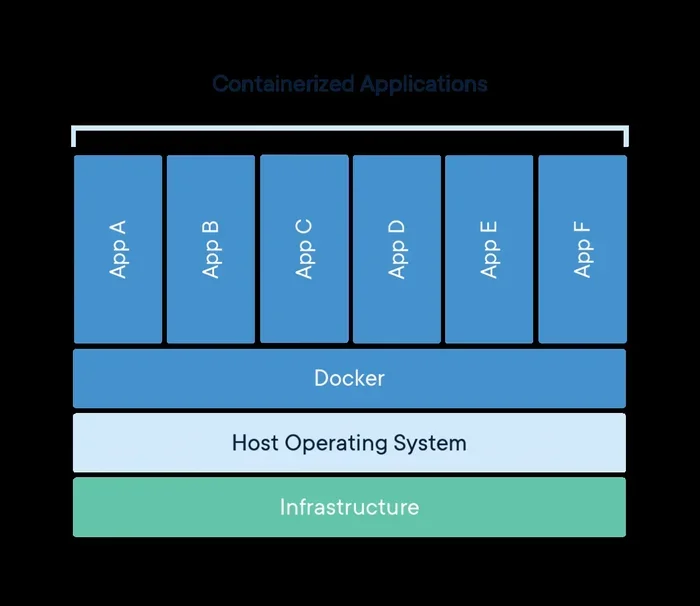
CaaS in cloud computing helps you save money in several ways. First, containers use fewer resources than virtual machines. They share the host operating system kernel, so you need less memory and CPU per container.
Second, auto-scaling means you do not pay for idle resources. If your app has low traffic at night, the platform scales down automatically. You only pay for active containers. This pay-as-you-go model is very cost-effective.
Improved DevOps Workflows
CaaS in cloud computing fits perfectly into modern DevOps practices. Containers integrate seamlessly with CI/CD pipelines. You can build, test, and deploy containers automatically every time code changes.
This automation reduces human error and speeds up delivery. DevOps teams love CaaS because it bridges the gap between development and operations. Everyone works with the same container images, so there is no environment mismatch.
Portability and Flexibility
One of the strongest selling points of containers is portability. A container runs the same way everywhere. It works on AWS, Google Cloud, Azure, or your local machine. This cloud portability prevents vendor lock-in.
If you ever need to switch providers, you simply move your containers. You do not need to rewrite your application or reconfigure your infrastructure. This flexibility is a huge advantage in today’s fast-changing cloud landscape.
Better Resource Utilization
Traditional virtual machines allocate fixed resources to each VM. This often leads to wasted capacity. Containers, on the other hand, share resources dynamically. They use only what they need.
CaaS in cloud computing platforms optimize resource allocation across all running containers. This means higher utilization rates and lower infrastructure costs. You get more value from every dollar you spend on cloud resources.
Popular CaaS Platforms and Tools
The CaaS in cloud computing ecosystem is rich with options. Here are some of the most popular platforms and tools you should know about.
Docker
Docker is the most widely used container platform. It lets you build, share, and run containers. Docker Engine is the runtime that powers containers on your machine. Docker Hub is a public registry where you can find and share container images.
Many CaaS platforms are built around Docker. When you use CaaS in cloud computing, you are likely working with Docker images and Dockerfiles.
Kubernetes
Kubernetes is the gold standard for container orchestration. Originally developed by Google, it is now maintained by the Cloud Native Computing Foundation. Kubernetes manages container deployment, scaling, and networking across clusters of machines.
Most major cloud providers offer managed Kubernetes services as part of their CaaS offerings. Amazon EKS, Google Kubernetes Engine, and Azure Kubernetes Service are all examples.
Amazon ECS and Fargate
Amazon Elastic Container Service (ECS) is AWS’s native CaaS offering. It lets you run and manage Docker containers on AWS. AWS Fargate takes it a step further by removing the need to manage servers entirely. You just define your containers, and Fargate handles the infrastructure.
Google Cloud Run
Google Cloud Run is a fully managed CaaS platform. You submit a container image, and Cloud Run handles the rest. It auto-scales to zero when not in use, which makes it very cost-effective for intermittent workloads.
Azure Container Instances
Azure Container Instances (ACI) lets you run containers on Azure without managing virtual machines. It is ideal for quick tasks, batch jobs, and development environments. ACI integrates well with other Azure services for a complete CaaS solution.
Who Should Use CaaS in Cloud Computing?
CaaS in cloud computing is not just for tech giants. Many types of teams and businesses benefit from it. Let us look at who gains the most.
Development Teams
Developers love CaaS in cloud computing because it removes infrastructure headaches. They can focus on writing code instead of managing servers. Containers also make it easy to test and debug applications in isolated environments.
When every developer works with the same container setup, collaboration becomes smoother. Onboarding new team members is faster too. They can run the exact same environment on their laptops.
DevOps and SRE Teams
DevOps and Site Reliability Engineering (SRE) teams benefit from the automation and consistency that CaaS provides. Container orchestration tools handle routine tasks like scaling, health checks, and rolling updates.
CaaS in cloud computing gives these teams better observability and control. They can monitor every container, set up alerts, and respond to issues quickly. This leads to more reliable and resilient applications.
Startups and Small Businesses
Startups often have limited resources and need to move fast. CaaS in cloud computing lets them deploy applications quickly without a large infrastructure team. The pay-as-you-go model keeps costs low during the early stages.
As the startup grows, CaaS scales with it. There is no need to migrate to a different platform. The same container workflow works for a handful of users or a million.
Enterprises Migrating to the Cloud
Large enterprises are adopting CaaS in cloud computing to modernize their application portfolios. Legacy applications can be containerized and moved to the cloud with minimal changes. This approach speeds up cloud migration and reduces risk.
Enterprises also value the governance and security features that CaaS platforms offer. Centralized management, access controls, and compliance reporting make it easier to meet regulatory requirements.
Common Mistakes to Avoid with CaaS
While CaaS in cloud computing is powerful, there are pitfalls to watch out for. Here are some common mistakes and how to avoid them.
- Ignoring container security. Always scan container images for vulnerabilities. Use trusted base images and keep them updated.
- Over-provisioning resources. Do not allocate more CPU and memory than needed. Start small and scale up as required.
- Neglecting monitoring. Without proper monitoring, you will not know when containers fail or slow down. Set up alerts from day one.
- Hardcoding configuration. Use environment variables and config maps instead of hardcoding values. This makes containers more portable.
- Skipping image optimization. Large container images slow down deployment. Use multi-stage builds and remove unnecessary files to keep images lean.
How to Get Started with CaaS
Getting started with CaaS in cloud computing is simpler than you might think. Here is a step-by-step guide to help you begin.
- Choose a CaaS provider. Pick a platform that fits your needs and budget. AWS, Google Cloud, and Azure all offer strong CaaS options.
- Install Docker. Docker is the standard tool for building containers. Install it on your development machine and learn the basics.
- Containerize your application. Write a Dockerfile that defines your app and its dependencies. Build the image and test it locally.
- Push to a registry. Upload your container image to a registry like Docker Hub or your cloud provider’s registry.
- Deploy to your CaaS platform. Use the provider’s dashboard or CLI to deploy your container. Configure scaling, networking, and monitoring.
- Monitor and optimize. Keep an eye on performance metrics. Optimize your containers and infrastructure as you learn more.
The learning curve for CaaS in cloud computing is gentle. If you are already familiar with Docker, you are halfway there. Most platforms offer excellent documentation and tutorials to guide you along the way.
Expert Insights on CaaS Adoption
Industry experts agree that CaaS in cloud computing is here to stay. Container adoption continues to grow year over year. According to recent surveys, over 80% of organizations now use containers in production.
Cloud-native architecture is built on containers. Microservices, serverless functions, and distributed systems all rely on containerization. As more companies adopt these patterns, the demand for CaaS will only increase.
Experts also highlight the importance of choosing the right orchestration tool. Kubernetes dominates the market, but newer options like Nomad and AWS ECS are gaining traction. The best choice depends on your team’s expertise and your application requirements.
Key Takeaways
- CaaS Defined: CaaS stands for Container as a Service, a cloud model that manages container infrastructure for you.
- How It Works: You build container images, push them to a CaaS platform, and the platform handles orchestration, scaling, and networking.
- Key Benefits: Faster deployments, lower costs, better scalability, and improved DevOps workflows make CaaS a top choice.
- Popular Platforms: Docker, Kubernetes, Amazon ECS, Google Cloud Run, and Azure Container Instances are leading CaaS tools.
- Who Uses It: Development teams, DevOps engineers, startups, and enterprises all benefit from CaaS in cloud computing.
- Watch Out for Pitfalls: Avoid security oversights, over-provisioning, and poor monitoring to get the most from your CaaS setup.
- Future-Proof Technology: Container adoption is growing fast, and CaaS is a foundational piece of modern cloud architecture.
Conclusion
CaaS in cloud computing is more than a trend. It is a fundamental shift in how teams build and deploy applications. By abstracting away infrastructure complexity, CaaS lets developers focus on what they do best: writing great software.
The benefits are clear. Faster deployments, lower costs, better scalability, and improved team collaboration. Whether you are a solo developer, a startup, or a large enterprise, CaaS in cloud computing offers real value. The tools are mature, the ecosystem is thriving, and the adoption numbers speak for themselves.
If you have not yet explored CaaS in cloud computing, now is the perfect time to start. Pick a platform, containerize a simple application, and see the difference for yourself. The learning investment pays off quickly, and the skills you gain will serve you well in an increasingly containerized world.
Embrace CaaS in cloud computing and unlock a faster, more flexible way to build and run applications. Your future self will thank you.
Frequently Asked Questions
What does CaaS stand for in cloud computing?
CaaS stands for Container as a Service. It is a cloud computing model where the provider manages container infrastructure, allowing you to build, deploy, and scale containerized applications without handling servers or networking yourself.
How is CaaS different from IaaS and PaaS?
IaaS gives you virtual machines and full infrastructure control. PaaS provides a platform for app development without infrastructure management. CaaS sits in between, giving you container-level control with less overhead than IaaS and more flexibility than PaaS.
What are the most popular CaaS platforms?
The most popular platforms include Amazon ECS and Fargate, Google Cloud Run, Azure Container Instances, and managed Kubernetes services. Docker and Kubernetes are the foundational tools used across most CaaS offerings.
Is CaaS the same as serverless computing?
No, they are different but related. CaaS gives you control over containers, while serverless platforms abstract away containers entirely. However, some CaaS platforms like Google Cloud Run offer serverless-style scaling for containers.
Do I need to know Docker to use CaaS?
Yes, knowing Docker is very helpful. Most CaaS platforms use Docker containers. Understanding how to write Dockerfiles and build container images is a core skill for working with CaaS effectively.
Can small businesses benefit from CaaS in cloud computing?
Absolutely. Small businesses benefit from the low upfront costs, fast deployment, and auto-scaling features of CaaS. It allows them to compete with larger companies by delivering applications quickly and efficiently without a large IT team.