What Does SaaS Stand For in Business Explained Simply
So what does SaaS stand for in business? It means Software as a Service, and it is one of the biggest shifts in how companies use technology today. Instead of buying and installing software on your own computers, you access it online through a subscription. This model saves money, scales easily, and works from anywhere. Whether you run a small startup or a large company, SaaS tools can transform the way you work.
Let us start with the basics. What does SaaS stand for in business? The answer is simple: Software as a Service. But behind those three words is a massive shift in how companies around the world use technology. Instead of buying a software CD, installing it on your computer, and paying a huge fee upfront, you now just log in through your browser and start working. That is the power of cloud-based software. It has changed everything for small businesses, large enterprises, and everyone in between.
You have probably used SaaS applications without even realizing it. Tools like Google Docs, Dropbox, Slack, and Zoom are all SaaS products. They live on remote servers, and you access them through the internet. No installations. No complex setups. Just open a tab and go. This software delivery model has become the standard for how modern businesses operate. In this article, we will break down everything you need to know about what SaaS means in business, how it works, and why it matters so much today.
Key Takeaways
- SaaS stands for Software as a Service: It is a cloud-based software delivery model where users access applications over the internet instead of installing them locally.
- SaaS replaces traditional software licensing: Businesses no longer need to buy expensive software outright or manage complex installations on their own servers.
- It works on a subscription basis: Users pay a monthly or annual fee to access the software, which includes updates, maintenance, and support.
- SaaS offers huge cost savings: Companies avoid large upfront costs and only pay for what they use, making it ideal for startups and small businesses.
- Scalability is a major advantage: SaaS platforms let businesses add or remove users and features easily as their needs change over time.
- Popular SaaS examples include Slack, Zoom, and Salesforce: These tools power millions of businesses worldwide for communication, sales, and project management.
- SaaS is the backbone of remote work and digital transformation: It enables teams to collaborate from anywhere with just an internet connection.
📑 Table of Contents
- What Does SaaS Stand for in Business?
- Why SaaS Is a Game Changer for Businesses
- How SaaS Differs from Traditional Software
- Popular SaaS Examples You Probably Use Every Day
- Benefits and Challenges of Using SaaS
- The Future of SaaS in Business
- Common Mistakes Businesses Make with SaaS
- How to Choose the Right SaaS Tool for Your Business
- Key Takeaways
- Frequently Asked Questions
- Final Thoughts
What Does SaaS Stand for in Business?
The term SaaS stands for Software as a Service. It is a way of delivering software applications over the internet. Instead of downloading and installing programs on your own computer or company servers, you access them through a web browser. The software provider hosts, manages, and maintains everything behind the scenes. You just pay a subscription fee to use the tool.
This is very different from traditional software. In the old days, companies had to buy a license for each computer. They needed powerful servers to run the software. They had IT teams to handle updates and fixes. With SaaS cloud computing, all of that is handled by the provider. You get instant access, automatic updates, and support without lifting a finger.
The SaaS business model is built around recurring revenue. Customers pay monthly or yearly to keep using the software. This gives companies a steady income stream and gives users flexibility. If you do not need the tool anymore, you simply cancel. There are no long-term contracts tying you down.
How SaaS Works in Simple Terms
Think of SaaS like renting an apartment instead of buying a house. When you rent, you pay a monthly fee, and the landlord handles all the repairs and maintenance. You just live there and enjoy the space. SaaS software works the same way. The provider owns and manages the servers, databases, and code. You just log in and use the application.
Here is how the process works:
- The SaaS provider hosts the application on remote servers in the cloud.
- Users access the software through a web browser or a lightweight app.
- The provider handles all updates, security patches, and maintenance automatically.
- Users pay a subscription fee, usually monthly or annually.
- Data is stored securely in the cloud, accessible from any device.
That is it. No installations. No servers to manage. No headaches. This is why cloud-based business software has become so popular in recent years. Companies of all sizes love the simplicity and ease of use.
Why SaaS Is a Game Changer for Businesses
The rise of SaaS platforms has transformed the business world in huge ways. Companies no longer need massive IT departments just to keep their software running. They do not need to spend thousands of dollars on software licenses upfront. SaaS solutions have leveled the playing field, giving small businesses access to the same powerful tools that big corporations use.
Let us look at some of the biggest reasons why SaaS adoption has exploded in recent years.
Cost Savings and Lower Entry Barriers
One of the biggest advantages of SaaS is the cost. Traditional on-premise software can be extremely expensive. You have to pay for the license, the hardware to run it, and the IT staff to maintain it. With SaaS, those costs disappear. You pay a low monthly fee, and that covers everything.
For startups and small businesses, this is a huge deal. They can access enterprise-grade tools without breaking the bank. Many SaaS products even offer free tiers or trial periods, so you can test them before committing. This pay-as-you-go model makes it easy to experiment and find the right tools for your needs.
Scalability and Flexibility
As your business grows, your software needs change. With traditional software, scaling up often means buying more licenses and installing more copies. With SaaS, it is effortless. You simply add more user seats or upgrade your plan. Most cloud-based platforms let you scale up or down in minutes.
This flexibility is perfect for businesses that are growing fast. A startup with 10 employees can become a company with 500 employees without worrying about software infrastructure. The SaaS provider handles all the technical heavy lifting behind the scenes.
Remote Work and Collaboration
The shift to remote work has made SaaS tools more important than ever. Teams need to collaborate from different locations, time zones, and devices. Cloud-based applications make this easy. Everyone can access the same files, communicate in real time, and stay productive no matter where they are.
Tools like Slack, Microsoft Teams, and Zoom are all SaaS products that power remote collaboration every day. Without cloud delivery, remote work as we know it would not be possible. This is one of the main reasons SaaS growth has accelerated so much in recent years.
How SaaS Differs from Traditional Software
To truly understand what SaaS means for businesses, it helps to compare it with traditional software. The differences are significant, and they affect everything from cost to how you use the tools day to day.
Installation and Deployment
With traditional software, you have to download and install the program on each computer. This takes time and often requires technical knowledge. SaaS applications, on the other hand, are ready to use the moment you sign up. You just open your browser and start working.
Updates and Maintenance
On-premise software updates can be a nightmare. You have to download patches, restart systems, and sometimes even hire IT staff to manage the process. With SaaS, updates happen automatically. The provider pushes updates to all users at once. You always have the latest features and security fixes without doing anything.
Access and Device Compatibility
Traditional software is tied to the device it is installed on. If you want to use it on a different computer, you have to install it again. SaaS tools work on any device with an internet connection. Your phone, your laptop, a tablet at a coffee shop. Everything syncs automatically.
Pricing Model
Here is a quick comparison to make the differences crystal clear.
| Feature | Traditional Software | SaaS |
|---|---|---|
| Upfront Cost | High (licenses and hardware) | Low (subscription-based) |
| Installation | Required on each device | None (browser-based) |
| Updates | Manual and infrequent | Automatic and frequent |
| Maintenance | Handled by your team | Handled by the provider |
| Scalability | Difficult and expensive | Easy and flexible |
| Access | Limited to installed devices | Any device with internet |
| Data Storage | Local servers | Cloud servers |
As you can see, SaaS offers a much more modern and flexible approach. This is why so many companies are making the switch from traditional software to cloud-based solutions.
Popular SaaS Examples You Probably Use Every Day
You might be surprised how many SaaS products you already use in your daily life. Many of the most popular tools and apps are built on the SaaS model. Here are some examples of SaaS platforms that millions of people rely on every day.
- Slack: A team communication tool used by businesses of all sizes for messaging, file sharing, and project collaboration.
- Salesforce: One of the world’s largest CRM platforms that helps companies manage customer relationships and sales pipelines.
- Zoom: A video conferencing tool that became essential for remote meetings, webinars, and virtual events.
- Google Workspace: A suite of cloud-based tools including Gmail, Docs, Sheets, and Drive for productivity and collaboration.
- Dropbox: A cloud storage platform that lets teams store, share, and sync files from anywhere.
- HubSpot: An inbound marketing and sales platform that helps businesses attract customers and manage leads.
- Trello: A project management tool that uses boards and cards to help teams organize tasks and workflows.
- Shopify: An e-commerce SaaS platform that lets businesses build and run online stores without any coding.
These are just a few examples. The SaaS market is massive and growing fast. From project management tools to accounting software to customer support platforms, there is a SaaS solution for almost every business need.
Benefits and Challenges of Using SaaS
Like any technology, SaaS comes with both advantages and challenges. Understanding both sides helps you make smart decisions for your business.
The Benefits
- Lower upfront costs: No need to buy expensive hardware or software licenses. You start with a small subscription fee.
- Fast setup: Most SaaS tools are ready to use in minutes. No long installation processes or configuration headaches.
- Automatic updates: The provider handles all updates and security patches. You always have the latest version.
- Access from anywhere: Work from your office, your home, or a coffee shop. All you need is an internet connection.
- Automatic scaling: Add or remove users and features as your business needs change. No complex reconfigurations needed.
- Built-in integrations: Most SaaS platforms connect easily with other tools, creating a seamless workflow for your team.
The Challenges
It is also important to be aware of the potential downsides of SaaS.
- Internet dependency: You need a reliable internet connection to access your tools. If the connection goes down, you may lose access.
- Data security concerns: Your data is stored on the provider’s servers. It is important to choose a trusted SaaS vendor with strong security measures.
- Long-term costs: While upfront costs are low, subscription fees add up over time. It is important to monitor your spending.
- Less control: You rely on the provider for updates, uptime, and data management. You cannot customize the backend infrastructure.
- Vendor lock-in: Switching from one SaaS platform to another can be difficult if your data is deeply integrated into the system.
Overall, the benefits of SaaS far outweigh the challenges for most businesses. The key is to choose the right SaaS providers and manage your subscriptions wisely.
The Future of SaaS in Business
The SaaS industry is not slowing down. In fact, it is growing faster than ever. More and more companies are moving their operations to the cloud, and SaaS adoption continues to rise across every industry. From healthcare to finance to education, cloud-based software is becoming the norm.
Here are some trends that are shaping the future of SaaS:
- AI-powered SaaS: Artificial intelligence is being built into SaaS platforms to automate tasks, analyze data, and improve user experience.
- Vertical SaaS: Instead of one-size-fits-all tools, more SaaS companies are building specialized solutions for specific industries like healthcare, real estate, and legal.
- Micro-SaaS: Small, focused SaaS products that solve one specific problem are gaining popularity among entrepreneurs and developers.
- Hybrid models: Some businesses are combining SaaS with on-premise solutions to get the best of both worlds.
- Increased security focus: As cloud computing grows, so does the need for stronger security and data protection in SaaS platforms.
The future looks bright for SaaS. As technology continues to evolve, we can expect even more innovative cloud-based solutions that make businesses more efficient, productive, and competitive. If you have not yet explored SaaS tools for your business, now is the perfect time to start.
Common Mistakes Businesses Make with SaaS
Switching to SaaS is not always smooth. Many businesses make avoidable mistakes that cost them time and money. Here are some common pitfalls to watch out for.
- Choosing the cheapest option: The lowest price does not always mean the best value. Look for features, support, and reliability too.
- Ignoring integration needs: Make sure your SaaS tools work well with your existing systems and workflows.
- Not training your team: Even the best cloud software is useless if your employees do not know how to use it properly.
- Overlooking security: Always check the SaaS provider’s security credentials and data protection policies before signing up.
- Forgetting to review subscriptions: Monitor your SaaS spending regularly. Cancel tools you no longer need to avoid wasting money.
Avoiding these mistakes will help you get the most out of your SaaS investments and set your business up for success.
How to Choose the Right SaaS Tool for Your Business
With so many SaaS products on the market, choosing the right one can feel overwhelming. Here are some tips to help you make a smart decision.
- Identify your needs: Clearly define what problems you need the software to solve. Do not buy tools just because they are popular.
- Check for integrations: Make sure the SaaS platform connects with your existing tools and systems.
- Read reviews: Look for honest feedback from other businesses in your industry. Real user experiences are very valuable.
- Test before you commit: Take advantage of free trials and demos. See if the tool fits your workflow before paying.
- Consider scalability: Choose a SaaS solution that can grow with your business over time.
- Evaluate support: Good customer support is essential. Check what kind of help is available if you run into issues.
Taking the time to choose the right SaaS tools will save you headaches down the road and help your team work more efficiently.
Key Takeaways
- SaaS stands for Software as a Service: It is a cloud-based software delivery model where users access applications over the internet instead of installing them locally.
- SaaS replaces traditional software licensing: Businesses no longer need to buy expensive software outright or manage complex installations on their own servers.
- It works on a subscription basis: Users pay a monthly or annual fee to access the software, which includes updates, maintenance, and support.
- SaaS offers huge cost savings: Companies avoid large upfront costs and only pay for what they use, making it ideal for startups and small businesses.
- Scalability is a major advantage: SaaS platforms let businesses add or remove users and features easily as their needs change over time.
- Popular SaaS examples include Slack, Zoom, and Salesforce: These tools power millions of businesses worldwide for communication, sales, and project management.
- SaaS is the backbone of remote work and digital transformation: It enables teams to collaborate from anywhere with just an internet connection.
Frequently Asked Questions
Is SaaS the same as cloud computing?
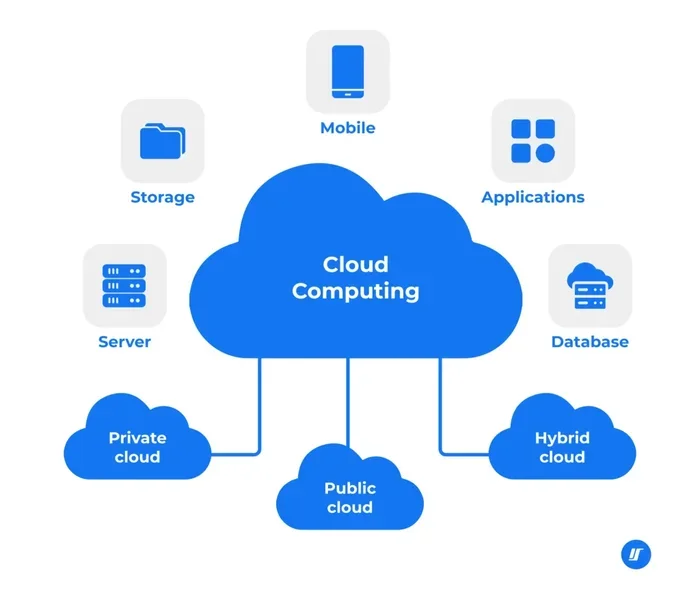
SaaS is a part of cloud computing, but they are not the same thing. Cloud computing is a broad term that includes various services delivered over the internet, such as storage, processing power, and software. SaaS specifically refers to software applications delivered as a service. Think of cloud computing as the big umbrella, and SaaS as one of the categories underneath it.
Do I need IT skills to use SaaS tools?
No, one of the biggest advantages of SaaS is how easy it is to use. Most cloud-based applications are designed for everyday users, not IT professionals. You just sign up, log in, and start using the tool. The SaaS provider handles all the technical setup, updates, and maintenance behind the scenes.
Is my data safe with SaaS providers?
Most reputable SaaS companies take data security very seriously. They use encryption, regular backups, and strict access controls to protect your information. However, it is always a good idea to research any SaaS vendor before signing up. Look for providers with strong security certifications and clear data protection policies. No system is 100% risk-free, but trusted SaaS platforms are generally very secure.
Can I cancel my SaaS subscription at any time?
Yes, most SaaS providers allow you to cancel your subscription at any time. Unlike traditional software with long-term licenses, SaaS operates on a flexible subscription model. You are not locked into a long-term contract. Just check the cancellation policy of the specific provider before you sign up, as some may require advance notice or have specific terms.
What types of businesses benefit most from SaaS?
Almost any business can benefit from SaaS, but it is especially valuable for startups, small businesses, and remote teams. These companies often have limited budgets and need flexible, affordable software solutions. SaaS also helps larger enterprises reduce IT overhead and improve team collaboration. Whether you run a one-person shop or a global company, there is likely a SaaS tool that can help you work smarter.
How much does SaaS cost on average?
The cost of SaaS tools varies widely depending on the product and features. Some SaaS platforms offer free plans with basic features. Others charge anywhere from $10 to $100 or more per user per month. Enterprise-level solutions can cost even more. The good news is that SaaS pricing is usually predictable and easy to budget for since it is based on a regular subscription rather than a large upfront purchase.
Final Thoughts
What does SaaS stand for in business? Software as a Service, and it is one of the most important developments in modern technology. From cutting costs to enabling remote work to scaling with ease, SaaS has transformed the way businesses operate. You do not need to be a tech expert to understand or use it. The tools are simple, the pricing is flexible, and the benefits are real.
If you have not yet explored the world of cloud-based software, there has never been a better time to start. Look at your current workflows, identify areas where SaaS tools could help, and try a few platforms. You might be surprised at how much easier and more efficient your work becomes. The future of business software is in the cloud, and SaaS is leading the way.