Business Intelligence Cloud Computing Guide for Smart Leaders
Business intelligence cloud computing empowers leaders to analyze data, make faster decisions, and drive growth from anywhere in the world. This guide covers everything from core concepts to practical implementation strategies. You will learn how cloud-based BI tools can transform your organization’s data into a powerful competitive advantage.
Business intelligence cloud computing is changing the way companies make decisions. Instead of relying on slow, on-premise systems, modern leaders use the cloud to access powerful analytics instantly. This approach combines business intelligence with cloud computing to deliver faster, smarter insights.
If you are a leader looking to stay ahead, understanding business intelligence cloud computing is essential. This guide breaks down everything you need to know. We will cover what it is, why it matters, how to choose the right platform, and how to implement it successfully. By the end, you will have a clear roadmap to transform your organization’s data strategy.
Key Takeaways
- Cloud BI enables real-time data access: Leaders can view insights and dashboards from any device, anywhere, at any time.
- Cost savings are significant: Moving BI to the cloud reduces hardware costs, maintenance, and IT overhead.
- Scalability is a major advantage: Cloud platforms grow with your business without requiring expensive infrastructure upgrades.
- Self-service analytics empower teams: Non-technical users can explore data and build reports independently.
- Security remains strong in the cloud: Leading providers invest heavily in encryption, compliance, and threat detection.
- Integration with existing tools is seamless: Most cloud BI platforms connect easily with your current data sources and software.
- Choosing the right provider matters: Consider factors like pricing, features, ease of use, and support before committing.
📑 Table of Contents
- What Is Business Intelligence Cloud Computing?
- Why Cloud BI Matters for Modern Leaders
- Key Features of Cloud-Based BI Platforms
- Top Benefits of Business Intelligence Cloud Computing
- How to Choose the Right Cloud BI Solution
- Implementing Cloud BI: A Practical Roadmap
- Common Mistakes to Avoid with Cloud BI
- Expert Insights on Cloud BI Trends
- Conclusion
What Is Business Intelligence Cloud Computing?
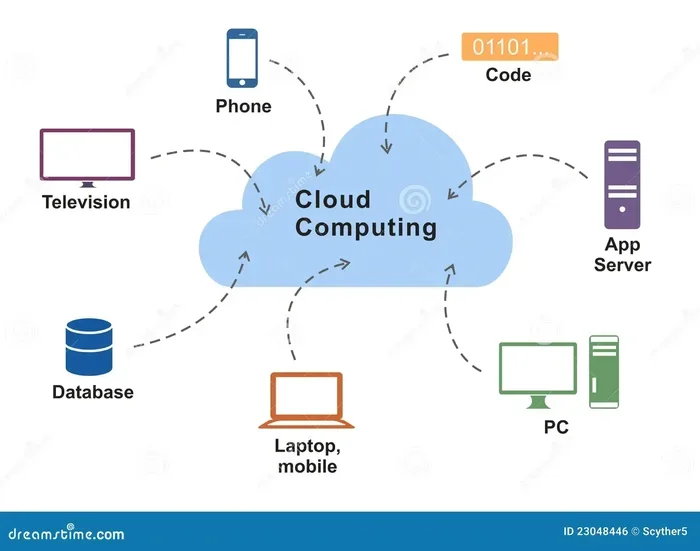
Let us start with the basics. Business intelligence cloud computing refers to using cloud-based platforms to collect, analyze, and visualize business data. Rather than installing software on local servers, companies access BI tools through the internet.
Think of it like this. Traditional BI is like owning a library. You buy the books, maintain the shelves, and control everything. Cloud BI is like having a subscription to a digital library. You get access to everything without the upkeep.
This model is part of the broader cloud-based analytics movement. It includes data analytics, data visualization, predictive analytics, and real-time analytics. All of these tools live in the cloud, making them easy to share and scale.
How Cloud BI Differs from Traditional BI
Traditional BI systems require significant upfront investment. You need servers, IT staff, and maintenance contracts. Updates can take months. Cloud BI eliminates most of these headaches.
Here is a quick comparison:
- Traditional BI: Installed locally, high upfront cost, limited scalability, slower updates.
- Cloud BI: Hosted remotely, subscription-based pricing, highly scalable, frequent automatic updates.
The difference is clear. Cloud-based BI gives leaders more flexibility and speed. Teams can collaborate on cloud dashboards in real time, no matter where they are located.
Why Cloud BI Matters for Modern Leaders
Today’s business environment moves fast. Market trends shift quickly. Customer expectations change daily. Leaders who rely on outdated data analytics tools risk falling behind.
Business intelligence cloud computing solves this problem. It provides real-time analytics that help leaders make data-driven decisions on the fly. Here is why this matters so much.
Speed and Agility
With cloud BI, you can access fresh data in seconds. Need to check sales performance during a meeting? Pull up a cloud dashboard on your phone. Want to spot a trend before your competitors? Real-time analytics give you that edge.
This speed translates directly into better decisions. Instead of waiting days for reports, leaders act on current information. That is a huge advantage in competitive markets.
Remote and Hybrid Work Support
Remote work is now a permanent fixture for many companies. Cloud-based analytics teams need access to data from home, coffee shops, or client offices. Cloud BI makes this seamless.
As long as there is an internet connection, the data is there. This accessibility supports operational intelligence across distributed teams and global offices.
Democratizing Data Access
One of the biggest shifts business intelligence cloud computing brings is self-service analytics. In the past, only data scientists could build complex reports. Now, business users can explore data on their own.
This empowerment leads to more creative problem-solving. Marketing teams can analyze campaigns. Finance teams can track budgets. Everyone becomes more data-driven without waiting on IT.
Key Features of Cloud-Based BI Platforms
Not all cloud BI tools are created equal. The best platforms share several important features. When evaluating options, look for these capabilities.
Data Integration and Connectivity
A strong cloud BI platform connects to multiple data sources. These may include databases, spreadsheets, CRM systems, and APIs. Data integration ensures you see a complete picture of your business.
For example, a sales leader might pull data from Salesforce, a finance tool, and an inventory system into one unified cloud dashboard. This single view saves time and reduces errors.
Advanced Analytics and AI
Modern cloud-based analytics platforms include artificial intelligence and machine learning. These features power predictive analytics and prescriptive analytics.
Predictive analytics forecast future trends. Prescriptive analytics suggest actions to take. Together, they turn raw data into strategic guidance. This is where cloud computing really shines, as AI models require massive computing power that the cloud provides effortlessly.
Customizable Dashboards and Reporting
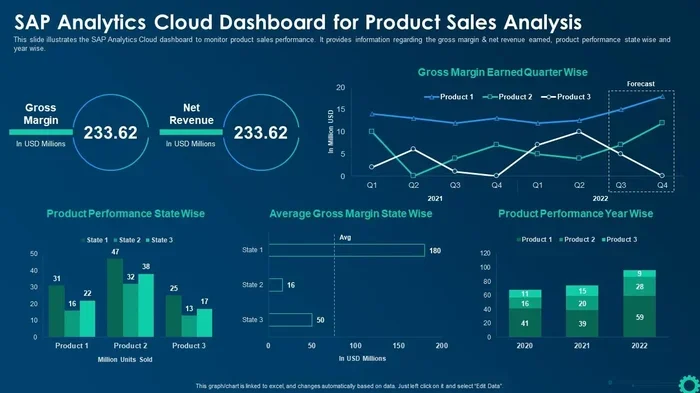
Every business is different. The best BI tools let you customize cloud dashboards to match your specific needs. You can drag and drop charts, add filters, and set up alerts.
Reports should tell a story. A well-designed dashboard highlights key performance indicators at a glance. Leaders can spot problems and opportunities immediately.
Collaboration and Sharing
Cloud BI makes it easy to share insights across your organization. Team members can comment on dashboards, schedule automated reports, and embed analytics in other applications.
This collaborative approach strengthens alignment. When everyone sees the same data, conversations become more productive and focused on facts.
Top Benefits of Business Intelligence Cloud Computing
The advantages of moving BI to the cloud go beyond convenience. Here are the most impactful benefits leaders should understand.
1. Significant Cost Savings
Eliminating on-premise servers reduces capital expenses. You pay for what you use with a subscription model. There are no costly hardware upgrades or maintenance fees. Many companies see a return on investment within the first year.
2. Effortless Scalability
As your business grows, your data analytics needs grow too. Cloud BI scales up or down based on demand. Whether you have ten users or ten thousand, the platform adapts.
This scalability is especially valuable for startups and growing companies. You do not need to predict your future infrastructure needs perfectly. The cloud handles it.
3. Faster Time to Insight
Traditional BI projects can take months to deliver results. Cloud-based BI platforms often provide value within days or weeks. Pre-built templates, intuitive interfaces, and automated data pipelines accelerate the process.
Faster insights mean faster reactions to market changes. This agility is a core competitive advantage.
4. Enhanced Security and Compliance
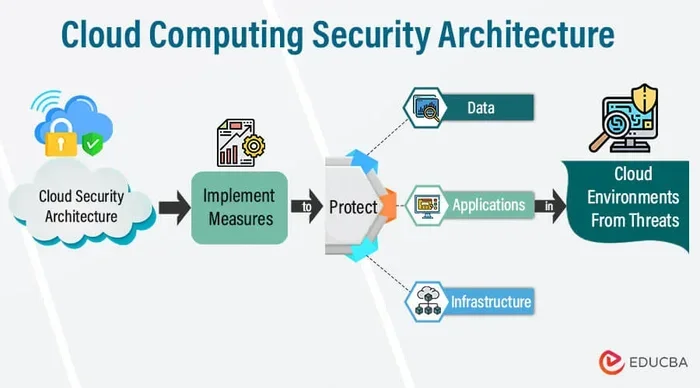
Many leaders worry about cloud security. The truth is that top cloud providers invest billions in protection. They offer encryption, multi-factor authentication, and regular security audits.
Leading enterprise cloud solutions also comply with regulations like GDPR, HIPAA, and SOC 2. For most companies, cloud security is stronger than what they could build on their own.
5. Automatic Updates and Innovation
With cloud BI, updates happen seamlessly in the background. You always have access to the latest features without downtime. This continuous innovation keeps your analytics capabilities current.
How to Choose the Right Cloud BI Solution
Selecting a cloud BI platform is a big decision. The right choice depends on your business needs, budget, and technical capabilities. Here is a practical guide to help you decide.
Assess Your Data Needs
Start by understanding what data you have and where it lives. Do you use multiple SaaS tools? Do you have on-premise databases? The best cloud BI platform integrates smoothly with your existing stack.
Make a list of your data sources and prioritize the ones that matter most. This clarity will narrow your options significantly.
Consider Your Team’s Skill Level
If your team is not technical, look for platforms with self-service analytics and intuitive interfaces. Drag-and-drop builders and natural language queries make data analytics accessible to everyone.
On the other hand, if you have data scientists on staff, you may want advanced modeling capabilities and API access. Match the platform to your team’s strengths.
Evaluate Pricing Models
SaaS analytics platforms use different pricing structures. Some charge per user, while others base pricing on data volume or feature tiers.
Consider your current needs and your growth trajectory. A platform that seems affordable today may become expensive as your team expands. Always check for hidden costs like data storage fees or premium support charges.
Test Before You Commit
Most cloud BI tools offer free trials or demos. Take advantage of these. Build a sample dashboard, connect a test data source, and see how the platform feels.
Usability matters more than feature lists. If your team loves the tool, adoption will be higher and your ROI will be greater.
Compare Leading Platforms
Here is a quick look at some popular options in the cloud BI space:
- Platform A: Known for powerful data visualization and ease of use. Great for mid-sized businesses.
- Platform B: Offers deep predictive analytics and AI capabilities. Best for data-heavy enterprises.
- Platform C: Strong data integration and collaboration features. Ideal for distributed teams.
Each platform has strengths. Your choice should align with your specific priorities and budget.
Implementing Cloud BI: A Practical Roadmap
Once you have chosen a platform, the next step is implementation. A thoughtful approach minimizes disruption and maximizes adoption.
Step 1: Define Your Goals
What do you want to achieve with business intelligence cloud computing? Better sales forecasting? Improved customer retention? Faster financial reporting?
Write down three to five clear goals. These will guide your entire implementation process and help you measure success.
Step 2: Clean and Prepare Your Data
Garbage in, garbage out. Before connecting data to your cloud BI platform, ensure it is clean and organized. Remove duplicates, standardize formats, and fill in missing values.
Good data integration starts with good data quality. This step is often overlooked but is absolutely critical.
Step 3: Train Your Team
Even the most user-friendly cloud BI tools require some training. Schedule hands-on sessions for different user groups. Show them how to build reports, explore dashboards, and ask questions of the data.
Encourage early adopters to share tips with colleagues. Peer learning accelerates cloud migration and boosts confidence across the organization.
Step 4: Start Small and Expand
Do not try to do everything at once. Pick one department or one use case and launch quickly. Measure results, gather feedback, and then expand to additional areas.
This phased approach reduces risk and builds momentum. Small wins create buy-in for larger initiatives.
Step 5: Monitor and Optimize
After launch, regularly review usage and performance. Are users engaging with dashboards? Are insights leading to action? Use these observations to refine your approach.
Operational intelligence improves over time. The more your team uses the platform, the more value you extract from it.
Common Mistakes to Avoid with Cloud BI
Even with the best intentions, organizations can stumble during their cloud BI journey. Here are common pitfalls and how to avoid them.
- Skipping data governance: Without clear rules about data ownership and quality, dashboards become unreliable fast. Establish governance standards before you go live.
- Overloading dashboards: Too many charts and metrics create confusion. Keep dashboards focused on key questions and actionable insights.
- Ignoring change management: Technology alone does not drive transformation. Communicate the vision, involve stakeholders, and celebrate early wins.
- Choosing price over fit: The cheapest option is not always the best. Consider long-term value, support quality, and scalability.
- Neglecting security reviews: Review access permissions regularly. Not everyone needs access to every dataset, even in the cloud.
Avoiding these mistakes saves time, money, and frustration. A thoughtful approach to cloud-based BI adoption pays dividends for years.
Expert Insights on Cloud BI Trends
The business intelligence cloud computing landscape continues to evolve rapidly. Here are some trends shaping the future that every leader should watch.
AI-Powered Analytics
Artificial intelligence is making data analytics more accessible than ever. Natural language queries let users ask questions in plain English and get instant answers. AI also automates pattern detection and anomaly alerts, reducing the manual work of analyzing data.
Augmented Analytics
Augmented analytics combines AI with data visualization to suggest insights automatically. Instead of manually exploring data, users receive smart recommendations about what to look at next. This trend is making business analytics faster and more intuitive.
Edge Computing Integration
As IoT devices multiply, cloud computing is moving closer to the data source. Edge computing processes data locally before sending summaries to the cloud. This reduces latency and improves real-time analytics for manufacturing, logistics, and retail operations.
Growing Emphasis on Data Privacy
With regulations tightening worldwide, cloud BI providers are prioritizing privacy features. Automated data masking, role-based access controls, and audit trails are becoming standard. Leaders can trust that their enterprise cloud solutions meet evolving compliance requirements.
Conclusion
Business intelligence cloud computing is no longer a luxury. It is a necessity for leaders who want to make smarter, faster, and more confident decisions. The combination of cloud-based analytics, real-time data, and self-service tools puts powerful insights at everyone’s fingertips.
The benefits are clear. You save money, scale effortlessly, and gain a competitive edge through data-driven decisions. Whether you are a small startup or a large enterprise, the cloud has a BI solution that fits.
Start by assessing your needs, choosing the right platform, and taking a phased approach to implementation. Avoid common pitfalls, invest in training, and focus on continuous improvement. The leaders who embrace business intelligence cloud computing today are the ones who will lead their industries tomorrow.
Your data is a goldmine. Cloud BI is the key to unlocking its full potential. Take the first step today and watch your organization transform.
Frequently Asked Questions
What is business intelligence cloud computing in simple terms?
Business intelligence cloud computing means using internet-based platforms to analyze business data and create reports and dashboards. Instead of installing software on local computers or servers, you access powerful analytics tools through the cloud. This makes data analysis faster, cheaper, and accessible from anywhere.
How much does cloud BI cost compared to traditional BI?
Cloud BI typically costs significantly less upfront because there is no hardware to buy. Most platforms use a subscription model, charging per user or per data volume. Traditional BI requires large capital investments in servers and ongoing maintenance. Over time, cloud-based BI usually delivers a lower total cost of ownership.
Is cloud BI secure enough for sensitive business data?
Yes, leading cloud BI platforms invest heavily in security measures including encryption, multi-factor authentication, and regular audits. Many offer compliance certifications like SOC 2 and GDPR. In most cases, cloud security is stronger than what individual companies can build on their own premises.
Can small businesses benefit from business intelligence cloud computing?
Absolutely. Cloud BI is especially valuable for small businesses because it eliminates the need for expensive IT infrastructure. Startups and growing companies can start small and scale as they grow. The self-service analytics features also mean small teams can get insights without hiring data specialists.
How long does it take to implement a cloud BI solution?
Implementation timelines vary, but many organizations see value within weeks. Simple dashboards can be set up in days. Full-scale deployments with multiple data sources may take a few months. The key is to start small, prove value, and then expand gradually across the organization.
What should I look for when choosing a cloud BI platform?
Focus on data connectivity, ease of use, scalability, and security. Make sure the platform integrates with your existing tools. Look for self-service analytics features if your team is not technical. Consider pricing structure carefully and take advantage of free trials before committing to a long-term contract.