Understanding Saas Architecture In Cloud Computing Today
SaaS architecture in cloud computing is the backbone of modern software delivery. It lets providers host applications online so users access them through a browser without installing anything. This guide breaks down how multi-tenant design, microservices, and cloud infrastructure work together to deliver fast, scalable, and secure software.
Have you ever wondered how apps like Slack, Salesforce, or Dropbox work? You don’t download anything. You just open a browser, log in, and start using them. That magic happens because of saas architecture in cloud computing. It is the invisible framework that makes all of this possible.
SaaS architecture in cloud computing refers to the way software is built, hosted, and delivered over the internet. Instead of installing programs on your computer, you access them through a web browser. The software lives on remote servers managed by a cloud provider or a SaaS provider. You just pay for what you use.
This model has changed how businesses operate. Companies no longer need expensive hardware or large IT teams to run software. They simply subscribe to a service and get instant access. The global cloud computing market keeps growing every year, and SaaS is leading the charge. Understanding how this architecture works gives you a huge advantage, whether you are a developer, a business owner, or just someone curious about modern tech.
Key Takeaways
- Multi-tenant architecture is the core of most SaaS models, allowing one instance to serve many customers efficiently.
- Cloud-native design enables SaaS apps to scale up or down based on real-time demand without downtime.
- Microservices and API integration make SaaS platforms more flexible, easier to update, and faster to deploy.
- Security and compliance remain top priorities, with encryption, access controls, and data isolation protecting every user.
- Choosing the right cloud provider and deployment model directly impacts performance, cost, and growth potential.
- Common mistakes like ignoring scalability planning or skipping load testing can derail a SaaS product early on.
📑 Table of Contents
- What Is SaaS Architecture in Cloud Computing?
- Multi-Tenant vs Single-Tenant Architecture
- How Cloud Infrastructure Powers SaaS
- Microservices and API Integration in SaaS
- Security and Compliance in SaaS Architecture
- Building a Scalable SaaS Architecture
- Common Mistakes in SaaS Architecture Design
- Conclusion
What Is SaaS Architecture in Cloud Computing?
At its core, saas architecture in cloud computing is a delivery model where software runs on remote servers. Users access it through the internet. The provider handles everything behind the scenes: servers, storage, databases, and security updates. The user just interacts with the application through a browser or a lightweight app.
This is very different from traditional software. Old-school programs required you to buy a CD, install it on your computer, and manage updates yourself. Cloud-native applications flip that model completely. The software is always up to date. It is always available. And it scales automatically as more people start using it.
Think of it like renting an apartment instead of buying a house. You get all the benefits without the heavy lifting. The landlord handles maintenance, repairs, and upgrades. In the same way, a cloud provider handles the infrastructure so you can focus on using the software.
Key Components of SaaS Architecture
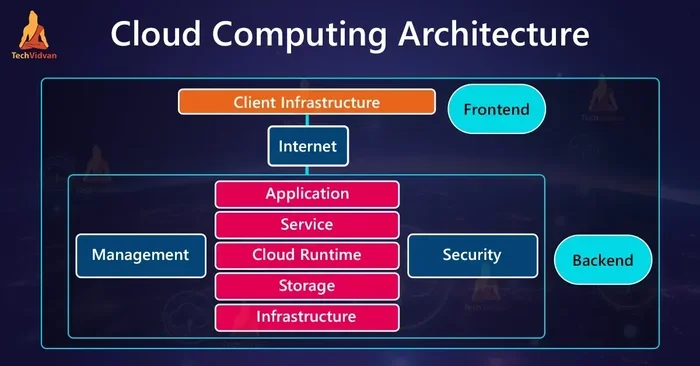
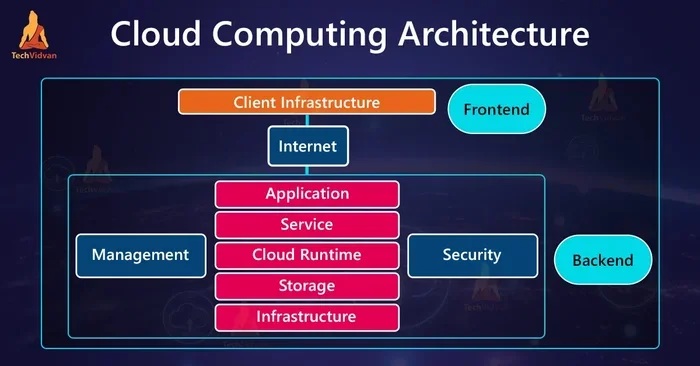
Every SaaS architecture in cloud computing setup includes several essential building blocks. Here is what makes it all work:
- Frontend: The part users see and interact with. Usually a web browser or mobile app built with HTML, CSS, and JavaScript.
- Backend: The server-side logic that processes requests, manages data, and runs business rules.
- Database: Where all user data, settings, and application information are stored securely.
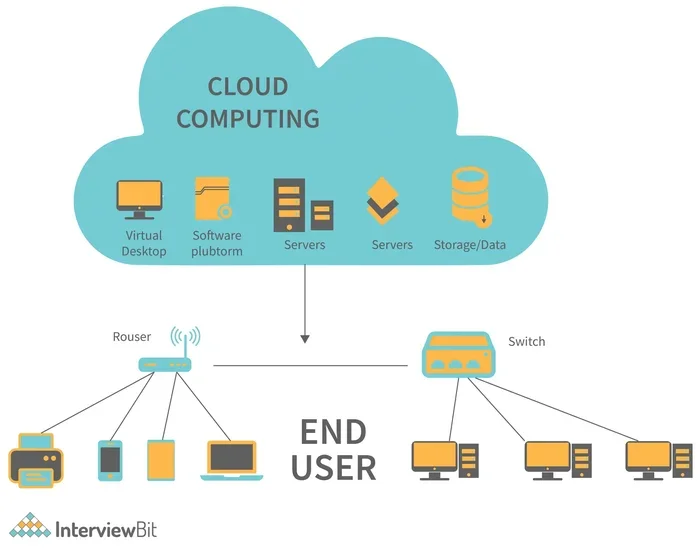
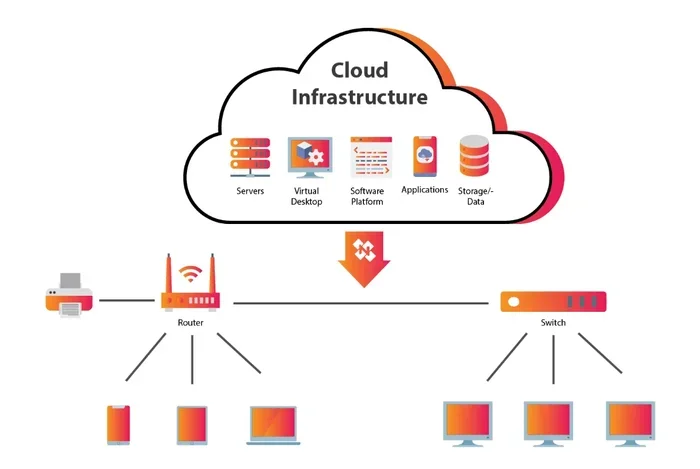
- Cloud Infrastructure: The physical or virtual servers hosted by providers like AWS, Google Cloud, or Microsoft Azure.
- APIs: Application Programming Interfaces that let different parts of the software communicate with each other and with third-party tools.
- Authentication Layer: Handles user login, permissions, and access control to keep data safe.
All of these components work together seamlessly. When you click a button in a SaaS app, the frontend sends a request to the backend. The backend processes it, talks to the database, and sends back the result. All of this happens in milliseconds.
Multi-Tenant vs Single-Tenant Architecture
One of the most important decisions in SaaS architecture in cloud computing is choosing between multi-tenant and single-tenant designs. This choice affects everything from cost to security to performance.
Multi-Tenant Architecture
In a multi-tenant model, a single instance of the software serves multiple customers. Think of it like a large apartment building. Many people live in the same building, but each person has their own private space. The shared infrastructure keeps costs low, which is why most SaaS providers use this approach.
Here is how it works in practice:
- All customers share the same codebase and infrastructure.
- Each customer’s data is isolated and invisible to others.
- Updates and patches are deployed once and apply to everyone.
- Resources are pooled and shared efficiently.
- Costs are lower because the provider does not need to build separate instances for each customer.
Most popular cloud platforms rely on multi-tenancy. It is the backbone of elastic computing, where resources stretch and shrink based on demand. This makes SaaS architecture in cloud computing incredibly cost-effective and scalable.
Single-Tenant Architecture
A single-tenant model gives each customer their own dedicated instance. Think of it like a standalone house. You have complete control over your space. No one else shares it with you.
This model offers stronger isolation and customization. But it comes at a higher cost. The provider needs to maintain separate environments for each customer. That means more servers, more maintenance, and more overhead. Some industries with strict compliance rules, like healthcare and finance, prefer single-tenant setups for cloud security reasons.
| Feature | Multi-Tenant | Single-Tenant |
|---|---|---|
| Cost | Lower | Higher |
| Scalability | Excellent | Limited |
| Data Isolation | Shared but separated | Fully dedicated |
| Customization | Limited | Extensive |
| Maintenance | One update for all | Per-customer updates |
| Best For | Most SaaS businesses | Regulated industries |
Most modern SaaS architecture in cloud computing solutions lean toward multi-tenancy. It offers the best balance of cost, performance, and scalability for the majority of use cases.
How Cloud Infrastructure Powers SaaS
Cloud infrastructure is the physical and virtual foundation that supports SaaS architecture in cloud computing. Without it, nothing would work. Let us break down what makes it tick.
Virtualization and Containers
Virtualization allows a single physical server to run multiple virtual machines. Each VM acts like its own independent computer with its own operating system. This is the first step in making cloud computing efficient and flexible.
Containers take this a step further. Tools like Docker package an application and all its dependencies into a single portable unit. This makes SaaS deployment models much simpler. Developers can build once and run anywhere, whether on AWS, Google Cloud, or a local server.
Load Balancing and Horizontal Scaling
When thousands of users access a SaaS app at the same time, the system needs to handle that traffic. Load balancing distributes incoming requests across multiple servers. This prevents any single server from becoming overwhelmed.
Horizontal scaling means adding more servers to handle increased demand. This is different from vertical scaling, which means upgrading a single server’s hardware. Horizontal scaling is the preferred approach for cloud-native applications because it is more flexible and cost-effective.
Quick Tip: Always plan for horizontal scaling from day one. Retrofitting a SaaS architecture in cloud computing setup to support it later is much harder and more expensive.
Elastic Computing
Elastic computing is the ability to automatically adjust resources based on real-time demand. During peak hours, the system spins up more resources. During quiet hours, it scales back down. This ensures optimal performance without wasting money on idle resources.
This is one of the biggest advantages of cloud computing over traditional hosting. You only pay for what you use. For startups and growing businesses, this is a game-changer.
Microservices and API Integration in SaaS
Modern SaaS architecture in cloud computing rarely relies on a single monolithic application. Instead, most providers use a microservices architecture.
What Are Microservices?
Microservices break a large application into small, independent services. Each service handles a specific function. For example, one microservice handles user authentication, another handles payments, and another manages notifications. These services communicate through APIs.
This approach has several advantages:
- Faster development: Teams can work on different services simultaneously without waiting for each other.
- Easier updates: You can update one microservice without affecting the entire application.
- Better fault isolation: If one service fails, the rest of the application keeps running.
- Technology flexibility: Different services can use different programming languages or databases as needed.
The Role of APIs
API integration is the glue that holds SaaS architecture in cloud computing together. APIs let different services talk to each other. They also allow third-party developers to build extensions and integrations.
For example, a SaaS CRM platform might use APIs to connect with email marketing tools, payment processors, and analytics platforms. This creates a rich ecosystem of connected tools that work together seamlessly.
Expert Insight: “APIs are the lifeblood of modern SaaS. A well-designed API strategy can make or break a cloud application. It determines how easily your platform integrates with the rest of the tech world,” says a senior cloud architect at a leading SaaS provider.
Security and Compliance in SaaS Architecture
Cloud security is a top concern for every SaaS architecture in cloud computing deployment. When your data lives on someone else’s servers, you need to trust that it is protected. Here is how reputable providers handle this.
Data Encryption
Encryption protects data both at rest and in transit. Data at rest is stored in encrypted form on servers. Data in transit is encrypted as it moves between the user and the cloud. This makes it extremely difficult for unauthorized parties to access sensitive information.
Access Controls and Authentication
SaaS apps use role-based access control (RBAC) to limit what each user can see and do. Multi-factor authentication adds an extra layer of protection. Together, these measures ensure that only authorized users can access the system.
Compliance Standards
Most enterprise-grade cloud platforms comply with industry standards like SOC 2, HIPAA, GDPR, and ISO 27001. These certifications prove that the provider follows strict security and privacy practices. When evaluating a SaaS provider, always check for these compliance badges.
Common Mistake: Many businesses assume that the cloud provider handles all security. In reality, security is a shared responsibility. The provider secures the infrastructure, but you still need to manage user access, passwords, and data classification properly.
Building a Scalable SaaS Architecture
Scalability is the ability of a system to handle growing amounts of work. For SaaS architecture in cloud computing, this is not optional. It is essential.
Design for Growth From Day One
The best SaaS apps are built with scalability in mind from the very start. This means choosing the right database, designing stateless services, and using caching layers to reduce load on the database.
Here are practical steps to build a scalable cloud architecture:
- Start with a microservices or modular monolith approach.
- Use managed database services that handle replication and backups automatically.
- Implement caching with tools like Redis or Memcached.
- Set up auto-scaling groups on your cloud platform.
- Monitor performance with tools like Datadog or New Relic.
- Test under load regularly to identify bottlenecks early.
Quick Tip: Use service-oriented architecture (SOA) principles even if you do not go full microservices. Breaking your app into logical, loosely coupled modules makes scaling much easier over time.
Database Scaling Strategies
Databases are often the biggest bottleneck in SaaS architecture in cloud computing. Here are common strategies to handle growth:
- Read replicas: Create copies of your database to handle read-heavy workloads.
- Sharding: Split your data across multiple database instances based on a key like user ID.
- Caching layers: Store frequently accessed data in memory to reduce database queries.
- NoSQL databases: Use document or key-value stores for flexible, high-volume data.
Each strategy has trade-offs. The right choice depends on your specific use case, data model, and expected growth trajectory.
Common Mistakes in SaaS Architecture Design
Even experienced developers make mistakes when designing SaaS architecture in cloud computing. Here are the most common pitfalls and how to avoid them.
Skipping Load Testing
Many teams assume their architecture will hold up under heavy traffic. It might work fine with 100 users. But what happens at 10,000? Load testing simulates real-world traffic to find weaknesses before your users do.
Ignoring Data Isolation
In a multi-tenant architecture, data isolation is critical. If your design allows one customer to accidentally access another customer’s data, that is a serious security breach. Always implement strict data filtering at the database and application levels.
Overlooking Vendor Lock-In
Relying too heavily on a single cloud provider’s proprietary services can make it very hard to switch providers later. Use open standards and portable formats whenever possible to keep your options open.
Underestimating Compliance Needs
If you serve customers in regulated industries, compliance requirements can be complex. Build compliance into your architecture from the start rather than trying to bolt it on later.
Conclusion
SaaS architecture in cloud computing is the foundation of the modern software industry. It enables companies to deliver powerful applications without the heavy costs and complexity of traditional hosting. From multi-tenant design and microservices to cloud infrastructure and API integration, every component plays a vital role in delivering fast, reliable, and secure software.
Whether you are building a new SaaS product or evaluating an existing one, understanding this architecture helps you make better decisions. Focus on scalability, prioritize cloud security, and always design with growth in mind. The cloud is only going to get bigger, and SaaS will continue to lead the way.
Take what you have learned here and apply it. Whether you are a developer, a founder, or a decision-maker, the principles of SaaS architecture in cloud computing will serve you well in building software that lasts.
Frequently Asked Questions
What is SaaS architecture in cloud computing?
SaaS architecture in cloud computing refers to the design and structure of software that is delivered over the internet. It includes components like multi-tenant infrastructure, microservices, APIs, and cloud hosting that work together to serve applications to users without requiring local installation.
How does multi-tenant architecture work in SaaS?
In a multi-tenant model, a single instance of the software serves multiple customers. Each customer’s data is isolated and secure, but they share the same underlying infrastructure. This keeps costs low and makes updates and maintenance much simpler for the SaaS provider.
What are the main differences between SaaS and traditional software?
Traditional software is installed locally on each user’s device and requires manual updates. SaaS applications are hosted in the cloud and accessed through a browser. They are automatically updated, scale easily, and do not require users to manage any infrastructure or hardware.
Why is scalability important in SaaS architecture?
Scalability ensures that a cloud application can handle growing numbers of users without performance issues. With elastic computing and horizontal scaling, SaaS architecture in cloud computing can automatically adjust resources to match demand, keeping the app fast and responsive at all times.
How do SaaS providers ensure cloud security?
Reputable SaaS providers use data encryption, role-based access control, multi-factor authentication, and strict compliance standards like SOC 2 and GDPR. They also rely on the built-in security features of their cloud platforms to protect user data at every level.
What cloud platforms are commonly used for SaaS development?
The most popular platforms for building SaaS architecture in cloud computing solutions include Amazon Web Services (AWS), Microsoft Azure, and Google Cloud Platform. Each offers powerful tools for hosting, scaling, and managing cloud-native applications efficiently.