Traditional Data Center vs Cloud Computing Breakdown
The debate between traditional data center vs cloud computing shapes how businesses store, manage, and access their data today. A traditional data center relies on on-premises hardware that you own and maintain, while cloud computing delivers resources over the internet through providers like AWS or Azure. Each approach has distinct advantages in cost, control, scalability, and security. Understanding these differences helps you make the right infrastructure choice for your organization.
When you think about where your business data lives, two options usually come to mind. You can keep it on your own servers in a traditional data center. Or you can move it to the cloud and let someone else handle the hardware. The choice between traditional data center vs cloud computing is one of the biggest decisions any IT leader faces today.
This guide breaks down everything you need to know. We will compare costs, performance, security, and scalability side by side. By the end, you will have a clear picture of which option fits your business goals best. Let us dive in.
Key Takeaways
- Control and Ownership: Traditional data centers give you full hardware control, while cloud computing offers flexibility without physical management.
- Cost Structure: Traditional setups require high upfront capital expenditure, whereas cloud uses pay-as-you-go operational expenditure.
- Scalability: Cloud infrastructure scales up or down quickly, but traditional data centers offer predictable, fixed capacity.
- Security: Both options have strong security measures, but the responsibility model differs significantly between them.
- Performance: On-premises setups can offer lower latency, while cloud services provide global reach and high availability.
- Hybrid Options: Many businesses now combine both approaches through hybrid cloud strategies for the best of both worlds.
📑 Table of Contents
What Is a Traditional Data Center?
A traditional data center is a physical facility that houses your IT equipment. Think of servers, storage systems, networking gear, and cooling units all in one place. You own the hardware. You manage the power. You handle the maintenance. It is your infrastructure, through and through.
Many large enterprises have relied on on-premises infrastructure for decades. Banks, hospitals, and government agencies often prefer this approach. It gives them direct control over sensitive data and operations. You know exactly where your information is and who has access to it.
Key Components of a Traditional Data Center
A typical setup includes several important pieces of equipment and systems:
- Servers: Physical machines that process and store data.
- Storage Arrays: Hard drives or solid-state drives for data retention.
- Networking Equipment: Routers, switches, and firewalls that manage traffic.
- Cooling Systems: Air conditioning and ventilation to keep hardware from overheating.
- Power Supply and Backup: Generators and uninterruptible power supplies for uptime.
- Security Systems: Physical access controls and surveillance cameras.
Running a data center hosting facility is no small task. It requires skilled technicians, regular maintenance, and a solid disaster recovery plan. You also need enough space and power to support growing demands over time.
What Is Cloud Computing?
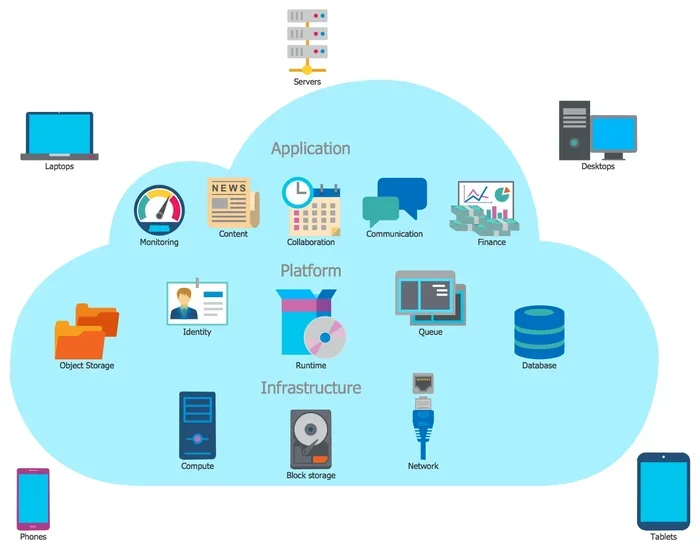
Cloud computing delivers IT resources over the internet. Instead of owning physical servers, you rent computing power, storage, and software from a provider. Companies like Amazon Web Services, Microsoft Azure, and Google Cloud Platform offer these cloud services on demand.
The beauty of the cloud is its flexibility. You can spin up a new server in minutes. You can scale down when demand drops. You only pay for what you use. This pay-as-you-go model has made cloud infrastructure attractive to businesses of all sizes.
Types of Cloud Deployment Models
Not all cloud setups are the same. Here are the main models:
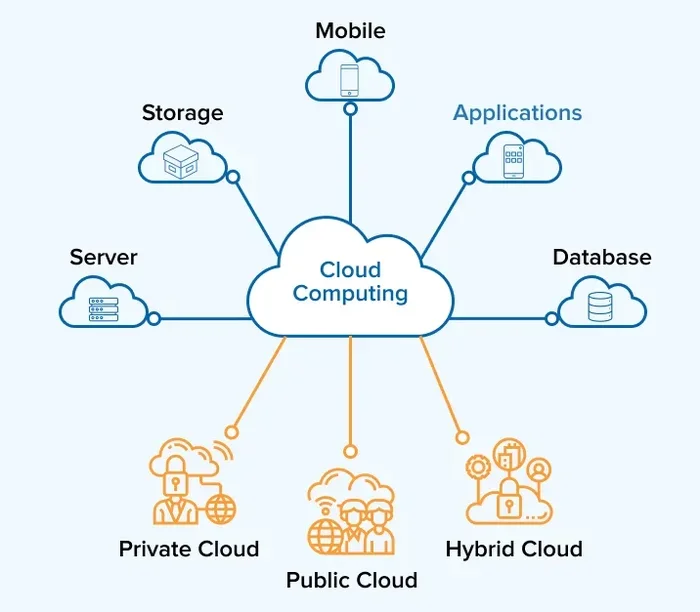
- Public Cloud: Resources are shared across multiple tenants. Providers like AWS and Google Cloud own the hardware.
- Private Cloud: Dedicated infrastructure for a single organization. It can be hosted on-premises or by a third party.
- Hybrid Cloud: A mix of on-premises and cloud resources that work together seamlessly.
- Multi-Cloud: Using services from multiple cloud providers at the same time.
Virtualization is the technology that makes all of this possible. It creates virtual versions of physical hardware, allowing multiple virtual machines to run on a single physical server. This is what enables cloud providers to offer such flexible and scalable resources.
Traditional Data Center vs Cloud Computing: Key Differences
Understanding the core differences between traditional data center vs cloud computing helps you evaluate each option honestly. Let us look at the main areas where they diverge.
Control and Ownership
With a traditional data center, you own everything. The hardware, the software, the physical space. You make every decision about configuration, upgrades, and replacements. This level of control appeals to organizations with strict compliance requirements or highly specialized workloads.
In the cloud, the provider owns the physical infrastructure. You control the software layer and your data. You do not worry about hardware failures or physical security. But you also have less say in the underlying systems. This is a trade-off between freedom and convenience.
Scalability and Flexibility
Scalability is one of the biggest advantages of cloud computing. Need more storage? Click a button. Need more computing power? Provision it instantly. The cloud adapts to your needs in real time.
A traditional data center scales differently. You must purchase, install, and configure new hardware. This process can take weeks or even months. It works well for predictable, steady workloads. But it struggles with sudden spikes in demand. That is why many businesses use cloud bursting to handle peak times while keeping their core systems on-premises.
Performance and Latency
Latency refers to the delay between sending a request and receiving a response. On-premises infrastructure often delivers lower latency because the hardware is physically close to your users. For applications that need real-time processing, this matters a lot.
Cloud services can also perform well, especially when you use edge computing or choose data centers close to your users. But network bandwidth and distance can introduce delays. For most everyday business applications, the difference is negligible. For high-frequency trading or real-time manufacturing systems, it can be critical.
Security and Compliance
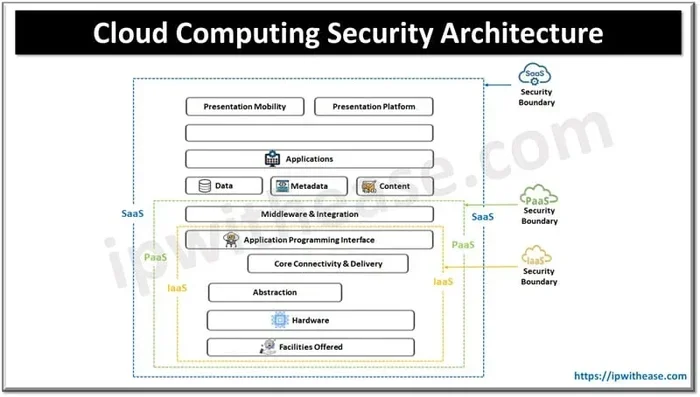
Both traditional data center and cloud infrastructure offer strong security. But the responsibility model is different.
With on-premises setups, you are responsible for everything. Physical security, network security, data encryption, access controls. You must stay on top of patches and updates. This can be a burden, but it also means you have complete visibility and control.
Cloud providers invest heavily in security. They offer built-in encryption, identity management, and threat detection. However, you still share responsibility for securing your data and configurations. Misconfigured cloud settings are a leading cause of data breaches. So neither option is automatically safer. It depends on how well you manage it.
Cost Comparison: Traditional Data Center vs Cloud
Cost is often the deciding factor in the traditional data center vs cloud computing debate. But the comparison is more nuanced than it first appears.
Capital Expenditure vs Operational Expenditure
A traditional data center requires significant capital expenditure upfront. You buy servers, networking gear, and storage devices. You build or lease a facility. You install cooling and power systems. These are large one-time costs that can strain your budget.
Cloud computing shifts this model to operational expenditure. You pay a monthly or hourly fee for the resources you use. There is no massive upfront investment. This makes cloud attractive for startups and small businesses that need to keep initial costs low.
Total Cost of Ownership Over Time
Here is where things get interesting. Over a long period, a traditional data center can actually become cheaper than the cloud. Once you have paid off the hardware, your ongoing costs are mainly electricity, maintenance, and staffing. The cloud, on the other hand, keeps charging you month after month with no end in sight.
This is why many large enterprises with stable workloads prefer on-premises. They avoid the cloud cost creep that happens when usage grows steadily over years. However, calculating the true total cost of ownership requires careful analysis. You must factor in staffing, power, cooling, hardware refresh cycles, and downtime costs.
Quick Tips for Cost Management
- Track your cloud usage monthly to avoid surprise bills.
- Right-size your instances. Do not over-provision resources.
- Use reserved instances or committed use discounts for predictable workloads.
- Consider a hybrid approach to balance upfront and ongoing costs.
- Review your traditional data center refresh cycle and plan for hardware upgrades.
Common Cost Mistakes to Avoid
Many businesses make avoidable mistakes when comparing costs. Here are a few to watch out for:
- Ignoring hidden costs: Staff salaries, training, and maintenance add up quickly in on-premises setups.
- Underestimating cloud egress fees: Data transfer costs can be surprisingly high in the cloud.
- Over-provisioning: Allocating more resources than you need wastes money in both models.
- Forgetting about downtime: Every hour of downtime costs money, whether on-premises or in the cloud.
Performance and Security Deep Dive
Performance and security deserve a closer look because they vary based on your specific needs and setup.
Uptime and Reliability
Uptime is critical for any business. A traditional data center can achieve excellent uptime if you invest in redundant power, cooling, and networking. But building that redundancy is expensive and complex.
Major cloud providers offer uptime guarantees of 99.99% or higher. They have multiple data centers across regions, so if one goes down, your services can fail over to another. This level of disaster recovery is hard to replicate on-premises without a huge investment.
Security Best Practices for Each Model
Whether you choose on-premises or cloud, security should be a top priority:
- Implement strong access controls and multi-factor authentication.
- Encrypt data at rest and in transit.
- Conduct regular security audits and vulnerability assessments.
- Keep all systems updated with the latest patches.
- Train your team on security awareness and best practices.
Expert Insight
“The biggest security risk is not the model you choose. It is the practices you follow. A well-managed cloud environment can be more secure than a poorly maintained on-premises setup, and vice versa. Focus on processes, not just platforms.” – Industry IT Infrastructure Expert
Which Option Is Right for Your Business?
Choosing between traditional data center vs cloud computing depends on your unique situation. There is no one-size-fits-all answer. Let us look at scenarios where each option shines.
When a Traditional Data Center Makes Sense
Consider keeping your infrastructure on-premises if:
- You have strict regulatory or compliance requirements that demand physical control.
- Your workloads are predictable and stable over long periods.
- You already have a skilled IT team and existing facility investments.
- Low latency is absolutely critical for your applications.
- You handle extremely sensitive data that cannot leave your premises.
When Cloud Computing Is the Better Choice
Consider moving to the cloud if:
- Your business needs to scale quickly and frequently.
- You want to reduce upfront capital costs.
- Your team is small and cannot manage physical hardware full-time.
- You need global reach and high availability across regions.
- You want access to advanced services like AI, machine learning, and analytics.
The Rise of Hybrid and Multi-Cloud Strategies
Many organizations are now taking a blended approach. A hybrid cloud strategy keeps sensitive workloads on-premises while moving less critical tasks to the cloud. This gives you the best of both worlds. You maintain control where it matters and gain flexibility where you need it.
Multi-cloud strategies take this a step further by using multiple cloud providers. This avoids vendor lock-in and lets you pick the best services from each provider. It adds complexity, but for large enterprises, the benefits often outweigh the challenges.
Key Takeaways
- There is no single “best” option. The right choice depends on your workload, budget, team, and goals.
- Many businesses start with cloud for new projects and keep legacy systems on-premises.
- A hybrid cloud approach is increasingly popular as organizations seek flexibility and control.
- Evaluate your total cost of ownership over 3 to 5 years, not just upfront costs.
The Future of IT Infrastructure
The traditional data center vs cloud computing debate is evolving rapidly. Edge computing is bringing processing closer to users. Serverless computing removes the need to manage servers entirely. Managed services are making it easier to run hybrid environments.
Artificial intelligence and machine learning are driving demand for massive computing power. Cloud providers are building specialized hardware to meet this need. But on-premises high-performance computing still has a place in industries like scientific research and defense.
The trend is clear: businesses are moving toward more flexible, software-defined infrastructure. Whether that means full cloud, full on-premises, or a hybrid mix depends on each organization’s unique needs. The key is to stay informed and be ready to adapt as technology evolves.
In the end, the best infrastructure strategy is the one that supports your business objectives. Focus on outcomes, not just technology. Choose the model that helps you grow, innovate, and serve your customers effectively. That is the real win in the traditional data center vs cloud computing discussion.
Frequently Asked Questions
What is the main difference between a traditional data center and cloud computing?
A traditional data center uses physical hardware that you own and manage on your own premises. Cloud computing delivers the same capabilities over the internet, where you rent resources from a provider. The main difference is ownership and management responsibility.
Is cloud computing cheaper than a traditional data center?
It depends on your usage and timeline. Cloud computing has lower upfront costs because you pay as you go. But over several years, a well-managed traditional data center can be more cost-effective for stable, predictable workloads. Always calculate your total cost of ownership before deciding.
Can I move my on-premises data center to the cloud?
Yes, cloud migration is very common. Many businesses move their workloads to cloud infrastructure to gain scalability and reduce maintenance. However, the process requires careful planning, especially for applications with strict latency or compliance requirements.
Which is more secure: traditional data center or cloud?
Both can be highly secure. In a traditional data center, you control all security measures. In the cloud, the provider handles physical security and infrastructure, while you are responsible for securing your data and configurations. The security of either model depends largely on how well it is managed.
What is a hybrid cloud, and why is it popular?
A hybrid cloud combines on-premises infrastructure with cloud services. It is popular because it gives businesses flexibility. You can keep sensitive data on-premises while using the cloud for scalable workloads. This approach balances control and cost effectively.
How do I decide between traditional data center vs cloud computing for my business?
Start by evaluating your workload requirements, budget, team expertise, and compliance needs. If you need full control and have stable demands, a traditional data center may be the right fit. If you need flexibility and want to minimize upfront costs, cloud computing services are likely the better choice. Many businesses use a hybrid approach to get the best of both worlds.
=== CONCLUSION ===
The comparison between traditional data center vs cloud computing is not about picking a winner. It is about finding the right fit for your business. Both models have strong advantages and real trade-offs. A traditional data center gives you control, predictability, and direct oversight. Cloud computing offers flexibility, scalability, and lower upfront costs.
Most organizations today do not have to choose just one. Hybrid and multi-cloud strategies let you combine the strengths of both approaches. The key is to understand your needs, plan your total cost of ownership, and build an infrastructure that supports your long-term goals.
Take the time to evaluate your options carefully. Involve your IT team, consider your compliance requirements, and think about where your business is headed. With the right strategy, you can build an infrastructure that drives growth, keeps your data safe, and delivers the performance your users expect. The traditional data center vs cloud computing debate is not about the past or the future. It is about making the smartest choice for right now and the years ahead.