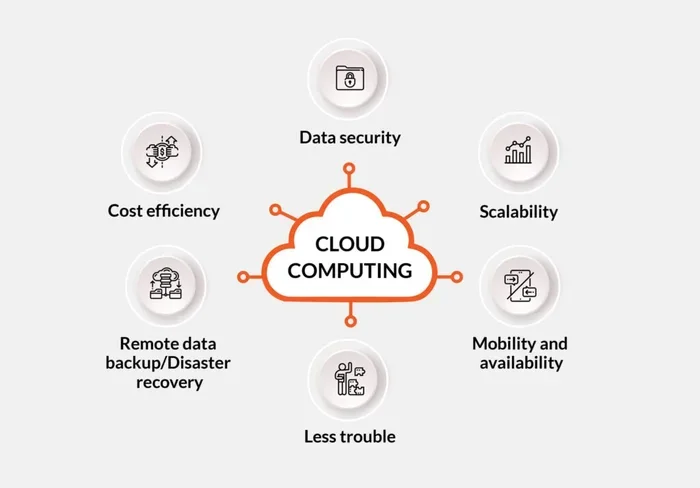
Cloud Computing Security Architecture for Modern Business
Cloud computing security architecture is the foundation of safe digital business operations today. It combines tools, policies, and controls to shield your data, apps, and networks from online threats. This guide walks you through every core component, best practice, and common pitfall so you can build a rock-solid security posture with confidence. Whether you are a startup or a large enterprise, these strategies will help you stay protected in the cloud.
Every day, businesses move more of their operations to the cloud. From storing customer data to running entire applications, the cloud offers incredible flexibility and scale. But with that convenience comes a big question: how do you keep all of that information safe?
The answer lies in cloud computing security architecture. Think of it as the blueprint for protecting everything you store and run online. It is not just one tool or one setting. It is a complete system of policies, technologies, and practices working together to guard your digital assets.
In this article, we will break down what cloud computing security architecture really means, why it matters for modern businesses, and how you can build a setup that actually works. We will cover the core components, best practices, common threats, and tips you can start using today. Let us dive in.
Key Takeaways
- Layered Defense Works Best: A strong cloud computing security architecture uses multiple layers of protection, from encryption to firewalls, to keep threats out.
- The Shared Responsibility Model Matters: Your cloud provider handles some security, but you must manage your own data protection and access controls.
- Zero Trust Is the Gold Standard: Verify every user and device every time, regardless of where they are connecting from.
- Regular Audits Keep You Safe: Ongoing security assessments and penetration testing help you catch weaknesses before attackers do.
- Compliance Is Non-Negotiable: Following frameworks like GDPR, HIPAA, and SOC 2 builds trust and keeps your business legally protected.
- Disaster Recovery Is Essential: A solid backup and recovery plan ensures your business can bounce back fast after a data breach or outage.
📑 Table of Contents
- What Is Cloud Computing Security Architecture?
- Why Cloud Computing Security Architecture Matters for Modern Business
- Core Components of a Secure Cloud Setup
- Best Practices for Building a Strong Cloud Security Architecture
- Common Threats to Cloud Environments
- Choosing the Right Cloud Security Partner
- Quick Tips for Everyday Cloud Security
- Key Takeaways
- Conclusion
What Is Cloud Computing Security Architecture?
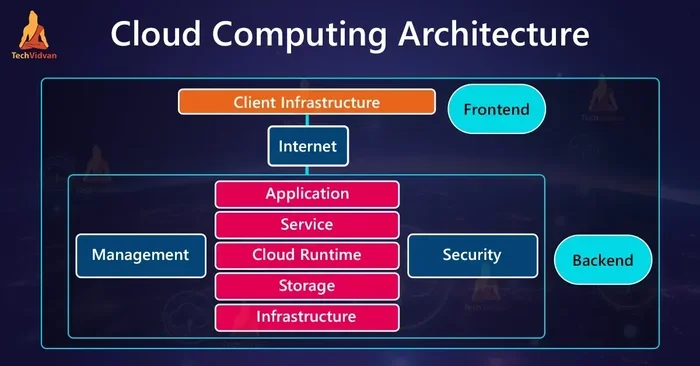
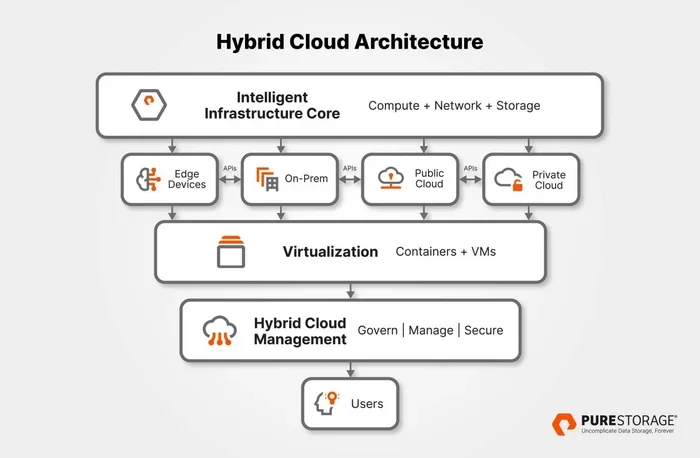
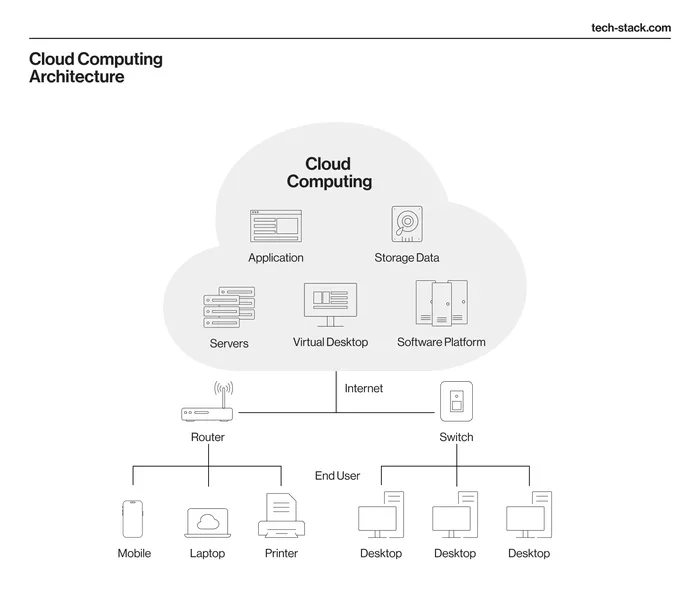
At its core, cloud computing security architecture refers to the structured design of security measures within a cloud environment. It is the plan and framework that determines how you protect data, applications, and infrastructure hosted in the cloud.
Imagine building a house. You would not just put up walls and call it done. You would add locks on doors, alarms on windows, cameras at the front gate, and maybe even a security system in the basement. Cloud computing security architecture works the same way. It layers multiple protections so that if one fails, others are still in place.
Why Is It Different from Traditional Security?
Traditional security focuses on a fixed perimeter, like a wall around a building. But cloud environments are different. Your data lives across servers, data centers, and networks that you do not physically control. This is where the shared responsibility model comes in.
Your cloud provider, whether it is Amazon Web Services, Microsoft Azure, or Google Cloud, takes care of the security of the cloud itself. That means the physical servers, the data centers, and the basic network infrastructure. But you are responsible for securing what you put inside the cloud. That includes your data, your access settings, and your configurations.
Understanding this split is essential. Many businesses assume their cloud provider handles everything. That assumption can lead to serious gaps in data protection and network security.
Why Cloud Computing Security Architecture Matters for Modern Business
The business world has changed dramatically. More companies operate remotely. More transactions happen online. And more data flows through cloud systems than ever before. With that shift comes a bigger attack surface for cybercriminals.
The Rising Threat Landscape
Cyberattacks are not slowing down. In fact, they are growing more sophisticated every year. Ransomware attacks, data breaches, and phishing schemes target businesses of all sizes. A single security gap can expose customer records, financial data, and intellectual property.
Here are some sobering numbers to consider:
- The average cost of a data breach in 2023 exceeded $4 million globally.
- Over 80 percent of organizations reported at least one cloud security incident in the past year.
- Small businesses are targeted in nearly 45 percent of all cyberattacks.
These numbers make one thing clear. A strong cloud computing security architecture is not optional. It is a business necessity.
Building Customer Trust
Beyond the financial damage, security failures hurt your reputation. Customers want to know their personal information is safe. When you invest in a robust cloud security framework, you send a powerful message. You show that you take their privacy seriously.
This trust can become a real competitive advantage. In markets where many companies offer similar products, a strong security reputation sets you apart.
Core Components of a Secure Cloud Setup
A well-designed cloud computing security architecture includes several essential components. Each one plays a specific role in keeping your environment safe. Let us walk through the most important ones.
Identity and Access Management
Identity and access management, often called IAM, is the gatekeeper of your cloud environment. It controls who can access what, and when. With IAM, you can set up multi-factor authentication, manage user roles, and enforce least-privilege access.
Least-privilege access means giving users only the permissions they need to do their jobs. No more, no less. This drastically reduces the risk of internal errors or misuse leading to a data breach.
Encryption
Encryption scrambles your data so that only authorized parties can read it. You should encrypt data both at rest and in transit. Data at rest means stored files and databases. Data in transit means information moving between systems or users.
Most modern cloud platforms offer built-in encryption tools. Use them. Encryption is one of the simplest and most effective security controls you can implement.
Firewalls and Network Security
Firewalls monitor incoming and outgoing traffic and block suspicious activity. In a cloud setup, you can use virtual firewalls to create network security boundaries around your resources.
A virtual private cloud, or VPC, lets you isolate your cloud resources from other users on the same infrastructure. Think of it as a private room inside a shared building. It adds a crucial layer of separation and control.
Threat Detection and Monitoring
You cannot protect what you cannot see. Threat detection tools keep an eye on your cloud environment 24/7. They watch for unusual behavior, such as login attempts from unfamiliar locations or sudden spikes in data downloads.
Many cloud providers offer native monitoring tools. Third-party options like CrowdStrike, Palo Alto Networks, and Splunk also provide powerful threat detection capabilities. The key is to set up alerts and respond quickly when something looks off.
Disaster Recovery and Backup
No security setup is perfect. That is why disaster recovery planning is a vital part of cloud computing security architecture. If a breach, outage, or natural disaster strikes, you need a plan to restore operations fast.
A good disaster recovery plan includes:
- Regular automated backups stored in a separate region.
- Clear recovery time objectives, or how fast you need to restore.
- Defined roles and responsibilities for your recovery team.
- Regular testing of your backup and restore processes.
Best Practices for Building a Strong Cloud Security Architecture
Now that you understand the core components, let us look at the best practices that tie everything together. These are actionable steps you can start implementing right away.
1. Adopt a Zero Trust Approach
The zero trust model operates on a simple principle: never trust, always verify. Every user, device, and connection must be authenticated and authorized, no matter where it comes from.
This approach removes the old idea of a “safe” internal network. Instead, it treats every access request as potentially risky. Combine zero trust with multi-factor authentication for the strongest possible security posture.
2. Conduct Regular Security Audits
Security is not a one-time setup. It is an ongoing process. Regular audits and penetration testing help you find weaknesses before attackers do. Schedule these assessments at least once a quarter, or more often if your environment changes frequently.
Use these audits to review access logs, configuration settings, and compliance status. Document everything and track improvements over time.
3. Automate Where Possible
Manual security tasks are slow and error-prone. Automating routine processes like patch management, log analysis, and incident response saves time and reduces human mistakes.
Tools like AWS Config, Azure Security Center, and Google Security Command Center can automate many aspects of cloud security. Set up automated alerts for misconfigurations, unauthorized access attempts, and policy violations.
4. Train Your Team
Your cloud computing security architecture is only as strong as the people using it. Human error remains one of the top causes of security incidents. Regular training on phishing awareness, password hygiene, and safe data handling goes a long way.
Make security training a part of your onboarding process. And do not just do it once a year. Short, frequent sessions keep security top of mind for your entire team.
5. Plan for the Shared Responsibility Model
We mentioned this earlier, but it deserves emphasis. Know exactly what your cloud provider handles and what you are responsible for. Map out your responsibilities clearly and assign ownership to specific team members.
When everyone understands their role, gaps are far less likely to appear. This clarity is a cornerstone of any solid cloud security framework.
Common Threats to Cloud Environments
Understanding the threats you face is just as important as knowing your defenses. Here are the most common risks to cloud environments and how they can affect your business.
Data Breaches
A data breach happens when unauthorized users gain access to sensitive information. This can result from weak passwords, misconfigured databases, or exploited vulnerabilities. The impact can range from financial loss to regulatory fines and lasting reputational damage.
Misconfigurations
Misconfigurations are one of the leading causes of cloud security incidents. A simple mistake, like leaving a storage bucket publicly accessible, can expose vast amounts of data. Regular audits and automated configuration checks help prevent this.
Insider Threats
Not all threats come from outside. Disgruntled employees, careless staff, or compromised accounts can all create serious risks. Strong access controls and monitoring help you detect and limit insider threats before they cause damage.
Denial of Service Attacks
A denial of service, or DoS attack, floods your systems with traffic until they crash or become unusable. While cloud providers offer some built-in protection, you should also implement rate limiting, traffic filtering, and endpoint security measures.
Choosing the Right Cloud Security Partner
Not every business has the resources to build a complete in-house security team. That is where cloud security partners come in. A good partner can help you design, implement, and maintain your cloud computing security architecture from start to finish.
When evaluating a partner, look for these qualities:
- Experience with your specific cloud platform and industry.
- A proven track record in compliance and regulatory frameworks.
- 24/7 monitoring and incident response capabilities.
- Clear communication and transparent reporting.
- Scalable solutions that grow with your business.
Take your time with this decision. The right partner becomes an extension of your team and a long-term asset to your security posture.
Quick Tips for Everyday Cloud Security
Want a few fast wins you can implement today? Here are some quick tips that make a big difference:
- Enable multi-factor authentication on every account and service.
- Rotate your API keys and access credentials regularly.
- Turn on logging and monitoring for all cloud resources.
- Review shared access permissions once a month.
- Keep all systems and applications up to date with the latest patches.
- Use strong, unique passwords for every cloud service and account.
- Store backup copies of critical data in a separate geographic region.
These small habits add up. Over time, they create a culture of security that protects your business from the inside out.
Key Takeaways
- Cloud computing security architecture is the blueprint that protects your data, applications, and infrastructure in the cloud.
- The shared responsibility model means you and your cloud provider each have specific security duties. Know yours clearly.
- Core components like IAM, encryption, firewalls, and threat detection form the foundation of a secure setup.
- Zero trust and regular audits are essential practices that keep your security posture strong over time.
- Common threats like data breaches, misconfigurations, and insider threats require ongoing vigilance and automation.
- Training your team and choosing the right cloud security partner amplify your defenses significantly.
Conclusion
Cloud computing security architecture is not just a technical topic. It is a business priority. Every company that operates in the cloud needs a clear, layered plan to protect its data, its customers, and its reputation.
The good news is that you do not have to build everything from scratch. Modern cloud platforms offer powerful tools and frameworks. The key is to use them intentionally and consistently. Start with the basics, layer your defenses, and keep improving over time.
Take action today. Review your current setup, identify any gaps, and make a plan to strengthen your cloud computing security architecture. Your business, your customers, and your future self will thank you.
Frequently Asked Questions
What is the shared responsibility model in cloud computing?
The shared responsibility model divides security duties between you and your cloud provider. Your provider secures the underlying infrastructure, while you are responsible for protecting your data, access settings, and configurations in the cloud.
How does zero trust improve cloud security?
Zero trust removes the idea of a trusted internal network. It requires every user and device to be verified every time they try to access a resource. This approach significantly reduces the risk of unauthorized access and lateral movement by attackers.
What are the most common cloud security misconfigurations?
The most common issues include publicly exposed storage buckets, overly permissive access rules, unencrypted data stores, and missing logging. Regular audits and automated checks help you catch and fix these problems early.
How often should I audit my cloud security setup?
You should conduct a full security audit at least once every quarter. However, if your environment changes often or you handle sensitive data, consider running assessments monthly. Automated monitoring tools can provide continuous oversight between formal audits.
Can small businesses benefit from cloud computing security architecture?
Absolutely. In fact, small businesses often benefit the most because they may lack the resources to recover from a serious breach. A well-designed cloud computing security architecture levels the playing field and gives smaller companies enterprise-grade protection at a fraction of the cost.
What should I look for in a cloud security partner?
Look for experience with your specific cloud platform, expertise in your industry, 24/7 monitoring support, and a clear approach to compliance and incident response. A good partner should feel like a seamless extension of your own team.