The Pros and Cons of Cloud Computing You Need to Know
Cloud computing offers amazing benefits like cost savings, scalability, and remote access, but it also comes with risks such as internet dependency, security concerns, and vendor lock-in. Understanding both sides helps you make smarter decisions for your business. This guide breaks down every major advantage and disadvantage so you can choose the right cloud strategy with confidence.
Key Takeaways
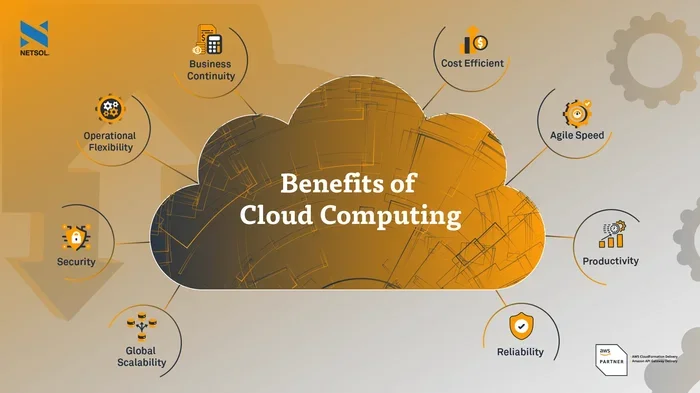
- Cost Efficiency: Cloud computing reduces upfront IT spending and shifts costs to predictable monthly payments.
- Scalability on Demand: You can scale resources up or down quickly based on your business needs.
- Security Trade-Offs: While cloud providers invest heavily in security, data privacy and compliance remain key concerns.
- Internet Dependency: A stable internet connection is essential, and outages can disrupt operations.
- Vendor Lock-In Risk: Switching providers later can be complex and expensive without proper planning.
- Disaster Recovery Made Easy: Cloud platforms offer robust backup and business continuity features out of the box.
📑 Table of Contents
- What Is Cloud Computing and Why Does It Matter?
- The Pros of Cloud Computing
- The Cons of Cloud Computing
- Cloud Deployment Models Explained
- Cloud Computing vs. Traditional IT Infrastructure
- Quick Tips for Choosing the Right Cloud Strategy
- Common Mistakes Businesses Make with Cloud Computing
- Expert Insights on Cloud Adoption
- Final Thoughts: Are the Pros Worth the Cons?
What Is Cloud Computing and Why Does It Matter?
Cloud computing has changed the way businesses and individuals use technology. Instead of running software or storing files on your own computer or server, you access everything over the internet. Think of it like renting electricity instead of building your own power plant.
The idea is simple. You pay for what you use, scale when you need to, and let someone else handle the heavy lifting. Companies like Amazon Web Services, Microsoft Azure, and Google Cloud lead this space. But the cloud computing landscape is much bigger than just big names.
Whether you are a small startup or a large enterprise, the cloud touches almost every part of modern IT. From cloud storage to cloud services like email and customer management tools, the shift has been massive. But is it right for everyone? That is exactly what we will explore.
In this article, we walk through the pros and cons of cloud computing in plain language. No jargon. No fluff. Just the facts you need to decide if the cloud fits your goals.
The Pros of Cloud Computing
Cost Savings and Lower IT Expenses
One of the biggest draws of the cloud is cost savings. When you run your own servers, you pay for hardware, maintenance, cooling, and a dedicated IT team. Those costs add up fast.
With cloud services, you shift to a pay-as-you-go model. You only pay for the storage, computing power, and features you actually use. This model is often called operational costs instead of capital expenses. It makes budgeting much more predictable.
Small businesses especially benefit. They get access to enterprise-grade tools without the enterprise price tag. You do not need a room full of servers anymore.
Scalability and Flexibility
Scalability is where the cloud truly shines. Need more storage during the holiday shopping season? Just upgrade your plan. Traffic drops in January? Scale back down.
This flexibility is a game changer. Traditional IT setups take weeks to expand. With the cloud, you can adjust resources in minutes. This is called elasticity, and it keeps your systems running smoothly without overpaying.
Here are some real-world examples of scalability in action:
- An online store handles a sudden traffic spike during a flash sale.
- A video streaming platform adds more server power for a new show launch.
- A startup grows from 10 users to 10,000 users without buying new hardware.
Remote Access and Collaboration
Cloud computing enables remote access from anywhere in the world. All you need is an internet connection and a device. This became especially important after the global shift to remote work.
Teams can collaborate on documents in real time. They can access company systems from home, coffee shops, or even the beach. This level of flexibility boosts productivity and helps companies hire talent from anywhere.
Cloud storage also means no more emailing files back and forth. Everyone works from the same version. Version control becomes much simpler, and mistakes are easier to fix.
Disaster Recovery and Business Continuity
Hardware fails. Fires happen. Storms knock out power. These are real risks for businesses that rely on physical servers. Cloud platforms offer built-in disaster recovery and business continuity features.
Your data gets backed up across multiple locations automatically. If one server goes down, another takes over seamlessly. This means less downtime and faster recovery compared to traditional setups.
Many cloud services come with guaranteed uptime promises, often called service level agreements or SLAs. These contracts define how reliable your provider promises to be.
The Cons of Cloud Computing
Internet Dependency and Downtime Risks
The cloud lives and dies by your internet connection. If your Wi-Fi goes down, you lose access to your files, apps, and systems. This internet dependency is the most common drawback people mention.
Even major providers experience outages. When they do, the impact can be huge. Think about how many services rely on a single cloud platform. A few hours of downtime can cost businesses thousands of dollars.
You can reduce this risk by choosing providers with strong uptime records. Look for SLAs that guarantee 99.9% or higher availability. But no system is perfect, and you should always have a backup plan.
Data Security and Privacy Concerns
Storing sensitive data on someone else’s servers naturally raises questions. Data security is the top concern for most businesses considering the cloud. Who has access to your information? Where is it physically stored?
Reputable cloud providers invest heavily in encryption, firewalls, and security teams. In many cases, they offer better protection than what a small business could afford on its own. But the shared responsibility model means you also play a role.
You must configure settings correctly, manage access controls, and follow best practices. A single mistake can expose your data. Always review your provider’s terms and conditions carefully to understand your rights and responsibilities. You can read more about what to look for in our Terms and Conditions guide.
Vendor Lock-In
Switching cloud providers is not as easy as changing phone plans. Once your data and applications are deeply integrated with one platform, moving to another becomes complex. This is known as vendor lock-in.
Different providers use different formats, APIs, and tools. Migrating your IT infrastructure can be time-consuming and expensive. Some companies find themselves stuck with a provider that no longer fits their needs.
You can avoid this by using open standards and multi-cloud strategies from the start. Planning ahead saves a lot of headaches later.
Limited Control and Customization
When you rent cloud services, you do not own the underlying hardware or software. This means less control over configurations, updates, and system architecture.
Some businesses need highly customized environments. They may find that public cloud offerings are too generic. This is where private cloud or hybrid cloud setups come into play, but they add complexity and cost.
Understanding your control needs before migrating is essential. Not every workload belongs in the cloud.
Potential Long-Term Cost Surprises
While the cloud starts cheap, costs can creep up over time. Egress fees (charges for data leaving the cloud), extra storage costs, and premium support plans can add up fast.
Many businesses underestimate their cloud migration costs. Training staff, rewriting applications, and managing new tools all require investment. Without careful monitoring, your monthly bill can surprise you.
Set a budget and track your usage regularly. Most providers offer cost management tools that help you spot wasteful spending early.
Cloud Deployment Models Explained
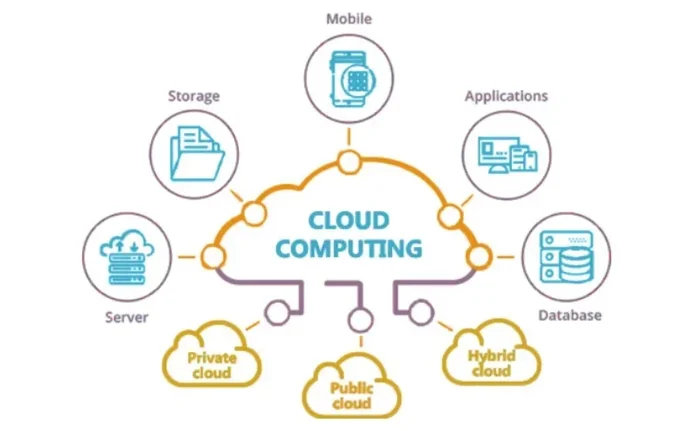
Public Cloud
Public cloud services are owned and operated by third-party providers. They serve multiple customers on shared infrastructure. This is the most common and affordable option. It works great for startups, small businesses, and non-sensitive workloads.
Private Cloud
A private cloud is dedicated to a single organization. It offers more control, security, and customization. Large enterprises with strict compliance needs often choose this route. The trade-off is higher cost and more maintenance.
Hybrid Cloud
A hybrid cloud combines public and private environments. You keep sensitive data on your own servers while using the public cloud for less critical tasks. This model offers the best of both worlds but requires strong technical management.
Cloud Computing vs. Traditional IT Infrastructure
| Feature | Cloud Computing | Traditional IT |
|---|---|---|
| Upfront Cost | Low | High |
| Scalability | Instant | Weeks or months |
| Maintenance | Handled by provider | Your responsibility |
| Remote Access | Anywhere with internet | Limited to VPN or office |
| Disaster Recovery | Built-in | Requires separate setup |
| Control | Shared | Full |
| Performance | Depends on internet | Local network speed |
Neither approach is perfect for every situation. Many businesses now use a mix of both. The key is understanding your unique needs before committing.
Quick Tips for Choosing the Right Cloud Strategy
- Assess your needs first. List every application and workload you plan to move. Know what you need before you start.
- Compare providers carefully. Look at pricing, SLAs, security features, and support options side by side.
- Start small. Migrate non-critical systems first. Learn how the cloud works for your team before moving everything.
- Train your team. Cloud tools work differently than on-premise systems. Invest in training to get the full value.
- Monitor costs monthly. Set alerts and review bills regularly to avoid surprise charges.
- Plan for exit. Even if you love your provider now, make sure you can leave if needed. Avoid tight lock-in by using standard formats.
Common Mistakes Businesses Make with Cloud Computing
Many companies rush into the cloud without a clear plan. Here are the most common mistakes to avoid:
- Ignoring security responsibilities. The provider secures the infrastructure, but you must secure your data and access.
- Underestimating bandwidth needs. Heavy cloud usage requires a fast, reliable internet connection.
- Not reading the fine print. Egress fees, support tiers, and SLAs vary widely between providers.
- Overlooking compliance requirements. Some industries have strict rules about where data can be stored and who can access it.
- Choosing the cheapest option. The lowest price rarely means the best value. Consider reliability, support, and features too.
Expert Insights on Cloud Adoption
Industry experts agree that the cloud is not a one-size-fits-all solution. The best approach depends on your business size, industry, and goals.
“The cloud is a tool, not a strategy,” says many IT leaders. The real value comes from aligning your cloud migration plan with your overall business objectives. Technology should serve your goals, not the other way around.
Another expert tip is to evaluate your IT infrastructure honestly. If most of your systems run smoothly on-premise, a full cloud move may not make sense. A hybrid approach often delivers the best results.
Security should always be a top priority. Choose providers with strong certifications like SOC 2, ISO 27001, and GDPR compliance. These standards show that the provider takes data security seriously.
Final Thoughts: Are the Pros Worth the Cons?
The pros and cons of cloud computing boil down to your specific situation. For most businesses, the benefits of cost savings, scalability, and remote access far outweigh the drawbacks. The cloud gives you agility that traditional IT simply cannot match.
But it is not a magic fix. You must plan carefully, choose the right provider, and stay on top of costs and security. Understanding both sides prepares you for a smoother transition.
If you take the time to evaluate your needs, test the waters, and build a solid strategy, the cloud can transform the way you work. Start small, learn as you grow, and never stop optimizing.
The future of technology is in the cloud. The question is not whether to move, but how to move smartly. Make informed choices, and the cloud will work hard for you.
Frequently Asked Questions
What are the main advantages of cloud computing?
The top advantages include lower costs, easy scalability, remote access from anywhere, built-in disaster recovery, and reduced maintenance burden. These benefits make the cloud appealing to businesses of all sizes.
What are the biggest risks of using the cloud?
The main risks are internet dependency, data security concerns, vendor lock-in, and unexpected long-term costs. Each of these can be managed with proper planning and the right provider.
Is cloud computing safe for sensitive business data?
Yes, when configured correctly. Reputable providers use strong encryption and security measures. However, you must also follow best practices on your end, like managing access controls and reviewing your provider’s policies.
What is the difference between public and private cloud?
A public cloud is shared among multiple customers and is more affordable. A private cloud is dedicated to one organization and offers more control and security. Many businesses use a hybrid approach to get the best of both worlds.
How much does cloud computing cost per month?
Costs vary widely based on usage, storage, and features. Small businesses might pay as little as $10 to $100 per month, while larger enterprises can spend thousands. Always monitor your usage to keep costs in check.
Can I switch cloud providers after migrating?
Yes, but it can be difficult and expensive. This is called vendor lock-in. To make switching easier, use open standards, standard data formats, and plan your migration strategy with flexibility in mind.
=== CONCLUSION ===
The pros and cons of cloud computing show that this technology is powerful but requires thoughtful adoption. You gain cost savings, scalability, and remote access while accepting trade-offs in control, security responsibility, and internet dependency.
Take the time to evaluate your needs, compare providers, and start with a pilot project. The cloud is a journey, not a destination. With the right approach, it becomes one of the strongest tools in your business toolkit.