How to Tackle Data Security Issues in Cloud Computing
Data security issues in cloud computing are a growing concern for businesses of all sizes. This guide breaks down the most common cloud computing security threats and gives you clear, actionable steps to protect your information. You will learn about encryption, access control, the shared responsibility model, and the best tools to keep your data safe. Whether you are a small business or an enterprise, these strategies will help you build a stronger defense against data breaches and security vulnerabilities.
More and more businesses are moving their data to the cloud every day. It makes sense. Cloud storage is flexible, scalable, and often cheaper than managing your own servers. But here is the problem. Data security issues in cloud computing are real, and they are growing. Every year, thousands of companies face data breaches, lost files, and compliance headaches because of poor cloud security. If you are using the cloud or planning to move there, you need to know what is at stake. This article breaks down the biggest cloud computing security challenges and gives you clear steps to protect your information.
The good news is that you do not need to be a tech expert to make your cloud data safer. With the right tools and habits, you can seriously reduce your risk. In this guide, we will walk you through the most common security vulnerabilities in the cloud. We will also share practical tips, expert advice, and real-world examples you can use right away. By the end, you will have a solid plan to keep your data secure in any cloud environment.
Key Takeaways
- Understand the Threats: Misconfigured storage, weak encryption, and poor access control are the top causes of cloud data breaches.
- Encrypt Everything: Use AES-256 for stored data and TLS 1.2+ for data in transit to keep information unreadable to attackers.
- Enable Multi-Factor Authentication: MFA adds a critical extra layer of protection that blocks most account takeover attempts.
- Know the Shared Responsibility Model: Your cloud provider secures the infrastructure, but you are responsible for your data, access, and configurations.
- Build a Living Security Strategy: Regular audits, team training, and continuous monitoring are essential for long-term cloud safety.
- Choose the Right Tools: Match your security tools to your cloud setup, whether you use a single provider or a hybrid environment.
📑 Table of Contents
Why Data Security in Cloud Computing Matters
Cloud data security is not just an IT issue. It affects your customers, your reputation, and your bottom line. When sensitive information is not properly protected, the consequences can be severe. Let us look at why this topic deserves your full attention.
The Rising Cost of Data Breaches
A single data breach can cost a small business tens of thousands of dollars. For larger companies, the price tag can reach millions. Beyond money, breaches damage trust. Customers lose confidence when their personal information is exposed. Studies show that over 60% of small businesses close within six months of a major breach. This is why cloud computing security must be a top priority for every organization.
Growing Cloud Adoption Means Growing Risks
More companies are adopting hybrid cloud and multi-cloud setups than ever before. While this brings flexibility, it also creates more entry points for attackers. Each new cloud service you add can introduce new security vulnerabilities. The more systems you have in the cloud, the more you need to think about data privacy and protection. Staying ahead of these risks is essential in today’s digital world.
Quick Tips: Always review your cloud security setup at least twice a year. Make it a calendar reminder. Small checkups prevent big problems.
Common Data Security Issues in the Cloud
Understanding the threats is the first step toward solving them. Here are the most common data security issues in cloud computing that businesses face today.
Misconfigured Storage and Permissions
This is the number one cause of cloud data leaks. Many companies set up cloud storage and leave default settings unchanged. These defaults often allow public access to sensitive files. A simple misconfiguration can expose customer records, financial data, or intellectual property to anyone on the internet. Proper access control and regular audits can prevent this entirely.
Insufficient Encryption
Encryption is one of the most powerful tools for protecting data. Yet many organizations skip it or use weak encryption standards. Without proper data encryption, your information is readable by anyone who intercepts it. Both data at rest and data in transit should be encrypted. Look for cloud providers that offer AES-256 encryption as a standard feature.
Lack of Visibility and Monitoring
When data lives in the cloud, it can be hard to track who is accessing it. Without proper threat detection tools, you may not know someone has gained unauthorized access until it is too late. Continuous monitoring and logging are essential for spotting suspicious activity early. Set up alerts for unusual login patterns or large data downloads.
Expert Insight: “Most cloud breaches are not caused by sophisticated hackers. They are caused by simple oversights like open storage buckets and weak passwords.” — Cloud Security Alliance
Inadequate Identity and Access Management
Weak identity management is a major contributor to cloud security failures. If anyone in your organization can access everything, you have a serious problem. Implementing multi-factor authentication and role-based access controls limits exposure and keeps unauthorized users out. Every employee should only have access to the data they need to do their job.
How to Protect Your Data in the Cloud
Now that you know the common issues, let us look at how to fix them. These practical steps will help you strengthen your cloud computing security posture significantly.
Implement Strong Encryption Everywhere
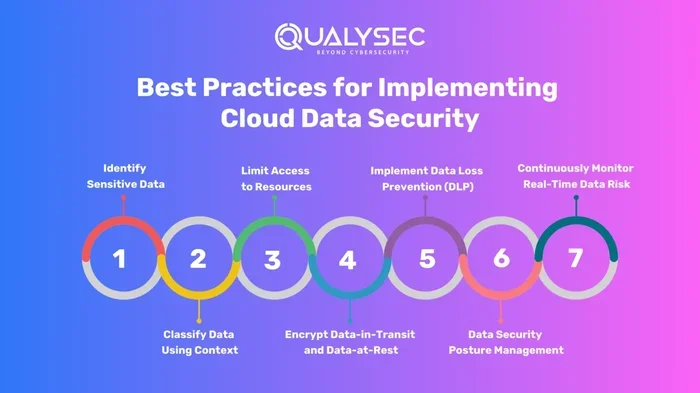
Encrypt all sensitive data before it leaves your system. Use strong encryption standards like AES-256 for stored data and TLS 1.2 or higher for data in transit. Most reputable cloud providers offer built-in encryption tools. Make sure they are turned on and properly configured. Do not rely on default settings alone.
Enable Multi-Factor Authentication
Multi-factor authentication adds a critical extra layer of protection. Even if a password is stolen, a second verification step stops unauthorized access. Require MFA for all user accounts, especially those with administrative privileges. This single step can block the majority of account takeover attempts. It is one of the easiest and most effective security measures you can implement.
Regularly Audit Access Permissions
Set a schedule to review who has access to what. Remove permissions for former employees immediately. Limit access based on the principle of least privilege. Users should only have access to the data they need to do their jobs. This reduces the blast radius if an account is compromised. A quarterly access review is a great habit to build.
Use Data Loss Prevention Tools
Data loss prevention tools monitor your cloud environment for unauthorized data transfers. They can alert you when sensitive files are being shared outside your organization or downloaded to unauthorized devices. These tools are especially valuable for companies handling customer data or financial records. They give you an extra safety net against accidental or intentional leaks.
Common Mistakes: Many businesses set up cloud security once and never revisit it. Cloud environments change constantly. New services are added, configurations shift, and risks evolve. Regular reviews are non-negotiable. Treat security as an ongoing process, not a one-time setup.
Choosing the Right Cloud Security Tools
Not all security tools are created equal. Choosing the right ones for your environment can make a huge difference in your data security posture.
Key Features to Look For
When evaluating cloud security tools, focus on these essential features:
- Real-time threat detection that alerts you to suspicious activity immediately
- Automated compliance reporting to simplify audits and paperwork
- Endpoint protection for devices that connect to your cloud systems
- Network security controls like firewalls and intrusion detection
- Easy integration with your existing cloud platform and workflows
Comparison: Cloud Security Approaches
| Approach | Best For | Pros | Cons |
|---|---|---|---|
| Native Cloud Tools | Single cloud providers | Seamless integration, lower cost | Limited to one platform, less flexibility |
| Third-Party Security Platforms | Multi-cloud or hybrid setups | Unified control across platforms, advanced features | Higher cost, steeper learning curve |
| Zero Trust Architecture | High-security environments | Maximum protection, verifies every access request | Complex to implement, requires training |
Your choice depends on your budget, team size, and cloud setup. Small businesses often benefit most from native tools to start. Larger organizations with complex hybrid cloud environments may need third-party platforms for comprehensive coverage. Start with what you can afford and scale up as your needs grow.
Quick Tips: Start with your most sensitive data. Protect that first, then expand your security coverage outward. Do not try to secure everything at once. Prioritization saves time and money.
The Shared Responsibility Model Explained
One of the most misunderstood concepts in cloud computing security is the shared responsibility model. Many businesses assume their cloud provider handles everything. That is not true, and misunderstanding this is one of the biggest cloud migration risks companies face.
What the Cloud Provider Secures
Your cloud provider is responsible for the security of the cloud itself. This includes the physical servers, data centers, and core network infrastructure. They also maintain the basic software that runs their platform. In other words, they protect the foundation. You do not need to worry about hardware failures or data center breaches.
What You Are Responsible For
You are responsible for securing your data, applications, and access controls in the cloud. This includes setting up proper access control, enabling encryption, managing user permissions, and configuring security settings correctly. If you leave a storage bucket open to the public, that is on you, not your provider. Understanding this division is critical to avoiding costly mistakes.
When both sides do their part, cloud computing security works much more effectively. Think of it like renting an apartment. The landlord handles the building structure, but you lock your door and protect your belongings.
Expert Insight: “The shared responsibility model is the single biggest factor in cloud security success. Companies that understand it are far less likely to experience preventable breaches.” — Gartner Research
Building a Cloud Security Strategy
A solid strategy ties everything together. Without a plan, your security efforts can be scattered and inconsistent. Here is how to build one that works for your organization.
Step 1: Assess Your Current Setup
Start by mapping out where your data lives. Which cloud services do you use? What data is stored where? Who has access? This assessment reveals your weak spots and helps you prioritize your efforts. Use a simple spreadsheet or a dedicated asset inventory tool to keep track.
Step 2: Define Your Security Policies
Create clear policies for password management, data access, encryption standards, and incident response. Make sure every team member knows these rules. Security compliance requirements like GDPR, HIPAA, or SOC 2 should also be part of your policy framework. Write them down and share them with your entire team.
Step 3: Train Your Team
Technology alone cannot protect your data. Your people are your first line of defense. Regular training on cloud migration risks, phishing awareness, and proper data handling makes a huge difference. Invest in ongoing education, not just one-time sessions. A well-trained team is your strongest defense against human error.
Step 4: Monitor and Improve Continuously
Cloud security is not a set-it-and-forget-it task. Set up dashboards to track security metrics. Run regular penetration tests. Review logs for unusual activity. Continuously improve your defenses as new threats emerge. The threat landscape changes constantly, and your strategy should too.
Common Mistakes: Skipping employee training is one of the biggest security oversights. Humans are often the weakest link in any security chain. A well-trained team is your strongest defense. Make security training a regular part of your company culture.
Conclusion
Data security issues in cloud computing are real, but they are manageable. By understanding the common threats, implementing strong encryption, enabling multi-factor authentication, and building a comprehensive security strategy, you can protect your data effectively. The shared responsibility model reminds us that security is a partnership between you and your cloud provider. Take ownership of your part, stay vigilant, and keep learning. Your data is worth the effort. Start today, and make cloud computing security a priority that pays off for years to come.
Frequently Asked Questions
What are the most common data security issues in cloud computing?
The most common issues include misconfigured storage permissions, insufficient encryption, weak identity and access management, lack of monitoring, and poor understanding of the shared responsibility model. These problems often stem from human error rather than sophisticated attacks, which makes them preventable with the right habits and tools.
How does the shared responsibility model work in cloud security?
The shared responsibility model divides security duties between you and your cloud provider. Your provider secures the physical infrastructure, data centers, and core platform software. You are responsible for securing your data, configuring access controls, enabling encryption, and managing user permissions. When either side neglects their duties, cloud computing security gaps appear.
What is the best encryption standard for cloud data?
AES-256 is the gold standard for encrypting data at rest, while TLS 1.2 or higher is recommended for data in transit. Most reputable cloud providers offer these encryption options built in. The key is to make sure they are enabled and properly configured, as default settings often leave data unprotected.
How can small businesses improve their cloud data security on a budget?
Small businesses should start by enabling multi-factor authentication on all accounts, using built-in encryption tools from their cloud provider, and conducting regular access reviews. These steps cost little to nothing and address the most common security vulnerabilities. Free or low-cost data loss prevention tools are also widely available for smaller teams.
What should I look for when choosing a cloud security tool?
Look for real-time threat detection, automated compliance reporting, endpoint protection, and easy integration with your existing cloud platform. The best tool depends on your setup. If you use a single cloud provider, native tools may suffice. For hybrid cloud or multi-cloud environments, a third-party platform with unified control is often a better fit.
Why is employee training important for cloud data security?
Human error is the leading cause of cloud security incidents. Phishing attacks, weak passwords, and accidental data sharing all stem from people, not technology. Regular training helps employees recognize threats, follow security policies, and handle data responsibly. A trained team is one of the most cost-effective security measures you can invest in.