Data Loss Prevention in Cloud Computing Tips and Tricks
Data loss prevention in cloud computing is essential for keeping your files safe from breaches, leaks, and accidental deletions. This guide shares practical tips and tricks to help you build a strong cloud data protection strategy. You will learn about common causes of data loss, top prevention strategies, and the best tools to use. Whether you are a small business or a large team, these steps will boost your cloud security and give you peace of mind.
Losing important files in the cloud can be a nightmare. Whether it is a customer database, financial records, or creative assets, the thought of permanent data loss keeps business owners up at night. Data loss prevention in cloud computing is the practice of protecting your digital information from being deleted, leaked, or stolen when stored in the cloud.
More and more companies are moving their operations online. Cloud storage offers flexibility, scalability, and cost savings. But with those benefits come real risks. Cyberattacks, human mistakes, and system failures can all lead to devastating data loss. The good news is that you can take steps to prevent this from happening. In this article, we will walk you through practical tips and tricks to keep your cloud data safe and sound.
Key Takeaways
- Encrypt everything: Encryption is your first line of defense against unauthorized access and data leaks.
- Control access carefully: Use role-based access control and multi-factor authentication to limit who sees what.
- Back up regularly: Automated backups ensure you can recover data fast after any incident.
- Train your team: Human error causes most data loss, so ongoing training is a must.
- Use the right tools: DLP software and threat detection platforms make prevention easier and more reliable.
- Have a plan ready: A written incident response plan helps you act fast when something goes wrong.
📑 Table of Contents
- Understanding Data Loss Prevention in Cloud Computing
- Essential Strategies for Data Loss Prevention in Cloud Computing
- Choosing the Right Tools for Cloud Data Protection
- Building a Data Loss Prevention Plan
- Common Mistakes to Avoid in Cloud Data Protection
- Expert Tips to Strengthen Your Cloud Security
- The Future of Data Loss Prevention in Cloud Computing
- Conclusion
Understanding Data Loss Prevention in Cloud Computing
Before diving into solutions, let us understand the problem. Data loss prevention in cloud computing refers to the tools, policies, and practices you use to stop sensitive data from being lost, accessed by unauthorized users, or leaked outside your organization. It covers everything from accidental deletions by employees to full-scale cyberattacks by hackers.
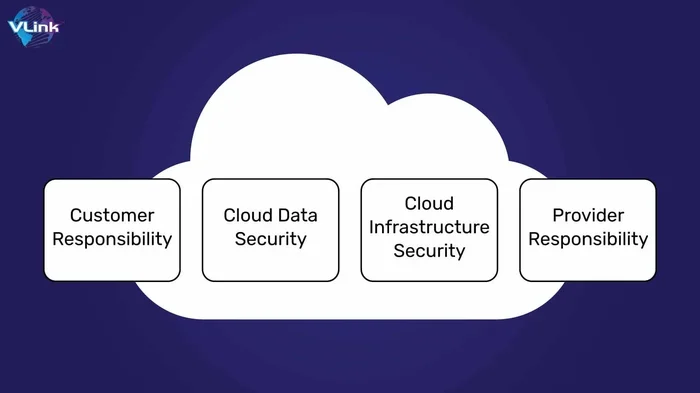
Cloud environments are different from traditional on-premise setups. Your data lives on servers managed by third-party providers like AWS, Google Cloud, or Microsoft Azure. This means you share responsibility for security. Your provider handles physical infrastructure, but you are responsible for protecting the data itself. Understanding this shared model is the first step toward better protection.
Why Cloud Data Loss Happens
Data loss in the cloud rarely has just one cause. It usually comes from a mix of factors. Here are the most common reasons businesses lose data in the cloud:
- Human error: Accidentally deleting files, misconfiguring settings, or sharing links with the wrong people.
- Cyberattacks: Hackers use phishing, ransomware, and other methods to steal or destroy data.
- Insider threats: Disgruntled employees or careless team members can expose sensitive information.
- Service outages: Even major cloud providers experience downtime that can make data temporarily inaccessible.
- Compliance failures: Not following data protection regulations can lead to fines and data exposure.
- Poor access control: Giving too many people access to sensitive files increases the risk of leaks.
Knowing these causes helps you build a smarter prevention plan. Each threat needs a different response, and a layered approach works best.
Essential Strategies for Data Loss Prevention in Cloud Computing
Now that you understand the risks, let us look at the strategies that actually work. These are the foundation of any solid cloud data protection plan.
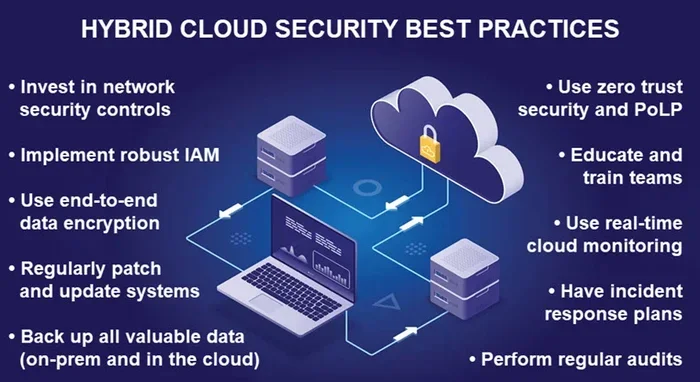
1. Encrypt Your Data at All Times
Encryption is the single most important step you can take. When your data is encrypted, it becomes unreadable to anyone who does not have the decryption key. This applies to data both at rest (stored in the cloud) and in transit (moving between devices and the cloud).
Most cloud providers offer built-in encryption tools. Turn them on by default. For extra protection, consider client-side encryption, where you encrypt data before it ever leaves your device. This way, even if someone breaches the cloud provider’s servers, your data stays safe.
Quick Tip: Use AES-256 encryption, which is the industry standard and nearly impossible to crack with current technology.
2. Implement Strong Access Controls
Not everyone in your organization needs access to every file. Role-based access control (RBAC) lets you assign permissions based on each person’s job. The marketing team does not need access to financial records, and the finance team does not need access to product designs.
Combine RBAC with multi-factor authentication (MFA). MFA requires users to verify their identity using two or more methods, like a password and a code sent to their phone. This simple step blocks a huge percentage of unauthorized access attempts.
Also, review access permissions regularly. People change roles, and old permissions should be removed promptly. This practice is a core part of zero trust security, which assumes that no user or device should be trusted by default.
3. Set Up Automated Backups
Even with the best prevention, accidents happen. Automated backups ensure you can recover your data quickly. Most cloud platforms let you schedule daily, weekly, or monthly backups with just a few clicks.
Follow the 3-2-1 backup rule: keep three copies of your data, on two different types of storage, with one copy stored offsite or in a separate cloud. This redundancy means that even if one backup fails, you have others to fall back on.
Quick Tip: Test your backups regularly. A backup you have never restored is not really a backup. Schedule monthly test restores to make sure everything works.
4. Monitor and Audit Cloud Activity
You cannot protect what you cannot see. Cloud monitoring tools track who accesses your data, when they access it, and what they do with it. Look for unusual patterns, like a user downloading large amounts of data at odd hours.
Most cloud providers offer built-in audit logs. Enable them and review them regularly. You can also use third-party monitoring tools that send real-time alerts when suspicious activity is detected. This kind of threat detection helps you catch problems before they become full-blown data breaches.
Choosing the Right Tools for Cloud Data Protection
The right tools make data loss prevention in cloud computing much easier. There are many options available, ranging from built-in features to dedicated third-party solutions. Here is how to choose wisely.
Built-In Tools vs. Third-Party Solutions
Major cloud providers include basic data protection features in their platforms. AWS offers Macie for sensitive data discovery, Google Cloud has Security Command Center, and Microsoft Azure includes Microsoft Defender for Cloud. These built-in tools are a great starting point and often come included with your subscription.
However, third-party DLP software (Data Loss Prevention) offers more advanced features. Tools like Symantec DLP, Microsoft Purview, and Digital Guardian provide deeper inspection, better policy enforcement, and cross-platform support. They can monitor data across multiple cloud services and on-premise systems simultaneously.
When choosing a tool, consider your budget, team size, and the sensitivity of your data. Small businesses may find built-in tools sufficient, while larger organizations often need dedicated DLP solutions.
Key Features to Look For
Not all cloud security tools are created equal. Here are the features that matter most:
- Real-time monitoring: Alerts you instantly when something looks wrong.
- Policy automation: Automatically enforces rules without manual intervention.
- Data classification: Identifies and labels sensitive data automatically.
- Incident response: Helps you react quickly to potential threats.
- Reporting and dashboards: Gives you clear visibility into your security posture.
- Integration capabilities: Works seamlessly with your existing cloud apps and SaaS applications.
Investing in a tool with these features gives you a strong return on investment. The cost of a good DLP tool is nothing compared to the cost of a major data breach.
Building a Data Loss Prevention Plan
Tools alone are not enough. You need a structured plan that guides how your team handles data every day. A data loss prevention plan is a written document that outlines your policies, procedures, and responsibilities.
Step 1: Identify Your Sensitive Data
You cannot protect what you do not know exists. Start by cataloging all the data your organization stores in the cloud. Classify it by sensitivity level: public, internal, confidential, and restricted. This classification helps you apply the right level of protection to each type of data.
Step 2: Define Clear Policies
Write down rules for how data should be handled. Who can access what? How should files be shared? What happens when an employee leaves the company? Clear policies remove guesswork and set expectations for everyone on the team.
Step 3: Train Your Employees
Human error is the leading cause of data loss in the cloud. A well-trained team is your best defense. Conduct regular training sessions on topics like phishing awareness, password hygiene, and safe file sharing practices. Make training engaging and practical, not just a boring slide deck.
Expert Insight: The most effective training happens in short, frequent sessions. Monthly 15-minute workshops work better than annual marathon training days. Keep it simple and relevant to your team’s daily work.
Step 4: Test and Update Your Plan
A plan that never changes becomes outdated fast. Review and update your data governance policies at least twice a year. Conduct simulated phishing tests to check how your team responds. Use the results to improve training and close any gaps in your cybersecurity posture.
Common Mistakes to Avoid in Cloud Data Protection
Even well-intentioned teams make mistakes that leave their data exposed. Here are the most common ones and how to avoid them.
- Ignoring configuration settings: Default cloud settings are often loose. Always review and tighten them before storing sensitive data.
- Skipping backups: Thinking your cloud provider handles everything is a dangerous assumption. You need your own backup strategy.
- Overlooking mobile access: With remote work on the rise, data accessed from personal devices is a major risk vector. Use endpoint protection solutions to secure those connections.
- Neglecting compliance: Regulations like GDPR, HIPAA, and CCPA have strict rules about data handling. Non-compliance can result in heavy fines and reputational damage.
- No incident response plan: When a breach happens, panic sets in without a plan. Having a clear incident response procedure ensures everyone knows what to do.
Avoiding these mistakes alone puts you ahead of most organizations. Combine this awareness with the strategies we have covered, and your cloud security will be in excellent shape.
Expert Tips to Strengthen Your Cloud Security
Beyond the basics, here are some advanced tips from cybersecurity professionals that can take your protection to the next level.
- Adopt a zero trust architecture. Trust no one and verify everything. Every user and device must be authenticated and authorized before accessing any resource.
- Use data loss prevention APIs. Many cloud platforms offer APIs that let you build custom data protection workflows tailored to your specific needs.
- Implement data residency controls. Some regulations require data to stay within certain geographic boundaries. Configure your cloud settings to enforce this.
- Leverage AI-powered threat detection. Modern tools use machine learning to spot anomalies that human reviewers might miss. This is especially useful for detecting slow, stealthy data leakage over time.
- Secure your APIs and integrations. Third-party apps connected to your cloud storage can create hidden vulnerabilities. Audit these connections regularly and remove any that are no longer needed.
Quick Tip: Start small. You do not need to implement everything at once. Pick the highest-priority items and build from there. Consistent, incremental improvements beat overwhelming overhauls every time.
The Future of Data Loss Prevention in Cloud Computing
The landscape of cloud security is constantly evolving. As more businesses adopt hybrid and multi-cloud strategies, protecting data becomes more complex but also more innovative. Emerging technologies like artificial intelligence and blockchain are creating new possibilities for data recovery and threat prevention.
AI-driven DLP tools are getting smarter at identifying sensitive data and detecting threats in real time. Blockchain-based solutions offer tamper-proof records that can verify data integrity. And as remote work security becomes a permanent priority, expect to see more focus on securing distributed cloud environments.
The key takeaway is this: staying ahead means staying informed. Keep learning, keep updating your tools, and keep training your team. Data loss prevention in cloud computing is not a one-time project, it is an ongoing commitment.
Conclusion
Protecting your data in the cloud does not have to be overwhelming. By understanding the risks, implementing strong strategies, choosing the right tools, and building a solid plan, you can dramatically reduce the chances of data loss. Data loss prevention in cloud computing is all about being proactive rather than reactive. Start with encryption, access controls, and automated backups. Then layer on monitoring, training, and a written plan. Every step you take strengthens your cloud data protection and gives you confidence that your most valuable assets are safe. The time to act is now, not after a breach has already happened.
Frequently Asked Questions
What is data loss prevention in cloud computing?
Data loss prevention in cloud computing refers to the strategies, tools, and practices used to protect sensitive information stored in the cloud from being deleted, leaked, stolen, or corrupted. It includes encryption, access controls, backups, monitoring, and employee training to keep your data safe from both accidental and malicious threats.
Why is cloud data loss prevention important for small businesses?
Small businesses are often targets for cyberattacks because they typically have weaker security than larger companies. Losing customer data or financial records can lead to legal penalties, lost revenue, and damaged reputation. A strong cloud data protection strategy helps small businesses avoid these costly consequences and build trust with their customers.
What are the most common causes of data loss in the cloud?
The most common causes include human error, such as accidental deletions or misconfigurations, cyberattacks like phishing and ransomware, insider threats from employees, service outages, and poor access control. Understanding these causes helps you build a layered defense that addresses each risk effectively.
How often should I back up my cloud data?
Automated daily backups are ideal for most businesses. However, the frequency should match how often your data changes. If you process large volumes of transactions daily, consider real-time or hourly backups. The key is to test your backups regularly to ensure they actually work when you need them.
Do I need third-party DLP tools if my cloud provider has built-in security?
Built-in tools are a great starting point and cover basic needs. However, third-party DLP solutions offer more advanced features like cross-platform monitoring, deeper data inspection, and custom policy enforcement. If you handle highly sensitive data or operate across multiple cloud platforms, a dedicated DLP tool is worth the investment.
Can encryption prevent all types of data loss?
Encryption is incredibly effective at preventing unauthorized access, but it is not a silver bullet. It does not protect against accidental deletion, ransomware attacks that encrypt your own data, or insider threats from someone with legitimate access. Encryption works best as part of a broader data loss prevention strategy that includes backups, access controls, and monitoring.
=== SEO TITLE ===
Data Loss Prevention in Cloud Computing Tips and Tricks
=== META TITLE ===
Data Loss Prevention in Cloud Computing Tips and Tricks
=== URL SLUG ===
data-loss-prevention-cloud-computing-tips-tricks