Why Data Storage Security in Cloud Computing Matters
Data storage security in cloud computing is no longer optional — it is essential for every business that stores files online. This guide covers the biggest threats, proven protection methods, and how to pick a safe cloud provider. You will walk away with clear, actionable steps to keep your data secure and your mind at peace.
Every day, millions of businesses move their files to the cloud. It is fast, convenient, and cost-effective. But convenience comes with risk. When your data lives on someone else’s servers, you need to trust that it stays safe. That is exactly why data storage security in cloud computing has become a top priority for companies of all sizes.
Whether you run a small startup or a large corporation, your data holds real value. Customer records, financial reports, and private communications can all be targets for cybercriminals. A single breach can cost millions of dollars and destroy hard-earned trust. This article breaks down why cloud data security matters, what the biggest threats look like, and how you can protect your information right now.
We will keep things simple and practical. No jargon overload. Just clear advice you can use today. Let us dive in.
Key Takeaways
- Data storage security in cloud computing protects your files from hackers, leaks, and accidental loss.
- Encryption, access control, and multi-factor authentication are the three pillars of cloud data safety.
- Common threats include phishing, misconfigured storage, and insider attacks — all are preventable with the right habits.
- Choosing a secure cloud provider means checking for compliance certifications, encryption standards, and a strong track record.
- Zero trust security and data loss prevention tools are shaping the future of cloud protection.
- Regular backups and employee training are simple but powerful ways to reduce risk.
📑 Table of Contents
- What Is Data Storage Security in Cloud Computing?
- Why Data Storage Security in Cloud Computing Matters
- Common Cloud Security Threats You Should Know
- Best Practices for Protecting Your Cloud Data
- How to Choose a Secure Cloud Storage Provider
- The Future of Cloud Data Storage Security
- Common Mistakes That Put Cloud Data at Risk
- Key Takeaways
- Conclusion
What Is Data Storage Security in Cloud Computing?
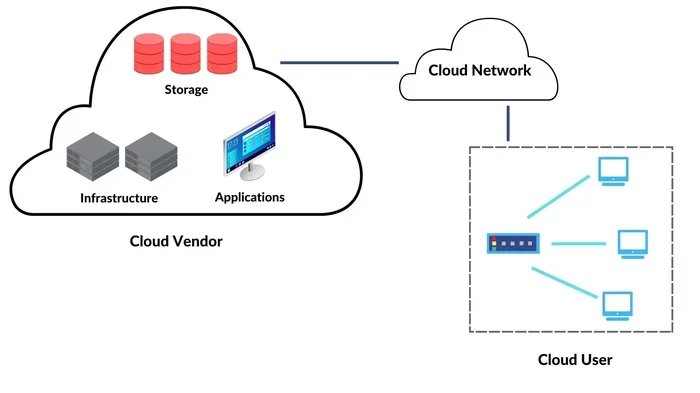
At its core, data storage security in cloud computing means protecting digital information that lives on remote servers instead of your own hard drives. These servers are managed by cloud providers like Amazon Web Services, Microsoft Azure, or Google Cloud Platform.
Cloud data security covers several layers. It includes the technology used to lock down files, the policies that control who can see them, and the physical safety of the data centers themselves. When all these layers work together, your data stays private, accurate, and available whenever you need it.
Think of it like a bank vault. The vault itself is strong (physical security). The lock is complex (encryption). The teller checks your ID before letting you in (access control). Cloud data protection works the same way — multiple layers working together to keep intruders out.
How Cloud Storage Works
When you upload a file to the cloud, it gets stored on a server in a data center somewhere in the world. That file may be copied across multiple servers for redundancy. This means even if one server fails, your data survives.
But here is the catch. Because your data travels over the internet and sits on shared hardware, it faces risks that local storage does not. This is exactly why secure cloud storage practices are so important. Without proper safeguards, anyone with the right tools and bad intentions could potentially access your files.
Why Data Storage Security in Cloud Computing Matters
The importance of data storage security in cloud computing cannot be overstated. Let us look at the real reasons it demands your attention right now.
First, data breaches are rising every year. According to recent reports, the average cost of a data breach hit over four million dollars in 2024. Small businesses are especially vulnerable because they often lack dedicated security teams. When your data lives in the cloud, a single weak password or misconfigured setting can expose everything.
Second, customers expect you to protect their information. Whether you collect names, email addresses, or credit card numbers, people trust you with their personal details. A leak of this information can ruin your reputation overnight. Trust is hard to build and easy to lose.
Third, governments around the world are cracking down on data privacy. Laws like GDPR in Europe and CCPA in California require businesses to follow strict rules for handling personal data. If you fail to meet these standards, the fines can be enormous. Cloud compliance is not just a nice-to-have — it is a legal requirement in many industries.
Real-World Consequences of Poor Cloud Security
History gives us plenty of cautionary tales. In 2019, a misconfigured Amazon S3 bucket exposed the personal data of over 100 million Capital One customers. The breach led to massive financial penalties and lasting damage to the company’s reputation.
In another case, a small marketing firm lost years of client work when an employee accidentally shared a cloud folder with the wrong person. The data was not stolen, but the breach of trust cost them several major contracts.
These stories show that data breach prevention is not just a technical issue. It is a business survival issue.
Common Cloud Security Threats You Should Know
Understanding the threats is the first step toward stopping them. Here are the most common cloud security threats that put stored data at risk.
1. Phishing and Social Engineering
Phishing attacks trick people into giving up their login credentials. A hacker sends an email that looks like it comes from your cloud provider. You click a link, enter your password, and just like that — they are inside your account.
These attacks are surprisingly effective. Over 80 percent of reported security incidents involve some form of phishing. The best defense is multi-factor authentication. Even if a hacker gets your password, they still cannot log in without a second verification step.
2. Misconfigured Storage Settings
This is one of the most common causes of cloud data leaks. When you set up a cloud storage bucket or folder, default settings often make data publicly accessible. If you do not change these settings, anyone on the internet can find and view your files.
A famous example involved an unsecured AWS bucket that exposed millions of customer records. The company had not bothered to restrict access. Simple misconfiguration led to a massive breach.
3. Insider Threats
Not all threats come from outside. Sometimes, the danger comes from within your own team. An employee with access to sensitive cloud files might intentionally or accidentally share them with the wrong people.
Implementing strict access control policies helps limit this risk. Give each team member only the access they need — nothing more. This approach is called the principle of least privilege, and it is a cornerstone of information security.
4. Ransomware and Malware
Ransomware attacks have grown sharply in recent years. Malicious software encrypts your cloud files and demands payment for the decryption key. Even if you pay, there is no guarantee you will get your data back.
Regular data backup is your best weapon here. If you maintain offline or separate cloud backups, you can restore your files without paying a ransom. Many cloud storage providers now offer built-in backup and recovery tools — make sure you use them.
5. Man-in-the-Middle Attacks
In a man-in-the-middle attack, a hacker intercepts data while it travels between your device and the cloud server. They can read sensitive information or even alter it without you knowing.
The solution is simple: always use encrypted connections. Look for HTTPS in your browser and ensure your cloud provider supports encryption standards like AES-256 for stored data and TLS for data in transit.
Best Practices for Protecting Your Cloud Data
Now that you know the threats, let us talk about what you can do. These data storage security best practices are practical and effective.
1. Encrypt Everything
Encryption is the single most important tool in your cloud security toolkit. When you encrypt data, it gets scrambled into a format that only authorized people can read. Even if a hacker steals your files, they cannot make sense of them without the decryption key.
Most modern cloud providers offer built-in encryption. Turn it on for every storage bucket and database you create. For extra protection, consider client-side encryption, where you encrypt files before they ever leave your computer.
2. Use Strong Authentication
Passwords alone are not enough. Use multi-factor authentication on every cloud account. This means requiring a second form of verification — like a code sent to your phone — before granting access.
Also, enforce strong password policies across your team. Passwords should be long, unique, and changed regularly. A password manager can help everyone follow these rules without the hassle.
3. Implement Role-Based Access Control
Not everyone on your team needs access to every file. Role-based access control lets you assign permissions based on job responsibilities. Your marketing team does not need access to financial records, and your developers do not need access to HR files.
Review access permissions regularly. Remove access for employees who leave the company or change roles. This keeps your attack surface small and manageable.
4. Monitor and Audit Activity
You cannot protect what you cannot see. Enable logging and monitoring on all your cloud resources. This lets you track who accesses what, when, and from where.
Set up alerts for unusual activity — like a login from an unfamiliar location or a large download at an odd hour. These warnings can help you catch a breach early, before it causes serious damage.
5. Maintain Regular Backups
Backups are your safety net. If ransomware hits or a user accidentally deletes critical files, a recent backup can save the day.
Follow the 3-2-1 backup rule. Keep three copies of your data, on two different types of storage, with one copy stored offsite or in a separate cloud region. This ensures you always have a fallback option.
Quick Tip: Schedule automated backups instead of relying on manual processes. Set them to run daily or weekly depending on how often your data changes. Automation removes human error from the equation.
6. Train Your Employees
Your team is both your greatest asset and your biggest vulnerability. A single careless click can compromise your entire cloud environment. Regular security training helps everyone recognize phishing emails, avoid risky downloads, and follow proper data handling procedures.
Make security training a recurring event, not a one-time seminar. Keep it short, practical, and relevant to each person’s role. When employees understand the why behind security rules, they are much more likely to follow them.
How to Choose a Secure Cloud Storage Provider
Not all cloud providers are created equal. When evaluating cloud storage providers, look for these key factors.
Check for Compliance Certifications
A reputable provider will hold certifications like SOC 2, ISO 27001, or HIPAA compliance. These certifications prove that the provider follows strict security standards and undergoes regular audits.
If you handle healthcare data, financial records, or European customer information, compliance is non-negotiable. Make sure your provider meets the specific regulations that apply to your industry.
Evaluate Their Encryption Capabilities
Ask your provider what encryption standards they use. Look for AES-256 encryption at rest and TLS 1.2 or higher for data in transit. Also check whether they manage the encryption keys for you or if you can control them yourself.
Provider-managed keys are convenient but less secure. Customer-managed keys give you full control over who can decrypt your data. For sensitive information, customer-managed keys are the better choice.
Review Their Track Record
Research the provider’s history of security incidents. Have they experienced major breaches? How did they respond? Transparency during a crisis is a good sign. A provider that hides security problems is a red flag.
Also look at their uptime guarantees and disaster recovery plans. A reliable provider will have redundant systems across multiple geographic regions. This means your data stays safe even if one data center goes offline.
| Factor | What to Look For | Why It Matters |
|---|---|---|
| Compliance Certifications | SOC 2, ISO 27001, HIPAA, GDPR | Proves adherence to industry security standards |
| Encryption Standards | AES-256, TLS 1.2+, customer-managed keys | Keeps data unreadable to unauthorized users |
| Incident Response | Transparent communication, clear SLAs | Shows how seriously they take breaches |
| Redundancy | Multi-region data centers | Ensures data availability during outages |
| Access Controls | Role-based permissions, MFA support | Limits who can access your data |
The Future of Cloud Data Storage Security
The world of data storage security in cloud computing is always evolving. New technologies and approaches are making cloud environments safer all the time.
Zero Trust Security
The zero trust model assumes that no user or device should be trusted by default — even if they are already inside your network. Every access request gets verified, every time. This approach is gaining rapid adoption in cloud environments because it drastically reduces the risk of unauthorized access.
Zero trust combines strong identity management, continuous monitoring, and granular access controls. It is one of the most effective strategies for modern cloud vulnerability prevention.
AI-Powered Threat Detection
Artificial intelligence is changing how we detect and respond to security threats. AI tools can analyze massive amounts of data in real time, spotting patterns that human analysts might miss. They can flag unusual login attempts, suspicious file access, or abnormal data transfers almost instantly.
Many cloud storage providers are now building AI-driven security features into their platforms. This means you get smarter protection without needing a dedicated security team.
Data Loss Prevention Tools
Data loss prevention, or DLP, tools help you stop sensitive information from leaving your cloud environment in unauthorized ways. They monitor data flows, classify sensitive files, and block risky actions like mass downloads or external sharing of confidential documents.
DLP is especially valuable for organizations that handle regulated data. It adds an extra layer of protection that complements encryption and access control.
Secure File Sharing Advancements
As remote work continues to grow, secure file sharing becomes more critical than ever. Modern cloud platforms now offer end-to-end encrypted sharing links, expiration dates on shared files, and detailed audit trails of who viewed or downloaded what.
These features make it easy to collaborate without sacrificing data privacy. You can share files confidently, knowing that only the intended recipients can access them.
Common Mistakes That Put Cloud Data at Risk
Even with the best intentions, people make mistakes that compromise cloud data storage security. Here are the most common ones to avoid.
- Using default settings. Cloud platforms often default to open access. Always review and tighten your settings before storing sensitive data.
- Ignoring software updates. Outdated software contains known vulnerabilities that hackers can exploit. Keep all systems and applications up to date.
- Sharing credentials carelessly. Never share login details through email or messaging apps. Use a secure password manager instead.
- Skipping backups. If you do not have a backup plan, you are one server failure away from losing everything.
- Underestimating insider threats. Most breaches involve some level of internal access. Monitor activity and limit permissions accordingly.
Avoiding these simple mistakes can dramatically reduce your risk. Data loss prevention starts with good habits, not expensive tools.
Key Takeaways
- Data storage security in cloud computing protects your files from hackers, leaks, and accidental loss.
- Encryption, access control, and multi-factor authentication are the three pillars of cloud data safety.
- Common threats include phishing, misconfigured storage, and insider attacks — all are preventable with the right habits.
- Choosing a secure cloud provider means checking for compliance certifications, encryption standards, and a strong track record.
- Zero trust security and data loss prevention tools are shaping the future of cloud protection.
- Regular backups and employee training are simple but powerful ways to reduce risk.
Conclusion
Data storage security in cloud computing is not something you can afford to ignore. The threats are real, the stakes are high, and the consequences of a breach can be devastating. But the good news is that you do not need to be a security expert to protect your data.
By understanding the common risks, following proven best practices, and choosing a trustworthy cloud provider, you can keep your information safe and your business running smoothly. Start with the basics — encrypt your data, enable multi-factor authentication, and train your team. These simple steps alone will put you ahead of most organizations.
Remember, cloud security is not a one-time setup. It is an ongoing commitment. Stay vigilant, keep learning, and never treat security as someone else’s responsibility. Your data is your most valuable asset. Protect it like it matters — because it does.
Frequently Asked Questions
What is data storage security in cloud computing?
Data storage security in cloud computing refers to the practices, technologies, and policies used to protect digital information stored on remote cloud servers. It covers encryption, access control, threat detection, and compliance with privacy regulations. The goal is to keep your files safe from unauthorized access, breaches, and accidental loss.
Why is cloud data security important for small businesses?
Small businesses are frequent targets for cyberattacks because they often lack strong security defenses. A single data breach can cause financial losses, legal penalties, and lasting damage to customer trust. Investing in cloud data protection helps small businesses compete safely and build credibility with their clients.
How does encryption protect cloud-stored data?
Encryption scrambles your data into an unreadable format that only authorized users can decode. Even if a hacker intercepts or steals your files, they cannot read them without the decryption key. Most secure cloud providers use AES-256 encryption, which is currently considered one of the strongest encryption standards available.
What are the most common cloud security threats?
The most common threats include phishing attacks, misconfigured storage settings, insider threats, ransomware, and man-in-the-middle attacks. Many of these risks can be reduced through multi-factor authentication, regular employee training, proper access controls, and consistent monitoring of cloud activity.
How do I choose a secure cloud storage provider?
Look for providers with strong compliance certifications like SOC 2 or ISO 27001, robust encryption capabilities, a transparent incident response history, and support for role-based access controls. Read independent reviews, check their uptime guarantees, and ask about their data backup and disaster recovery processes before committing.
Can I improve cloud security without hiring a dedicated team?
Absolutely. Many cloud storage providers offer built-in security features like automated backups, encryption, and threat detection. Combine these with strong passwords, multi-factor authentication, regular employee training, and routine security audits. These steps go a long way toward keeping your data safe without needing a full-time security team.